00198501-02_IM_711.1_R18-1_EN.pdf - 第8页
Station Software V ersion 711.1 (R 18 - 1) / Installat ion Manual 05/2018 Edition 8 3 Upgrading to Station Softwa re Version 7 1 1.1 This chapter des cribes which steps you generally hav e to attend when up grading to th…
Station Software Version 711.1 (R18-1) / Installation Manual 05/2018 Edition
7
2.3 Languages
User Interfaces SIPLACE Station and SIPLACE Vision:
The basic software contains German, English and Simplified Chinese versions. As for Simplified
Chinese a preliminary version is provided.
The final version of Simplified Chinese and other languages contained in the Language Pack are
optional. The Language Pack can be downloaded from the ASM Download Center.
Available languages for station software and SIPLACE Vision
– Bulgarian
*)
– Chinese (simplified)
– Czech
*)
– French
– Hungarian
– Italian
– Japanese
– Korean
– Polish
*)
– Portuguese (Brazil)
– Romanian
*)
– Russian
*)
– Spanish (Mexico)
– Vietnamese
*)
*)
GUI only (online help English)
Please refer to section 5.6 for detailed information on the Language Pack.
Station Software Version 711.1 (R18-1) / Installation Manual 05/2018 Edition
8
3 Upgrading to Station Software Version 711.1
This chapter describes which steps you generally have to attend when upgrading to the current
station software version and which steps are additionally required when upgrading from lower to
higher software versions.
Upgrading from previous station software versions (701.x – 709.x) to station software version 711.x
is not possible due to a change in the installation technology beginning with station software
version 710.0.
If a previous station software version is already installed on the station computer, it will be
automatically uninstalled by the setup wizard before the current station software gets installed.
Only if the installation of station software 711.x fails, the previous station software version has to be
manually uninstalled.
NOTICE
Individual machine data (calibration data) will not be deleted!
► Note some information before you start upgrading the station software.
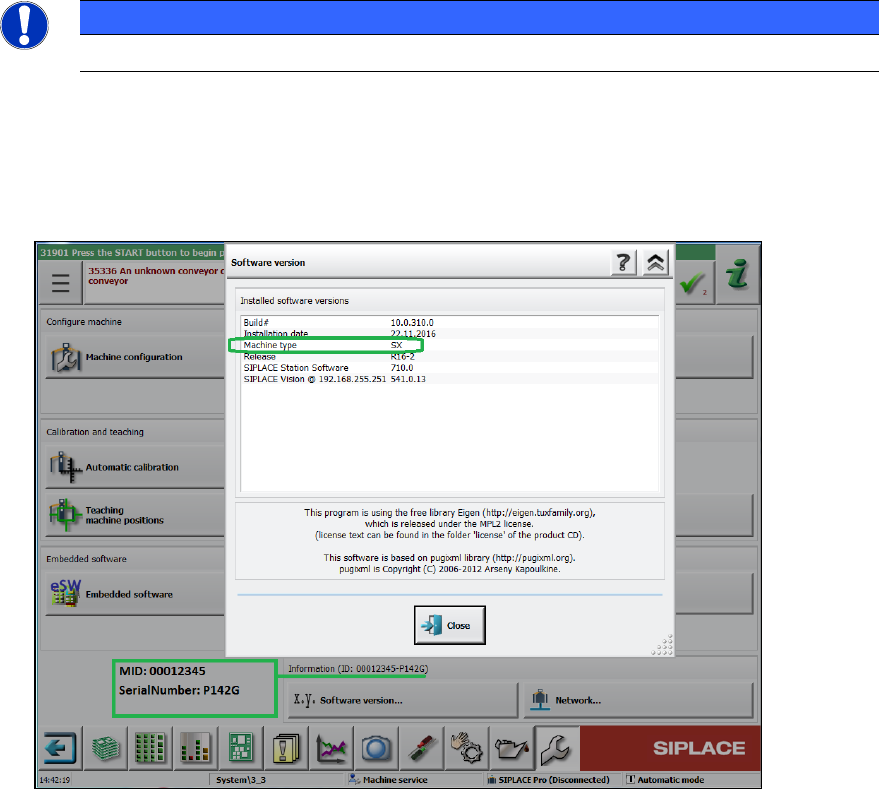
During installation of station software 711.1 you will be asked for machine type, MID number
and serial number. These settings will not be transferred during upgrading (no default
settings!). You find this information on the GUI of your current station software version:
Figure 3-1: Example of machine information
► When upgrading the station software, always check the eSW versions and download the
current versions if necessary.
Station Software Version 711.1 (R18-1) / Installation Manual 05/2018 Edition
9
Automatic Calibration – System identification for SX-series
The System identification calibration feature has been introduced for the SX-series placement
machines in the automatic calibration. Therefore, an additional calibration step may be required
after installation. In this case, a warning is displayed that the calibration is not up to date. This also
applies for the respective station software version in compatible mode. Proceed as follows:
► Log in on the Machine service activity level.
► Switch to the Configure, update and calibrate machine menu.
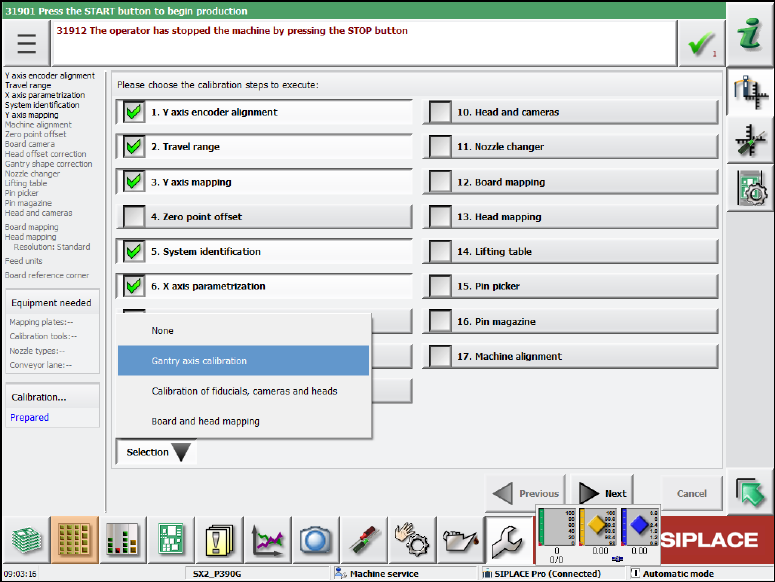
► Press the Automatic calibration button.
The following dialog box is displayed:
Figure 3-2: Calibration steps dialog box
► Select the System identification calibration step.
Or
► Select Selection – Gantry axes calibration.
All required calibrations will then be performed for the main axes and the machine provided
with the current data.
3.1 Upgrading from the 711.0 Software Version
No further steps required.
3.2 Upgrading from the 710.1 Software Version
No further steps required.