00198501-02_IM_711.1_R18-1_EN.pdf - 第9页
Station Software V ersion 711.1 (R 18 - 1) / Installat ion Manual 05/2018 Edition 9 Automati c Calibration – System identifi cation for SX - series The System identi fication calibr ation feature ha s been introduce d fo…
Station Software Version 711.1 (R18-1) / Installation Manual 05/2018 Edition
8
3 Upgrading to Station Software Version 711.1
This chapter describes which steps you generally have to attend when upgrading to the current
station software version and which steps are additionally required when upgrading from lower to
higher software versions.
Upgrading from previous station software versions (701.x – 709.x) to station software version 711.x
is not possible due to a change in the installation technology beginning with station software
version 710.0.
If a previous station software version is already installed on the station computer, it will be
automatically uninstalled by the setup wizard before the current station software gets installed.
Only if the installation of station software 711.x fails, the previous station software version has to be
manually uninstalled.
NOTICE
Individual machine data (calibration data) will not be deleted!
► Note some information before you start upgrading the station software.
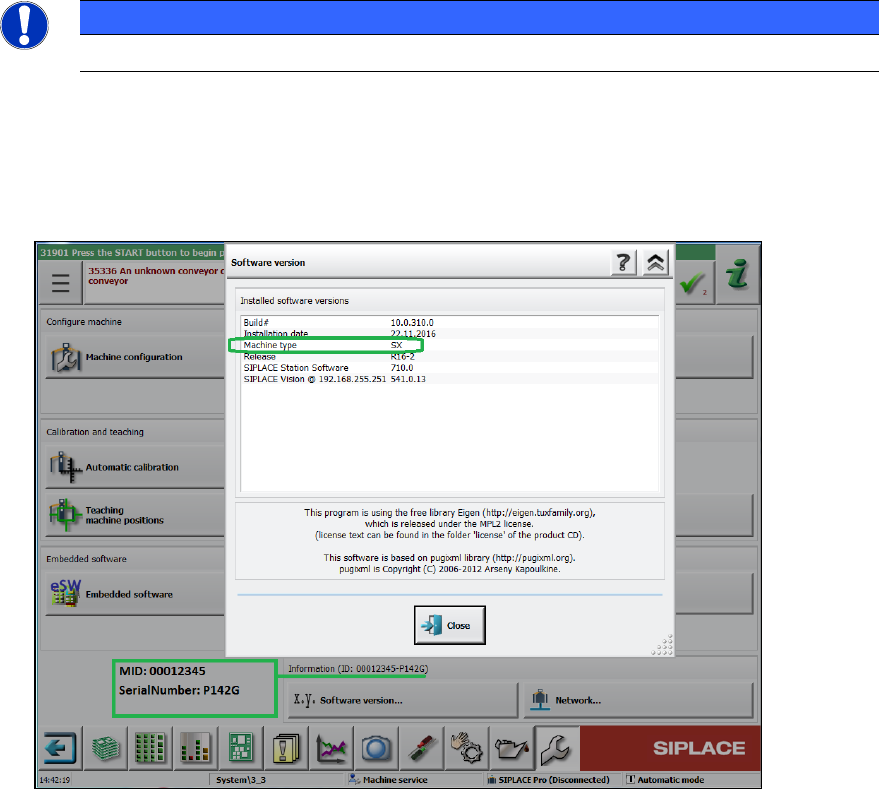
During installation of station software 711.1 you will be asked for machine type, MID number
and serial number. These settings will not be transferred during upgrading (no default
settings!). You find this information on the GUI of your current station software version:
Figure 3-1: Example of machine information
► When upgrading the station software, always check the eSW versions and download the
current versions if necessary.
Station Software Version 711.1 (R18-1) / Installation Manual 05/2018 Edition
9
Automatic Calibration – System identification for SX-series
The System identification calibration feature has been introduced for the SX-series placement
machines in the automatic calibration. Therefore, an additional calibration step may be required
after installation. In this case, a warning is displayed that the calibration is not up to date. This also
applies for the respective station software version in compatible mode. Proceed as follows:
► Log in on the Machine service activity level.
► Switch to the Configure, update and calibrate machine menu.
► Press the Automatic calibration button.
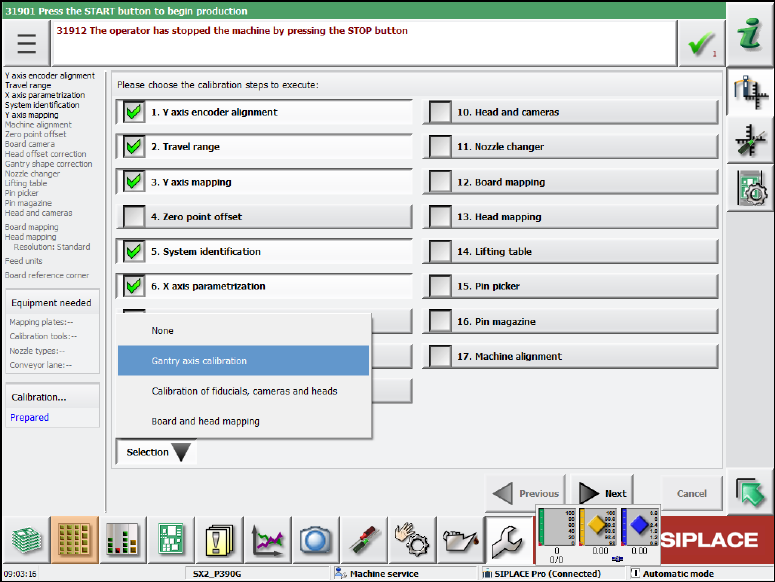
The following dialog box is displayed:
Figure 3-2: Calibration steps dialog box
► Select the System identification calibration step.
Or
► Select Selection – Gantry axes calibration.
All required calibrations will then be performed for the main axes and the machine provided
with the current data.
3.1 Upgrading from the 711.0 Software Version
No further steps required.
3.2 Upgrading from the 710.1 Software Version
No further steps required.
Station Software Version 711.1 (R18-1) / Installation Manual 05/2018 Edition
10
3.3 Upgrading from the 710.0 Software Version
No further steps required.
3.4 Upgrading from the 709.1 Software Version
No further steps required.
3.5 Upgrading from the 709.0 Software Version
► Predictive Maintenance:
By installing station software version 709.1, the calculation of the maintenance display for
placement heads, cutters and X-/Y-axes has been changed for the SX placement machines.
The calculation is now based on time.
For this, the following conditions must be met:
► Ensure that the system time of the station computer is set correctly.
► Perform a complete maintenance of the machine and placement heads before installing the
station software. This is required as a date stamp is stored in the corresponding EEPROMs
with the new station software version and this stamp is used for the maintenance display.
3.6 Upgrading from the 708.x Software Version
► Calibration of head parameter identification is necessary for all C&P20 P heads. This can be
done either by automatic calibration or by single calibration.
3.7 Upgrading from the 707.x Software Version
► The 708.x station software version runs with Windows Embedded Standard 7 (WES7) only.
The station computer has to be equipped with at least 2 GB memory with WES7, 32-bit and 4
GB memory with WES7, 64-bit respectively. If necessary, station computers in the field have to
be exchanged or upgraded with a memory extension. Please refer to the Technical Information
TI2014-09E04.
► When upgrading from a previous station software version to the 708.x version, C&P head
segments with the Deactivated or Not used state will be reset to the Activated state
automatically! If required, the status for such segments has to be changed manually again.
3.8 Upgrading from the 706.xx Software Version
► If necessary, perform an upgrade to the Microsoft Windows Embedded Standard 7 (WES7,
32-bit or 64-bit) operating system. Please refer to sections 4.1.1 and 5.3.1.
► With the installation of the 707.x station software, statistic data (maintenance intervals) is
registered for the CPP and C&P20A placement heads and the SX main axis. In order to
achieve a defined initial state for the maintenance due, the correspondent maintenance
operations have to be performed on the subsystems after the software installation.