SOM-1929-001_w.pdf - 第13页
10 Tg 1423 -ID-SO 5.2 "Others" T ab 0606 - 001 [ON] Button (entitled "MOVE") : When the [ENABLE] button on the front operation panel is pressed in two seconds after the[ON] button (entitled "MOVE…
9
Tg1423-ID-SO
5.2 "Others" Tab
0606-001
5.2 "Others" Tab
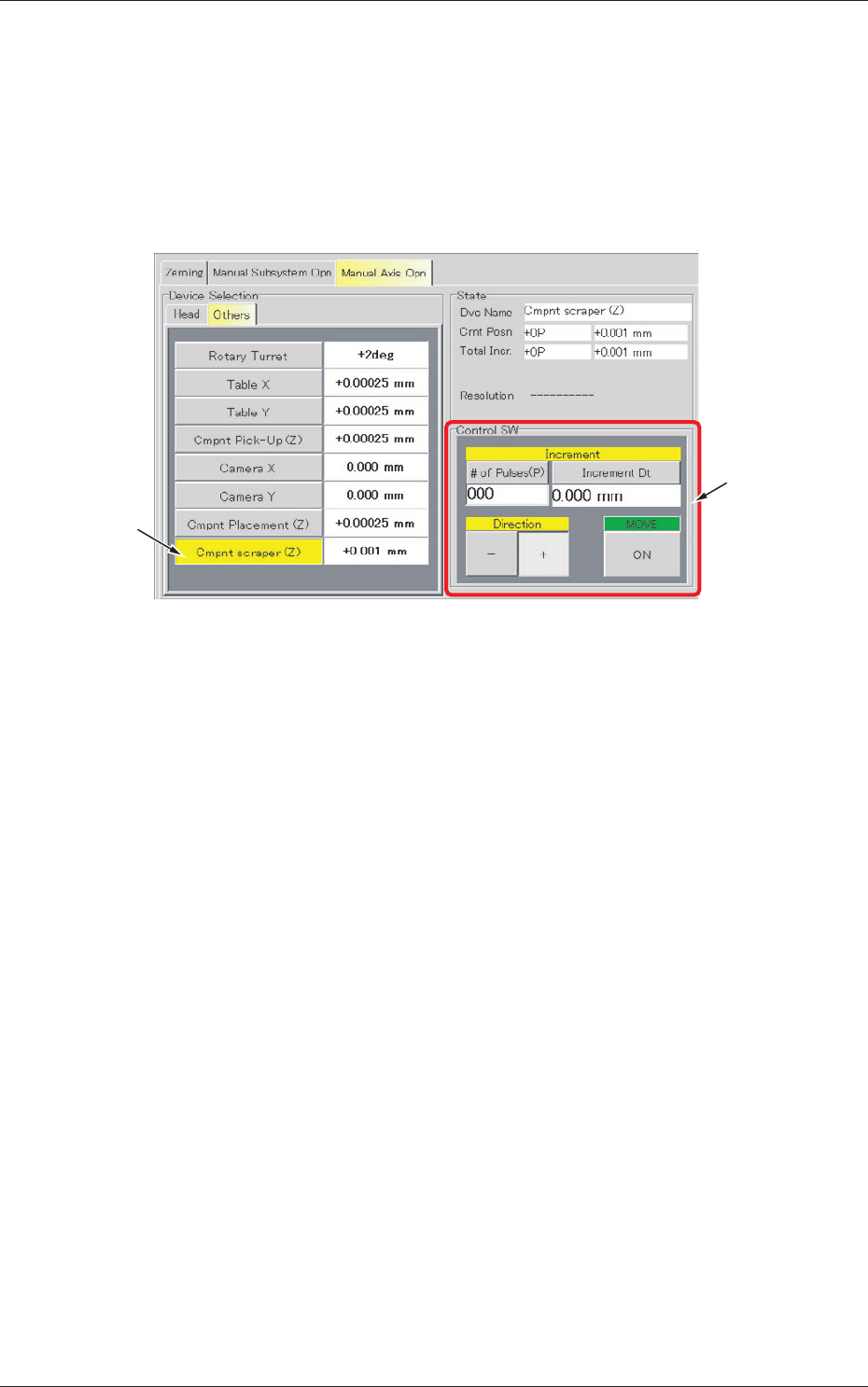
Inching operation for the component scraper is performed.
•
Sheet Layout
When the [Others] tab is pressed in the "Manual Axis Opn" tab sheet,
the following tab sheet appears.
[1]
[2]
Fig.4 "Others" Tab Sheet
•
Sheet Composition
[1] Operation Selection Buttons
[Cmpnt Scraper] Button
When a button is pressed, the background color turns yellow, indicating
that the corresponding device is selected.
Each button has a box on the right side and the current position of
the corresponding device is displayed.
[2] Control SW
The following operation buttons are provided in this group box.
[# of pulses (P)] Button (entitled "Increment") :
Enter an amount of movement (# of pulses).
The calculated value (travel) appears in the
"Increment Dt" text box.
[-] and [+] Buttons (entitled "Direction") :
Press either the [-] or the [+] button to specify
the direction of manual axis operation for the
selected device.

10
Tg1423-ID-SO
5.2 "Others" Tab
0606-001
[ON] Button (entitled "MOVE") :
When the [ENABLE] button on the front
operation panel is pressed in two seconds after
the[ON] button (entitled "MOVE") is pressed,
the machine starts the manual axis operation on
the selected device.
The inching operation can be performed for the component scraper by
starting up with entering the number of pulses (P) or travel distance.
# of Pluses (P) :
The lowermost point is origin (0 pulse) and
the plus number is increased as the position is
lowered.
Increment Dt :
The travel allowable range is [-0.500 to 0.000]
mm ([-201 to 0] pulse).
11
Tg1423-ID-SO
5.3 "Input Check" Tab
0606-001
5.3 "Input Check" Tab
When the [Input Check] tab is pressed in the "DVC. CHECK" window
(submenu), the following "Input Check" tab sheet appears inside the
window.
5.3.1 "Motor Cont (EB005)" Tab
The corresponding tab sheet enables the operator to view the input / output
statuses of the motor control (EB005).
•
Sheet Layout
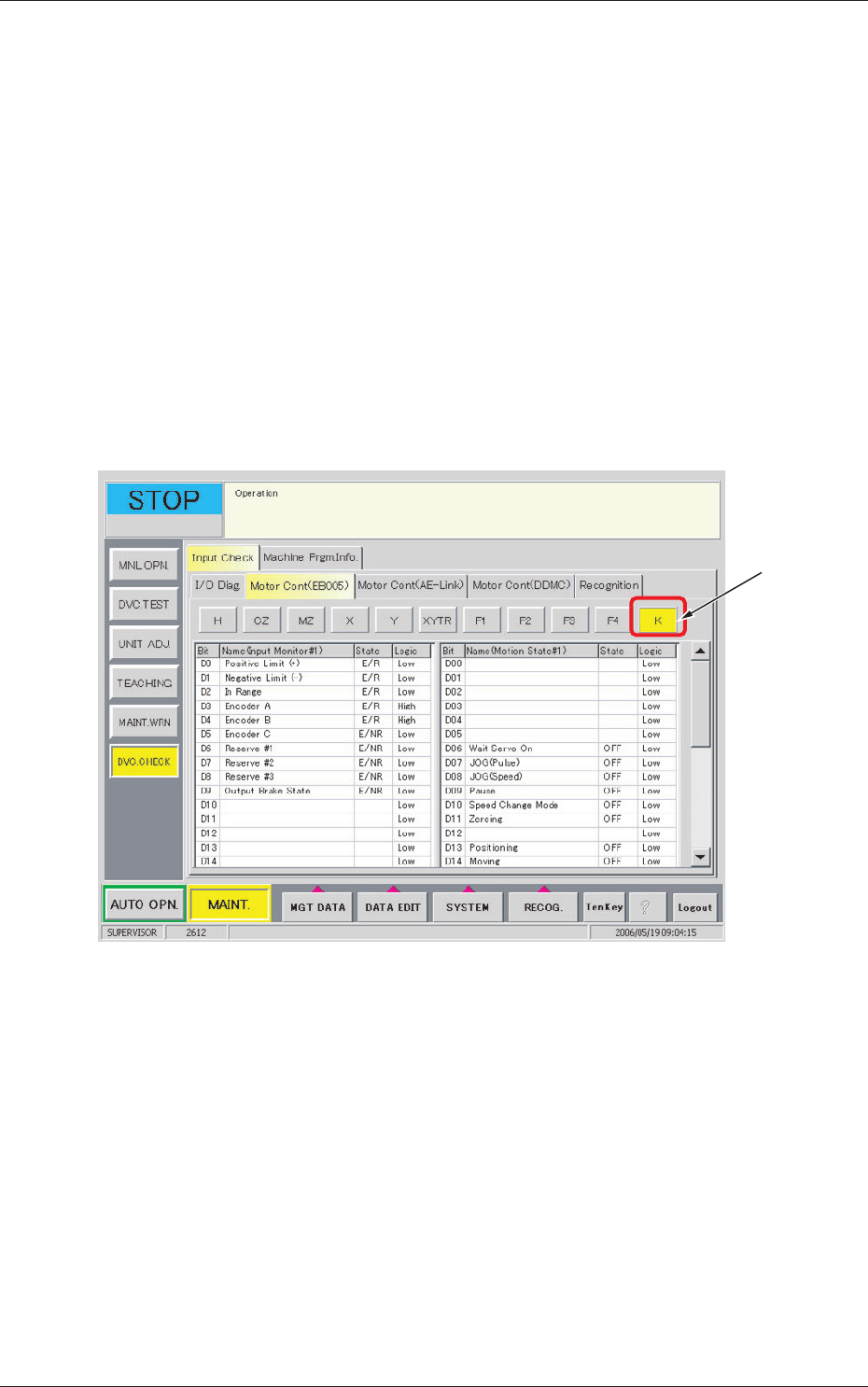
When the [Motor Cont (EB005)] tab is pressed in the "Input Check" tab
sheet, the following tab sheet appears.
[1]
Fig.5 "Motor Cont (EB005)" Tab Sheet
•
Sheet Composition
[1] Motor Axis Buttons
[K] Button
When this button is pressed, the component scraper status is displayed.