SOM-1929-001_w.pdf - 第17页
14 Tg 1423 -ID-SO 5.5 "Adj Menu" T ab 0606 - 001 5.5.1 Cmpnt scraper (Z) unit maintenance menu [1] [5] [6] [7] [2] [3] [4] Fig.8 " Cmpnt scraper (Z) unit maintenance menu " T ab Sheet [1] [Nozzle teac…
13
Tg1423-ID-SO
5.5 "Adj Menu" Tab
0606-001
5.5 "Adj Menu" Tab
The cmpnt scraper (z) axis is adjusted.
Note
This adjustment should be made only by a service personnel.
Consult our service personnel for details.
•
Sheet Layout
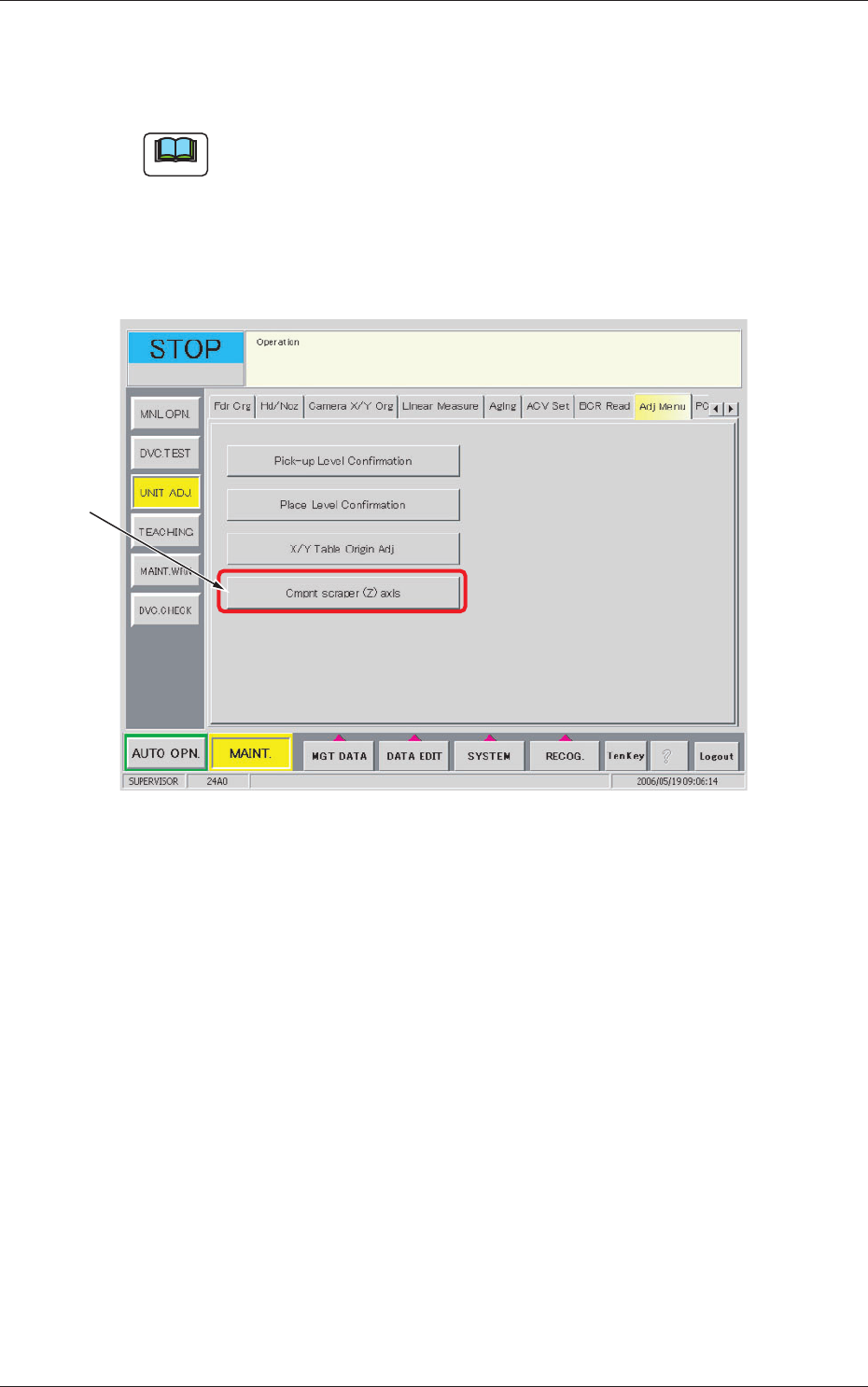
When the [Adj Menu] tab is pressed in the "UNIT ADJ." window (submenu),
the following tab sheet appears.
[1]
Fig.7 "Adj Menu" Tab Sheet
•
Sheet Composition
[1] [Cmpnt scraper (Z) axis] Button
Displays the "Component Scraper (Z) unit Maintenance Menu".
The confirmation and adjustment of the component scraper offset data
are available, using a thickness gauge.
14
Tg1423-ID-SO
5.5 "Adj Menu" Tab
0606-001
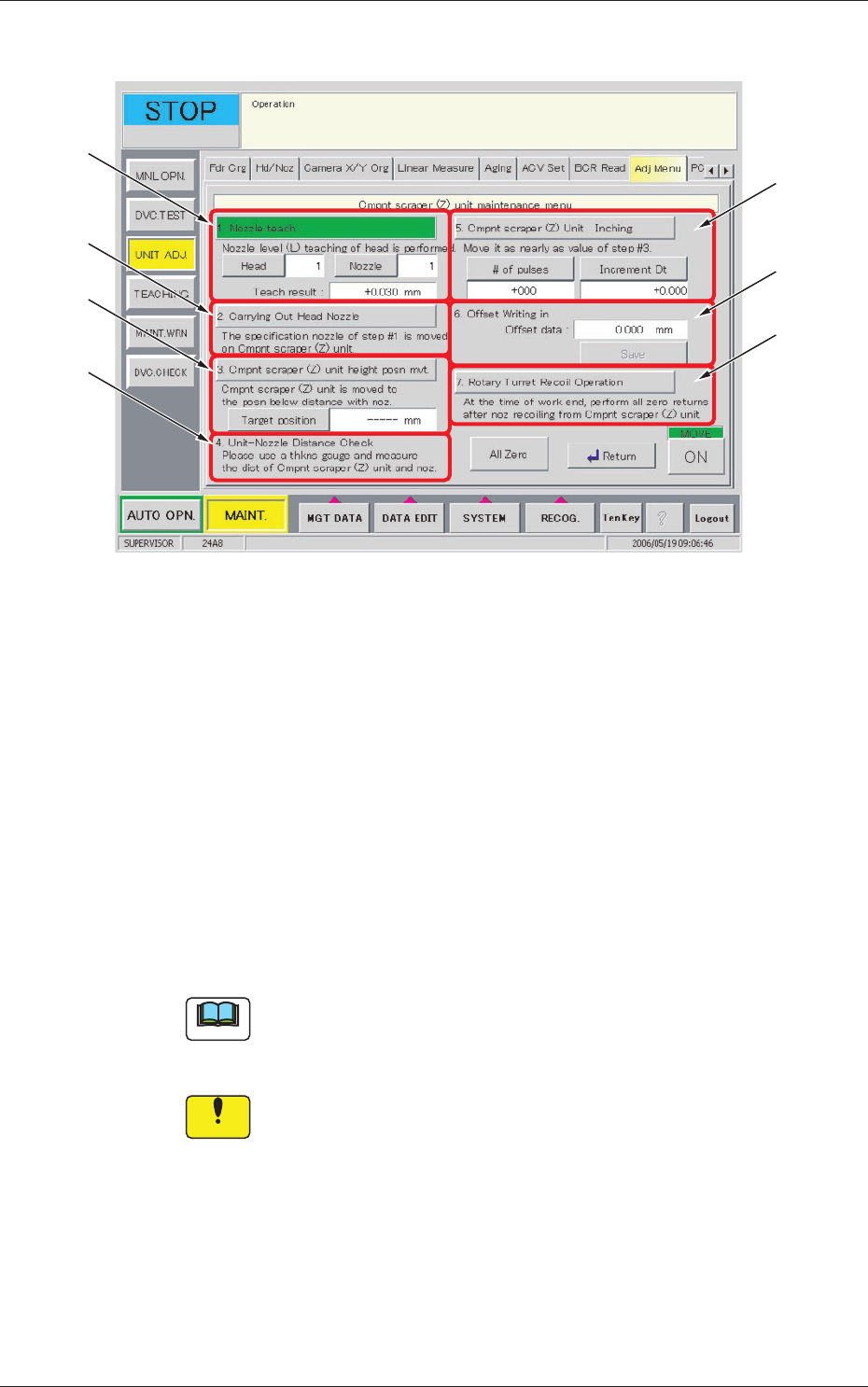
5.5.1 Cmpnt scraper (Z) unit maintenance menu
[1]
[5]
[6]
[7]
[2]
[3]
[4]
Fig.8 "
Cmpnt scraper (Z) unit maintenance menu
" Tab Sheet
[1] [Nozzle teach] Button
Teaches the nozzle level for the specified Head/Nozzle to be used in the
adjustment of the axis-K. The teaching result will be indicated.
[2] [Carrying Out Head Nozzle] Button
Locates the nozzle designated in [1] on the upper side of the component
scraping plate.
[3] [Cmpnt scraper (Z) unit height posn mvt] Button
Locates the component scraping plate so that the gap value between the
nozzle and the component scraping plate becomes the designated value.
Note
(a) The component scraping plate can only be moved in the range of
-201 to 0 pulse.
(b) Input Range: 0.010 to 0.500 mm
Notice
The nozzle might hit the component scraping plate, so take the
greatest care in entering the value.
[4] Unit-Nozzle Distance Check
Confirm the gap between the component scraping plate and the nozzle,
using a thickness gauge.
When the value does not meet the designated distance value in [3],
adjust it using the [5] [Cmpnt scraper (Z) Unit Inching] button.
The deviation will be added to the offset data.
15
Tg1423-ID-SO
5.5 "Adj Menu" Tab
0606-001
[5] [Cmpnt scraper (Z) Unit Inching] Button
Perform the inching operation so that the gap distance between the
component scraping plate and the nozzle is as close as the designated
distance in [3].
Repeat the confirmation and inching operation to adjust it, using a
thickness gauge.
(Input Range: -201 to 201 pulses, -0.500 to 0.500 mm)
Notice
The nozzle might hit the component scraping plate, so take the
greatest care in entering the value.
[6] Offset Writing in Offset data
The offset data calculated on the basis of the travel distance in the
inching operation in [5], is entered.
[7] [Rotary Turret Recoil Operation] Button
Performs the index zeroing after the component scraper has been
retreated to the origin.
Notice
When the nozzle is located upper to the component scraping
plate, always complete the adjustment after the index
escaping.
(In normal index zeroing, the nozzle might hit the component
scraping plate because the zeroing of the component scraping
plate is always performed in advance).