00197381-04_VB_SetupCenter6.3SP2_DE_EN.pdf - 第46页
New Functions in Setup Center 6.3 User Interface of the Motorola Scanner s in Polish Language 46 SIPLACE Setup Center 6.3 SP2 5.4 5 . 4 U s e r I n t e r f a c e o f t h e M o t o r o la S c a n n e r s in P o lis h L a …
New Functions in Setup Center 6.3
Display of the Split Table
SIPLACE Setup Center 6.3 SP2 45
5
5 New Functions in Setup Center 6.3
New Functions in Setup Center 6.3
5.1
5.1 Display of the Split Table
Display of the Split Table
Purpose
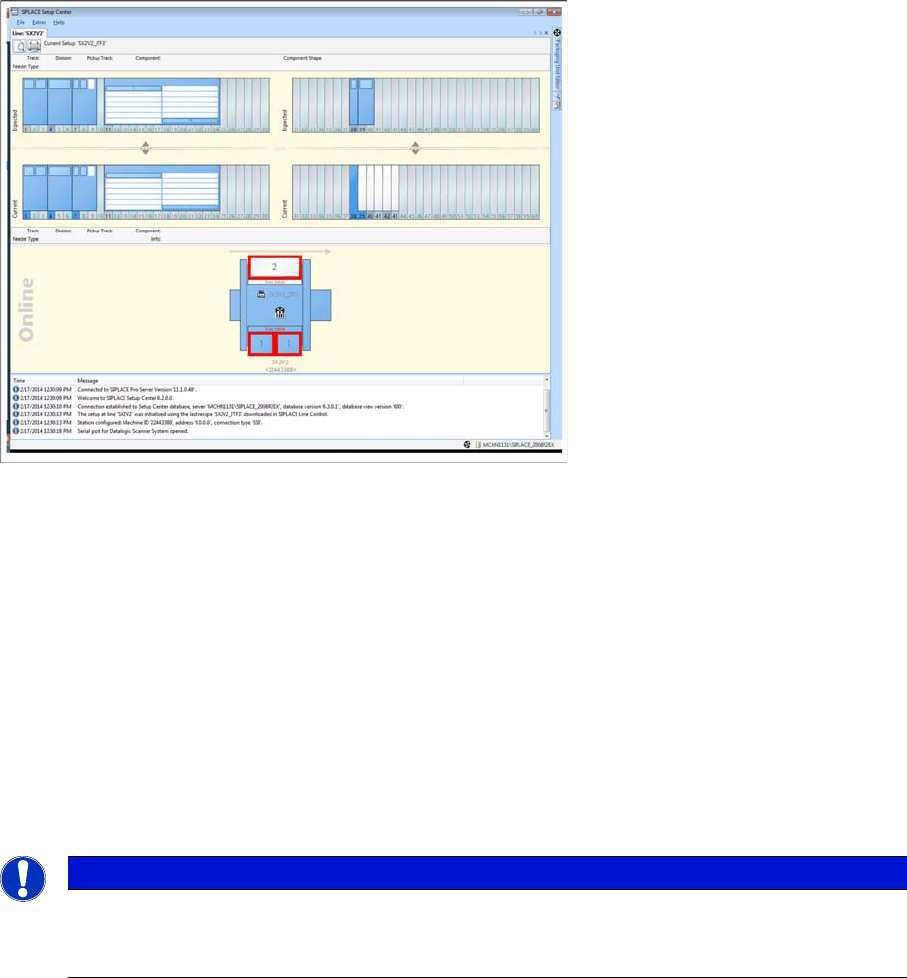
Up to now, the table at a location could only be displayed as a complete table. The usage of a fixed table
(e.g. the fixed table in combination with a JTF-S/JTF-M Feeder) is now visible in the software.
Function
Example: SX12 with fixed table and JTF-S/M Feeder
5.2
5.2 Motorola Scanners MC3090 and MC3190
Motorola Scanners MC3090 and MC3190
Purpose
With version 6.3 and higher, Setup Center additionally supports the two Motorola scanners MC3090 and
MC3190.
5.3
5.3 User Interface of the Motorola Scanners in Chinese Language
User Interface of the Motorola Scanners in Chinese Language
Purpose
The user interface of Motorola scanners that are supported by ASM is available in Chinese language.
Function
If the scanner supports the display of Chinese characters (see prerequisite), the user interface at the
scanner is displayed in Chinese. The language of the Setup Center client must be set to Chinese.
NOTICE
Prerequisite
The language variant of the scanner operating system must be in Chinese Simplified. If this pre-
requisite is not met, the texts at the scanner are displayed in English.
New Functions in Setup Center 6.3
User Interface of the Motorola Scanners in Polish Language
46 SIPLACE Setup Center 6.3 SP2
5.4
5.4 User Interface of the Motorola Scanners in Polish Language
User Interface of the Motorola Scanners in Polish Language
Purpose
The user interface of Motorola scanners that are supported by ASM is available in Polish language.
Function
The user interface at the scanner is displayed in Polish. The language of the Setup Center client must
be set to Polish.
5.5
5.5 Advanced Settings for the Splice Sensor
Advanced Settings for the Splice Sensor
Purpose
Up to now, the limit for monitoring the Missing splice could be entered as a percentage value in relation
to the packaging unit size. This resulted in very small limits for small packaging units and very high limits
for big packaging units which made it difficult to find a common setting that could be used for packaging
units of different sizes. Now, it is possible to enter an absolute value in addition to the percentage. During
monitoring, the smaller value is decisive.
Function
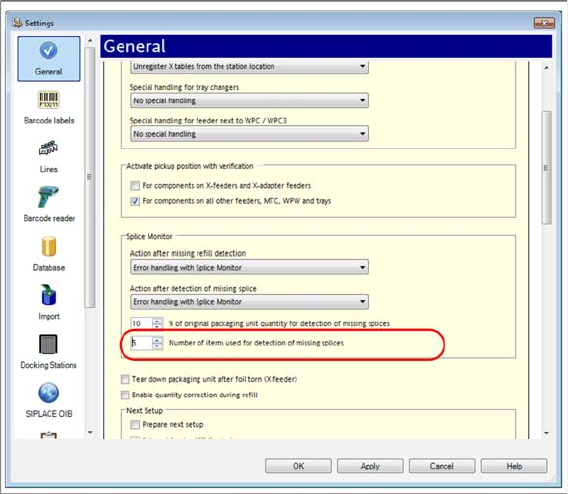
► Open with Extras => Settings => General
► Open Settings for online setup verification.
► In Splice Monitor => Number of components for detection of missing splices, enter the required num-
ber of components.
► For detailed information, refer to the user manual "Setup Center 6.3" or the Online Help.
New Functions in Setup Center 6.3
Barcode Labels in the Database
SIPLACE Setup Center 6.3 SP2 47
5.6
5.6 Barcode Labels in the Database
Barcode Labels in the Database
Purpose
Up to now, barcode labels were saved locally for each Setup Center installation. With Setup Center ver-
sion 6.3 and higher, the barcode labels are saved in the Setup Center database. Thus, all Setup Center
installations that are connected to the corresponding database can use these barcode labels.
Function
During the update installation of Setup Center 6.3, the barcode labels will be transferred from the local
Setup Center installations to the database. The barcode labels are transferred in the exact sequence of
the installations (Setup Center PC1 to n). If identical barcode labels with different settings are detected,
a message will be issued. You are prompted to check the barcode label in question.
5.7
5.7 Event Log in the Regional Format of the Operating System
Event Log in the Regional Format of the Operating System
Purpose
The columns (date, time) and the column separators of the verification protocols (*.CSV file) are shown
in the regional format of the operating system.
Function
► Open with Extras => Settings => Event Log.
► Activate the Output date/time columns and column delimiters in the regional format set in the oper-
ating system option.
NOTICE
SIPLACE OIB
If Setup Center is configured for SIPLACE OIB, the barcode labels will also be saved in the OIB
Configuration Manager.
NOTICE
Checking Barcode Labels
After the update installation from an older Setup Center version to Setup Center 6.3 and higher,
check the sequence and the settings of the barcode labels.