00197381-04_VB_SetupCenter6.3SP2_DE_EN.pdf - 第50页
New Functions in Setup Center 6.3 Domain-Wide Thre shold Settings 5. 8.1 Adapting Threshold Settings for Line or Station 50 SIPLACE Setup Center 6.3 SP2 ⇨ The Threshold settings for the station: view is displayed. ► Disa…
New Functions in Setup Center 6.3
5.8.1 Adapting Threshold Settings for Line or Station Domain-Wide Threshold Settings
SIPLACE Setup Center 6.3 SP2 49
5.8.1
5.8.1 Adapting Threshold Settings for Line or Station
Adapting Threshold Settings for Line or Station
The threshold settings for the component level indicator are configured for the domain by default. This
means that all connected lines and their stations have the same settings. You can, however, adapt these
global threshold settings for single lines or stations.
Adapting Threshold Settings for the Line
► Open with Extras => Settings => Lines.
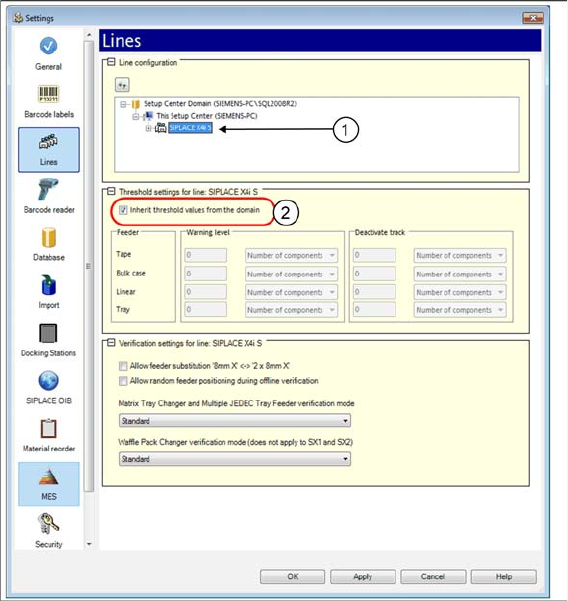
► Open Line configuration and mark the line (1).
⇨ The Threshold settings for the line: view is displayed.
► Disable the Inherit threshold values from the domain option. You can now change the threshold val-
ues for this line.
Adapting Threshold Settings for the Station
► Open with Extras => Settings => Lines.
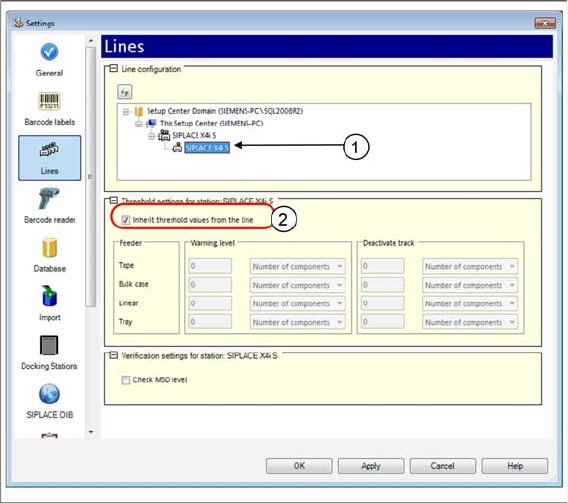
► Open Line configuration and mark the station (1).
New Functions in Setup Center 6.3
Domain-Wide Threshold Settings 5.8.1 Adapting Threshold Settings for Line or Station
50 SIPLACE Setup Center 6.3 SP2
⇨ The Threshold settings for the station: view is displayed.
► Disable the Inherit threshold values from the line option. You can now change the threshold values
for this line.
New Functions in Setup Center 6.3
5.8.1 Adapting Threshold Settings for Line or Station Permitted Packaging Units of a Packaging Unit Chain
SIPLACE Setup Center 6.3 SP2 51
5.9
5.9 Permitted Packaging Units of a Packaging Unit Chain
Permitted Packaging Units of a Packaging Unit Chain
Purpose
Up to now, the permitted packaging unit was entered for the each line. Now, the permitted packaging
unit for each packaging unit chain is configured for the domain.
Function
► Open with Extras => Settings => Lines.
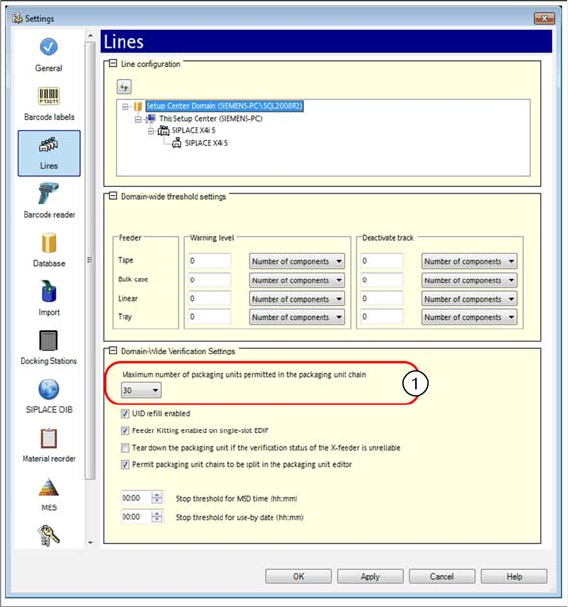
► Open the Line configuration and mark a domain. The Verification Settings for Domains view is dis-
played.
► Enter a value for the Maximum number of packaging units permitted in the packaging unit chain.
► For detailed information, refer to the user manual "Setup Center 6.3" or the Online Help.