00197381-04_VB_SetupCenter6.3SP2_DE_EN.pdf - 第48页
New Functions in Setup Center 6.3 Domain-Wide Thre shold Settings 48 SIPLACE Setup Center 6.3 SP2 5.8 5 . 8 D o m a in - W id e T h r e s h o ld S e t t in g s Domain-Wide Thre shold Settings Purpose Up to now, the thres…
New Functions in Setup Center 6.3
Barcode Labels in the Database
SIPLACE Setup Center 6.3 SP2 47
5.6
5.6 Barcode Labels in the Database
Barcode Labels in the Database
Purpose
Up to now, barcode labels were saved locally for each Setup Center installation. With Setup Center ver-
sion 6.3 and higher, the barcode labels are saved in the Setup Center database. Thus, all Setup Center
installations that are connected to the corresponding database can use these barcode labels.
Function
During the update installation of Setup Center 6.3, the barcode labels will be transferred from the local
Setup Center installations to the database. The barcode labels are transferred in the exact sequence of
the installations (Setup Center PC1 to n). If identical barcode labels with different settings are detected,
a message will be issued. You are prompted to check the barcode label in question.
5.7
5.7 Event Log in the Regional Format of the Operating System
Event Log in the Regional Format of the Operating System
Purpose
The columns (date, time) and the column separators of the verification protocols (*.CSV file) are shown
in the regional format of the operating system.
Function
► Open with Extras => Settings => Event Log.
► Activate the Output date/time columns and column delimiters in the regional format set in the oper-
ating system option.
NOTICE
SIPLACE OIB
If Setup Center is configured for SIPLACE OIB, the barcode labels will also be saved in the OIB
Configuration Manager.
NOTICE
Checking Barcode Labels
After the update installation from an older Setup Center version to Setup Center 6.3 and higher,
check the sequence and the settings of the barcode labels.
New Functions in Setup Center 6.3
Domain-Wide Threshold Settings
48 SIPLACE Setup Center 6.3 SP2
5.8
5.8 Domain-Wide Threshold Settings
Domain-Wide Threshold Settings
Purpose
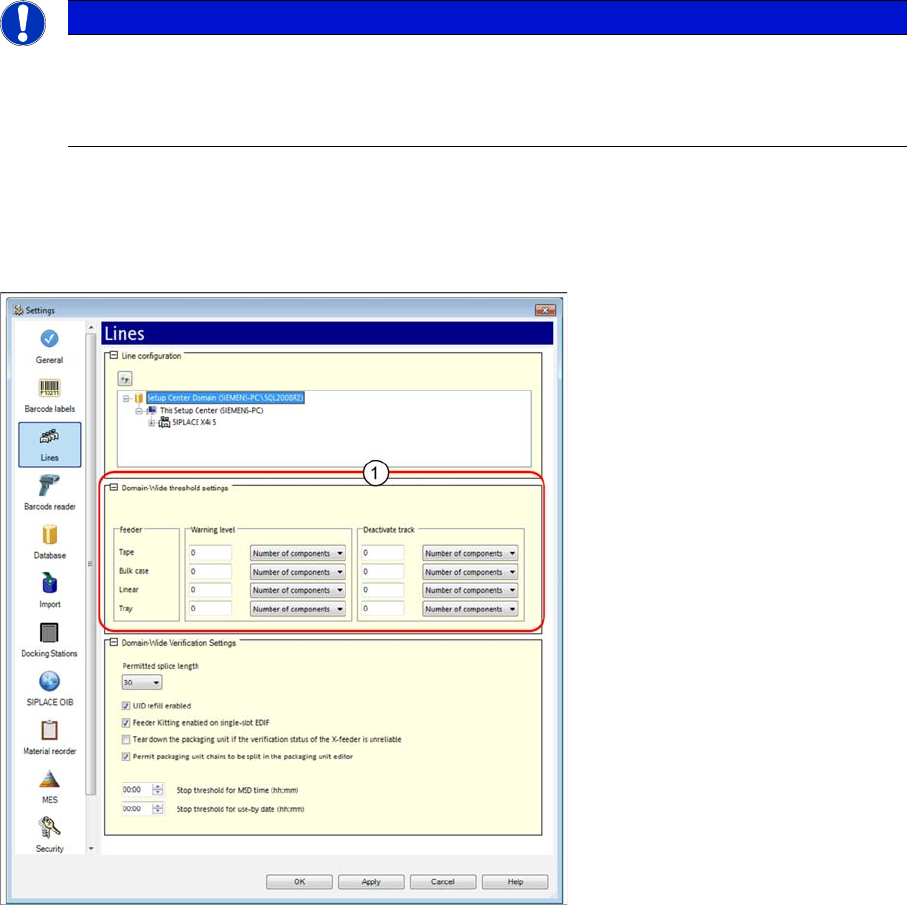
Up to now, the threshold settings for the component level indicator were entered for the respective lines.
Now, the threshold settings for the component level indicator are configured for the domain.
Function
► Open with Extras => Settings => Lines.
► Open Line configuration and mark a domain. The Domain-Wide Threshold Settings view is dis-
played.
► For detailed information, refer to the user manual "Setup Center 6.3" or the Online Help.
NOTICE
The domain settings are transferred to the lines
The domain settings are transferred and applied to the connected lines and their stations. You
can change these settings individually for each station later on. See also "5.8.1 Adapting
Threshold Settings for Line or Station" [ ➙ 49].
New Functions in Setup Center 6.3
5.8.1 Adapting Threshold Settings for Line or Station Domain-Wide Threshold Settings
SIPLACE Setup Center 6.3 SP2 49
5.8.1
5.8.1 Adapting Threshold Settings for Line or Station
Adapting Threshold Settings for Line or Station
The threshold settings for the component level indicator are configured for the domain by default. This
means that all connected lines and their stations have the same settings. You can, however, adapt these
global threshold settings for single lines or stations.
Adapting Threshold Settings for the Line
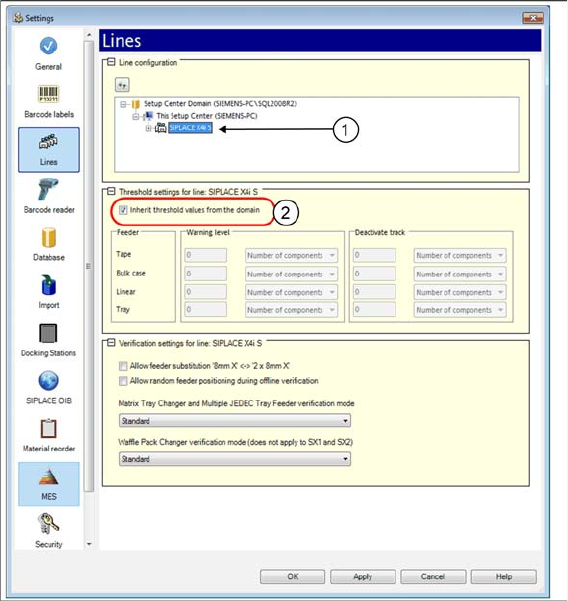
► Open with Extras => Settings => Lines.
► Open Line configuration and mark the line (1).
⇨ The Threshold settings for the line: view is displayed.
► Disable the Inherit threshold values from the domain option. You can now change the threshold val-
ues for this line.
Adapting Threshold Settings for the Station
► Open with Extras => Settings => Lines.
► Open Line configuration and mark the station (1).