Printer 710_810 v8 Transport Rails Module.pdf - 第20页
TRAN SPORT R AILS MOD ULE ADJUS TMEN TS AND SETTI NGS 16.20 Technical Reference Manual Chapter Issue 6 Oct 06 19. If the r ail wid th is inc orrect, close t he printhead co ver/shutte r , press the System button an d rep…
TRANSPORT RAILS MODULE
ADJUSTMENTS AND SETTINGS
Chapter Issue 6 Oct 06 Technical Reference Manual 16.19
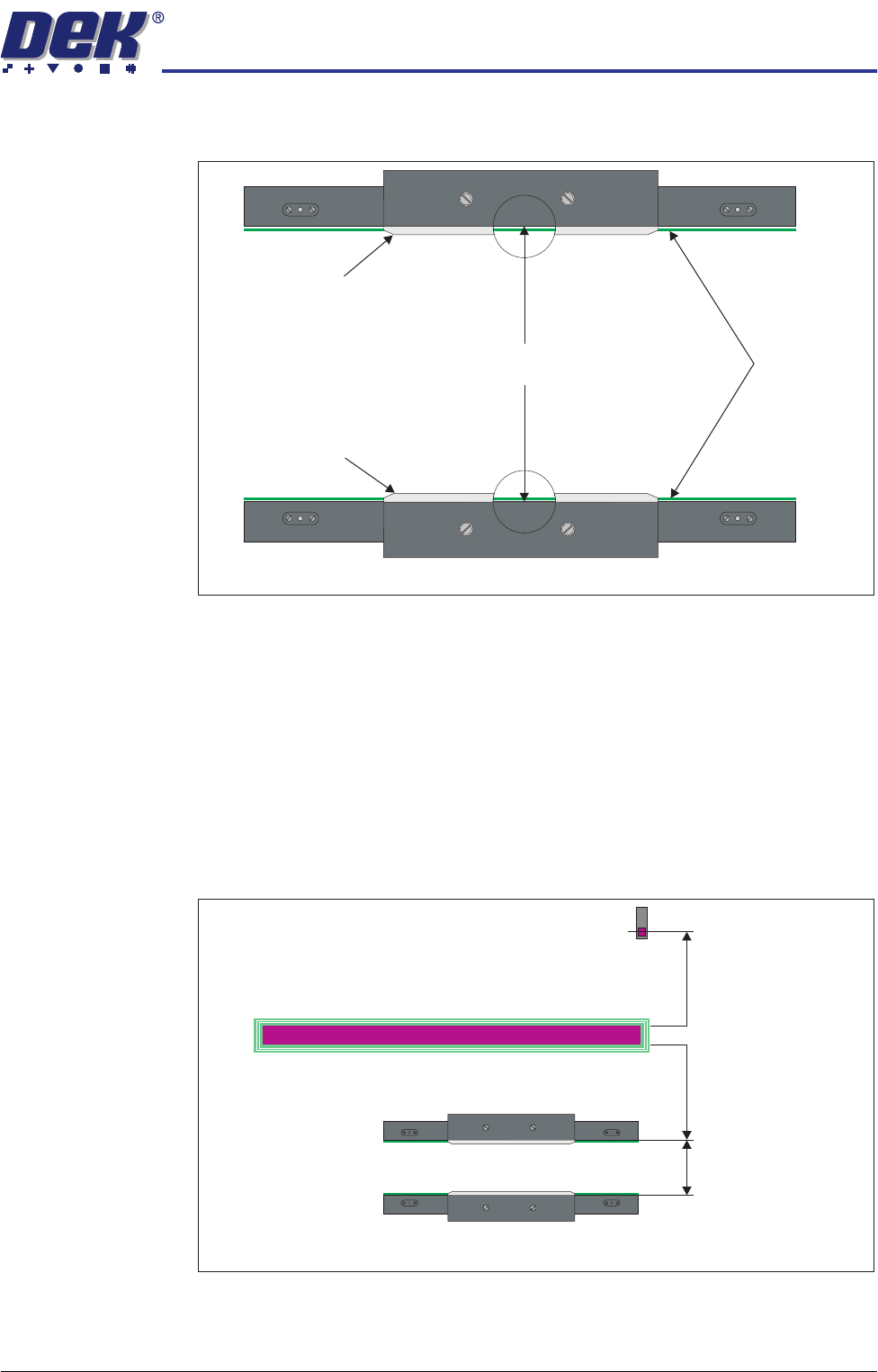
11. Place a vernier gauge above the transport belts in the centre of the board
clamps and check that the vernier reads between 250.25mm ±0.10mm.
12. If the rail width is correct, go to Step 22.
13. Close the printhead cover/shutter and press the System button.
14. Select Set Rail Board Width Calibration.
15. Select Run Diagnost to open the Rail Width Offset window.
16. Use Incr. or Decr. to set the offset required to achieve the dimension in Step
11.
NOTE
Increasing the offset increases the dimension between the rear rail and the
home position therefore, decreasing the width between the front and rear
rails.
17. Select Move.
18. Open the front printhead cover/shutter and recheck the measurement.
250.25mm ±0.10mm
Rear Board Clamp
Plan View of Board Clamps
Transport Belts
Front Board Clamp
Plan View of Transport Rails (centre section)
Home Position
Rail Width
RAIL WIDTH OFFSET 0.00 mm
+/- 3.00mm

TRANSPORT RAILS MODULE
ADJUSTMENTS AND SETTINGS
16.20 Technical Reference Manual Chapter Issue 6 Oct 06
19. If the rail width is incorrect, close the printhead cover/shutter, press the
System button and repeat Steps 16 to 18.
20. If the rail width is correct, close the printhead cover/shutter, press the
System button and select Set.
21. Select Yes to save the information.
22. Using a suitable test board, with the rail width programmed to the board size,
select Cycle Board on Belts.
23. Select Run and ensure the board runs through the entire length of the rail
system for 10 complete cycles, without jamming or excessive clicking of the
board edges.
NOTE
If any jamming occurs investigate the position of the board/snugger clamps
before repeating the check.
TRANSPORT RAILS MODULE
REPLACEMENT PROCEDURES
Chapter Issue 6 Oct 06 Technical Reference Manual 16.21
REPLACEMENT PROCEDURES
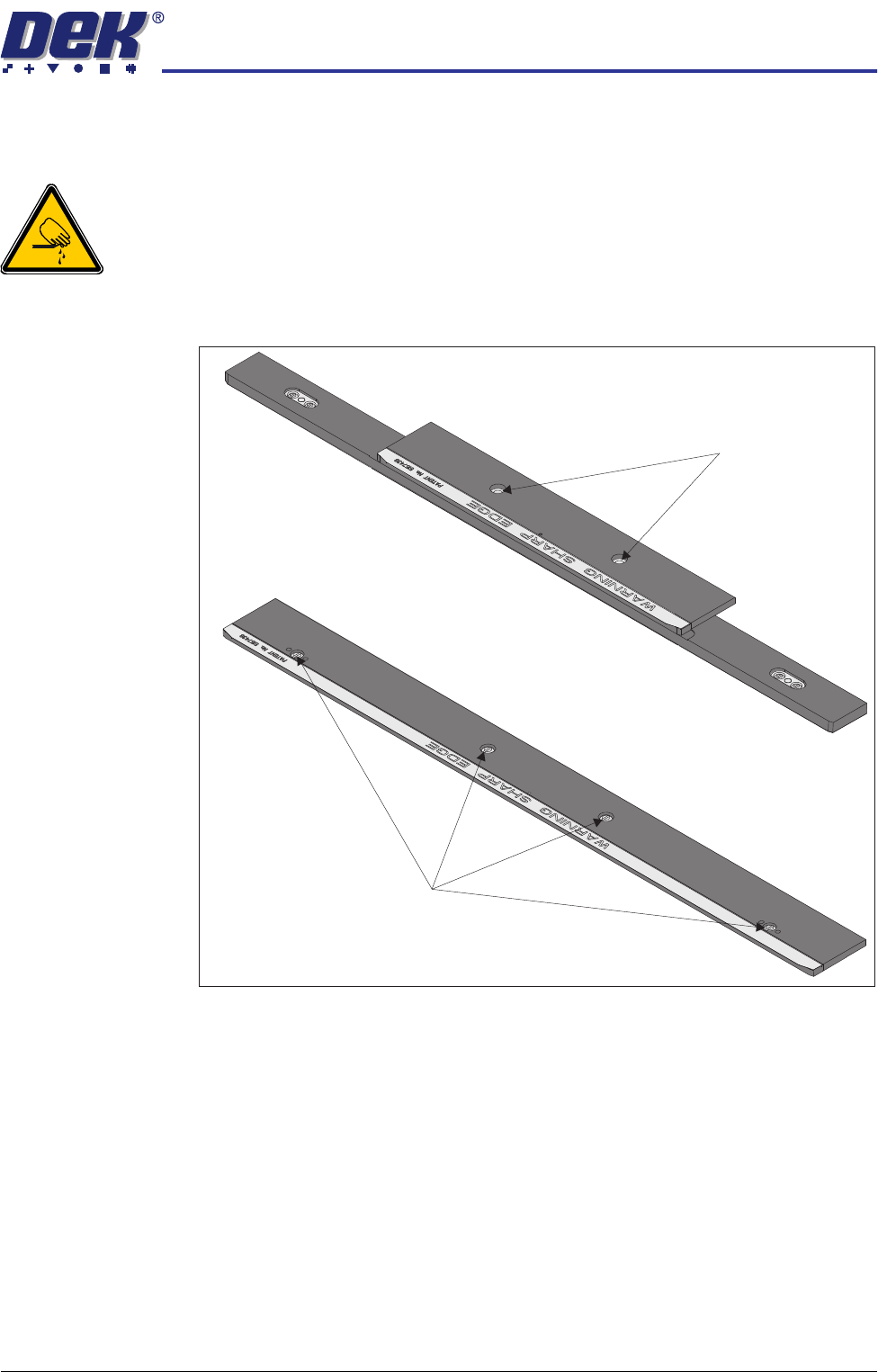
Board Clamp Replacement
WARNING
BOARD CLAMPS. EXTREME CARE MUST BE EXERCISED WHEN WORKING IN
THE TOOLING AREA OF THE MACHINE TO AVOID INJURY. THE FOILS ON THE
FRONT AND REAR BOARD CLAMPS ARE VERY SHARP.
1. Remove the board clamp securing screws and remove the board clamp.
Retain the screws.
2. Place the new board clamp in position on the location plates.
3. Secure the board clamp in position with the screws removed in Step 1.
NOTE
The Board Clamp Setting procedure is not required after board clamp
replacement.
500mm Board Clamp Mechanism
Board Clamp Securing Screws
250mm Board Clamp Mechanism
Board Clamp Securing Screws