Printer 710_810 v8 Transport Rails Module.pdf - 第4页
TRAN SPORT R AILS MOD ULE ELECTRICA L SCHEM ATIC 16.4 Technical Reference Manual Chapter Issue 6 Oct 06 ELECTRICAL SCHEMA TIC Machine PC Motherboard Machine Control Enclosure Front Belt Drive (8M03) Rear Belt Drive (8M04…
TRANSPORT RAILS MODULE
OVERVIEW
Chapter Issue 6 Oct 06 Technical Reference Manual 16.3
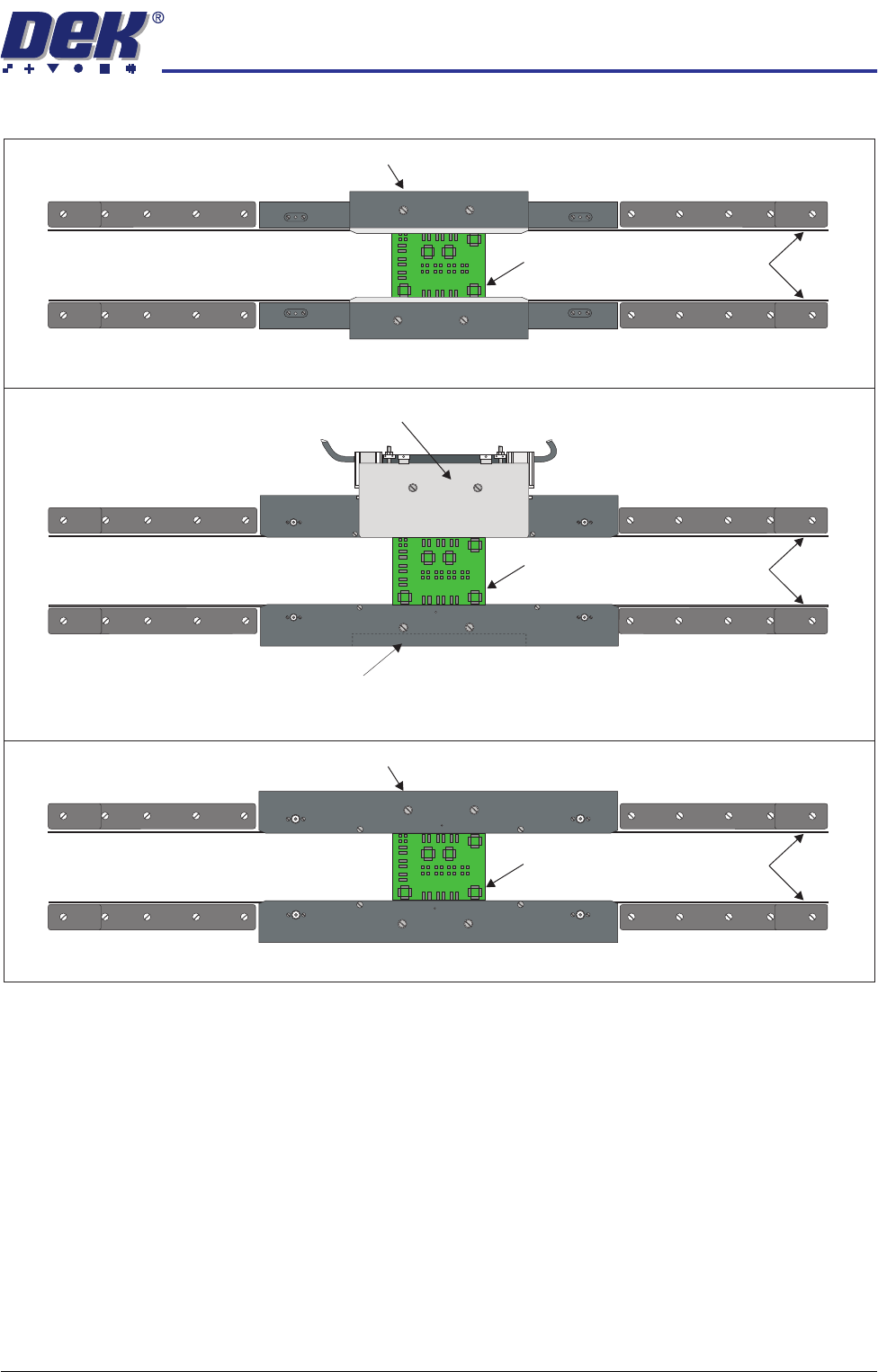
Figure 16-1 Board Clamping Arrangements
Board
Transport Belts
Rear Snugger Plate
Counterweight Block
Board
Transport Belts
Rear Foil-less Clamp
Foil-less Clamps
Board
Transport Belts
Rear Board Clamp
Board Clamps
Board Snuggers
TRANSPORT RAILS MODULE
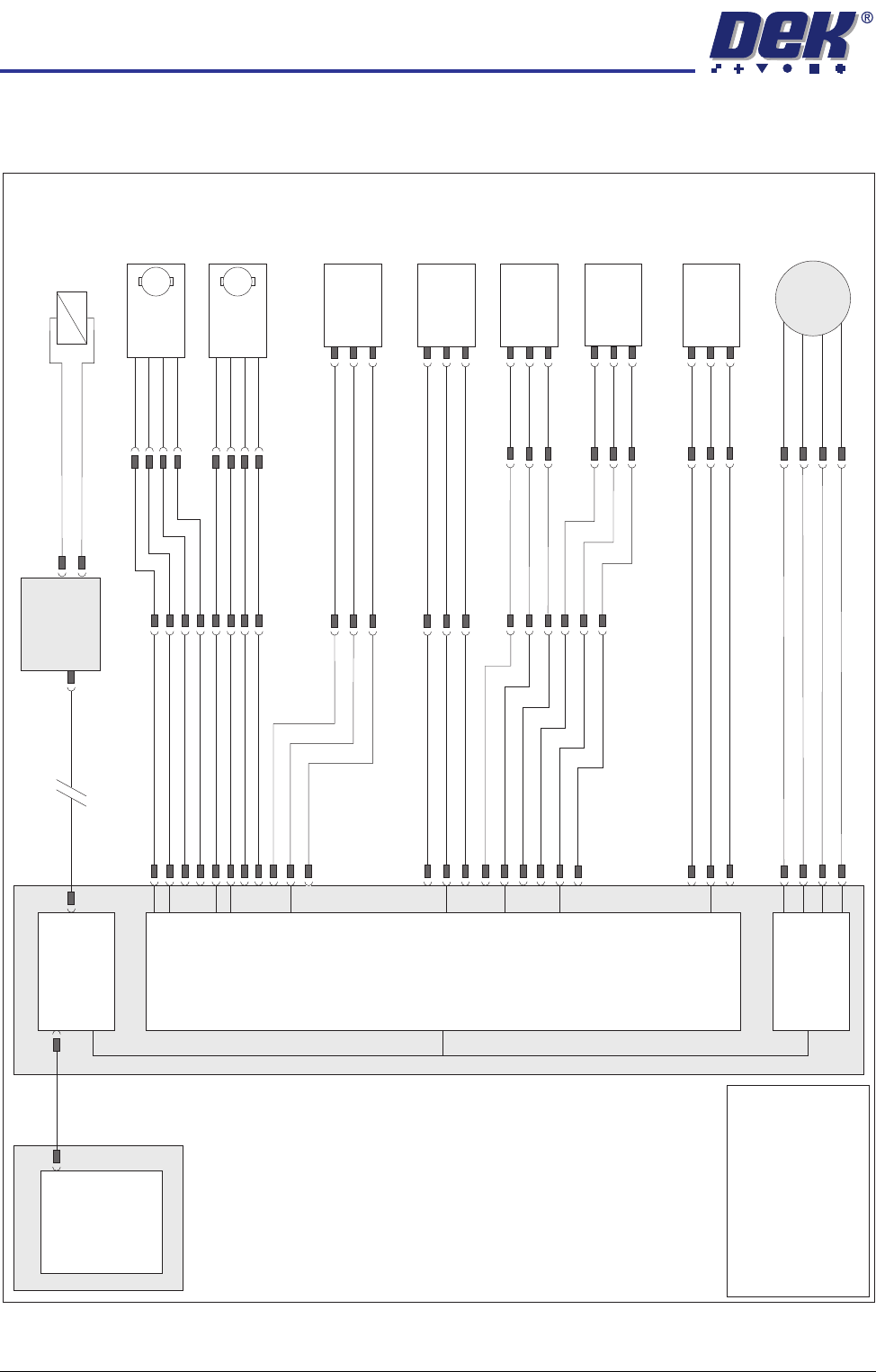
ELECTRICAL SCHEMATIC
16.4 Technical Reference Manual Chapter Issue 6 Oct 06
ELECTRICAL SCHEMATIC
Machine PC
Motherboard
Machine Control Enclosure
Front Belt
Drive (8M03)
Rear Belt
Drive (8M04)
DIG IN 10
DIG IN 11
DIG IN 6
Rail Lift Left
(8SE5)
Board at Right
Sensor (8SE7)
Board at Left
Sensor (8SE8)
8PL10
8PL04
M36PL17
8PL03
Sig
Sig
Sig
+12V
+12V
+12V
0V
0V
0V
8PL12
M36PL22
Moving Rail
Stepper
Motor 2B-
Motor 2A-
Motor 2B+
Motor 2A+
8PL20
8M2
Dual Stepper
X3
NextMove
Interface Card
X4
M
Enable
Direction
24V SW
0V
M
Enable
Direction
24V SW
0V
8SK21
8PL22
8SK23
M36PL18
!DIG OUT 3
DIG OUT 3
DIG OUT 2
DIG OUT 2
NextMove ES
(I/O Node 1)
X5
Board Clamp/
Snugger Solenoid
(16SOL10)
DIG OUT 9
GND
Main Machine
I/O Node 2
N2PL4
CAN Bus
N2SK2
USB
Moving Rail
Home (8SE6)
Sig
8PL26
M36PL19
+12V
0V
DIG IN 5
DIG IN 7
Rail Lift Right
(8SE4)
Sig
+12V
0V
8PL15
NOTE
The breaks in the CAN Bus
chain reflect that additional
I/O Nodes may be fitted,
refer to Machine Control
chapter for the complete
CAN Bus chain.
TRANSPORT RAILS MODULE
ADJUSTMENTS AND SETTINGS
Chapter Issue 6 Oct 06 Technical Reference Manual 16.5
ADJUSTMENTS AND SETTINGS
Rail Lifted Sensors 1. In Diagnostics, select Rising Table.
2. Select Select Module.
3. Select Home Rising Table.
4. Select Run Diagnost, the table moves to the home position.
5. Select Exit.
6. Select Rail System.
7. Select Select Module.
8. Select Home Rail Width.
9. Select Run Diagnost, the rear rail moves to the home position.
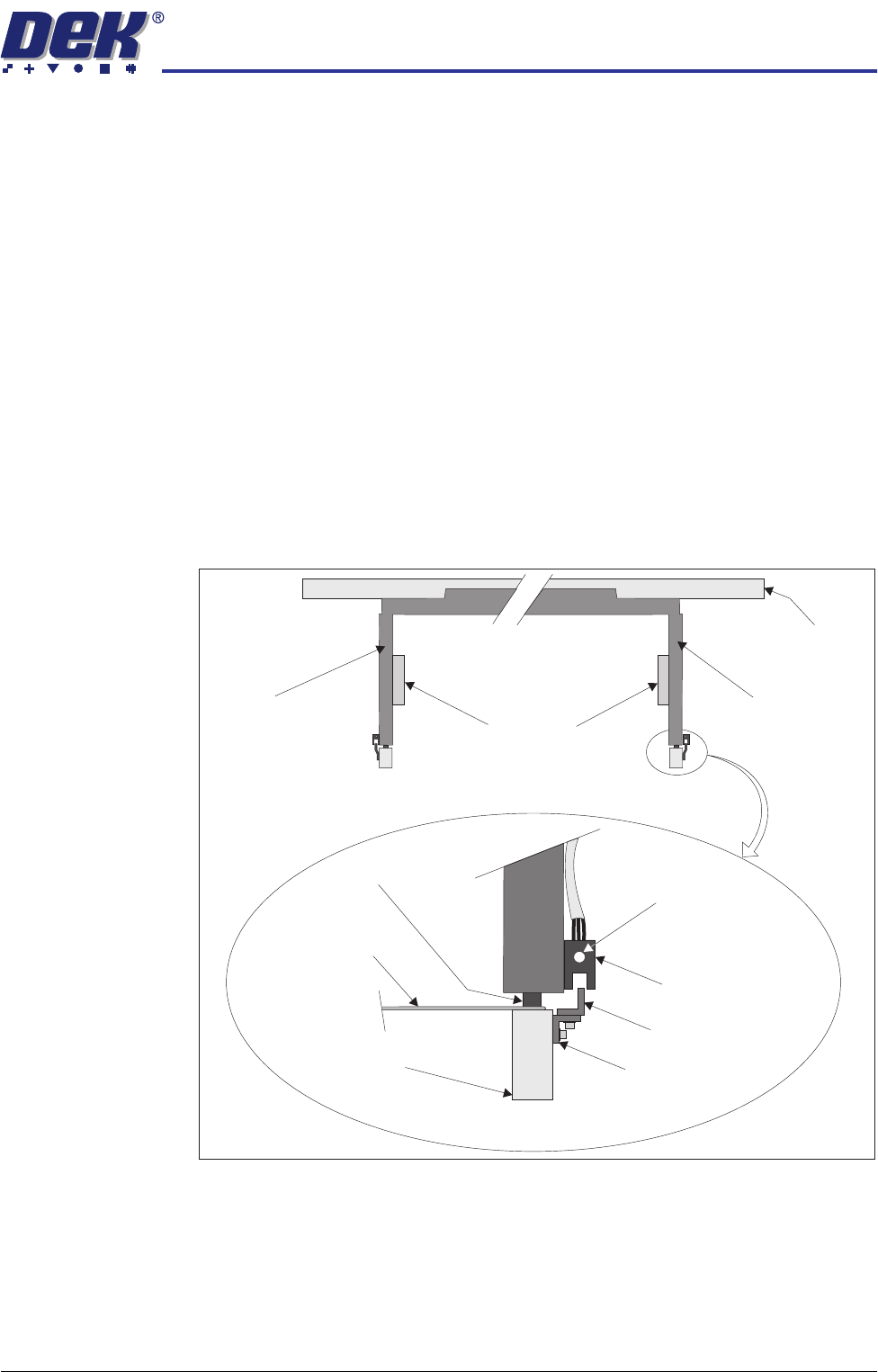
10. Place a 0.5mm feeler gauge between the rail shock absorber on the rear
right rail transport leg and the rail stop bar (clatter bar). Adjust the vane
bracket using a 2.5mm Allen key, so that the sensor LED is On with a 0.5mm
feeler gauge fitted and Off with a 0.7mm feeler gauge fitted. Lock adjusting
screws.
11. Repeat Step 10 for left hand end of the rear rail.
12. Select Drive Rail To Board Width.
13. Select Run Diagnost.
Right Transport Leg
Rear Rail
Front View of Rail System
Left Transport Leg
Linear Bearing
Feeler Gauge
Rail Stop Bar
(Clatter Bar)
Opto Vane
Bracket
Opto Vane
Opto
Shock Absorber
Sensor LED
Enlarged View of Right Rail Opto