Printer 710_810 v8 Transport Rails Module.pdf - 第28页
TRAN SPORT R AILS MOD ULE REP LAC EMEN T PR OCED URE S 16.28 Technical Reference Manual Chapter Issue 6 Oct 06 19. Repeat S tep 18 for the front foi l-less clamp. 20. Remove the b oard from t he print er . NOTE The Board…
TRANSPORT RAILS MODULE
REPLACEMENT PROCEDURES
Chapter Issue 6 Oct 06 Technical Reference Manual 16.27
8. Fit the appropriate foil-less clamp to the rear rail and secure using the M4
pan head screws.
9. Repeat Step 8 for the front rail.
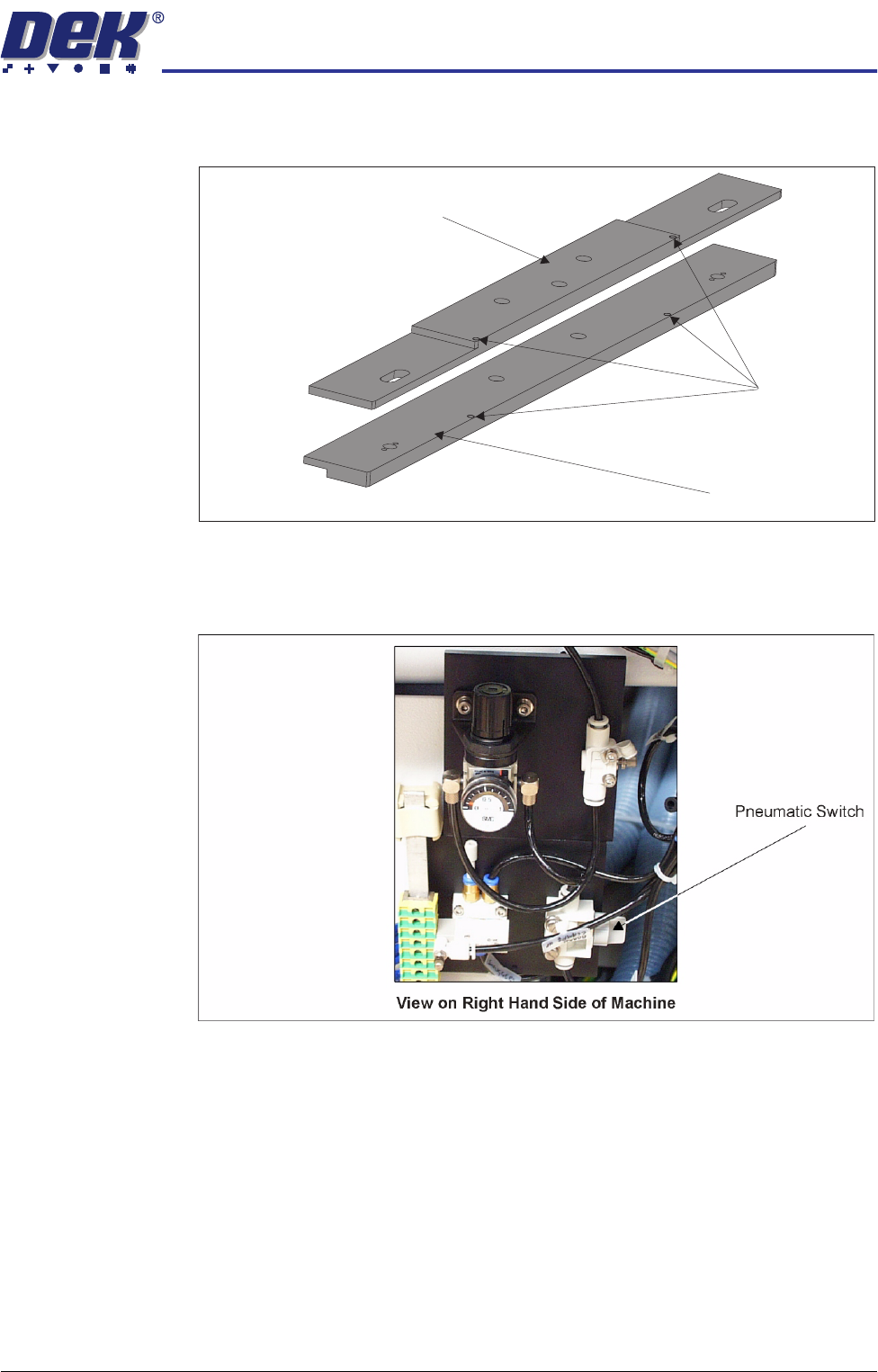
10. Turn the pneumatic switch Off, located on a magnetic plate on the right hand
side of the machine.
11. Under Setup select Machine.
12. Select Basic Parameters.
13. Set Clamp Type to Board Clamp.
14. This completes the procedure if board clamps have been fitted. If foil-less
clamps have been fitted continue with Step 15.
15. Load a product board.
16. In Diagnostics select Rail System.
17. Select Toggle Board clamp.
18. Using a 2mm Allen key adjust the two downstops on the rear foil-less clamp,
(previous figure refers) to ensure that the top of the foil-less clamp is flush
with the top of the board.
Downstops
Foil-less Clamp -
Adjustable Screen Mount (ASM)
Foil-less Clamp -
Fixed Width Chase
TRANSPORT RAILS MODULE
REPLACEMENT PROCEDURES
16.28 Technical Reference Manual Chapter Issue 6 Oct 06
19. Repeat Step 18 for the front foil-less clamp.
20. Remove the board from the printer.
NOTE
The Board Clamp Setting procedure is not required after snugger to board
clamp/foil-less clamp replacement.
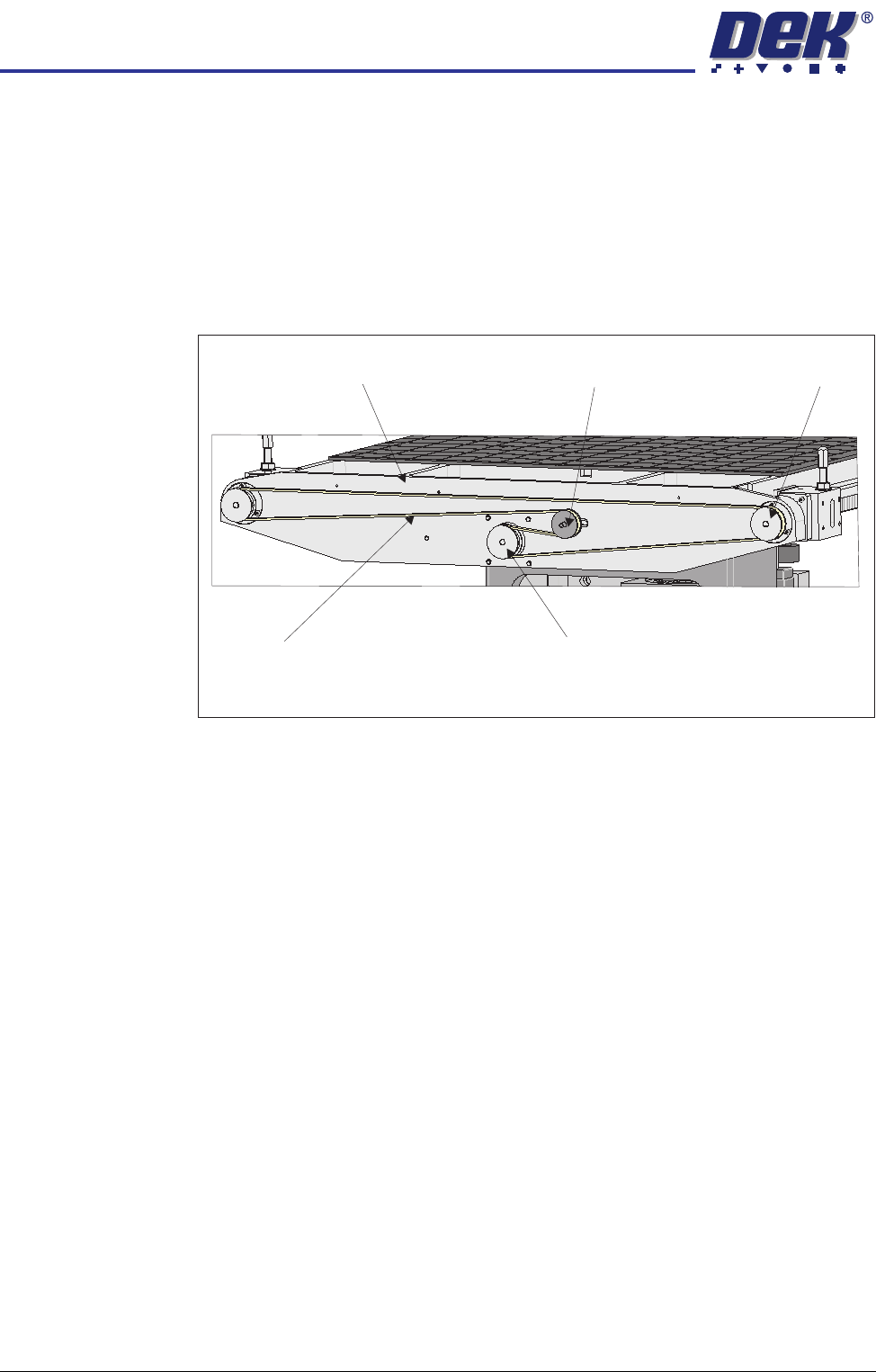
Rear Rail Drive Belt 1. At the rear of the rising table, slacken the adjustable idler pulley by means
of the nut at the front face of the rail drive plate.
2. Slide the adjustable idler pulley to slacken the drive belt.
3. Remove the drive belt and discard.
4. Fit the replacement drive belt.
5. Using a suitable cable tie, engage a forcemeter with the adjustable idler
pulley. Apply a horizontal force of 6kg.
6. Maintaining this force, tighten the adjustable idler pulley securing nut.
7. Using a tension meter on the top of the drive belt, check the tension is
between 38Hz - 45Hz.
8. Adjust the drive belt tension as necessary to achieve the reading in Step 7.
9. In Diagnostics select Rail System module.
10. Select Drive Rail Width Using Two Button Control.
11. Using the left jog button drive the rear rail to the rear for a few seconds, this
evens out the tension in the belt.
12. Repeat Steps 7 and 8.
13. Select Drive Rail to Board Width.
View on Rear of Rising Table
Adjustable Idler Pulley
Moving Rail Stepper Motor Pulley
Drive Belt
Left Hand Drive Shaft
Rail Drive Plate
TRANSPORT RAILS MODULE
REPLACEMENT PROCEDURES
Chapter Issue 6 Oct 06 Technical Reference Manual 16.29
Heavy Board Rails
Drive Belt
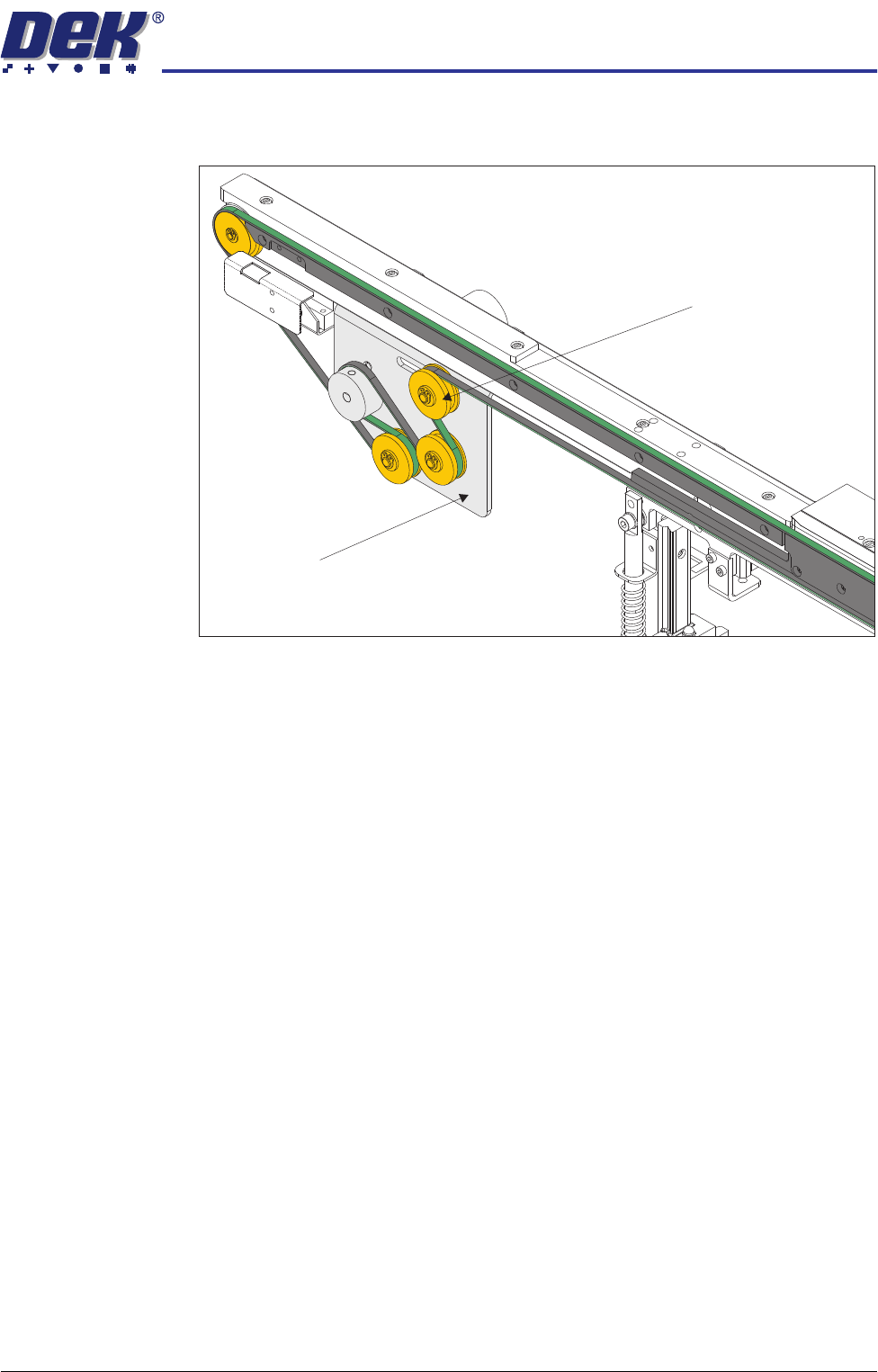
1. Slacken the adjustable idler pulley securing screw, at the rear of the motor
bracket.
2. Slide the adjustable idler pulley to slacken the drive belt.
3. Remove the drive belt and discard.
4. Fit the replacement drive belt.
5. Using a suitable cable tie, engage a forcemeter with the adjustable idler
pulley. Apply a horizontal force of between 5.1kg - 6.1kg.
6. Maintaining this force, tighten the adjustable idler pulley securing screw.
7. In Diagnostics select Rail System module.
8. Select Drive Belts Using Two Button Control.
9. Using either the left or right jog button, drive the belt motors for a few
seconds, this evens out the tension in the belt.
10. Repeat Step 5.
View on Inside of Front Rail
Adjustable Idler Pulley
Motor Bracket