00196430-0102-AI_Head_Reconfiguration_Kit_SX_CPP_en_de.pdf - 第68页
Installing the CPP Placement Head Assembly of the CPP Placement Hea d Height Adjustment and Install ation of the Nozzle Station 68 Assembly Instructions / Montageanleitung Head Reconfiguratio n Kit CPP 3.4.7 Height Adjus…
Installing the CPP Placement Head
Settings On the Base Adapter Assembly of the CPP Placement Head
Assembly Instructions / Montageanleitung Head Reconfiguration Kit CPP 67
Settings On the Ba se Adapter
3.4.6 Settings On the Base Adapter
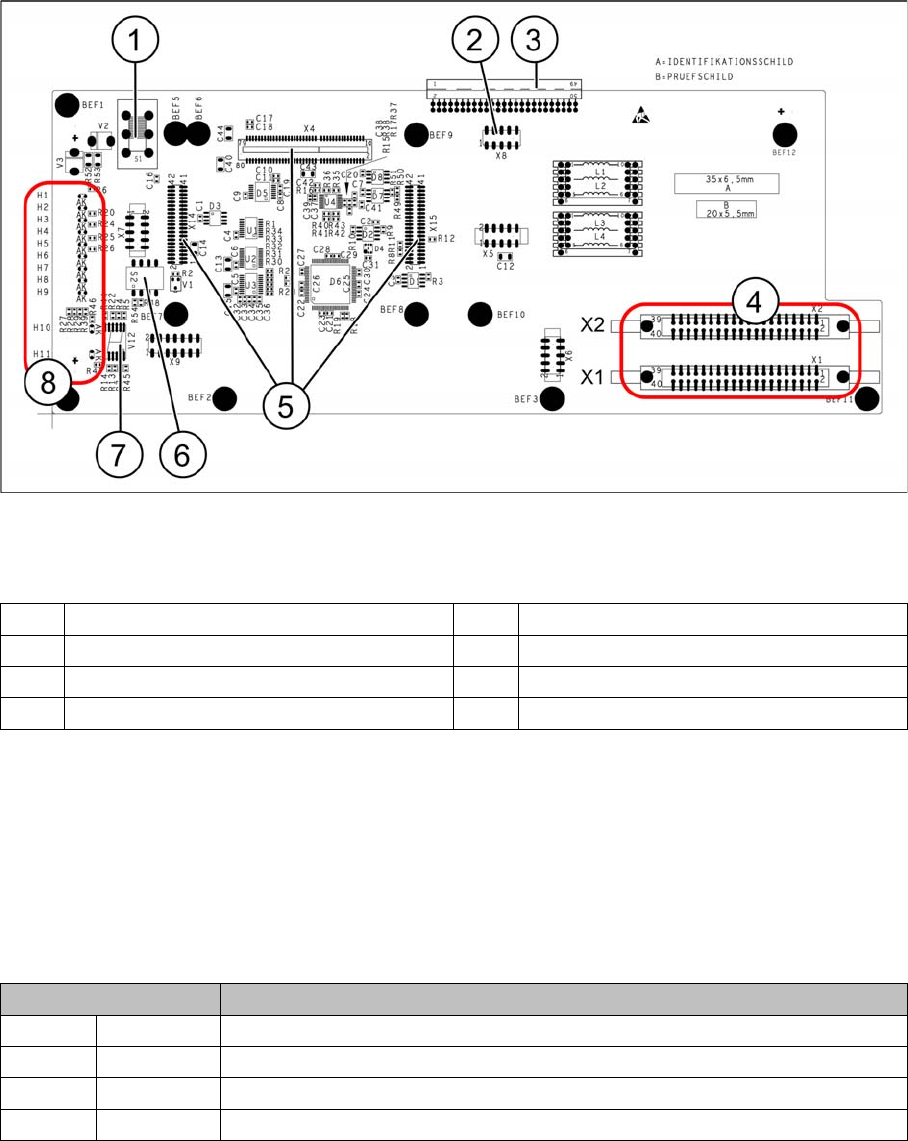
Base adapter for CPP and C&P20A heads (without HCU)
Legend
Switch S1
This switch sets the intermediate circuit voltage for the Z axis.
▪ The switch must be set to 40 V for C&P20 heads.
▪ The setting must be 150 V for CPP heads.
If the setting is incorrect, no damage will be done but an HCU error message will be issued.
DIP switch S2
All switches must be set to OFF. The HCU can be reset with S3, if necessary.
Height Adjustment and Installation of the Nozzle Station
1 Switch S1 (see below) 2 X4 – for checking the voltages
3 Connection to the head interface C700 4 X1 and X2 – to the head
5 X4, X14 and X15 – for the HCU 6 DIP switch S2
7 7 segment display 8 LEDs H1-H11
Switches Description
S1 S0 Gantry encoding (currently not in use)
S2 S1 Gantry encoding (currently not in use)
S3 Reset Reset HCU
S4 Boot Activation of bootstrap function for the HCU (not designed for Service)
Installing the CPP Placement Head
Assembly of the CPP Placement Head Height Adjustment and Installation of the Nozzle Station
68 Assembly Instructions / Montageanleitung Head Reconfiguration Kit CPP
3.4.7 Height Adjustment and Installation of the Nozzle Station
The nozzle station [03073328-xx] is included in the parts set.
When replacing a C&P20A head by a CPP head and vice versa the present nozzle station can be kept.
When replacing a TwinHead by a CPP or a C&P20A head the nozzle station of the parts set must be
installed.
Height Adjustment of the No zzle Station
3.4.7.1 Height Adjustment of the Nozzle Station
CAUTION
► If the COT insert has been removed or shifted during the conversion, the installation height
of the nozzle station should be checked in any case.
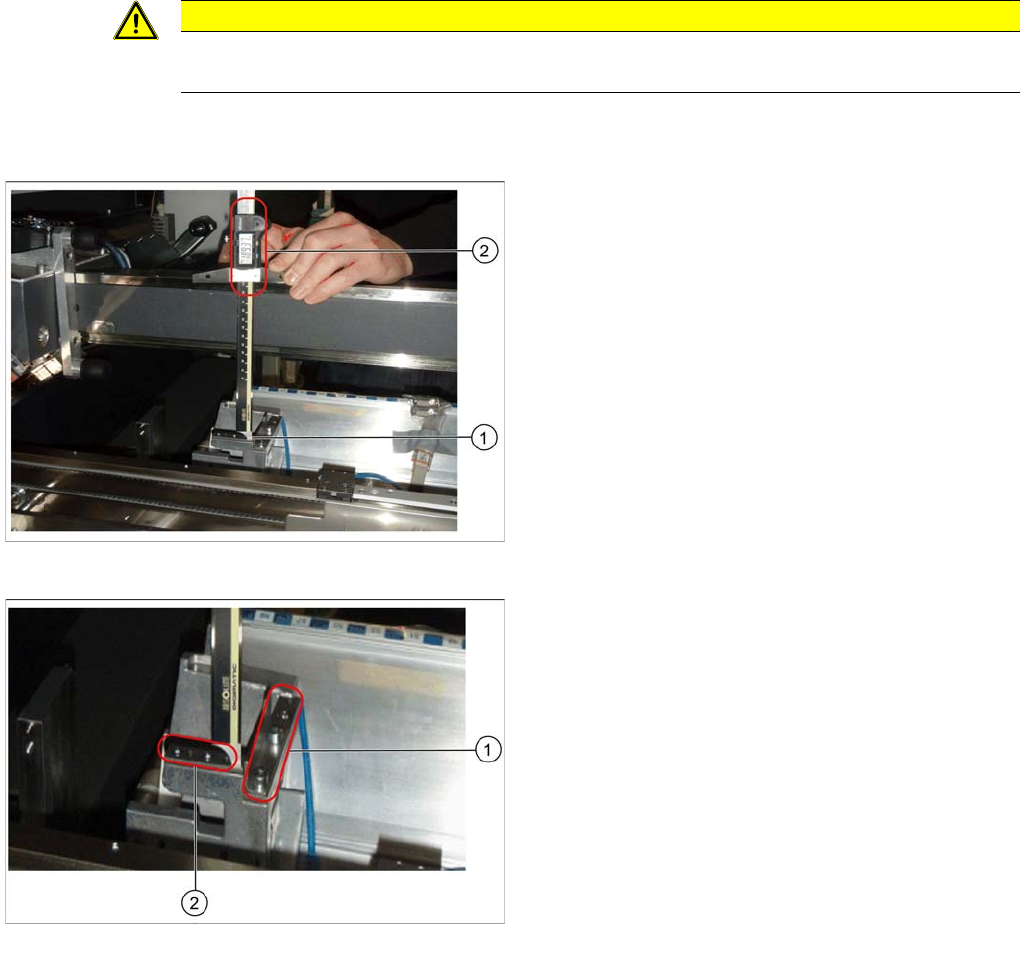
Measuring the height of the nozzle station
► Push the placement head to be measured outwards.
► Place the caliper perpendicularly on the contact sur
-
face of the reject station (1) and measure the dis
-
tance to the guide rail of the gantry.
This distance must be 189mm ± 0.2mm (2).
► If the distance is correct, proceed with the installation
of the nozzle station.
Position for the shim plates
► If the distance is too large, insert shim plates: Shim
plates for nozzle stripping device [03039514
-
xx and
03021079-xx], screws DIN7991 M4x20 - 8.8
[00333782
-
xx].
► If the distance is too small because shim plates have
already been inserted, remove these.
Installing the CPP Placement Head
Height Adjustment and Installation of the Nozzle Station Assembly of the CPP Placement Head
Assembly Instructions / Montageanleitung Head Reconfiguration Kit CPP 69
Installing the Nozzle Station
3.4.7.2 Installing the Nozzle Station
► Remove the downholder on the right above the reject bin.
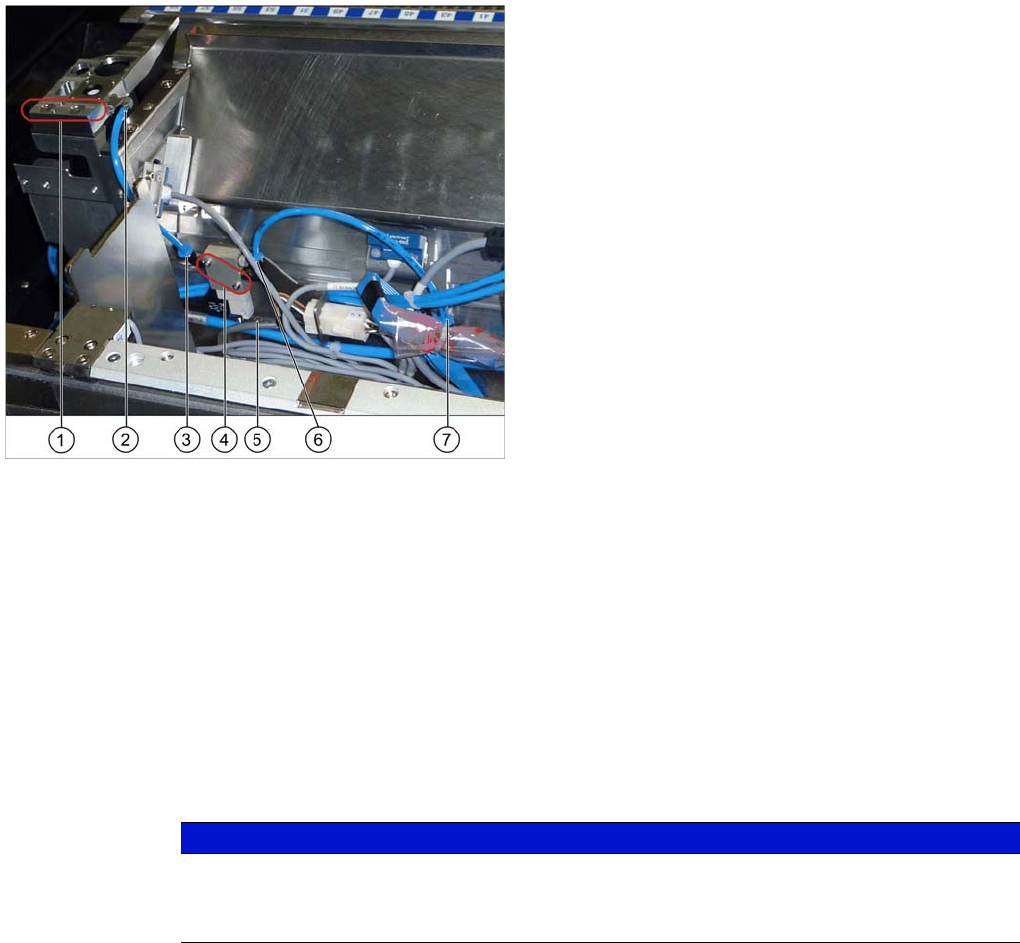
► Fit the nozzle station [03073328-xx] with two screws in its mounting position (1).
► Depending on the machine configuration (see "3.4.7.3.1 Configurations with Reject Bins and Coding
Sheet" [ ➙ 70]) insert the reject bin [03048638-xx] and the component reject bin up to 6x6
[03062378--xx]. The reject bin mustn't be higher than the conveyor side wall in any case.
► Fasten the downholder left [03079173-xx] above the reject bin [03048638-xx] (see "3.4.7.3.2 Install
-
ing/Removing Downholder" [ ➙ 73]).
► Insert the coding sheet at unoccupied bin locations [03083883-xx] (see "3.4.7.3.3 Installing/Remov
-
ing Coding Sheet" [ ➙ 74]).
► Install the valve for the nozzle station [03055785-xx] (4) at the COT insert using the two DIN912-
M2,5 x 16-A2-70 screws [00350291-xx].
► Replace, unless already performed, the QSC-6H plug at the solenoid valve feed control with the Y
press-fit connection with push-on socket QSY-6H-4 [03055792-xx].
► Plug the hose PUN-CM 4x0.75 / 200mm [03056096-xx] into the pneumatic connection to the nozzle
changer (5) and into the pneumatic connection of the nozzle changer (6) or close it with the plug
QSC-4H [00330249-xx].
► Plug the hose PUN-CM 4x0.75 / 135mm [03056097-xx] into the pneumatic connection to the nozzle
changer [03055785-xx] (3) and to the pneumatic connection of the nozzle changer (2).
► Connect the cable "Cable feed X series: nozzle station" [03053223-xx] which has already been con
-
nected in the COT insert with the "valve for nozzle station cplt." [03055785-xx].
► If the verify reject bin option is already installed, the sensor for this reject bin has to be installed at
another position. For this, use the metal sensor MK2 prefitted (reject bin 6x6) [03080138-xx]. For fur
-
ther information please refer to the Assembly Instructions Reject Bin SIPLACE SX1/2 [00196615-
xx].
Installing the nozzle station
Legend
1. Fixation points of the nozzle station [03073328-xx]
2. Pneumatic connection on the nozzle station
3. Pneumatic connection to the nozzle station
4. Valve for the nozzle station [03055785-xx]
5. Pneumatic connection to the nozzle changer
6. Fixing screw of the mounting plate
7. Pneumatic connection on the nozzle changer
NOTICE
The mounting plate for the solenoid valve is fastened and fixed in position with one screw only
(6). If necessary, loosen this mounting plate to install the solenoid valve.
Attention: the connector left to the solenoid valve is also fastened to this plate.