00196068_Install_Vista_unattended.pdf - 第16页
Installation Manual for Windows Vista (unattended setup) 11/2007 US+DE Installationsanleitung für Windows Vista (unattended setup) → To agree with the selected configurati on and start the installation, click the Install…
Installation Manual for Windows Vista (unattended setup) 11/2007 US+DE
Installationsanleitung für Windows Vista (unattended setup)
→ Click the OK button to continue.
→ If you want to cancel the ongoing SIPLACE product selection, click the Cancel button.
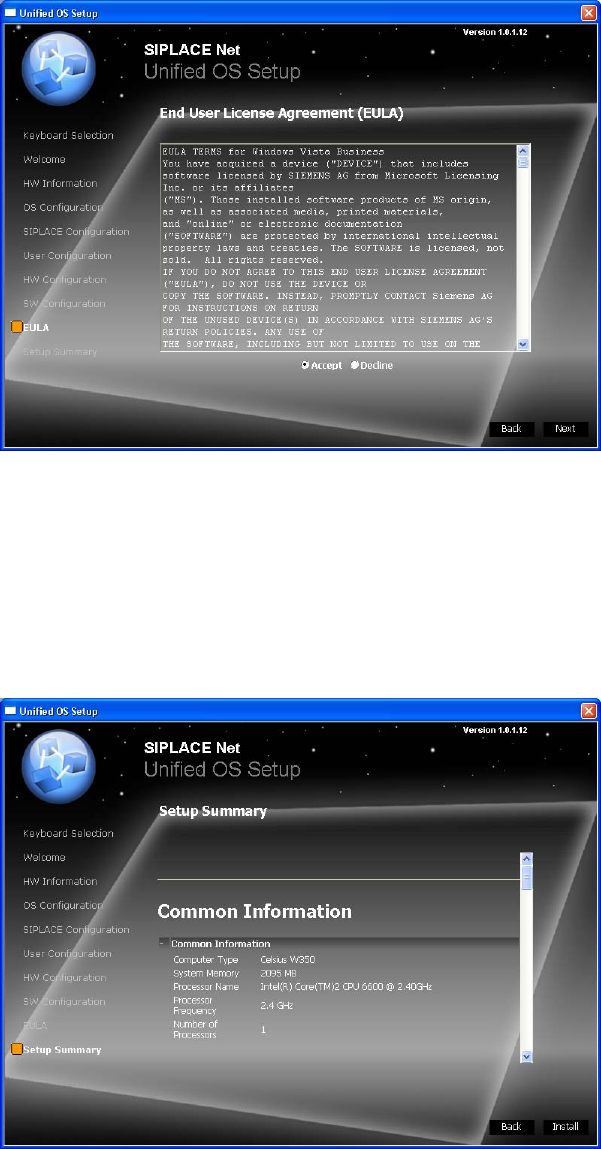
5.1.9 End User License Agreement (EULA)
The following dialog is displayed:
Fig. 13 EULA
→ Read the license agreement carefully.
→ Select the Accept radio button to accept the EULA.
→ Click the Next button to continue.
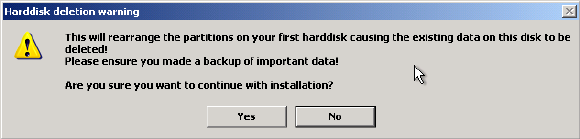
5.1.10 Summary and Installation
The following dialog is displayed:
Fig. 14 Summary and Installation
15 / 38
→ Verify the summarized information about the ongoing installation procedure carefully.
Installation Manual for Windows Vista (unattended setup) 11/2007 US+DE
Installationsanleitung für Windows Vista (unattended setup)
→ To agree with the selected configuration and start the installation, click the Install button.
The following warning message is displayed:
Fig. 15 Warning message
→ To continue erasing the first hard disk and starting the installion, click the Yes button.
→ To abort the procedure, click the No button.
16 39 /

Installation Manual for Windows Vista (unattended setup) 11/2007 US+DE
Installationsanleitung für Windows Vista (unattended setup)
5.2 Standard Settings and Final Administration
5.2.1 Default settings
Screen resolution: 1024 x 786, 24-bit (16 mill.) Colors, 60 Hz Refresh Frequency
Time Zone: GMT (London, Edinburgh, Lisbon)
Network Protocol: TCP/IP
In addition to the default user groups of Windows Vista, the following users and user groups are configured:
• plr
• SIPLACEServices
• SIPLACEAdmin
Note:
If the computer you installed is equipped with a CRT (cathod ray tube), please set the refresh
frequency to a higher value. The default value of 60 Hz is preset for TFT displays.
5.2.2 Passwords
Administrator
For the local administrator the unattended setup uses the default password MS128. It is recommended to
assign a new password.
plr
The default user „plr“ uses the default password plr.
SIPLACEServices
The user “SIPLACEServices“ is created for the COM+ components. The password must not be changed.
Otherwise the necessary rights of the SIPLACEPro Components are missed.
Administrator group
The user “SIPLACEAdmin“ is defined in the local administrator group. This user must not be removed from
the group. Otherwise the Siemens service technician can not perform any maintenance. The password is
only known by the SIPLACE Service. The password must not be changed.
Other settings depend on the configuration specified by the user.
17 / 39