00196784-02_VD_Traceability_3.3_DE_EN.pdf - 第30页
Traceability Interfaces 30 SIPLACE Traceability 3.3

Traceability Interfaces
SIPLACE Traceability 3.3 29
2 Traceability Interfaces
The traceability data generated in the machine are made available for further processing.
There are 3 options for further processing:
▪ Traceability via OIB (recommended)
▪ Traceability data in an SQL database
▪ Traceability data as XML files in the file system
To export traceability data into an advanced processing subsystem (e.g. MES) we recommend integra-
tion via the OIB interface. The data interface (XML) is primarily available for test purposes and should
not be used in productive operations without deleting or moving the data generated, due to the existing
limitations of the file system.
Data in the traceability database can be accessed for viewing via the DBView interface (see Traceability
3.3 User Guide). The traceability SQL database is designed to find the placement data for boards to be
produced. To directly and rapidly locate new traceability data with external subsystems, we recommend
using the event-based OIB interface.
NOTICE
Further Information
►For further information about traceability data interfaces, register at http://www.siplace.com
and request the document package via the menu: Products & Solutions -> SIPLACE Soft-
ware Suite -> Interface Support.
►If you plan to connect SIPLACE Traceability to your own Software interfaces we recommend
to contact SIPLACE product management in advance.
Traceability Interfaces
30 SIPLACE Traceability 3.3
Requirements
Software Requirements
SIPLACE Traceability 3.3 31
3 Requirements
3.1 Software Requirements
To run the Traceability 3.3 system, you must install the following software:
▪ SIPLACE Pro 9.3 (recommended), 9.2, 8.0 (compatible)
▪ Setup Center 4.2
▪ SIS 9.3 (recommended), 9.1, 8.0 (compatible)
▪ Trace Service 3.3
▪ Trace Monitor 3.3
▪ Station software:
– 407.05 (SIPLACE 80 F4, F4-6, S20; F5, F5 HM, S23)
– 505.05 SP2 (SIPLACE S25 HM, S27 HM, HS50, HS 50+, HS60, HF, HF3)
– 605.03 (SIPLACE X2, X3, X4; D1, D2, D3, D4)
– 704.03 (SIPLACE X2, X3, X4, X4I, SX1, SX2, SX4)
– 705.04 (SIPLACE X2, X3, X4, X4I, SX1, SX2, SX4)
3.2 Time Sync
To ensure that you can trace board production data properly at a later date, it is important that all systems
involved have synchronized time keeping. The individual times in the various systems can be automat-
ically synchronized with the SIPLACE Time Sync tool.
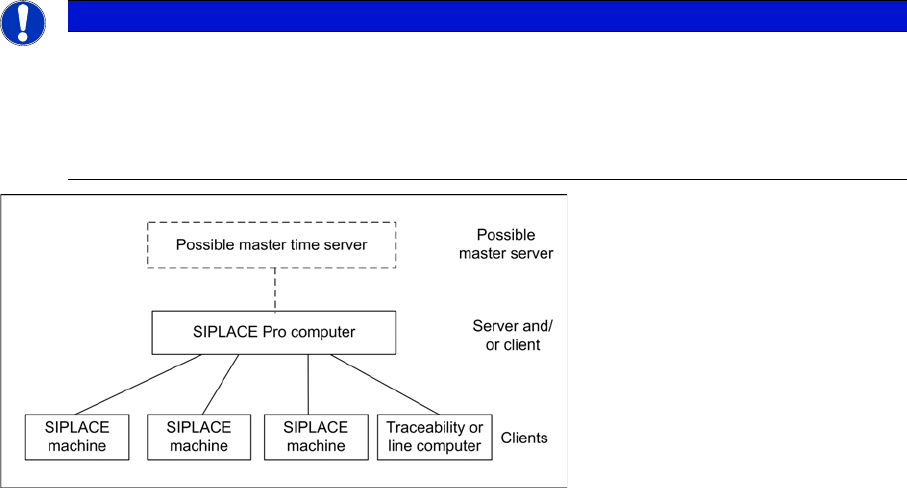
SIPLACE Time Sync is a client server application, which helps to synchronize the time at all SIPLACE
machines and all traceability or line computers (client) via the SIPLACE Pro computer or a central time
server (server). Time Sync is installed and configured on one particular computer as a time server and
on one or more other computers as a client.
The SIPLACE Pro computer has proven to be an ideal time server.
NOTICE
Time Sync
After installing the Time Sync server and Time Sync client, check the settings for "Time Sync"
and correct the times where necessary, at the Time Sync client.
The current Time Sync software and software instructions can be found on one of the Support
Media DVDs (item no: 00388693-xx or 00388694-xx), supplied with each software product.