00196784-02_VD_Traceability_3.3_DE_EN.pdf - 第38页
Traceability System Components and Features SIPLACE Trace Service User Interface Traceability Option for SIP LACE Explo rer 38 SIPLACE Traceability 3.3 5.1.4 Traceability Option for SIPLACE Explorer The traceability opti…
Traceability System Components and Features
Trace Service Server System Components
SIPLACE Traceability 3.3 37
5 Traceability System Components and Features
5.1 System Components
SIPLACE Trace Service processes traceability data. This data is imported from station and line software
and then stored in the traceability database, before being exported as XML files or made available via
the OIB interface. The traceability database can be visualized via the Trace Monitor.
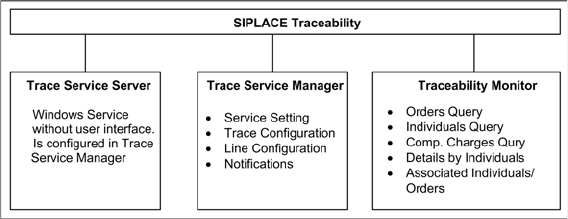
SIPLACE Traceability consists of three components:
▪ Trace Service server:
for generation and export of data
▪ Trace Service Manager:
for configuration of the Trace Service server
▪ Trace Monitor:
For displaying and searching for recorded traceability data
The Trace Host service no longer exists. Its function has been assumed by Trace Service. The data are
directly exported into the database via the file system.
All SIPLACE Trace Service components are automatically installed on the same computer during instal-
lation. The Trace Monitor web application is generated with the help of the Trace Monitor configuration
tool, which can be separately installed on any computer.
In addition to Trace Monitor, you can also install the traceability option for SIPLACE Explorer. Before this
installation, make sure that SIPLACE Explorer has been installed and activated. This is required for dis-
playing and searching for recorded traceability data.
5.1.1 Trace Service Server
When using machine-based traceability, the Trace Service server imports the traceability data from the
stations. From SW 70x, the Trace Service server generates the data. The traceability data are exported:
▪ into the Trace database (which is configured in the Trace Service Manager)
▪ to the OIB interface (see the OIB SDK for details)
▪ into the file system (as XML files)
All settings or configurations are performed via the SIPLACE Trace Service Manager.
5.1.2 Trace Service Manager
The line-specific configuration and other options are set via the user interface of the Trace Service Man-
ager.
▪ Configuring the database connection to SIS and Setup Center
▪ Export method for configuring traceability data
▪ Configuring traceability database (create, update, backup and restore)
▪ Configuring lines and their traceability operating modes
5.1.3 Trace Monitor
The Trace Monitor is used to display the recorded and invoked data.
The user can search for specific data using the Trace Monitor. In doing so, it is possible to filter the
search according to various criteria, e.g. according to produced boards, placed components etc. The
data displayed can be saved as a CSV file for further processing in MS Excel.
Traceability System Components and Features
SIPLACE Trace Service User Interface Traceability Option for SIPLACE Explorer
38 SIPLACE Traceability 3.3
5.1.4 Traceability Option for SIPLACE Explorer
The traceability option for SIPLACE Explorer provides the SIPLACE Explorer users with the traceability
data recorded by Trace Service.
For this purpose, the traceability option must be installed on the SIPLACE Explorer. During the installa-
tion a new tab for "Traceability" is added to the SIPLACE Explorer factory website. This tab provides the
user with the Trace Monitor user interface. The user can search for specific data.
5.2 SIPLACE Trace Service User Interface

Fixed Defects
SIPLACE Traceability 3.3 39
6 Fixed Defects
Fixed defects in other systems
Information about fixed defects in other systems regarding traceability can be found in the following sta-
tion software version descriptions:
▪ Software Version Description Station Software 705.04
▪ Software Version Description Setup Center 4.2
Fixed defects in Traceability
The following defects have been fixed compared to Traceability 3.2.
Error Number Description
D1-63433212 Invalid format: Not supported version of tracefile
F1-61688201 Error while deserializing message" / Traceability OIB Interface
F1-61688217 TraceService ErrorReporter uses wrong installation folder
F1-62674501 Trace Monitor treats job-related Trace data incorrectly
F1-62790401 Trace Monitor shows bad headlines in English
F1-62917801 Add line: the lines shown are not sorted
F1-63003019 No connection to station if faulty proxy configuration
F1-63003035 Synchronization SSI not possible
F1-63144807 Version not given for Trace Monitor
F1-63342332 Trace Service produces inconsistent Trace XML file
F1-63600101 Connection to SC-DB failed, error details not shown and also not in LOG
F1-63600517 faulty log messages if rear barcode scan missing (LBTRC)
F1-63958501 'TypeName' should be filled with component name.