TM2248_Explanation Document of DualLane MachineYS24(DL)YS24X(DL).pdf - 第25页
MDOC - SOFT50073 25 • K AN BAN <Operation Proc edure> Scan “ASSY” barc ode for eac h lane, and set t he “ASS Y ”, “Surf ace I n fo”, “Board Count” , and “Lane”. 1. Open “Input KANBAN” screen 2. Scan “ASSY” ba r cod…

MDOC
-
SOFT50073
24
• In dual lane machine, automatic program change-over function
is available.
• In this chapter, the differences from the conventional single lane
machine and limitations are explained.
5. About Automatic Program Change-Over (Option)
MDOC
-
SOFT50073
25
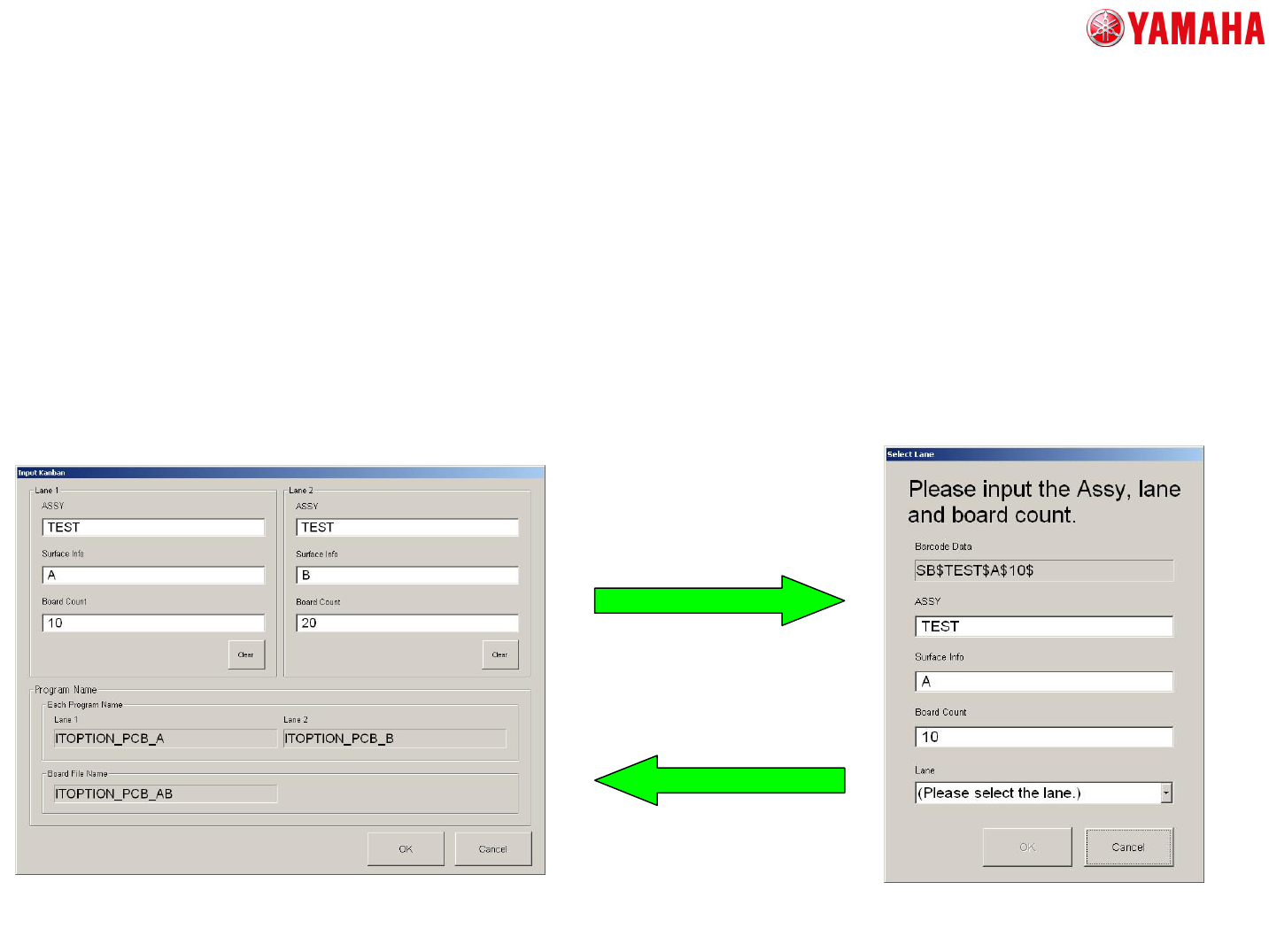
• KANBAN
<Operation Procedure>
Scan “ASSY” barcode for each lane, and set the “ASSY”, “Surface Info”,
“Board Count”, and “Lane”.
1. Open “Input KANBAN” screen
2. Scan “ASSY” barcode. Then
“Select Lane” screen is displayed.
3. Set “Lane” (Scanning the barcode is
also available).
Input other information as appropriate.
4. Tap the [OK] button.
The information which is set on
“Select Lane” screen is reflected
to “Input KANBAN” screen.
5. Repeat 2-4 procedures
for the other lanes.
5. About Automatic Program Change-Over (Option)
MDOC
-
SOFT50073
26
• KANBAN
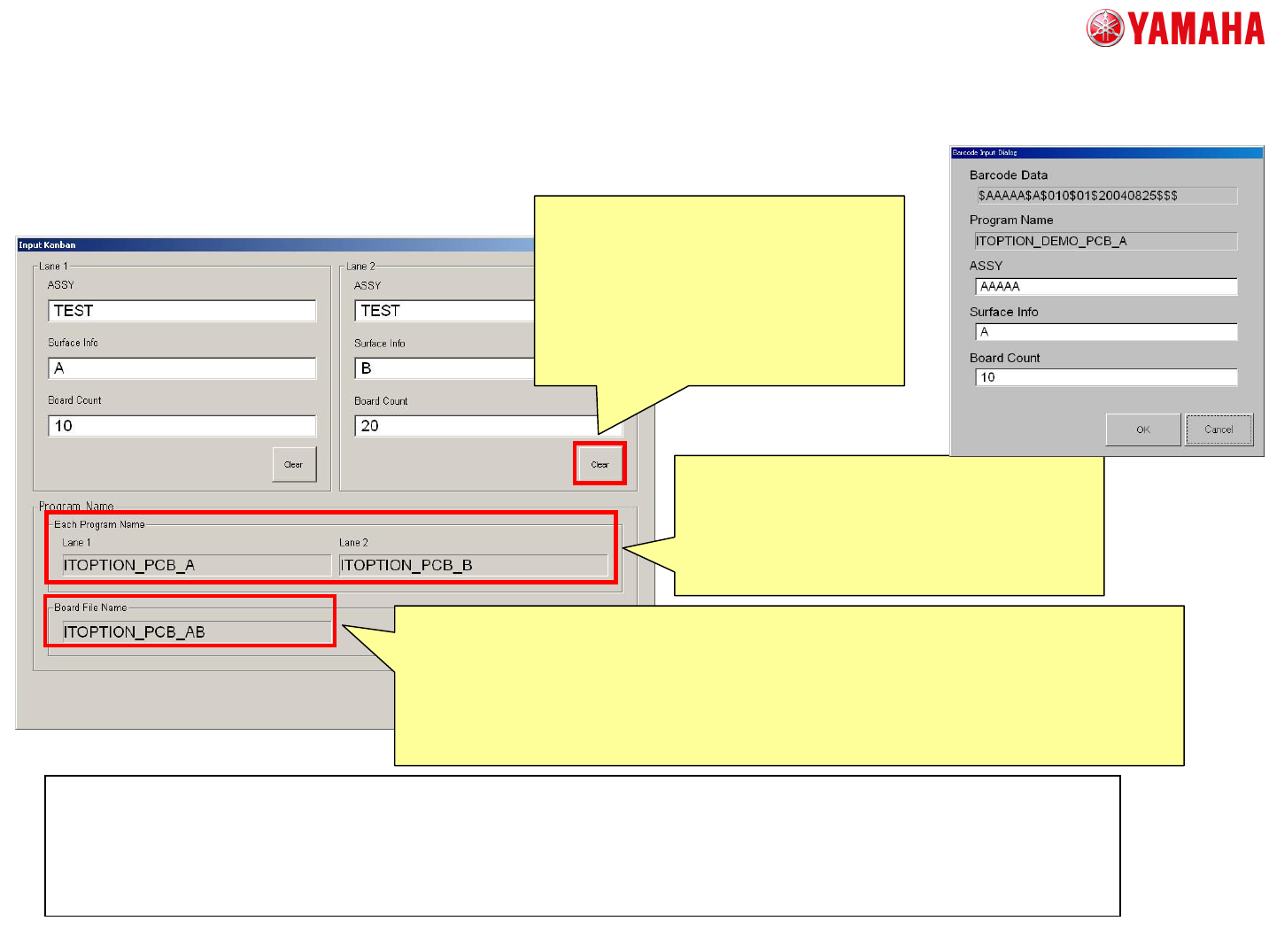
“Input KANBAN” screen at
single lane machine.
<“Clear” button>
When the “Input KANBAN” screen is
opened, “ASSY” information now in
production is displayed.
Therefore, when you want to change the
one lane unused, please tap “Clear” button.
After that, the information such as “ASSY”
or “Program Name” becomes blank.
<Each Program Name>
The “Board Name” of each lane is displayed.
When the production is performed with in only one
lane, the board program is switched to the file of
this item.
<Board File Name>
When the “ASSY” of both lanes are input, the file name of the combined board data is displayed.
The combined board data is searched by the “Board Name” of both lanes. And it is displayed
when target board data was found.
If nothing is displayed in this item though the “ASSY” of both lanes is input, there is not the file to
change. In this condition, if OK button is tapped, an error message “Ea25690:Board data un-
registering error” is displayed.
<Note>
* There is no change in “Program List”.
* The “Board Name” corresponding to the “ASSY” and “Surface Info” is searched in the program list. Then the
combined program including the “Board Name” of both lanes is searched, and the program change is performed.
* “Lane” is added to KANBAN barcode. Please prepare the barcode as appropriate.
<Explanation of screen>
5. About Automatic Program Change-Over (Option)