TM2248_Explanation Document of DualLane MachineYS24(DL)YS24X(DL).pdf - 第29页
MDOC - SOFT50073 29 • BOARD ID AAA <Example 2> Program list to us e and the boar d data which is prepared for are shown in the right figure. 1. A board of the ASSY “AAA” arrives at ex it position of L ane 1 in Mach…
MDOC
-
SOFT50073
28
• BOARD ID
AAA
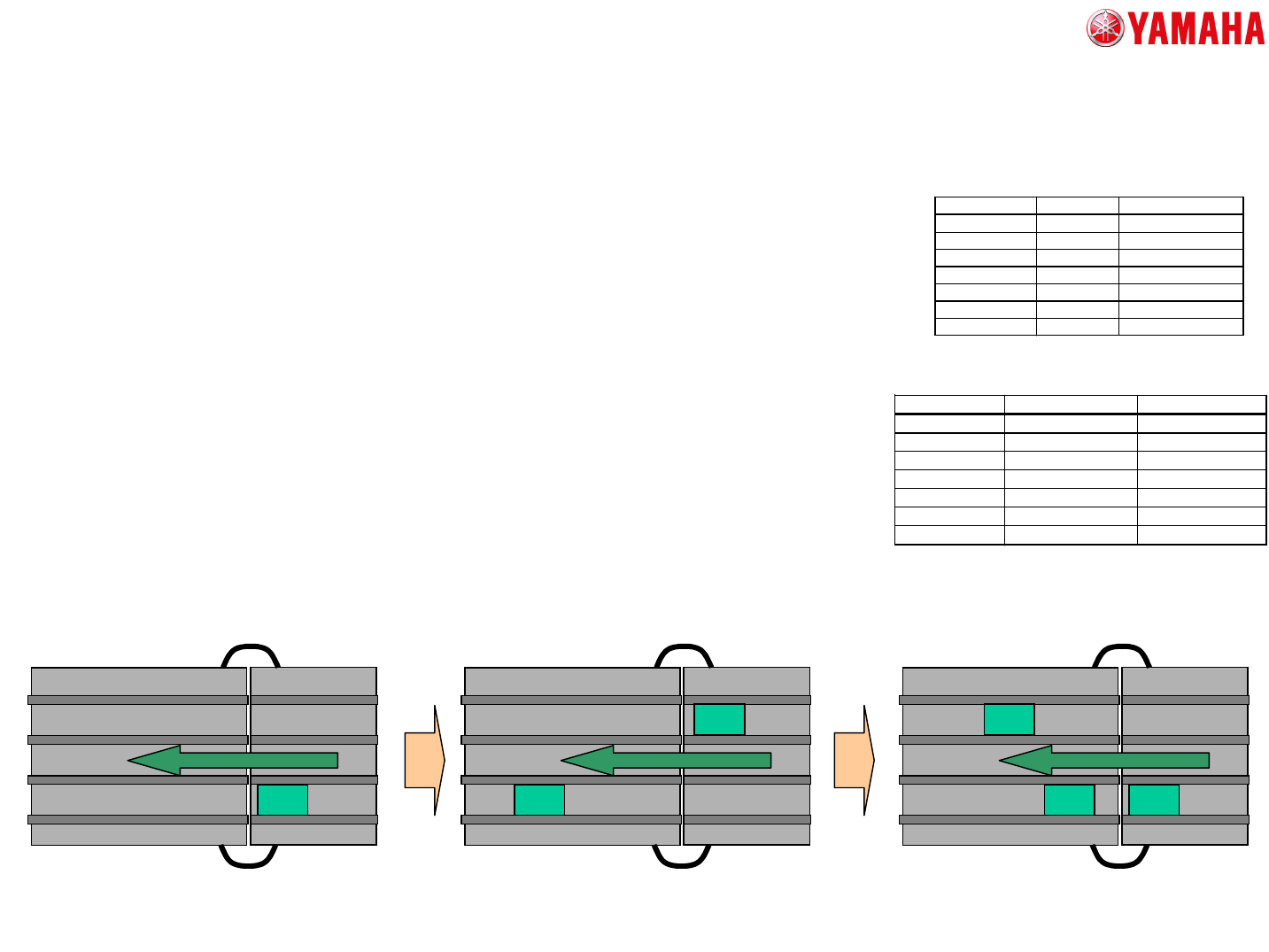
<Example 1>
Program list to use and the board data which is prepared for are shown in the right
figure.
1. A board of the ASSY “AAA” arrives at exit position of Lane1 in Machine A.
2. In Machine B, the board data is switched to the board data file of “DATA_A”.
3. After that, a board of the ASSY “BBB” arrives at the exit position of Lane 2 in
Machine A.
4. In Machine B, the board data is switched to the board data file of “CMB_DATA_AB”.
The program name of ASSY “BBB” is “DATA_B”, and the production of “DATA_A” in
Lane1 is executed. Therefore switching board is executed to the board data file of
“CMB_DATA_AB”.
5. When a board of the ASSY “AAA” arrives at exit position of Lane1 in Machine A,
switching board is not executed, and carry it out to Machine B.
Upper
Machine A
ASSY Boardface ProgramName
AAA DATA_A
BBB DATA_B
Program list
The chosen board data file
doesn’t exist.
Machine B
BBB
AAA
BBB
AAA
BoardFileName BoardNameLane1 BoardNameLane2
DATA_A DATA_A
DATA_B DATA_B
CMB_DATA_AB DATA_A DATA_B
The prepared board data list.
5. About Automatic Program Change-Over (Option)
Machine A Machine B Machine A
The chosen board data file is
“BOARD A”
AAA
The chosen board data file is
“CMB_DATA_AB”
The first machine B which
performs BOARD ID.
MDOC
-
SOFT50073
29
• BOARD ID
AAA
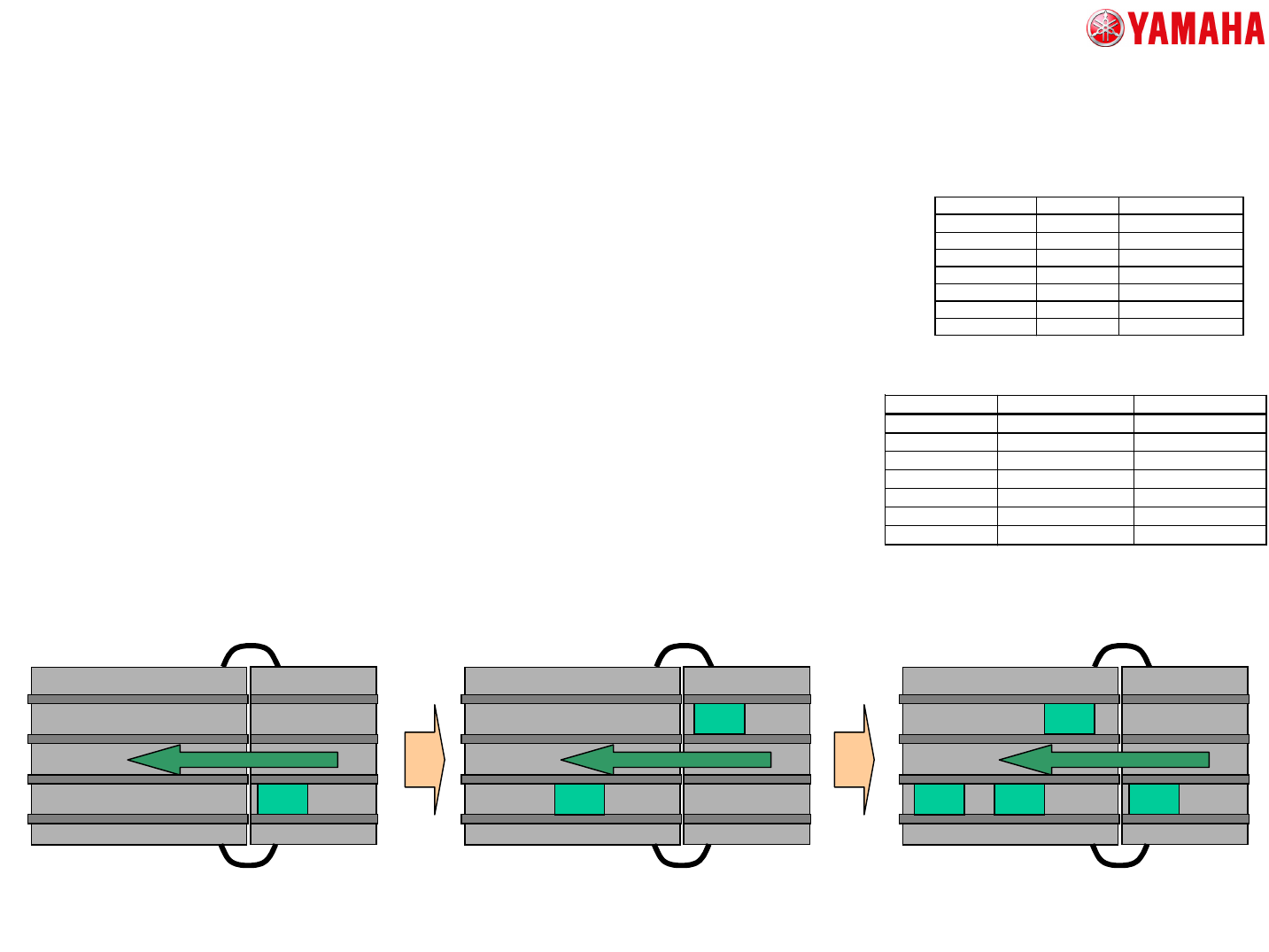
<Example 2>
Program list to use and the board data which is prepared for are shown in the right
figure.
1. A board of the ASSY “AAA” arrives at exit position of Lane1 in Machine A.
2. In Machine B, the board data is switched to the board data file of “CMB_DATA_AB”.
If the board data file “DATA_A” is not exist, the board data file whose board name of
Lane1 is “DATA_A” is searched. And the board is switched to the searched board
data first.
3. When a board of the ASSY “BBB” arrives at exit position of Lane2 in Machine A,
switching board is not executed, and carry it out to Machine B.
BBB
AAA AAA
BBB
AAAAAA
<Supplement>
Please delete the single board data “DATA_A” from the machine like example 2, so
that the switching board process won’t be executed several times like example 1.
5. About Automatic Program Change-Over (Option)
ASSY Boardface ProgramName
AAA DATA_A
BBB DATA_B
Program list
BoardFileName BoardNameLane1 BoardNameLane2
CMB_DATA_AB DATA_A DATA_B
The prepared board data list.
The first machine B which
performs BOARD ID.
Upper
Machine A
Machine B Machine A Machine B Machine A
The chosen board data file
doesn’t exist.
The chosen board data file is
“CMB_DATA_AB”
The chosen board data file is
“CMB_DATA_AB”
MDOC
-
SOFT50073
30
• MANUAL SELECT
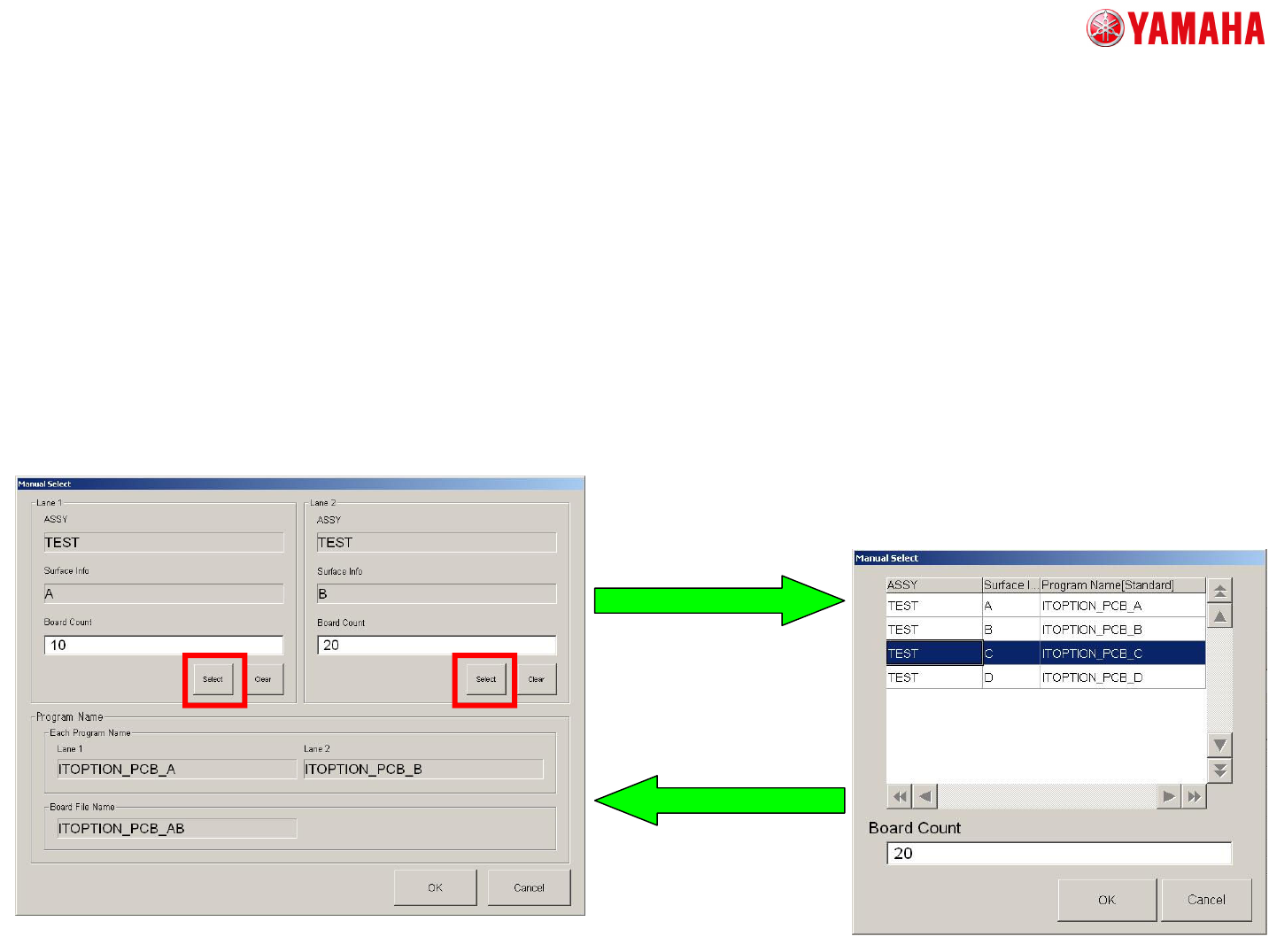
<Operation Procedure>
In “MANUAL SELECT” mode, set the “ASSY” and “Board Count” by manual.
Please set the “ASSY” as the following procedures.
1. Open “Manual Select” screen.
2. Tap the [Select] button
at each lane, then “Manual
Select” screen is displayed
by each lane.
3. Appoint the “ASSY”.
And Input “Board Count” as
appropriate.
4. Tap the [OK] button.
The information which is set
on each “Manual Lane”
screen is reflected to
“Manual Select” screen.
<Explanation of screen>
It is same as “Input KANBAN” screen.
5. About Automatic Program Change-Over (Option)
5. Repeat 2-4 procedures
for the other lanes.