00197465-01_SM_CP20-A-M_EN.pdf - 第55页
5 Settings 5.4.2 Determination of Z and Star axes zero point correction (S ITEST) 5.4 Zero Point Correction for the Star and Z Axis Service Manual SIPLACE C&P20, C&P20A, C&P20M 55 5.4.2 5 . 4 . 2 D e t e r m …
5 Settings
5.4 Zero Point Correction for the Star and Z Axis 5.4.1 Transfer head specific data to the machine data after manual head
54 Service Manual SIPLACE C&P20, C&P20A, C&P20M
5.4
5.4 Zero Point Correction for the Star and Z Axis
Zero Point Correction for the Star and Z Axis
5.4.1
5.4.1 Transfer head specific data to the machine data after manual head exchange
Transfer head specific data to the machine data after manual head exchange
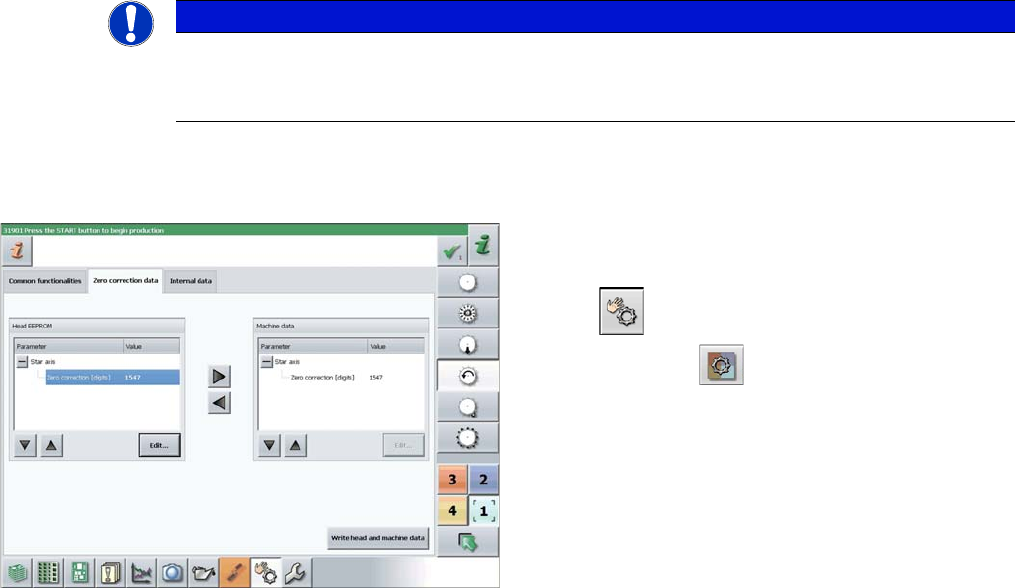
Transfer head specific data manually
Precondition: The head needs to have been referenced (star and Z axis).
NOTICE
Fast Head Exchange
If a head exchange is carried out with the FHE function the head specific data will be automat
-
ically transferred to the machine data.
► Switch over to operator level SIPLACE (customer).
► Select Manual operations (Check sensors and func
-
tions) --> Check sensors and functions of spe
-
cific components .
► Select the relevant head.
► Select Z axis.
► Select Zero correction data.
► In the Head EEPROM section, select the relevant pa
-
rameters, then click on Edit and enter the corre
-
sponding value.
► Use the arrow button of the head EEPROM to trans
-
fer the data to the machine data.
► After correcting the parameters, select Write head
and machine data.
► Repeat these settings for the star axis.
5 Settings
5.4.2 Determination of Z and Star axes zero point correction (SITEST) 5.4 Zero Point Correction for the Star and Z Axis
Service Manual SIPLACE C&P20, C&P20A, C&P20M 55
5.4.2
5.4.2 Determination of Z and Star axes zero point correction (SITEST)
Determination of Z and Star axes zero point correction (SITEST)
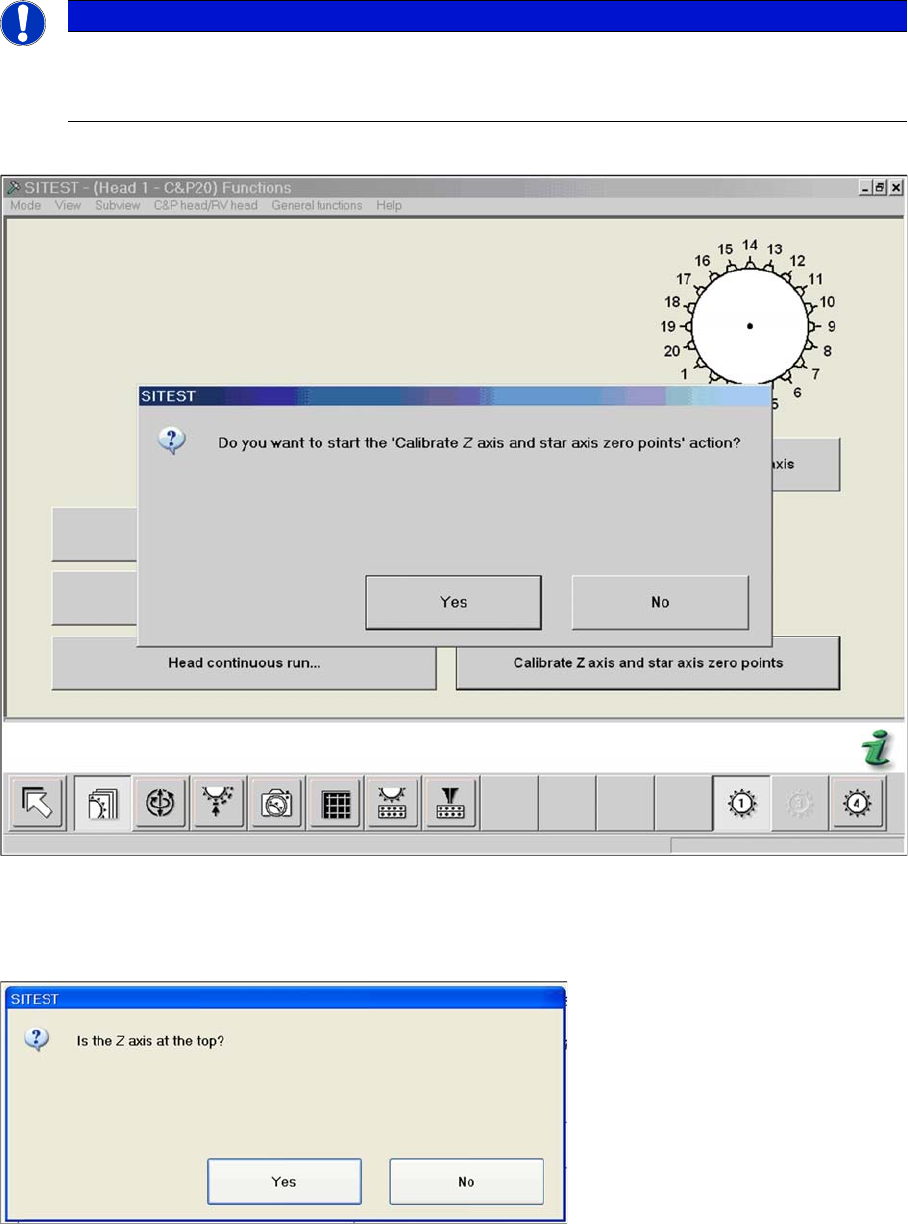
► Start SITEST --> Head Functions .
The zero point corrections has to be determined again after service work on the Z axis or star axis.
► Click on the Calibrate Z axis and star axis zero points button.
► Confirm the question shown with YES.
► Check the position of the Z axis and click on YES.
NOTICE
After service work at C&P20
The function Calibrate zero point correction should be carried out after service work to the
C&P20 head.
5 Settings
5.4 Zero Point Correction for the Star and Z Axis 5.4.2 Determination of Z and Star axes zero point correction (SITEST)
56 Service Manual SIPLACE C&P20, C&P20A, C&P20M
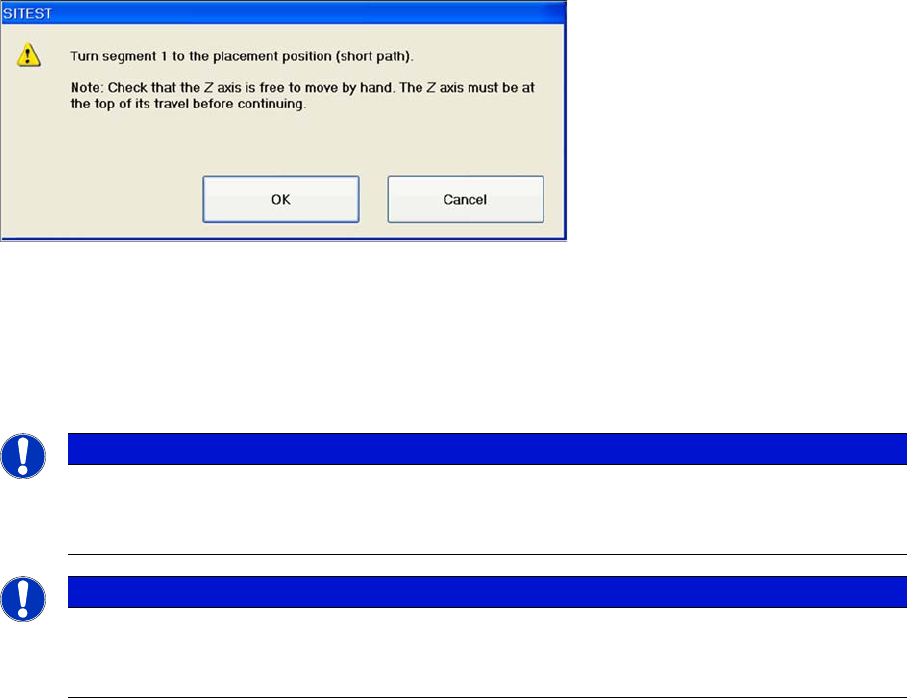
► Rotate the star with segment 1 by the shortest route, into the placement position.
► Press the Start button on the machine.
► Click on OK on your screen.
The calibration process will begin and the new Z axis and star axis zero point correction values will be
stored in the Achs_ver.ma and on the head EPROM.
NOTICE
Calibration process not successful
If the calibration run was not successful, please check the travel range of the Z axis. The max.
and min. travel of the Z axis (C&P20) is 34000 digits and -200 digits.
NOTICE
Reference run reports error
If the refernce run is unsuccessful, use a setting gauge to adjust the Z axis jaws..
This work must be carried out by a SIPLACE service engineer.