forte_en.pdf - 第102页
Page 102 11 HPRAVR HPRAVR is an opt ional accessory for PRESTO and FORTE programmers for programming AVR microcon trollers in applications wit h the ISP10PIN standard connect or on the device's side an d with the IC…
Page 101
programmer may be connected to the control PC and its
drivers must be correctly installed. This is confirmed by
the green ON-LINE LED being on.
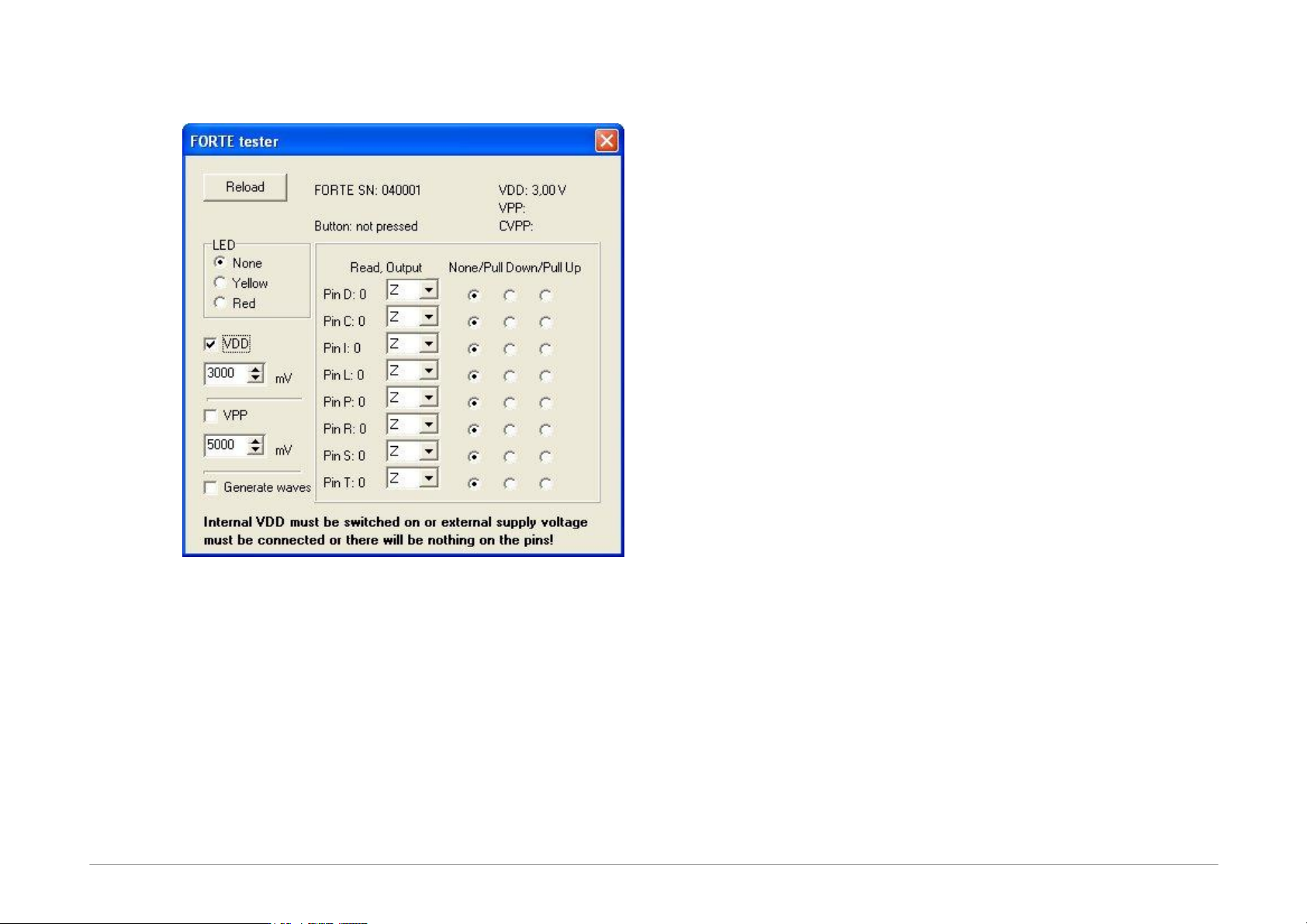
Fig.49: FORTE Tester
After you start the tester, make sure that the
programmer's output buffers are fed. You can either
switch on the VDD and set its voltage to the required
level or connect an external feeding voltage to the VDD
pin. The level of detected voltage is displayed in the lower
part of the window.
Basic communication with the programmer can easily be
recognized by the Active diode being on. You can choose
its color to be yellow or red.
Programmer's serial number is displayed in the top part of
the window. This number is necessary for any
communication with the service shop. You can also find
this number on the bar code label on the programmer
bottom.
Space for displaying possible error messages concerning
overcurrent or overvoltage detected is provided in the
window under the serial number.
The line below provides information on the GO button.
The programing voltage level on pin P can be verified by
switching the VPP option on and setting the required
voltage level. The detected voltage is displayed in the top
right corner of the window. The level of the current
detected on pin P is displayed immediately below the
voltage. As the P output features a built-in potential
divider of approximately 5kΩ, a non-zero value of the
current is displayed even with the output pin P
disconnected caused by feeding this potential divider.
If outputs are in a state of high impedance (Z),
information on input logical levels at these pins is
displayed. If a pull-up resistor is connected to a selected
pin, the system starts reading log. 1. If a pull-down
resistor is connected, log. 0 is read.
Outputs can be linked individually to log. 1 or log.0.
Output signal quality can be verified by a voltmeter.
The Generate waves option sends a periodical signal of
approximately 1 kHz simultaneously to all outputs.
Neither reading of inputs nor setting of outputs works if
there is no voltage at pin VDD.
If everything seems to be in order, but the device still fails
to get programmed, it is recommended to check the
application connection according to instructions for
connecting a microcontroller to the programmer.
If in doubt as to whether the programmer is in order or
faulty, do not hesitate to contact our technical support.
Page 102
11
HPRAVR
HPRAVR is an optional accessory for PRESTO and FORTE
programmers for programming AVR microcontrollers in
applications with the ISP10PIN standard connector on the
device's side and with the ICSPCAB8 cable on the
programmer's side. The ISP10PIN connector is typically
used on boards with microcontrollers of the AVR type
such as STK500, for example.
11.1
Usage
Connect the HPRAVR adapter to the application's
connector. Make sure that pin 1 of the HPRAVR adapter is
connected to pin 1 of the ISP10PIN connector in the
application (Pin1 is marked with a red dot at HPRAVR
while it may be marked in different ways on the
connected application – see information in the
corresponding manual).
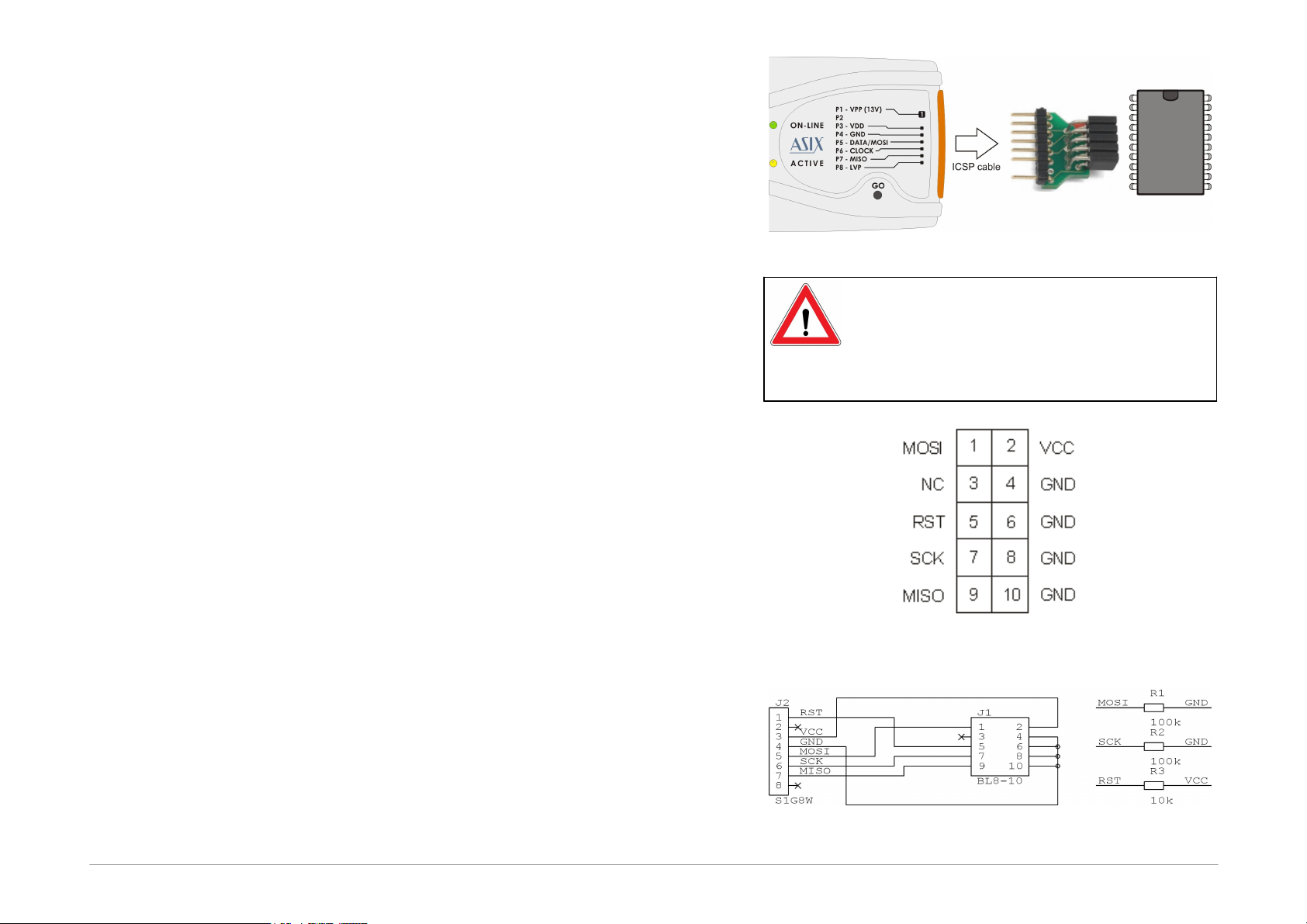
Now interconnect the adapter and FORTE with an ICSP
cable. Pin2 in the cable is used as the key. The following
picture illustrates a typical interconnection of the PRESTO
programmer with an application through the HPRAVR
adapter:
Fig.50: Use of HPRAVR
Important Warning
Pin No.1 of the HPRAVR adapter is marked
with red color. Please double check the
position of the pin No.1 in the application as
the application could be damaged if
incorrectly connected.
Fig.51: ISP10PIN, top
view
Fig.52: HPRAVR adapter diagram
Page 103
12
Document history
Document
revision
Modifications made
2013-07-03
Newly created document
2013-12-18
Minor text corrections
2014-02-28
The NXP LPC2xxx family was added in the JTAG
Interface chapter
New command line parameter [/read]
2014-04-25
The STM8 family was added in the Connection
Examples chapter
2014-07-01
The ARM SWD interface was added in the
Connection Examples chapter
CE certificate was replaced by Declaration of
Conformity
2014-09-23
A note about reset of MCU ARM SWD was cleared.
Described new option - Show only the lowest byte of
word in ASCII
2014-11-21
Updated list of variables for up_dll.dll
2014-11-25
New settings of the UP program have been added.
2015-02-03
Added View/Console menu description.
Added description of PIC32MZ_BootProg variable.
Small text fixes.
2015-03-12
The name of item Delay for VDD switching on/off
has been changed
Added description of the checksum settings
2015-04-07
Updated description how to create SVF file for
Lattice.
2015-05-19
A chapter about forte.dll was added.
The C8051 and EFM8 C2 interface was added in the
Connection Examples chapter.
Definition of input voltage on pins was added.
Description of w=32 parameter for Windows
messages was added.
2015-08-05
Description of the programmer driver installation
has been changed.
Added new /getpartrev parameter.
Added new commandline errorcodes.
2015-09-21
Added description of the setting of the warning
when the loaded file is not aligned to a word size.
Fixed links.
2015-11-19
Added description of setting of the T pin during and
after programming.
2016-01-22
The serial numbers logging description has been
updated.
2016-03-08
Added description of the Display programmer form
function.
Added description of the setting which disables the
VPP before VCC warning.
2016-05-20
The PE description has been updated.
Added description of the start and end address for
the SPI Flash memories.
2016-08-10
Description of the HCSxxx connection has been
added.
2016-10-10
Added description of the /sn commandline
parameter and manual serial numbers description.
Added the commandline error code 9 description.
2016-12-15
Description of usage of the programmers at Linux
has been added.
2017-02-02
Added description of auto programming in the Mass
production window.
Added description of Keep manually modified data.
2017-02-10
The Linux driver instalation chapter has been
completed.
2017-03-13
A link to lin_ftd2xx has been added.
2017-03-23
Added description of /q1 commandline parameter.
2017-05-09
Added description of "Load last project on start-up"
option.