00198014-01_IM_SQL_Server_2014_EN.pdf - 第27页
SQL Server 2014 / I nstallation Manual 11/2015 Edition 27 5 After Installa tion This chapter des cribes how to perform some a dditionally required and opt ional settings after the SQL installati on and how to define sett…
SQL Server 2014 / Installation Manual 11/2015 Edition
26
► Close the window by clicking the X in the right upper corner.
► Restart the computer to ensure proper function of your SQL installation.
► Continue with the following chapter which describes additionally settings.
SQL Server 2014 / Installation Manual 11/2015 Edition
27
5 After Installation
This chapter describes how to perform some additionally required and optional settings after the
SQL installation and how to define settings you missed to set during the installation.
5.1 Additionally Required Settings
5.1.1 TCP/IP Network Protocol Enabled
After installation, you have to verify that the TCP/IP network protocol is enabled for communication.
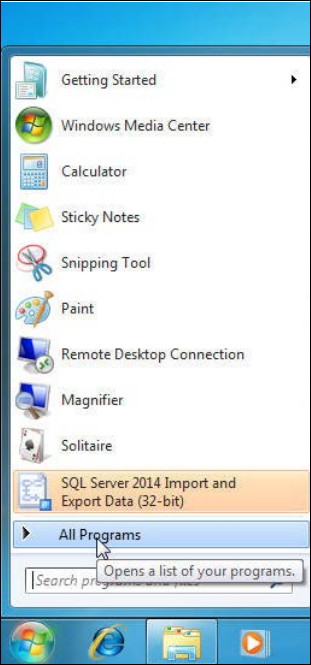
► Click the Start/Windows button.
► Expand the All Programs or Programs group respectively – depending on your operating
system.
Figure 5-1: Expanding "All Programs" group in Windows 7
SQL Server 2014 / Installation Manual 11/2015 Edition
28
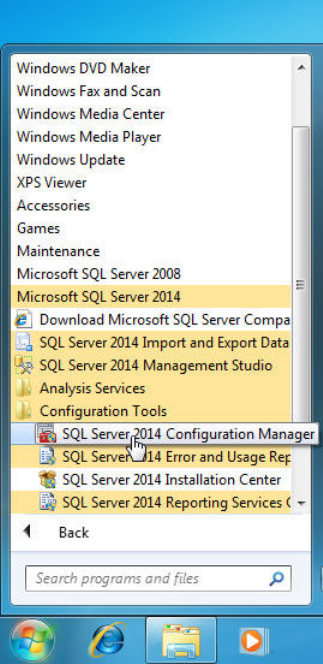
► Expand Microsoft SQL Server 2014.
► Expand Configuration Tools.
► Click SQL Server 2014 Configuration Manager.
Figure 5-2: Selecting SQL Server 2014 Configuration Manager
► Accept any possibly appearing User Account Control message by clicking its Yes button.