00198014-01_IM_SQL_Server_2014_EN.pdf - 第9页
SQL Server 2014 / I nstallation Manual 11/2015 Edition 9 Figure 4-1: Product Selecti on page of Prerequisite Analy zer ► Expand the SIPLACE Net (Infrastructure Tools , etc.) profile group. ► Expand the SQL Ser ver Prereq…

SQL Server 2014 / Installation Manual 11/2015 Edition
8
4 Installation
4.1 Installing SQL Server 2014 Prerequisites
To prepare for installation of SQL Server 2014, some software components have to be installed or
updated.
For SQL Server 2014, following software is required:
– .Net Framework 3.5 SP 1
– .Net Framework 4.0
– PowerShell 2.0
The normal procedure of installation of these components might be difficult, depending on the
Operating System (OS) you use and the components you have already installed. Some operating
systems have certain versions of these components integrated and installation of some
components might require other packages, like Windows Installer, to be updated.
To simplify installation of SQL Server Prerequisites, the Prerequisite Analyzer from SIPLACE Net
Support Media provides own profiles for preparation.
NOTICE
Basic knowledge in use of Support Media and Prerequisite Analyzer required
This documentation assumes you know the basic usage of Support Media and
Prerequisite Analyzer. If not, you should make yourself familiar with Support Media
before proceeding. We recommend reading the appropriate documentation which is also
provided on Support Media.
► Insert the SIPLACE Net Support Media (V2.2 or later).
► If not started automatically, start the launcher application.
► Select Prerequisite Analyzer in the launcher application.
► Step through the Prerequisite Analyzer, until the Product Selection page.
SQL Server 2014 / Installation Manual 11/2015 Edition
9
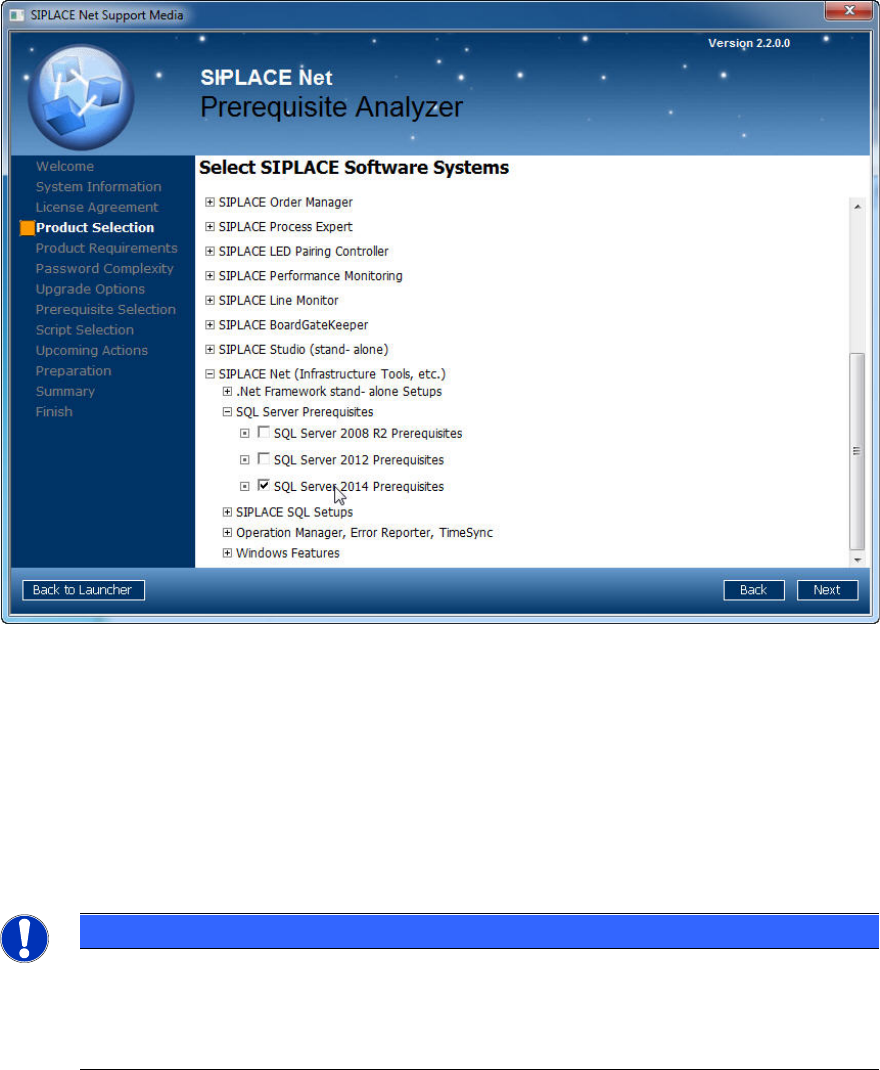
Figure 4-1: Product Selection page of Prerequisite Analyzer
► Expand the SIPLACE Net (Infrastructure Tools, etc.) profile group.
► Expand the SQL Server Prerequisites profile group.
► Select SQL Server 2014 Prerequisites.
► Click the Next button.
► Continue preparing your computer with the Prerequisite Analyzer. The Prerequisite Analyzer
will automatically install all packages as required for SQL Server/Express 2014.
NOTICE
Internet connection possibly required
Because of limited redistribution permissions
, some required packages might be missing
on Support Media. In this case, the Prerequisite Analyzer will offer the possibility to
automatically download the missing packages.
SQL Server 2014 / Installation Manual 11/2015 Edition
10
4.2 Installing SQL Server 2014 Standard Edition
Follow the instructions below for the manual installation of SQL Server 2014 Standard Edition.
► Ensure that you have installed the SQL Server 2014 Prerequisites as described in section 4.1.
► Close all other applications before you start the installation.
► Double-click Setup.exe in the root directory of the DVD.
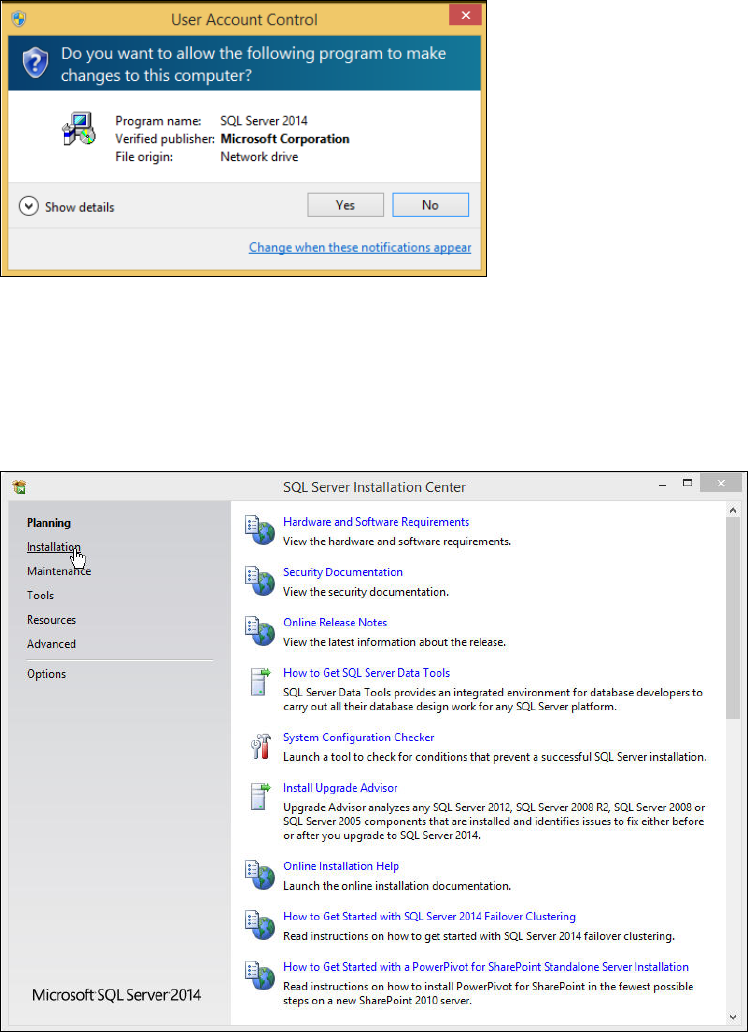
The UAC (User Account Control) warning may occur:
Figure 4-2: User Account Control warning message
This message informs you that the started application requires permissions above the standard
user (in this case administrative permissions).
► Click the Yes button.
The SQL Server Installation Center is displayed.
Figure 4-3: SQL Server Installation Center
► Click Installation on the left side.