00194579-0202.pdf - 第43页
Retrofit instructions Wide board 242 / 508 mm SIPLACE HS-60 / D4 08/2006 Edition 45 : S tart the SITEST program. : Switch to service engineer mode. : Use the "Settings“ menu to change from the main view to the "…

Retrofit instructions Wide board 242 / 508 mm SIPLACE HS-60 / D4
08/2006 Edition
44
: Switch the placement machine on at the main switch.
2
When the reflectors are removed, the safety distance of the gantries for the gantry synchronization
must be reduced. This must be done by the line engineer using the "MaDatenEditor“ utility. 2
The settings depend on the software version: 2
From version 505.03 onwards M21:
The reduced gantry distance is calculated by the software if the machine zero point was moved
outwards. 2
2
If the value can also be reduced manually, then the gantries may move too closely together. 2
2
For older versions: 2
: In the table entitled "Determining the travel range for the Y axis", change the values for "iMin-
PortalAbstand“ from 180000 to 176000 or from –180000 to –176000.
2
2
2
2
2
2
2
2
2
2
2
2
2
2
2
2
2
2
2
Retrofit instructions Wide board 242 / 508 mm SIPLACE HS-60 / D4
08/2006 Edition
45
: Start the SITEST program.
: Switch to service engineer mode.
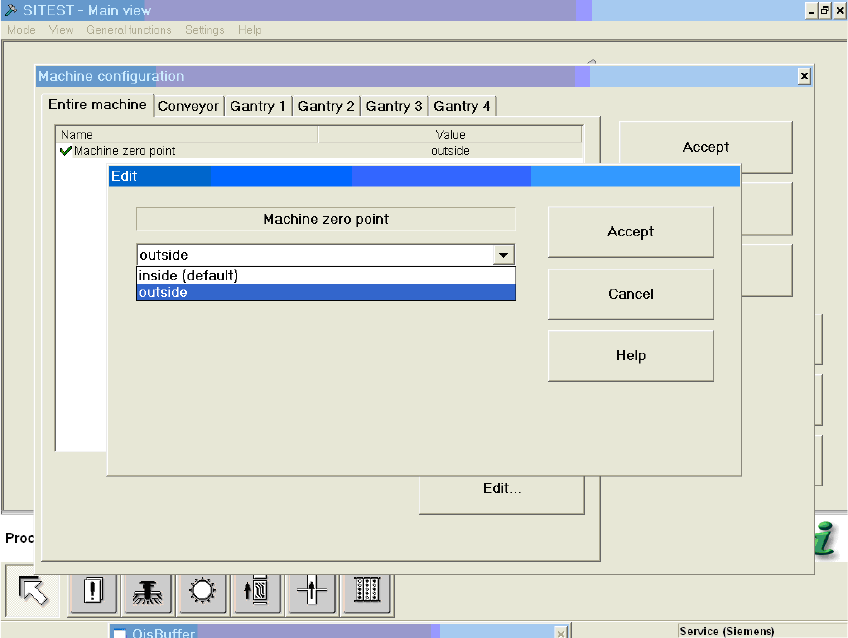
: Use the "Settings“ menu to change from the main view to the "Machine configuration“ view.
Then select the "Entire machine“ tab.
2
: Edit the "Machine zero point“ entry from "inside" for standard 216mm / 460mm LPT“ to "out-
side" for 242mm / 508mm LPT.
2
2
: Accept the setting in the machine configuration.
The machine is shut down automatically.
When you accept the machine zero point position "outside", an offset of 25mm is added to the ma-
chine zero point in the Y direction and the value in real.ma is thus updated.The position of the ca-
librating part is also adapted. When the machine zero point position is returned to "inside“
(previous default), the offset is deducted once more. 2
The value for the park position offset in real.ma is also set to a low value of 5000. 2
2
Retrofit instructions Wide board 242 / 508 mm SIPLACE HS-60 / D4
08/2006 Edition
46
The necessary offsets are read from a new table in the machine database. 2
The moved position is also transferred to the machine configuration (config.ma). Only then is a
change in the "Position of stationary side wall“ conveyor configuration to "Wide“ enabled. 2
2.6.3 Reducing / increasing the minimum traveling range for gantry 3
These settings are needed since gantry 3 cannot approach the machine zero point with the mini-
mum traveling range determined for the normal path. 2
: Start up the machine and immediately switch to SITEST without a reference run after start-up.
: Switch to the
"Gantries" view (for gantry 3 and Y axis), ==>
“Machine parameters“ ==>
"Minimum position“ ==>
"Edit to reduce by 20000“ ==>
"Accept“.
: SITEST main view:
Select "Settings" ==> "Save machine data".
: Switch to the "Gantries" view (for gantry 3).
Select: “Calibrate position“ ==->
“Advance to machine zero point BB2".
: Switch to the "Axis functions" view.
Select "Read gantry position“.
: Add 5000 to / deduct 5000 from the determined y value.
Enter this value under “Machine parameters“ ==> "Minimum position" ==> “Edit“ ==> "Mini-
mum position".
2
: SITEST main view:
Select "Settings" ==> "Save machine data".
2
2
2
2
2