Portal_Manual_1.2.1_Rev_H-1.pdf - 第40页
Portal PVA Revisio n H ( 2018 ) 40 of 93 8.3.4 Auto Cyc le Fl ow Err or Auto Cycle checks the mat erial flow after every cycle if the e rror is turned “ ON ” in the Flow Con trol mod e . If th e volume i s within paramet…

Portal
PVA
Revision H (2018)
39 of 93
8.3.2 Find the Correct Material Volume
You must have a complete path program before you find the correct material volume.
Any change to a program changes the flow data results.
1. Load a completed program into memory.
2. In Portal, select Manual mode.
3. Put the board in the correct position, as related to the board stops, and run one
cycle as “WET”. For more information on the Manual mode, refer to Section 6.
4. After the cycle is done, the dispensed volume is shown in the system messages
window.
5. Select “Stop” to go to Cycle Stop.
6. Select “Setup” mode.
7. Select the “Flow Monitor” tab in Setup mode (In the setup tree adjust the
setpoint to match the value found).
8. Change the flow set point to the value that was shown on the mode system
messages window. This will be a DMC command in your path program, adjust
the value of the variable to achieve this.
9. Select “Stop” to go to Cycle Stop.
10. Select “Manual” mode.
11. Operate the workcell for more cycles to make sure the path program dispenses
the same amount of material each cycle.
8.3.3 Set the Material Volume Check
The settings for the material volume check must be programmed into the path program.
If no settings are programmed in the path, the machine will use the flow monitor
settings of the program run before it. To set the material volume check parameters,
program these settings into the path program.
• Two variables are used: FC_SETx and FC_DEVx; if you set these to “0” it will
cause errors.
• And “x” is the letter of the related flow monitor (A, B, C, or D).
• FC_SETx is the set point for the material flow in cc.
• FC_DEVx is the percent deviation allowed, which can be anywhere from 0 to 99.
As an example, entering the following line into a path program: FCA_SET=0.500;
FCA_DEV=5 would put the volume setting for monitor ‘A’ at 0.5 cc and the allowable
deviation at 5%.

Portal
PVA
Revision H (2018)
40 of 93
8.3.4 Auto Cycle Flow Error
Auto Cycle checks the material flow after every cycle if the error is turned “ON” in the
Flow Control mode. If the volume is within parameters, no indication is shown. When
the volume is outside the parameters, the flow error screen is shown when the cycle
completes (not immediately on error).
Remove the part before operating the workcell again.
NOTE: Any changes made to settings in the material delivery system (material
pressure, stroke adjustment, etc.) will affect the data from the flow monitor.
When this happens, it will be necessary to find the correct material volume
again.
8.3.5 Flow Monitor Calibration
The flow monitor on the workcell measures the amount of material that moves through
the material supply line before it splits to supply individual valves. It does not control
the process, but reports deviations from the set values. Both the necessary material
volume and the permitted deviation are determined by the operator. The flow monitor
calibration should be examined once a month or if any changes are made to the fluid
delivery system.
This procedure is to calibrate a single flow monitor, if the specific gravity of the
dispensed material is known. This procedure would calibrate the A flow monitor, to
calibrate the B, C, and D monitors replace the variable DEZ, with DEW, DEE, and DEF
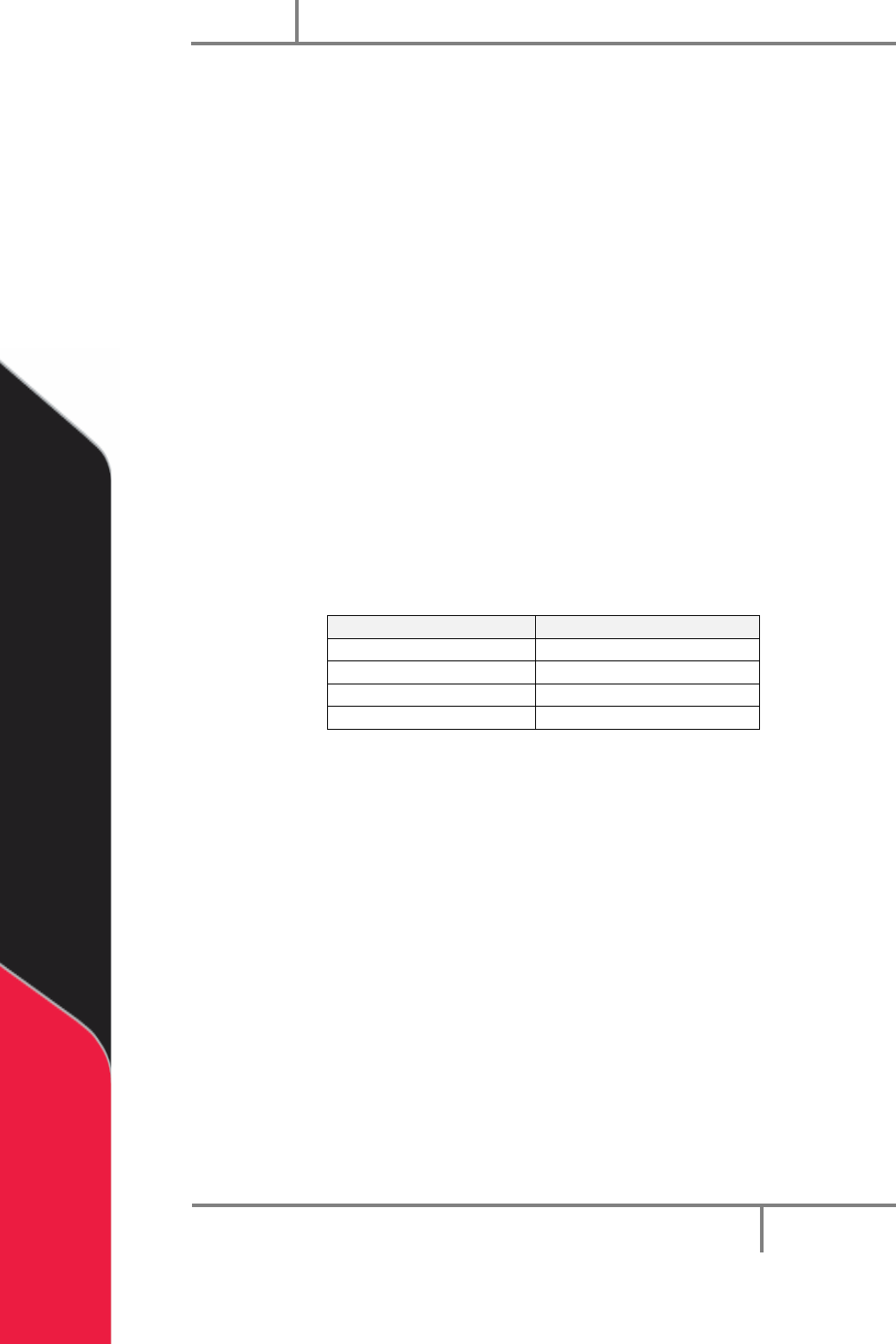
respectively, as well as FCA_CAL, with FCB_CAL, FCC_CAL, and FCD_CAL. See the Chart
at the bottom of the page for the variables relating to each monitor.
1. Login to Portal.
2. Make sure the workcell is in Manual Mode.
3. Select the Terminal tab on the right side of the Portal screen to open the
terminal screen.
4. Type DEZ=0 (for first flow monitor only) in the top section of the terminal screen
and select the “Enter” button on the keyboard. This resets the flow monitor
encoder to zero.
5. Weigh an empty purge cup and record the weight, or zero the scale with the
empty purge cup on it.
6. Purge a quantity of material into the purge cup.
7. Type DEZ=? into the terminal and select the “Enter” button on the key board. A
number will return (ex. 50 counts per cc dispensed). The factory set value is
1000cnt/cc. If zeros are returned or incorrect data, type MG_DEZ=?
Portal
PVA
Revision H (2018)
41 of 93
8. Weigh the dispensed quantity of material in grams. Subtract the weight of the
cup if necessary.
9. Find the volume in cc with the equation below:
Grams of material/specific gravity=cc
Ex: .500g/.96=.5208cc
10. Use this value (in cc) to find the correct number of counts per cc dispensed.
Counts/cc= counts per cc
Ex: 25counts/.5208cc= 48.003 counts per cc
11. Do this procedure at least three times and average the results.
12. Open the Main Program in a text editor such as Windows NotePad.
13. Search for the variable: FCA_CAL= It will be in the section titled: REM !!!!
Machine-Specific Information!!!!
14. Type in the new value for FCA_CAL= (Ex: FCA_CAL=48.003)
15. Download the modified main program and test changes.
Flow Monitor
Variables
A
DEZ FCA_CAL
B
DEW FCB_CAL
C
DEE FCC_CAL
D
DEF FCD_CAL
Table 1: Flow Monitor Variables