SM482PLUS_Maintenance(Eng_Ver2.7).pdf - 第67页
Mon thly Inspe ction Chap ter 5 Multi -Func tional Placer SM482PLUS Maintenance Handbo ok 5-1 4 Checking and apply grease the X Axis, Y Axis Flat Cable Monthly Inspe ction Apply grease only to the surface in contact with…
Monthly Inspection
Chapter 5
Multi-Functional Placer
SM482PLUS Maintenance Handbook
5-13
Checking and apply grease the X Axis, Y Axis Flat Cable
Checking and apply grease the X Axis, Y Axis Flat
Cable
Tool for Maintenance
Utra-fine fiber cloth, GREASE: KS-63W
Measures
Step 1.
Move the X Frame to rear by referring to “Backward
movement of the X-frame” on page 1-4.
Step 2.
Press the 'STOP' and 'RESET' buttons in order after
pressing the 'EMG' button on the OP panel to stop
operation.
For more details, refer to “How to perform emergency stop” on page
1-2.
Step 3.
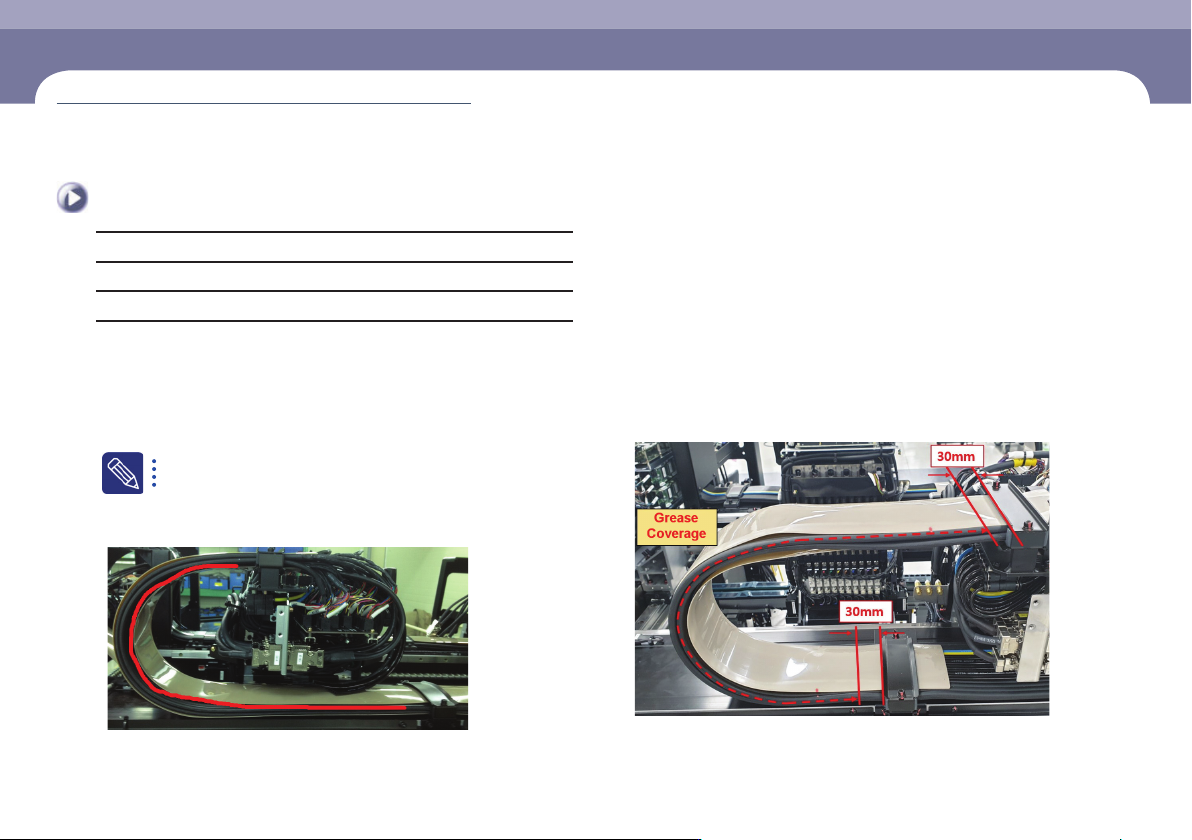
Inspect the grease application of the Multi Tube and
Guide Mat of the X Axis Flat Cable.
Step 4.
If grease application is required after inspection,
proceed with the following procedure.
Step 5.
Apply a small amount of grease to the cloth, and then apply
the grease to the Multi Tube and Guide Mat as if wiping it
off.
→ Application range: from the position 30 mm away from the upper fixing bracket to
the position 30 mm away from the lower fixing bracket
(Time required: 20min / No. M-9)
Monthly Inspection
Chapter 5
Multi-Functional Placer
SM482PLUS Maintenance Handbook
5-14
Checking and apply grease the X Axis, Y Axis Flat Cable
Monthly Inspection
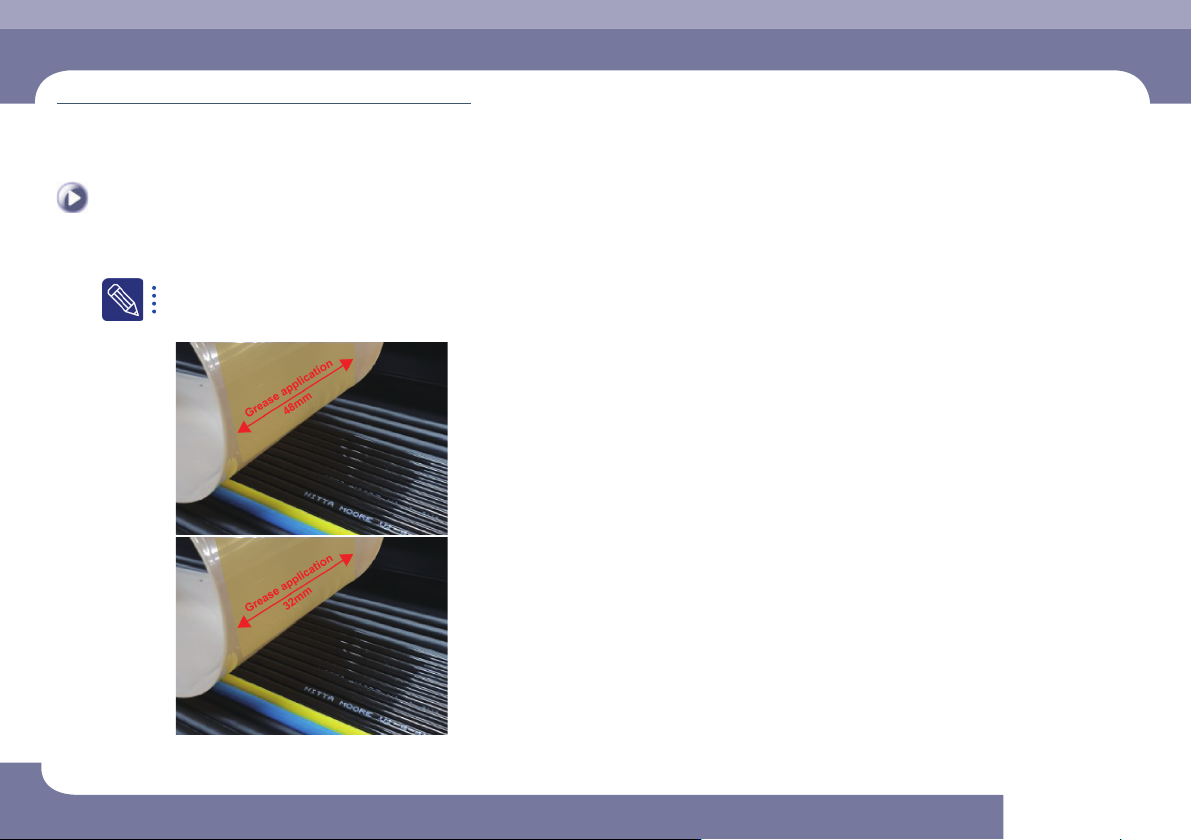
Apply grease only to the surface in contact with the multi-tube, not
the entire surface of the guide mat.
(12 multi-tube width: 48 mm, 8 multi-tube width: 32 mm)
Step 6.
Apply grease to the Y Axis Flat Cable in the same way.
Step 7.
Release the emergency stop as described in “Releasing
‘Emergency Stop’ mode” on page 1-6 and perform the
operation again.
Monthly Inspection
Chapter 5
Multi-Functional Placer
SM482PLUS Maintenance Handbook
5-15
Cleaning and apply grease, lubricating the conveyor LM guide, Lead screw
It is possible to prevent deformation of the corresponding section by friction or an
error due to increased temperature.
Tool for Maintenance
Utra-fine fiber cloth, Flat Brush, Lubricator: KH-20, GREASE: GADUS S2 V220-2
Measures
Step 1.
Move the X Frame to rear by referring to “Backward
movement of the X-frame” on page 1-4.
Step 2.
Press the 'STOP' and 'RESET' buttons in order after
pressing the 'EMG' button on the OP panel to stop
operation.
For more details, refer to “How to perform emergency stop” on page
1-2.
Step 3.
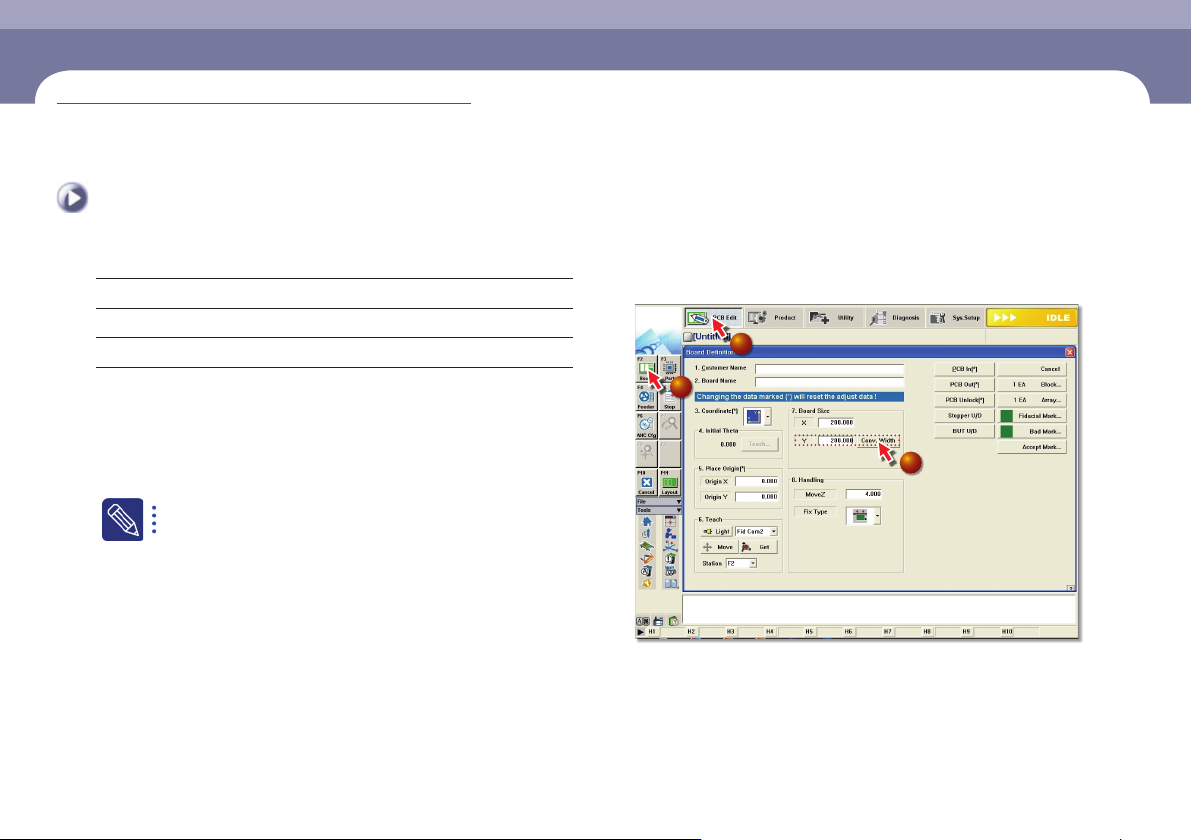
Adjust the conveyor width
1
2
3
①Select the <PCB Edit> Menu
②Select the <Borad> Submenu
③Enter 200 (maximum size in the Y direction) in the <7. Board Size> group and
click the <Conv.Width> Button
Cleaning and apply grease, lubricating the conveyor
LM guide, Lead screw
(Time required: 30min /
No. M-10)