00194086-01.pdf - 第143页
User Manual SIPLAC E CS 6 Component handling Software Vers ion SR.408.xx 03/2006 U S Edition 6.2 Technical da ta for the S feeder modules 143 6.2.1 1.2 T echnical dat a Item no. 001 17010- xx 6 Assign ed locations 3 6 Co…
6 Component handling User Manual SIPLACE CS
6.2 Technical data for the S feeder modules Software Version SR.408.xx03/2006 US Edition
142
6.2.11 Dip module
6
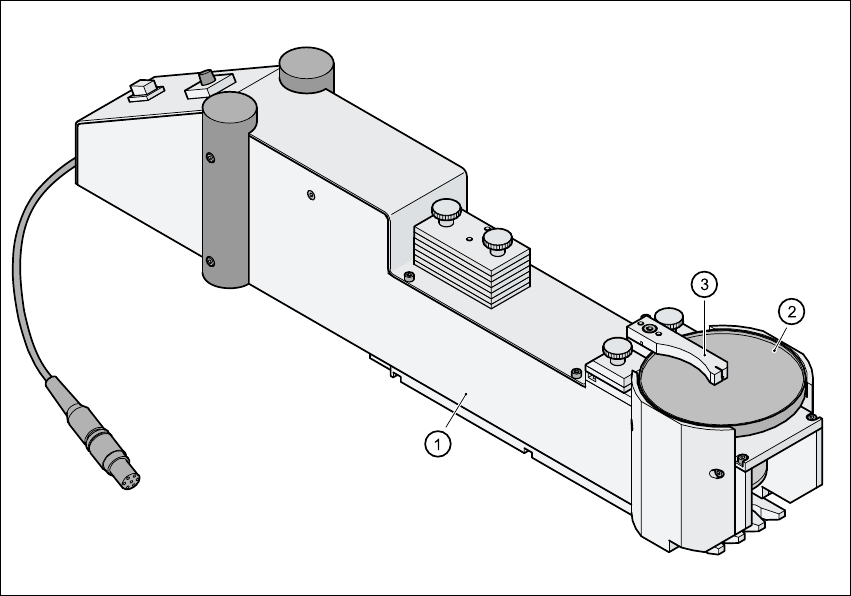
Fig. 6.2 - 11 Dip module
(1) Dip module
(2) Rotating plate
(3) Squeegee
6.2.11.1 Principle of dip fluxing
The dip module (item 1) is used to wet flip-chip and CSP components with flux or conductive ad-
hesive. The flux holder is a rotating plate (item 2) on which a thin film of flux (e.g. 40 µm) is created
with a squeegee (item 3). This method is particularly suitable for highly viscous (honey-like) fluxes.
The amount of flux required for the process is reduced to a minimum coating thickness since only
the undersides of the bumps have to be wetted.
The dip module is suitable for all placement heads. It is regarded as a standalone type of conveyor
by the set-up optimization. There is no limit to the number of dip modules at the individual loca-
tions.
User Manual SIPLACE CS 6 Component handling
Software Version SR.408.xx 03/2006 US Edition 6.2 Technical data for the S feeder modules
143
6.2.11.2 Technical data
Item no. 00117010-xx 6
Assigned locations 3 6
Component size Max. 36 x 36 mm²
depending on the placement head type 6
Possible coating thicknesses 25, 35, 45, 55, 65, 75 µm 6
Time required to change the coating thickness Less than 1 min. 6
Gap height tolerance ± 5 mm 6
Plate rotating speed Programmable from 0 - 10 sec.
in 0.1 sec. increments 6
Component dip time Programmable from 0 - 2 sec.
in 0.1 sec. increments 6
Flux Highly viscous flux, conductive adhesive 6
6 Component handling User Manual SIPLACE CS
6.3 Component trolley Software Version SR.408.xx03/2006 US Edition
144
6.3 Component trolley
6.3.1 Structure
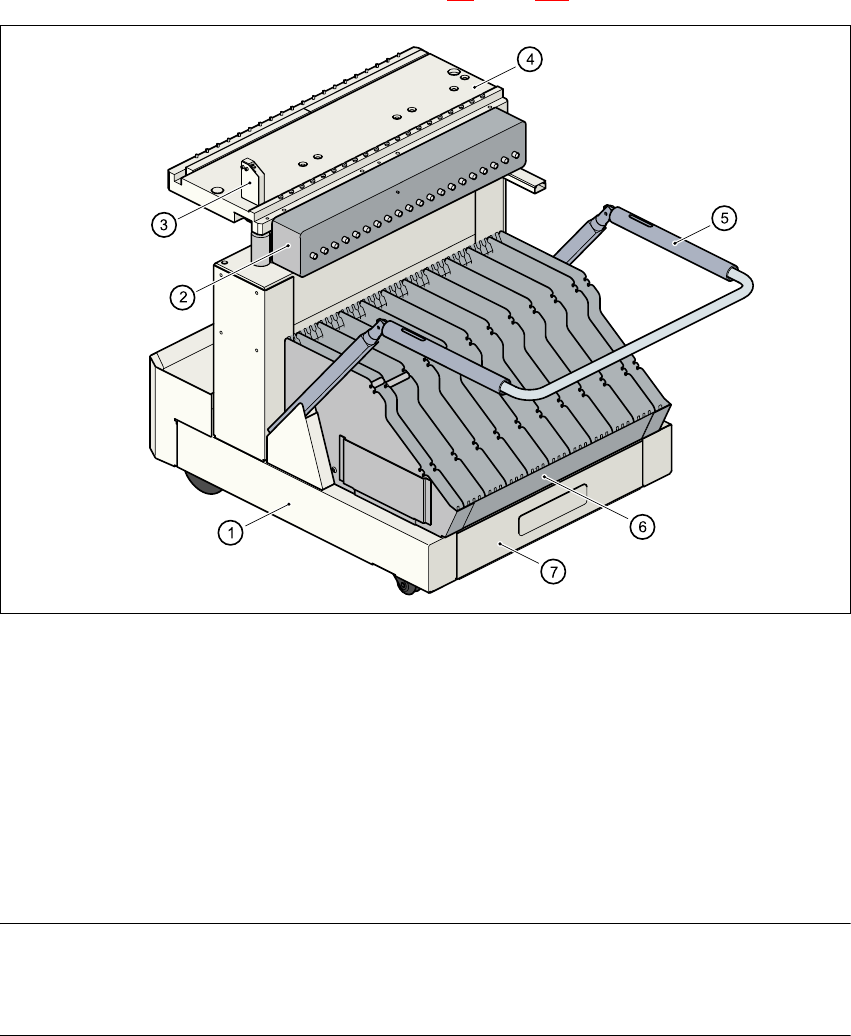
The component trolley consists essentially of a chassis, a component feeder table on which the
feeder is mounted, a communication unit, a tape container and a waste container. Docking the
component trolley in or out is described in Section 5.8
, page 120 onwards.
Fig. 6.3 - 1 Component trolley
(1) Component trolley
(2) Communication unit
(3) Control button for raising the component feeder table
(4) Component feeder table
(5) Handle for locking and lowering the component feeder table
(6) Tape container
(7) Waste tape container
NOTE ON OPERATIONAL SAFETY
All component trolleys must be docked on the machine in order to operate it. If they are not, the
machine stays in EMERGENCY STOP status. The placement process is interrupted.