00193687-04.pdf - 第49页
In stal latio ns- u nd K onf igura tio nsa nleit ung SIPL ACE Explo rer 3 I ns tall ation des SIP LACE Expl orer Au sgab e 12 /200 5 D E 3. 1 Erst ins tall ation von SI PLA CE Ex plor er 2 .0 SP 1 49 3. 1. 5 I nst all at…
3 Installation des SIPLACE Explorer Installations- und Konfigurationsanleitung SIPLACE Explorer
3.1 Erstinstallation von SIPLACE Explorer 2.0 SP1 Ausgabe 12/2005 DE
48
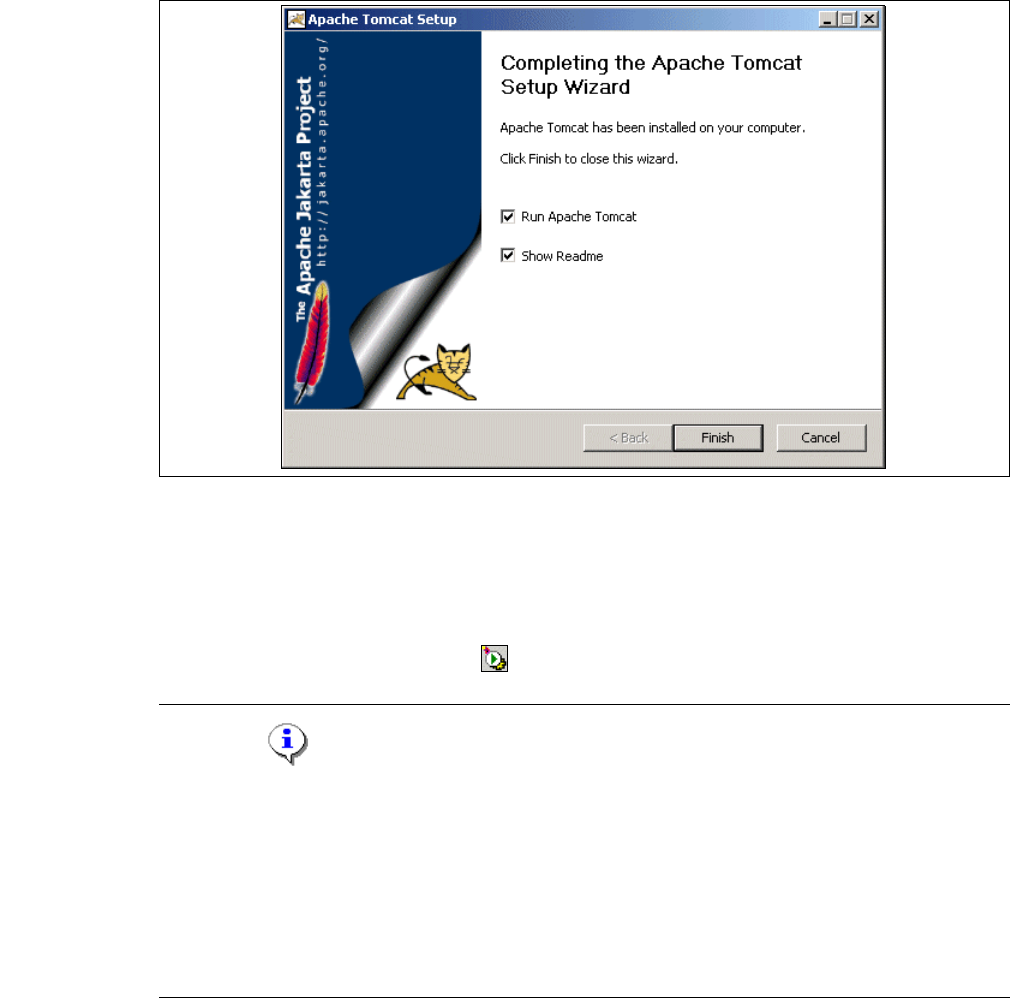
→ Die Installation wurde komplett ausgeführt.
3
Abb. 3 - 33 Apache Tomcat Setup - Installing
→ Klicken Sie Finish (Beenden).
→ Um Tomcat nun zu starten, müssen Sie den Computer neu starten oder Tomcat manuell
starten.
→ Tomcat 5.5 wird bei jedem Neustart des Computers als Windows Service automatisch
gestartet. Sie sehen das Symbol in der Konsole.
HINWEIS
Sie müssen für die Arbeit mit SIPLACE Explorer Tomcat 5.5 in folgenden Fällen
nachkonfigurieren:
- Verwendung von Windows XP Professional mit SP2
- Port-Konfiguration bei Veränderung der Tomcat-Portnummer
- Speichererweiterung für Tomcat.
Eine detaillierte Beschreibung dieser Themen erhalten Sie in dem Abschnitt “Konfiguration von
Tomcat” auf Seite 61. 3
Installations- und Konfigurationsanleitung SIPLACE Explorer 3 Installation des SIPLACE Explorer
Ausgabe 12/2005 DE 3.1 Erstinstallation von SIPLACE Explorer 2.0 SP1
49
3.1.5 Installationsvorgang MSDE 2000
HINWEIS
Sie müssen über Windows 2000 Administrator-Rechte verfügen, um die Installation ausführen zu
können. 3
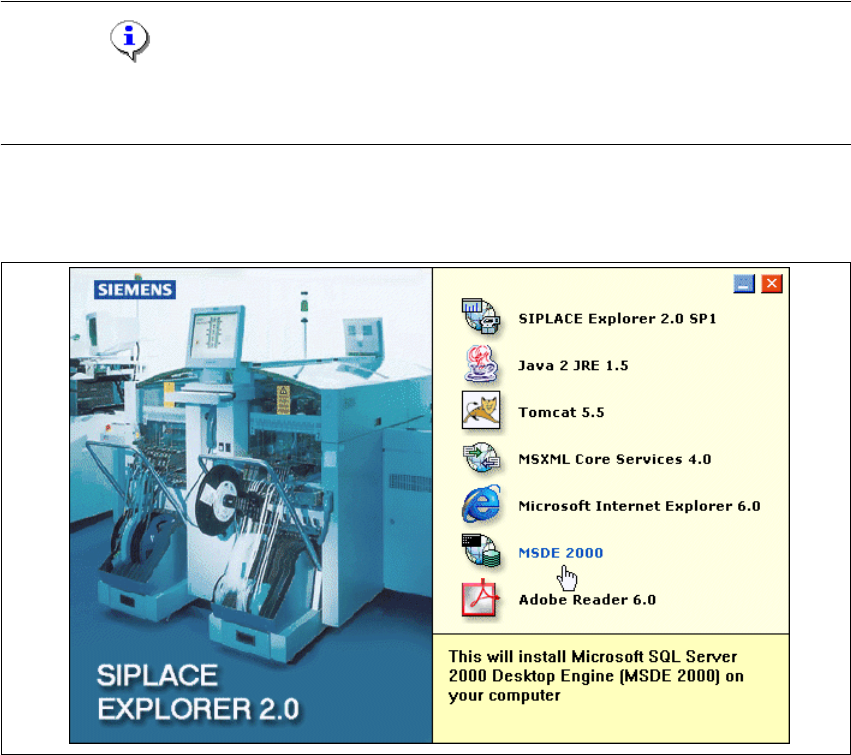
→ Legen Sie die SIPLACE Explorer CD in Ihr CD-Rom-Laufwerk ein.
→ Es erscheint der Start Screen.
3
Abb. 3 - 34 SIPLACE Explorer setup - Start Screen
→ Wählen Sie MSDE 2000 aus. Die Installation von MSDE 2000 läuft automatisch ab.
3 Installation des SIPLACE Explorer Installations- und Konfigurationsanleitung SIPLACE Explorer
3.1 Erstinstallation von SIPLACE Explorer 2.0 SP1 Ausgabe 12/2005 DE
50
3
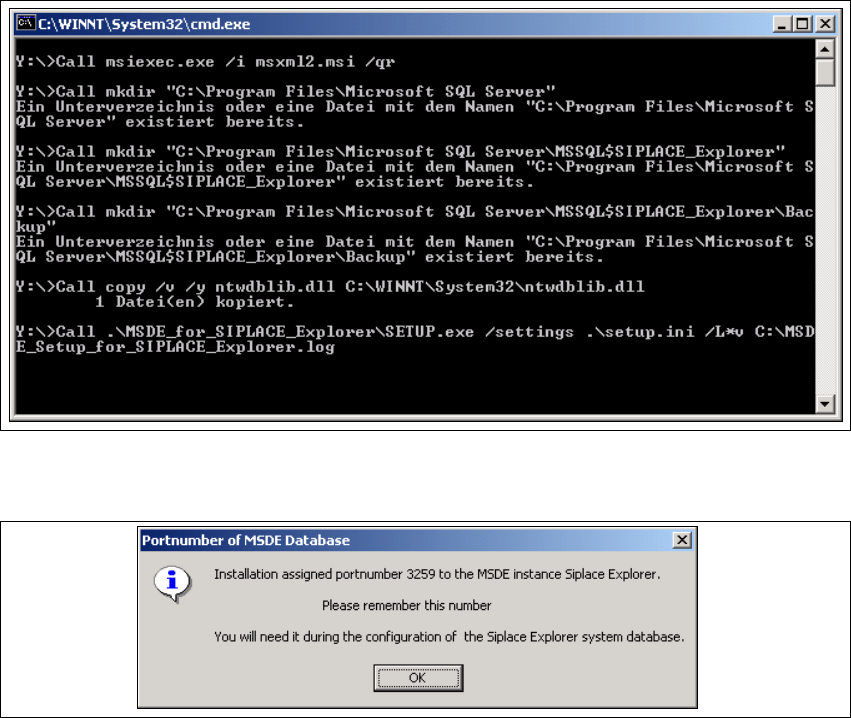
Abb. 3 - 35 MSDE 2000 - Installation
→ Wenn die Installation beendet ist, erscheint nachfolgendes Pop-up.
3
Abb. 3 - 36 MSDE 2000 - Portnummer
→ Notieren Sie sich diese Portnummer, Sie benötigen diese beim weiteren Arbeiten mit SIPLACE
Explorer.