00193687-04.pdf - 第59页
In stal latio ns- u nd K onf igura tio nsa nleit ung SIPL ACE Explo rer 3 I ns tall ation des SIP LACE Expl orer Au sgab e 12 /200 5 D E 3. 3 SI PLAC E Exp lorer star te n 59 – SE Man ager – SE Securi ty Manager – Modi f…
3 Installation des SIPLACE Explorer Installations- und Konfigurationsanleitung SIPLACE Explorer
3.3 SIPLACE Explorer starten Ausgabe 12/2005 DE
58
3.3 SIPLACE Explorer starten
→ In Abhängigkeit der ausgewählten Installationsoptionen können Sie SIPLACE Explorer aus
dem Menü
Programme → SIPLACE Explorer 2.0 in Windows starten.
→ SIPLACE Explorer V.2.0 Runtime Environment:
Runtime Environment wird bei jedem Neustart des Computers als Windows NT Service
automatisch gestartet. Sie sehen das Symbol in der Konsole. Mit dem rechten Mausklick
können Sie weitere Applikationen und Tools starten. Sie haben folgende
Auswahlmöglichkeiten:
3
– SE Manager
– SE Security Manager
– Line Configuration
– Performance Analyzer
–Console
– Language
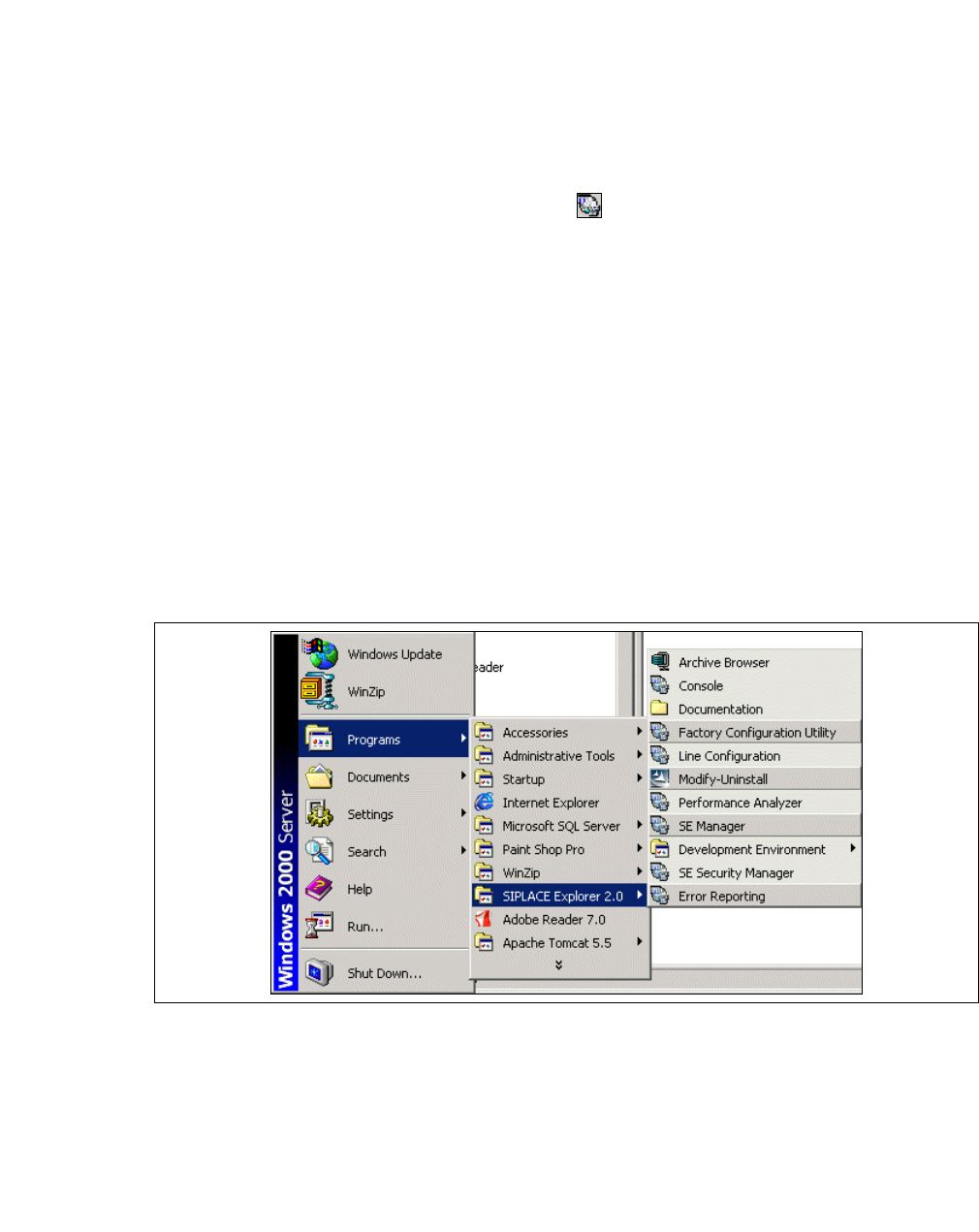
Sie können die weiteren Applikationen und Tools auch über das Windows-Menü
Programme
→ SIPLACE Explorer 2.0
starten. 3
3
Abb. 3 - 43 RTE Windows Start Menü
Sie haben folgende Auswahlmöglichkeiten: 3
– Archive Browser
–Console
– Line Configuration
– Performance Analyser
Installations- und Konfigurationsanleitung SIPLACE Explorer 3 Installation des SIPLACE Explorer
Ausgabe 12/2005 DE 3.3 SIPLACE Explorer starten
59
– SE Manager
– SE Security Manager
– Modify-Uninstall
– Documentation
→ SIPLACE Explorer V.2.0 Development Environment
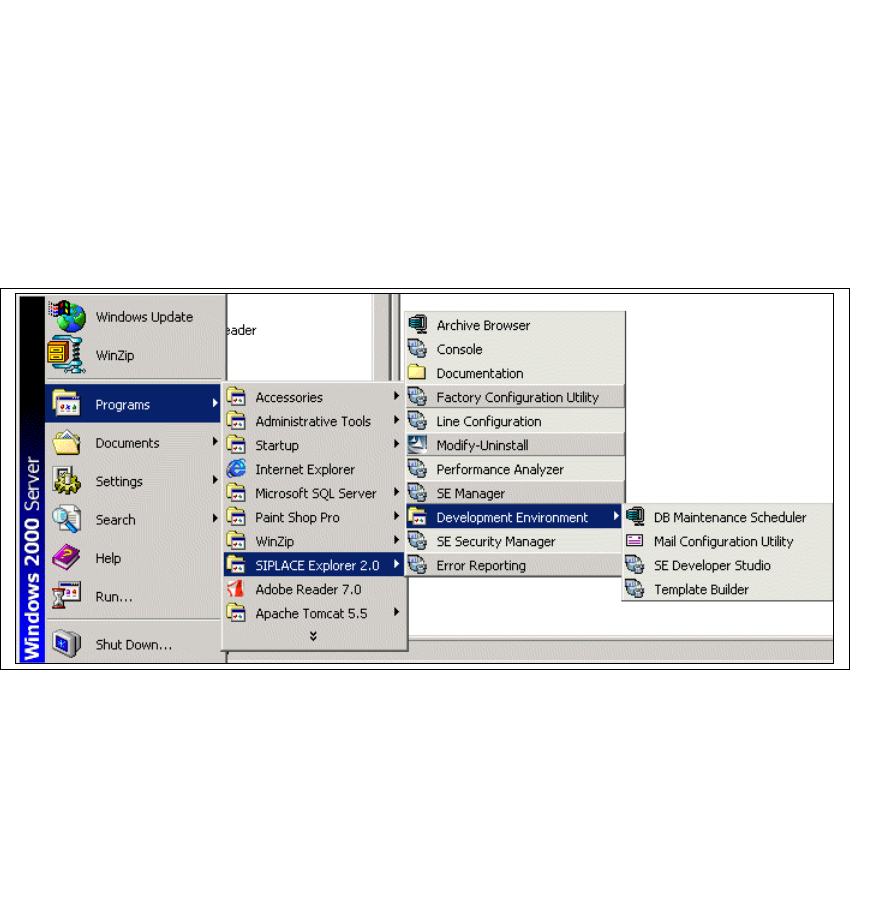
Starten Sie Development Environment über das Windows-Menü
Programme → SIPLACE
Explorer 2.0 → Developer Tools
. 3
3
Abb. 3 - 44 DE Windows Start Menü
Sie haben folgende weitere Applikationen und Tools zur Auswahl: 3
– DB Maintenance Scheduler
– Mail Configuration Utility
– SE Developer Studio
– Template Builder
3 Installation des SIPLACE Explorer Installations- und Konfigurationsanleitung SIPLACE Explorer
3.3 SIPLACE Explorer starten Ausgabe 12/2005 DE
60
→ SIPLACE Explorer V.2.0 Factory Configuration Utility
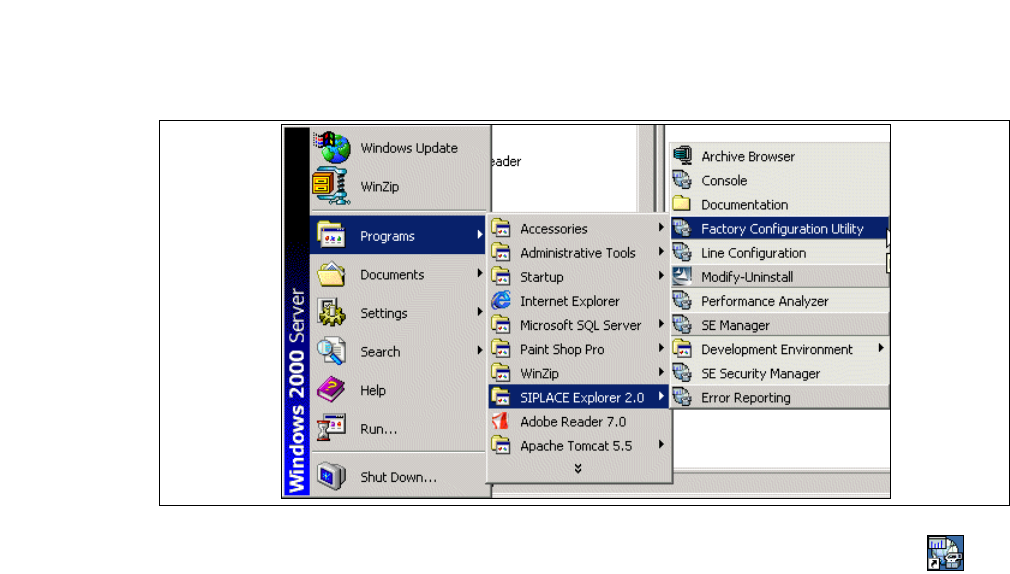
Starten Sie Factory Configuration Utility über das Windows-Menü
Programme → SIPLACE
Explorer 2.0 → Factory Configuration Utility
. 3
3
Abb. 3 - 45 Factory Configuration Utility Windows Start Menü
→ Oder klicken Sie auf Ihrem Desktop auf das Symbol Factory Configuration Utility .