SOM-1613-002.pdf - 第12页
11 Tg0780-PM-SO 0209-001 5. Setup Operation 5.3 Overall Automatic Setup Function Interlocked with Program Change • When the [ON] button (entitled "MOVE") is pressed in the pattern program change operation at th…

10 Tg0780-PM-SO0209-001
5. Setup Operation
*3 Clearance
This data is used to give some leeway to the chute and conveyor
widths.
The actual widths become ''P.C.B. Size (Width) + Clearance''.
*4 [Tgt Wd] Button
When this button is pressed, the "Tgt Wd" edit window opens.
Enter a numerical value and press the [Set] button. The entered
value is set as a target one.
*5 [PCB CIp (Y)] Button
When this button is pressed, the "PCB Clp (Y)" edit window opens.
Enter a numerical value and press the [Set] button. The entered
value is set as a value for Y clamping.
*6 Control Switch
When the [ON] button entitled "MOVE" is pressed, the setup
operation starts.
All Devices Overall Setup Operation
(1) Press the [AII Device Overall Setup] button (*2).
(2) Enter numerical values as clearance data (*3) for both chute and
conveyor widths and press the [Clearance Reset] button.
(3) Press the [ON] button in the "Control Switch" group box and then
the [ENABLE] button on the operation panel in two seconds. The
all device overall setup operation starts and the foIIowings are
indicated in the ''Status" text box (*1) of each device.
"Ready" : The setup operation is completed and the devices
are located at the position "P.C.B. Width + Clear-
ance".
"Not Ready" : The devices are located at the position "P.C.B.
Width + Clearance" but the current position is not
under control.
"-----" : The current position or program is indefinite.
"-----" (red) : "Disable" is set for the setup data.
When the current pattern program is indefinite, zeroing operation
is implemented and the automatic setup operation is performed
continuously.

11 Tg0780-PM-SO0209-001
5. Setup Operation
5.3 Overall Automatic Setup Function Interlocked with
Program Change
• When the [ON] button (entitled "MOVE") is pressed in the pattern
program change operation at the "AUTO OPN." window (submenu),
"Product Change" and "Pattern Program" windows, the machine
starts automatically setting up the width of all the units, for which
"ON" is set in the data boxes at the "Product Change" tab sheet,
interlocking with the pattern program change operation.
(a) When the current position is indefinite, zero each
device to its origin and perform the automatic setup
operation continuously.
(b) When the [OPERATION] switch is set to the "SET
UP" side, the product change operation will not start.
Close the front safety door and set the switch to the
"RUN" side for safety purposes. Then, perform the
program change operation.
Note
12 Tg0780-PM-SO
6. Zeroing Operation
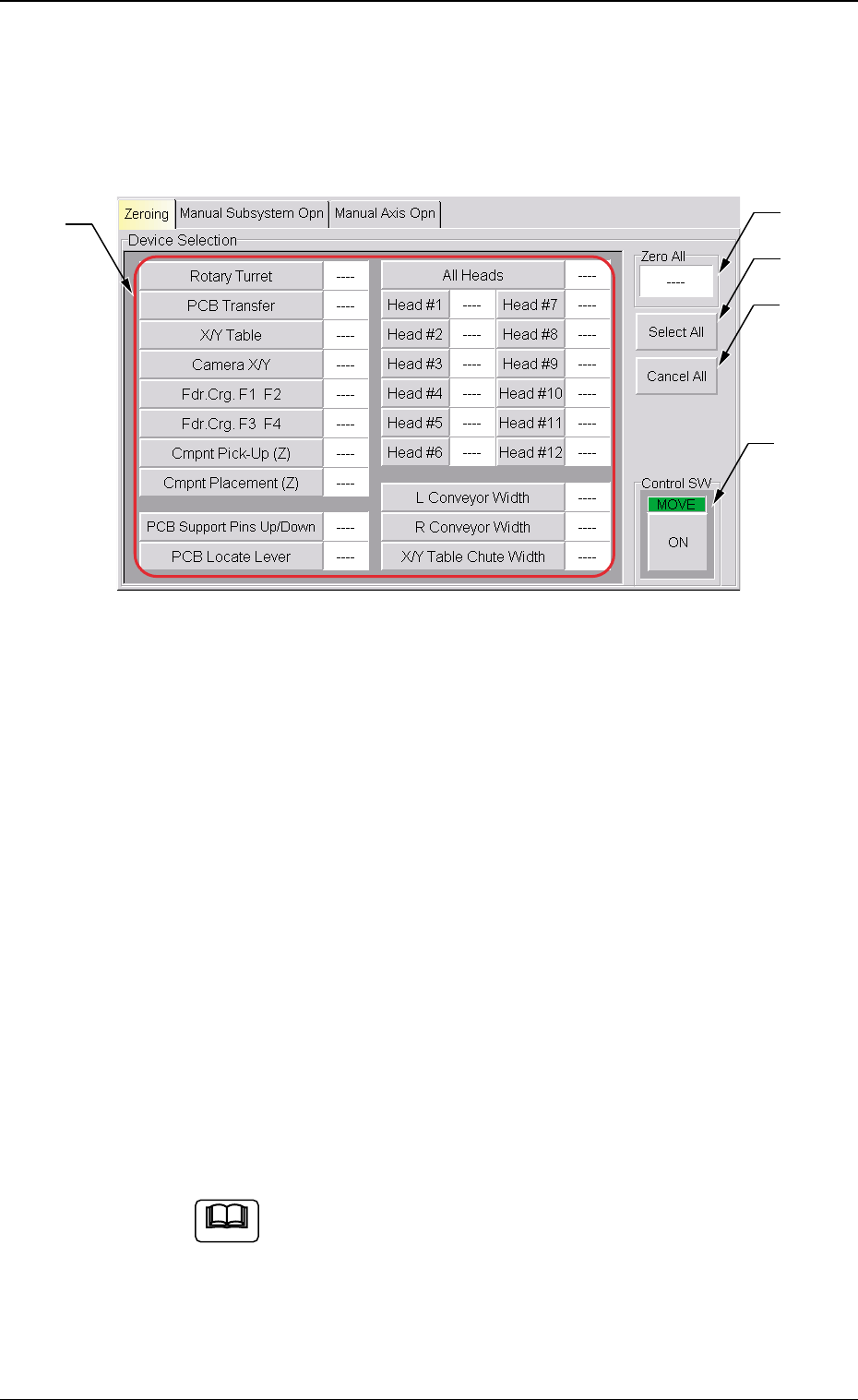
When the [Zeroing] tab is pressed at the "MNL. OPN." window
(submenu), the following tab sheet appears.
• When the current position is indefinite during the setup operation which
interlocks with the overall setup and program change operations se-
lected at the "Product Change" tab sheet, the zeroing operation is
automatically performed and the automatic setup operation is imple-
mented continuously.
• Sheet Composition
*1 Device Selection Buttons
When a button is pressed, the background color turns yellow,
indicating that the device is selected. Pressing the button again
changes the background color to the original one, indicating that
the selection is canceled.
Each button has a box on the right side and the status of the
corresponding device is indicated in the box.
Refer to "Note" in ''*5".
Two or more devices can be selected.
Fig. 5
0209-001
6. Zeroing Operation
*2
*3
*4
*5
*1
Note