SOM-1613-002.pdf - 第9页
8 Tg0780-PM-SO Reference Point: "Hole" 5.2 Overall Setup Operation after Selection of the [Product Change] T ab When the [Product Change] tab is pressed at the "PROGRAM CHANGE" submenu window , the fo…
7 Tg0780-PM-SO
*1
0312-002
5. Setup Operation
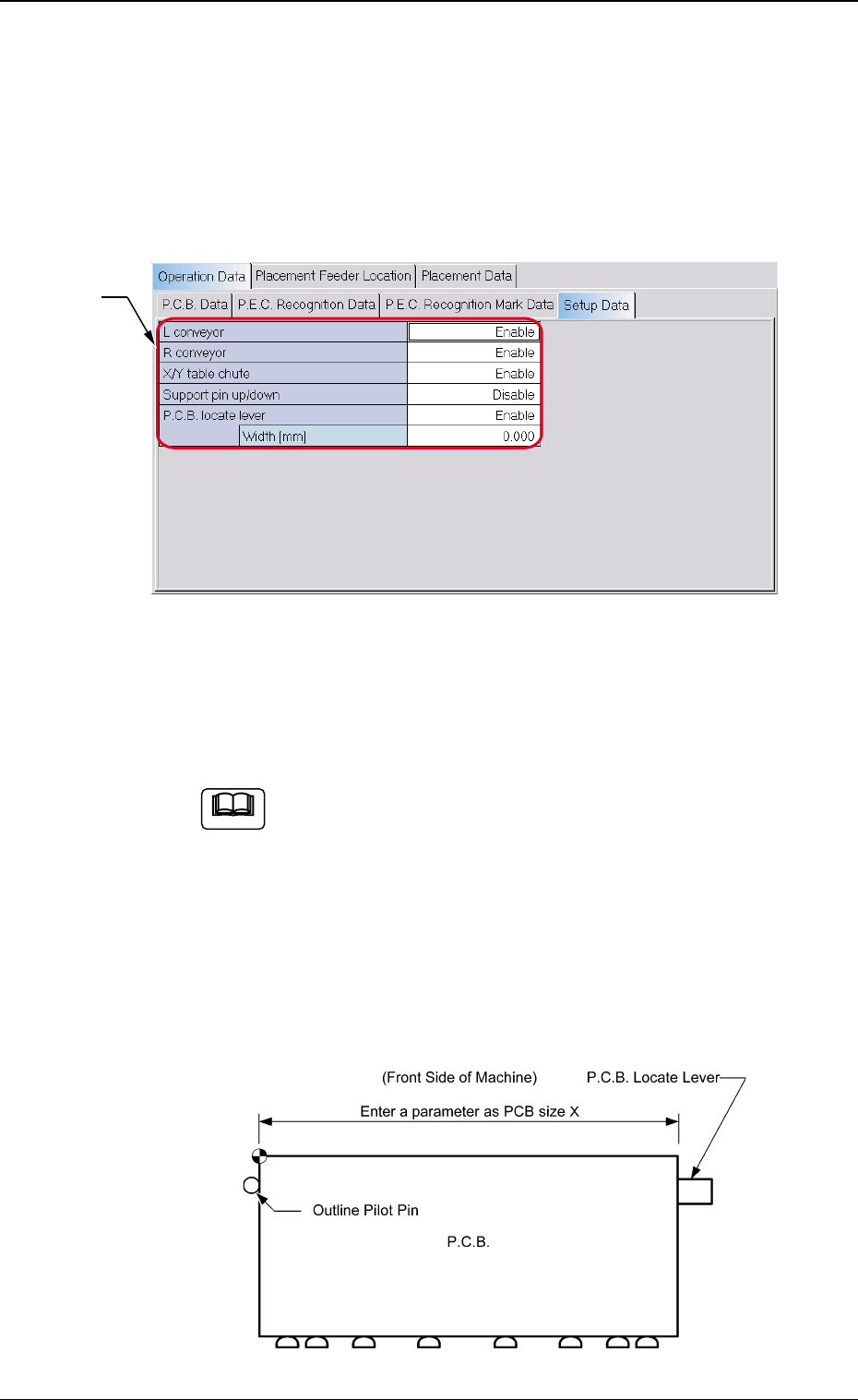
*1 Setup Data
Set whether or not the setup data for each device is set. Select
"Enable" or "Disable" for each device.
When the setup operation is performed for the P.C.B.
locate pin, be sure to enter a parameter in the " Width
[mm]" data box of the label "P.C.B. locate lever" in ac-
cordance with the selected positioning method "Hole" or
"Outline".
Unless a correct parameter is entered, the P.C.B. locate
pin cannot be positioned to have the correct width.
Reference Point: "Outline"
5. Setup Operation
5.1 Setting of Setup Parameters
When the [Setup Data] tab is pressed on the "Operation Data" tab
sheet, the following tab sheet appears.
Fig. 3
Fig. 4-1
Note
8 Tg0780-PM-SO
Reference Point: "Hole"
5.2 Overall Setup Operation after Selection of the
[Product Change] Tab
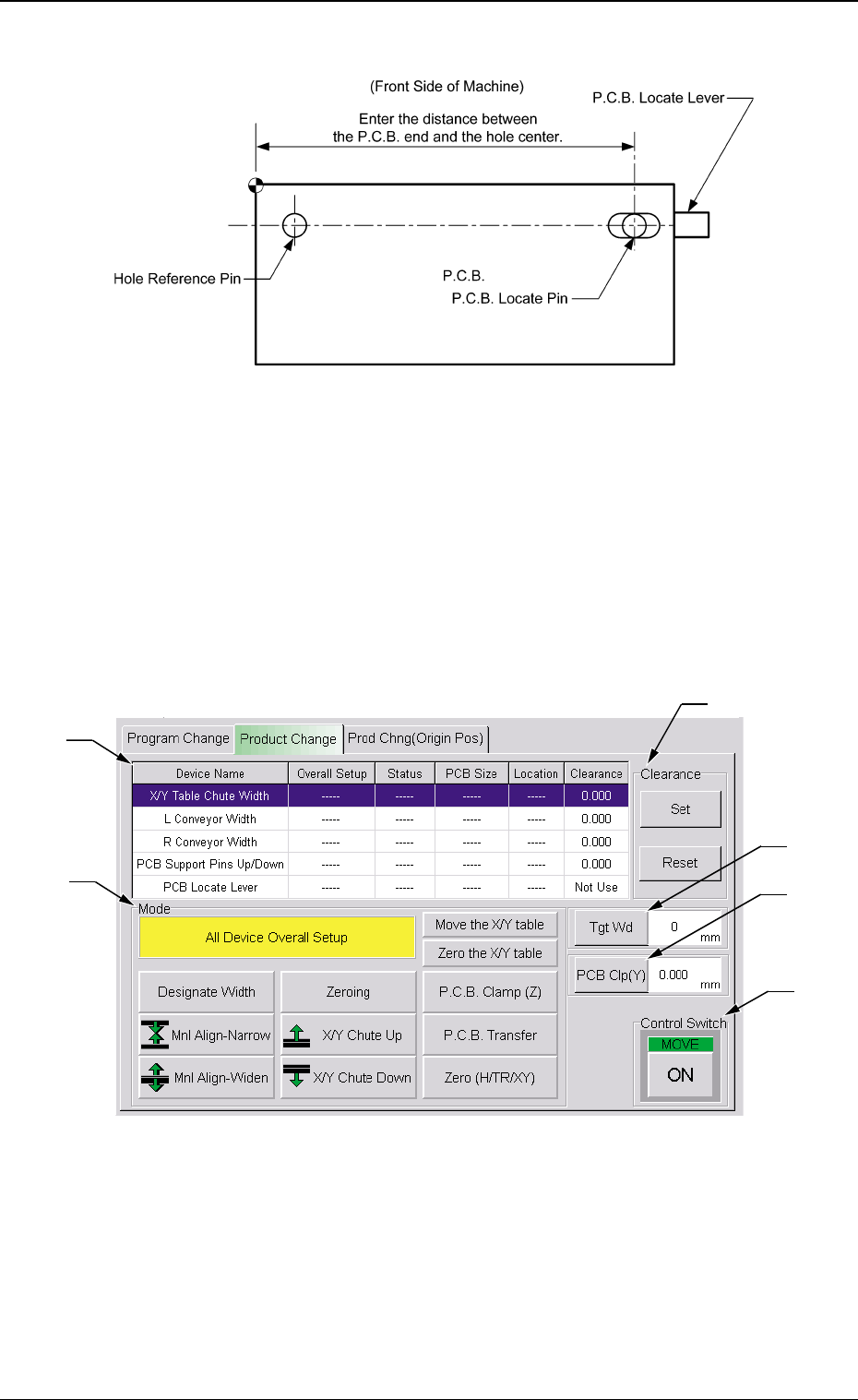
When the [Product Change] tab is pressed at the "PROGRAM
CHANGE" submenu window, the following tab sheet appears.
0312-002
5. Setup Operation
Fig. 4-3
Fig. 4-2
*3
*5
*6
*4
*2
*1

9 Tg0780-PM-SO0209-001
5. Setup Operation
• Sheet Composition
*1 Devices
Device Name : The following names represent the items that can
be set up.
X/Y Table Chute Width
L Conveyor Width
R Conveyor Width
P.C.B. Support Pins Up/Down
P.C.B. Locate Lever
Overall Setup: ON or OFF appears in the text box.
Status : When the [ON] button (*6) is pressed, the setup
operation starts and the status of each device is
indicated.
"Ready" : The setup operation is completed and the
device is located at the position "P.C.B.
Size (Width) + Clearance''.
"Not Ready" : The devices are located at the position
"P.C.B. Width + Clearance" but the cur-
rent position is not under control.
'' -----'' : The current position or program is indefi-
nite.
'' -----'' (red) : ''Disable" is set for the setup data.
P.C.B. Size : Displayed are the P.C.B. sizes (widths) in the cur-
rent pattern program data.
When the current pattern program is indefinite,
''-----'' appears.
Location : The currently managed widths appear in the text
boxes.
"-----" appears when the current location is indefi-
nite or is not managed.
When a device is selected for the setup operation, the background
color of the line turns blue.
*2 Mode
A setup mode can be selected.
The background color of the selected button turns yellow.