SOM-1653-001.pdf - 第9页
Tg0756-PM-SO 5.1 Pattern Program 5.1.1 T ypes of P .C.B.'s and Required Data The following shows typical examples (applications) of each data. Refer to the examples for creation of a pattern program. Marks in "…
Tg0756-PM-SO0206-001 7
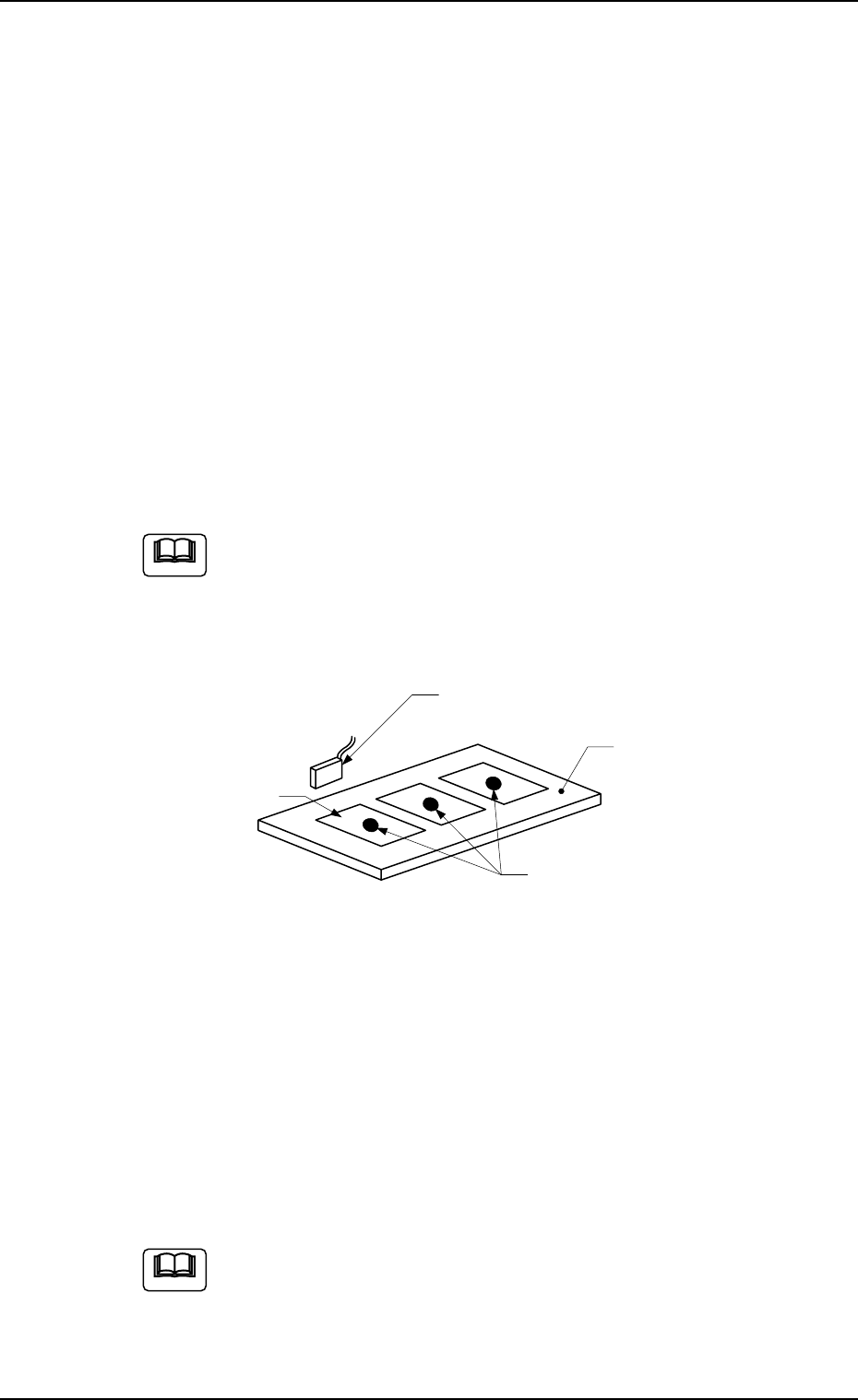
4. Scope of Actions
4. Scope of Actions
(1) When the machine starts automatic operation, the X/Y beam moves
to the specified "Bad Mark Position".
(2) After the X/Y beam has moved to such a specified position, the bad
mark detection sensor detects whether or not there are any bad
marks on the multi-unit P.C.B.
(3) Whether or not there are bad marks on any of the repetitive pat-
terns is detected according to the pattern program data.
If the detection function finds no bad mark on the multi-unit P.C.B.,
then this function will not indicate any bad mark on any unit P.C.B.
(4) When all bad marks have been detected, then the machine starts
its placement. At this stage, the machine does not place any com-
ponent on the unit P.C.B. where a bad mark was detected in the
above steps (1) through (3).
If the function detects bad marks on all unit P.C.B.s of the multi-
unit P.C.B. placed on the P.C.B. positioning section, then the
machine will not place any component on any unit P.C.B. It will
stop in an error condition.
Note
Unit P.C.B.
Bad Mark Sensor
Bad Marks
P.C.B.
5. Preparation Before Operation
(1) Create the pattern program data.
Refer to "5.1 Pattern Program" for details.
(2) Set the sensitivity of the bad mark detection photosensor.
Refer to "5.5 Sensitivity Setting of Bad Mark Sensor" for details.
(3) Operate the machine automatically after program change.
How to use "Black Mark" and "White Mark" for a Bad Mark.
P.C.B. relatively bright (Reflective P.C.B.) : Use a black
mark.
P.C.B. relatively dark (Less reflective P.C.B.) : Use a white
mark.
Fig. 3
Note
Tg0756-PM-SO
5.1 Pattern Program
5.1.1 Types of P.C.B.'s and Required Data
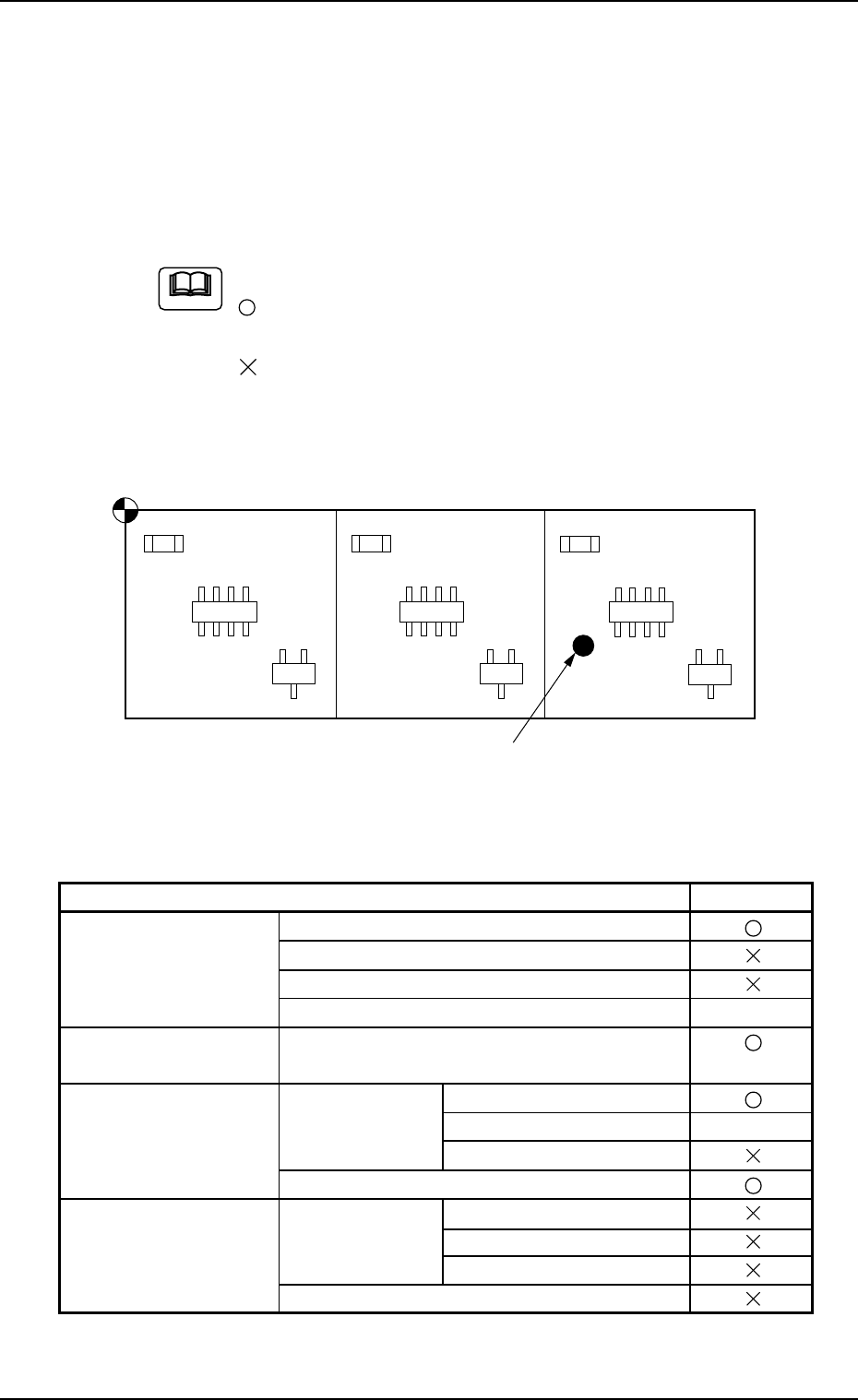
The following shows typical examples (applications) of each data.
Refer to the examples for creation of a pattern program.
Marks in "Required Data"
: This means that you must refer to the description of the
pattern program data and create the data correctly.
: This means that you must refer to the description of the
pattern program data and set "Disable" for the pertinent
functions.
Bad Mark
Placement Coordinate Reference Point
Fig. 4 In case of a Repetitive Pattern (Unit P.C.B. B.B.R. Function Enabled)
Note
0206-001 8
5.1 Pattern Program
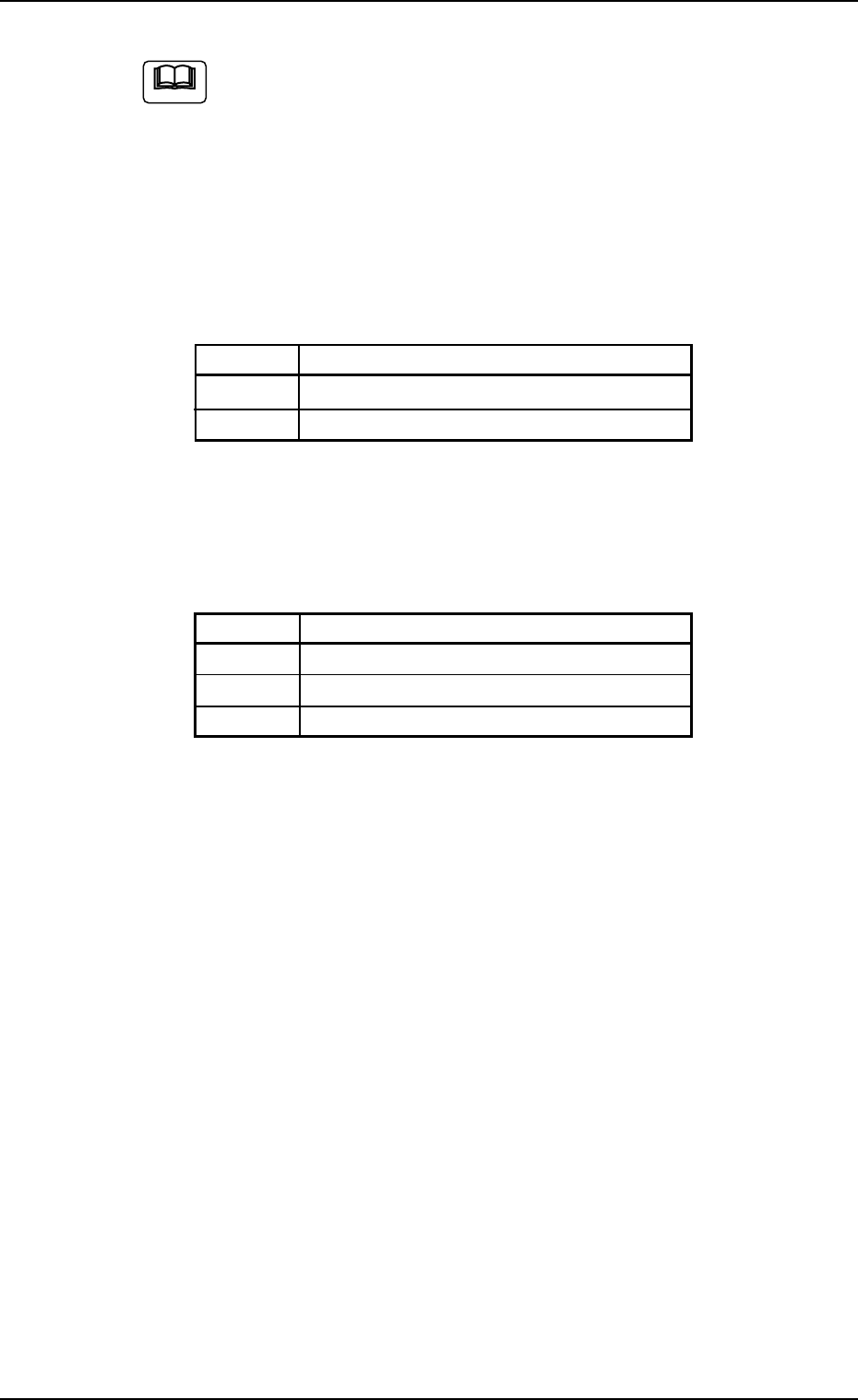
List of Required Data Table 2
Pattern Program Required Data
Operation Data P.C.B. Data
P.E.C. Recognition Data
P.E.C. Recognition Mark Data
Setup Data Note (a)
Placement Feeder Feeder Base #1, #3, #4
Location Data Vibratory Stick #1, #2, #3
Placement Data U01 Placement Data Placement Data (P Data)
(P Data) Unit Control Note (b)
Unit P.C.B. B.B.R.
Placement Data (O Data)
Placement Data Un Placement Data Placement Data (P Data)
(P Data) Unit control
Unit P.C.B. B.B.R.
Placement Data (O Data)
Tg0756-PM-SO0206-001 9
5.1 Pattern Program
(a) Create these parameters (data) for automatic adjustment
of the conveyor.
(b) Use these parameters (data) according to the situational
changes.
• Composition of Operation Data
Only specific data to this special specifications is here described.
Refer to the instruction manual for the main machine for other data.
Note
P.C.B. Data Tabel 3
Ref. No. Data Name
(1) Unit P.C.B. B.B.R.
(2) Overall P.C.B. B.B.R.
Placement Data (O) Tabel 4
Ref. No. Data Name
(3) X, Y for P-No. 1 Step
(4) C for P-No. 1 Step
(5) B-X, B-Y
• Composition of Placement Data
Only specific data to this special specifications is here described.
Refer to the instruction manual for the main machine for other data.