SOM-1619-001.pdf - 第24页
Tg0590-PM-SO 1st Edition Issued Apr ., 2003 Copying Prohibited Compiled and Distributed by 0304-001

22 Tg0590-PM-SO0301-001
5. Placement Position Teach
(9) When the Teach Operation is completed, the new placement
position is indicated in the Teach Result (X, Y) *3.
(10) When the new placement position is entered temporarily, press
the [Temp Entry] button *4.
The new placement position is saved in the temporary file.
When the temporarily registered data is to be cancelled, move
the cursor to the step to be cancelled, and press the [Cancel]
button. When all data items are to be cancelled, refer to (11).
(a) The Temp Entry function of the new placement
position saves the temporary file for the data for
operation and pattern program file, but does not
overwrite the data on the original file.
(b) The temporarily entered step data can be can-
celled. When it is to be cancelled, select the step
to be cancelled and press the [Cancel] button *9.
(c) The temporarily entered step data is indicated
with a blue background.
(d) The temporarily entered data is immediately
reflected on the Auto Move and Step Move opera-
tions.
23 Tg0590-PM-SO
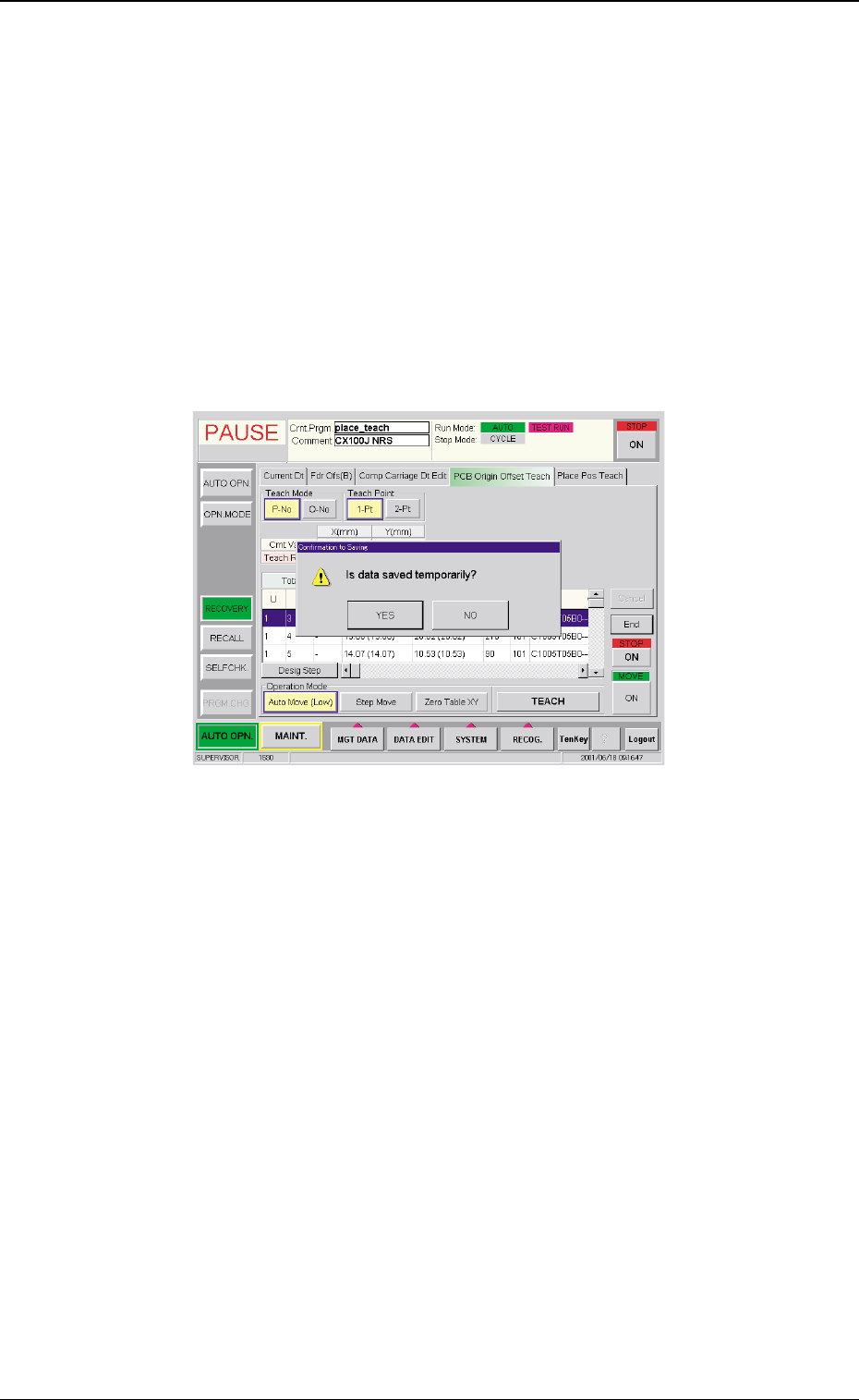
(11) When the new placement data is formally entered, press the
[End] button *10.
The window indicating the message "Is data saved tempo-
rarily?" will appear.
When the new data is overwritten on the Current Pattern
Program Data (Save)
When the [YES] button is pressed in the window indicating
the message "Is data saved temporarily?", the "Confirmation
to Saving" window appears. Press the [YES] button.
The temporarily entered data is overwritten on the current
pattern program data.
Fig. 9 "Confirmation to Saving" Window
0301-001
5. Placement Position Teach
Maintaining the Current Pattern Program Data (Save As)
When the [NO] button is pressed in the window indicating
the message "Is data saved temporarily?", the File Name
window appears.
Enter the new file name and press the [Set] button.
The temporarily entered pattern program will be saved with
the newly entered file name.
Deleting the Teach Data (All Teach Data Delete)
Press the [NO] button in the window indicating the message
"Is data saved temporarily?".

Tg0590-PM-SO
1st Edition Issued Apr., 2003 Copying Prohibited
Compiled and Distributed by
0304-001