00198228-02_IM-MaterialSetupAssistant_DE_EN.pdf - 第56页
Introduction Scope of Delivery 56 SIPLACE Material Setup Assistant 2.2 SIPLACE Material Setup Assistant 2 .2 1.2 1 . 2 S c o p e o f D e liv e r y Scope of Delivery The delive ry contains: ▪ ASM Material Setup Assistant …
Introduction
Overview
SIPLACE Material Setup Assistant 2.2 SIPLACE Material Setup Assistant 2.2 55
1
1 Introduction
Introduction
This installation manual provides instructions for installing and configuring ASM Material Setup Assistant
(MSA) Version 2.2.
The installation manual contains information on the scope of delivery and requirements for successful
installation.
1.1
1.1 Overview
Overview
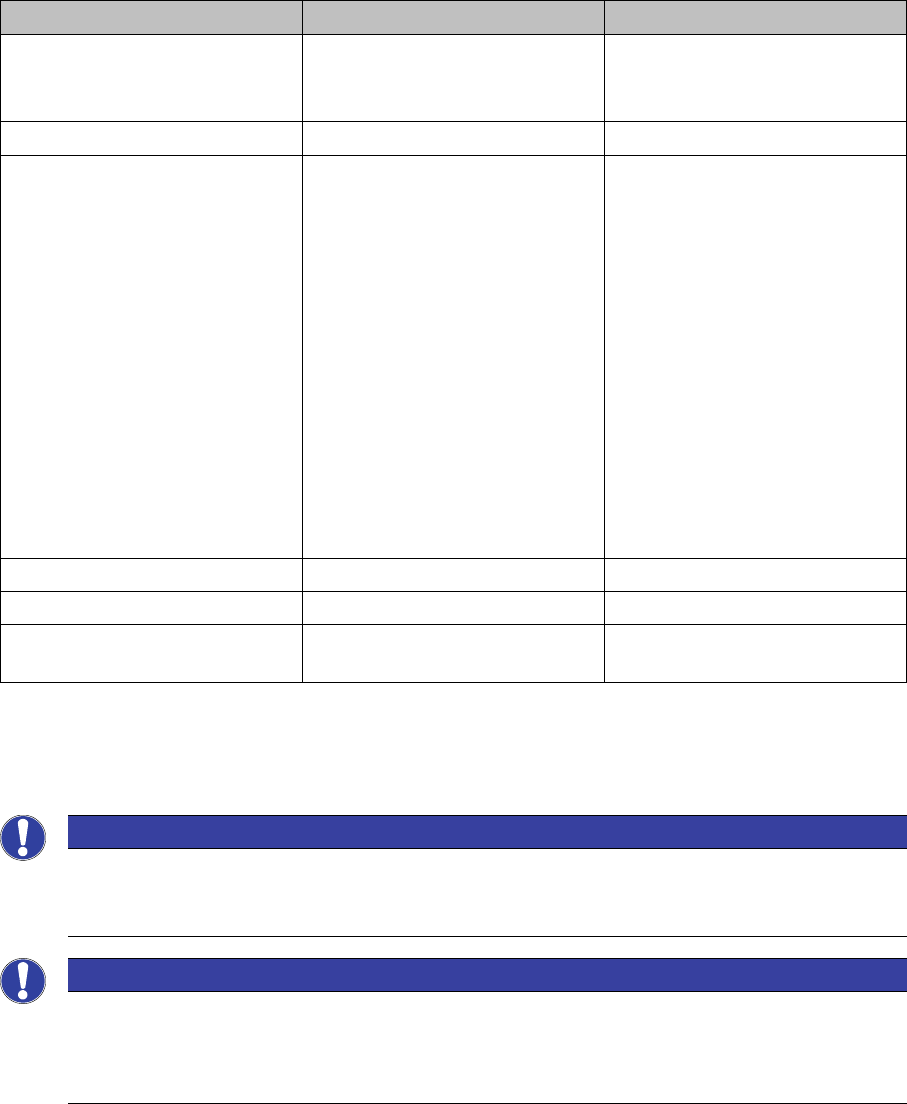
The workflow solution for the ASM Material Setup Assistant (MSA) consists of the following applications
and their components:
This installation manual describes the installation of the Order Manager and the configuration of the sys
-
tems involved.
The following systems must already be correctly installed and functional. For more details about the in
-
stallation procedure, refer to the relevant installation guide.
Application Components Software version
Order Manager ▪ Module: Production Order
Manager
▪ Module: Monitoring
2.2
ASM Setup Center (offline) ▪ View - Setup Preparation 9.0.1
ASM Material Manager ▪ Full version
– Full version of the ASM
Material Manager for
storage management
with ASM Material Man
-
ager
–View - Material Demand
List
Or
▪ ASM Material Manager for
MSA
– Limited version of the
ASM Material Manager
for storage management
with a customer system
2.3
SIPLACE Pro with LCGUI Complete 14.0 or higher
ASM OIB Complete 5.0
ASM Engineering Data Manager
(EDM) - optional
Complete 3.1 or higher
NOTICE
Tearing down all lines and changeover tables before the first commissioning
When introducing ASM Material Setup Assistant, all lines and changeover tables must be torn
down before the first commissioning.
NOTICE
Configuration
To enable ASM Material Setup Assistant to function and communicate with the applications in
-
volved, you need to modify the configuration settings for the applications concerned. See also
Configuration.

Introduction
Scope of Delivery
56 SIPLACE Material Setup Assistant 2.2 SIPLACE Material Setup Assistant 2.2
1.2
1.2 Scope of Delivery
Scope of Delivery
The delivery contains:
▪ ASM Material Setup Assistant V2.2 license (machine connection) for each SIPLACE station,item
no.: [00117421-xx]
▪ ASM Material Setup Assistant V2.2 license (server), item no.: [00117422-xx]
▪ ASM Material Setup Assistant media pack V2.2, item no. [00117432-xx] contains:
– Software CD-ROM Order Manager V2.2
– Software installation manual ASM Material Setup Assistant V2.2, item no.
[00198228-02]
▪DVD Support Media Version 2.4, item no. [00392803-xx]
–
1.3
1.3 Installation Notes
Installation Notes
You can install the Order Manager in two different structures:
▪ Client and server installation on one server computer
– The client and server components (database and server service) for the Order Manager are in
-
stalled on one server computer.
▪ Distributed Installation
– The server components (database and server service) for the Order Manager are installed on
one server computer.
– The client components for the Order Manager are installed on one or more client computers.
NOTICE
Support Media DVD:
Please use the Navigation Guide button of the Support Media Launcher to navigate through the
documentation.
The navigation guide and all related documents are available on the Support Media DVD.
NOTICE
Service engineers
The installation and configuration of the Order Manager and the systems involved for the ASM
Material Setup Assistant must always be undertaken by a specially trained service technician.
NOTICE
Administrator privileges
You need the following administrator privileges for installation of the Order Manager.

Introduction
Installation Notes
SIPLACE Material Setup Assistant 2.2 SIPLACE Material Setup Assistant 2.2 57
Software
▪ You need to have a local SQL database on the server on which you want to install the Order Man
-
ager.
▪ The server and the relevant client computer on which you want to install the Order Manager need to
be prepared with the help of the current Support Media DVD for the ASM Material Setup Assistant.
NOTICE
System requirements
The Support Media DVD checks the necessary system requirements for your system and then
installs these automatically. These include, amongst others Microsoft .NET Framework, ASM
Studio, the License Manager and the Error Reporting tool.
The use of the Support Media version 2.4 is mandatory.
The system requirements (supported operating system and database variants) and an over
-
view of the interoperable products can be found in the Support Media installation manual, item
no. [00197214-xx].