00198228-02_IM-MaterialSetupAssistant_DE_EN.pdf - 第79页
Configuration Configuration Settings in ASM OIB SIPLACE Material Setup Assistant 2.2 SIPLACE Material Set up Ass istant 2.2 79 3.1.5 3 . 1 . 5 D e f in in g W a r e h o u s e C o n f ig u r a t io n s Defining Warehouse …
Configuration
Configuration Settings in ASM OIB
78 SIPLACE Material Setup Assistant 2.2 SIPLACE Material Setup Assistant 2.2
3.1.4
3.1.4 Defining Configurations for the Setup Area
Defining Configurations for the Setup Area
► Select Central Settings.
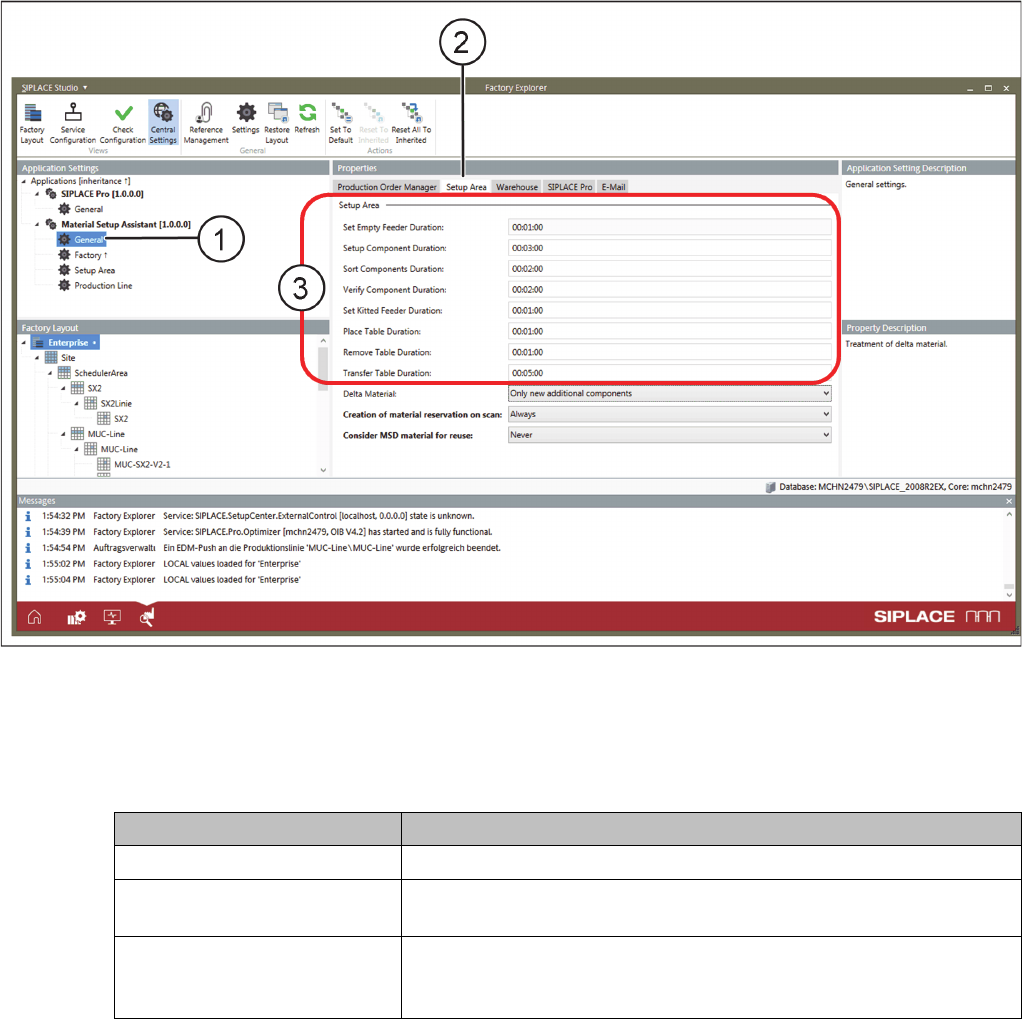
► Go to Application Settings => Material Setup Assistant and select General (1) from the tree structure.
► Go to Properties and select the Setup Area (2) tab.
Application Settings – General: Tab - Setup Area
► Enter the times (3) for the individual steps scheduled in the setup area of your production. During
scheduling, these times will be added in the timeline for the setup area.
Optional settings
Parameter Function
Delta Material Select how the delta material is to be treated.
Creation of material reservation
on scan
The material reservation is updated either on scanning the setup list
or on the first scan only.
Consider MSD material for re
-
use
When determining the material for reuse, the MSD material is either
not considered at all or considered to a preset level or always consid
-
ered.
Configuration
Configuration Settings in ASM OIB
SIPLACE Material Setup Assistant 2.2 SIPLACE Material Setup Assistant 2.2 79
3.1.5
3.1.5 Defining Warehouse Configurations
Defining Warehouse Configurations
► Select Central Settings.
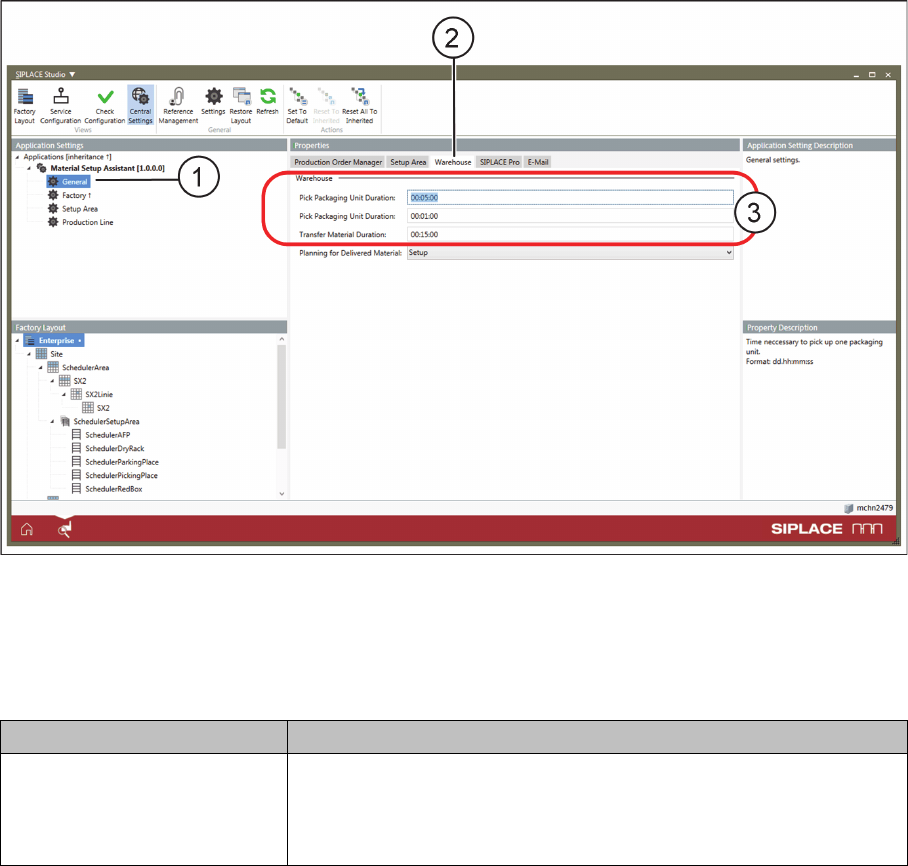
► Go to Application Settings => Material Setup Assistant and select General (1) from the tree structure.
► Go to Properties and select the Warehouse (2) tab.
Application Settings – General: Tab - Warehouse
► Enter the times (3) for the individual steps scheduled in the warehouse of your production. During
scheduling, these times will be added in the timeline for the warehouse.
Optional settings
Parameter Function
Planning for Delivered Material Determine when the scheduling for the supplied material should be
-
gin:
After completing picking of the entire Setup or after picking the mate
-
rial for a Location.
Configuration
Configuration Settings in ASM OIB
80 SIPLACE Material Setup Assistant 2.2 SIPLACE Material Setup Assistant 2.2
3.1.6
3.1.6 Defining Factory Configurations
Defining Factory Configurations
► Select Central Settings.
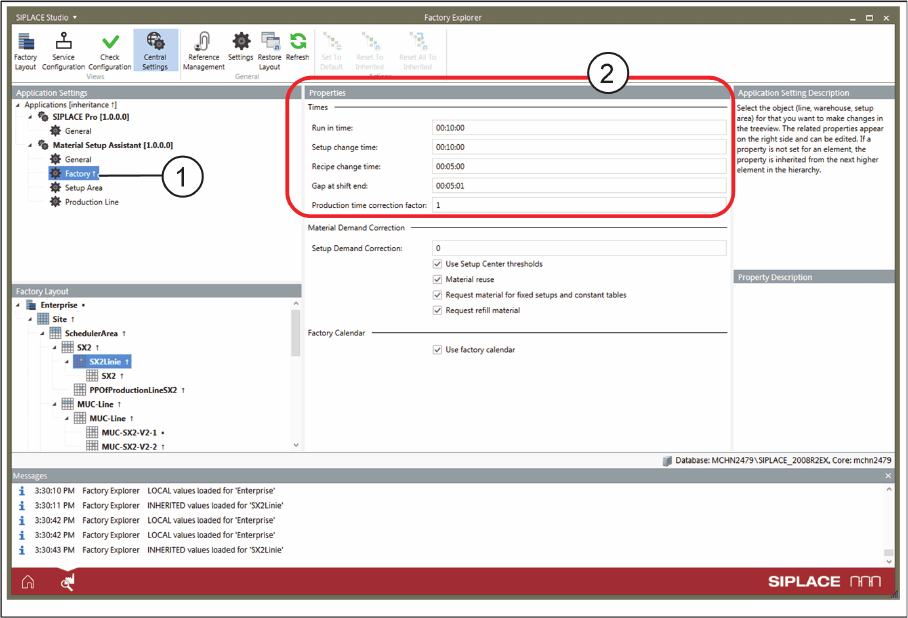
► Go to Application Settings => Material Setup Assistant and select Factory (1) from the tree structure.
Application Settings - Factory
► The factory settings can be made on a global level and can be overwritten for individual areas. In the
Factory Layout, select the Enterprise level for global settings or select another element for overwrit
-
ing the global settings for this very element.
► Enter the times (2) for specific production tasks used for scheduling in your factory. These times in
-
fluence the production times for your lines or globally the production times for the entire production.