00198228-02_IM-MaterialSetupAssistant_DE_EN.pdf - 第82页
Configuration Configuration Settings in ASM OIB 82 SIPLACE Material Setup Assistant 2.2 SIPLACE Material Setup Assistant 2 .2 Settings in OIB - Factory The Request material for fixed setups an d constant tables option an…

Configuration
Configuration Settings in ASM OIB
SIPLACE Material Setup Assistant 2.2 SIPLACE Material Setup Assistant 2.2 81
Optional settings
3.1.6.1
3.1.6.1 Constant Tables and Refill Material
Constant Tables and Refill Material
SIPLACE Material Setup Assistant supports fixed setups and constant tables in two variants:
▪ Without refill material
– Usually, no material is requested because the required basic setup is normally present on the
tables. Only if a component misses completely on a table, it will be requested.
– Refill reels are requested "on demand" via the ASM Material Manager - full version (e.g. reorder
-
ing at the line). This can be automated in Setup Center as well.
▪ With refill material
– The material for the basic setup (which is usually present) and the refill material is requested like
it is the case for flexible tables.
Parameters Function
Production time correction fac
-
tor
The production time calculated by SIPLACE Pro can be modified us
-
ing this factor. If, e.g., the production takes 5% longer in real time, en
-
ter 1.05.
Material reuse You define if material reuse is to be applied to the production line.
Enabled: Default setting. The Material Setup Assistant workflow is
configured for material reuse at the line.
NOTICE!
A mixed operation with S, X and E feeders is possible in SIPLACE Ma
-
terial Setup Assistant. However, a different workflow is necessary be
-
cause the S feeders cannot signal the material reuse to the AFP.
See also Mixed Operation of S Feeders and X Feeders in a Line.
Disabled: (If only S feeders are operated at the line).
Disable this option if the stations in your line are operated with S feed
-
ers only. The S feeders cannot be used for material reuse.
Use Setup Center thresholds ASM Setup Center uses threshold value settings to calculate the cor
-
rection of the material demand.
Request material for fixed set
-
ups and constant tables
Activate this option if the material for constant tables and fixed setups
is to be requested for this production line.
See also "3.1.6.1 Constant Tables and Refill Material" [ ➙ 81].
Request refill material Activate this option if the refill material is to be requested for this pro
-
duction line. See also "3.1.6.1 Constant Tables and Refill Material"
[➙81].
Use factory calendar Select if the factory calendar is to be used.
Configuration
Configuration Settings in ASM OIB
82 SIPLACE Material Setup Assistant 2.2 SIPLACE Material Setup Assistant 2.2
Settings in OIB - Factory
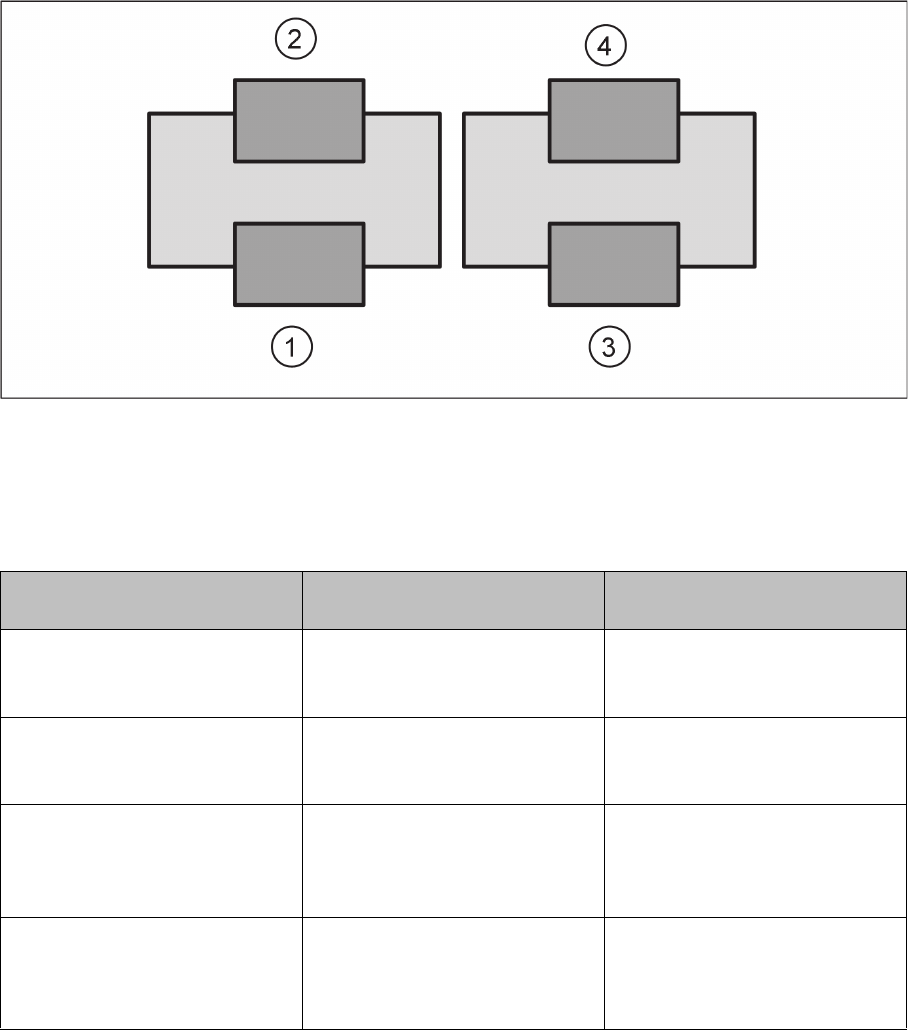
The Request material for fixed setups and constant tables option and the Request refill material option
enforce the following four combination scenarios.
Example: line with two placement machines with two tables each
1. Setup with flexible table (default)
2. Setup with fixed/constant table
3. Setup with flexible table (default)
4. Setup with fixed/constant table
Material for fixed setups and con
-
stant tables
Request refill material Effect
On On ▪ Basic setup at tables 1 to 4.
▪ Refill material is requested
for tables 1 to 4.
On Off ▪ Basic setup at tables 1 to 4.
▪ Refill material is not request
-
ed at tables 1 to 4.
Off On ▪ Basic setup at tables 1 and 3
only.
▪ Refill material is requested
for tables 2 and 4.
Off Off ▪ Basic setup at tables 1 and 3
only.
▪ Refill material is not request
-
ed at tables 1 to 4.
Configuration
Configuration Settings in ASM OIB
SIPLACE Material Setup Assistant 2.2 SIPLACE Material Setup Assistant 2.2 83
3.1.7
3.1.7 Configurations for SIPLACE Pro
Configurations for SIPLACE Pro
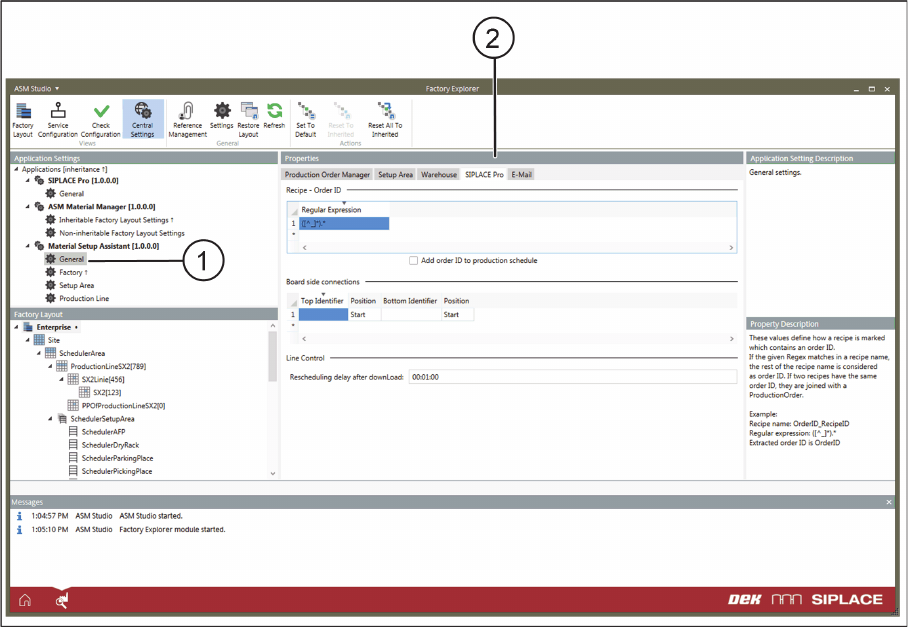
► Select Central Settings.
► Go to Application Settings => Material Setup Assistant and select General (1) from the tree structure.
► Go to Properties and select the SIPLACE Pro (2) tab.
Application Settings – General: Tab - SIPLACE Pro
► Define the following settings.
Recipe - Order ID
With the help of regular expressions, you can define how a recipe which contains a job number is named.
If the regular expression occurs in the name of the recipe, the remaining part of the recipe name will be
understood as the job number. If two recipes have the same job number, these recipes will be compiled
to a production job.
▪ Add order ID to production schedule
– Enabled: The order ID determined by the regular expression is added to the corresponding rec
-
ipe in the production schedule in the SIPLACE Line Control GUI.
Board side connections
If the board descriptions for the top and bottom sides have been divided up in SIPLACE Pro, you can
add the designators for the top and bottom accordingly here. This is helpful in case another two boards
for the top and bottom have been created in SIPLACE Pro.
Line Control
After a download, a new planning is to be made after this time.