00198228-02_IM-MaterialSetupAssistant_DE_EN.pdf - 第87页
Configuration Configuration Settings in ASM OIB SIPLACE Material Setup Assistant 2.2 SIPLACE Material Set up Ass istant 2.2 87 SIPLACE Pro Deployment Scenario - Overview SIPLACE Pro Deployment Scenario - Overview 1. Cent…
Configuration
Configuration Settings in ASM OIB
86 SIPLACE Material Setup Assistant 2.2 SIPLACE Material Setup Assistant 2.2
3.1.10
3.1.10 EDM Configuration
EDM Configuration
3.1.10.1
3.1.10.1 Defining EDM Scenarios
Defining EDM Scenarios
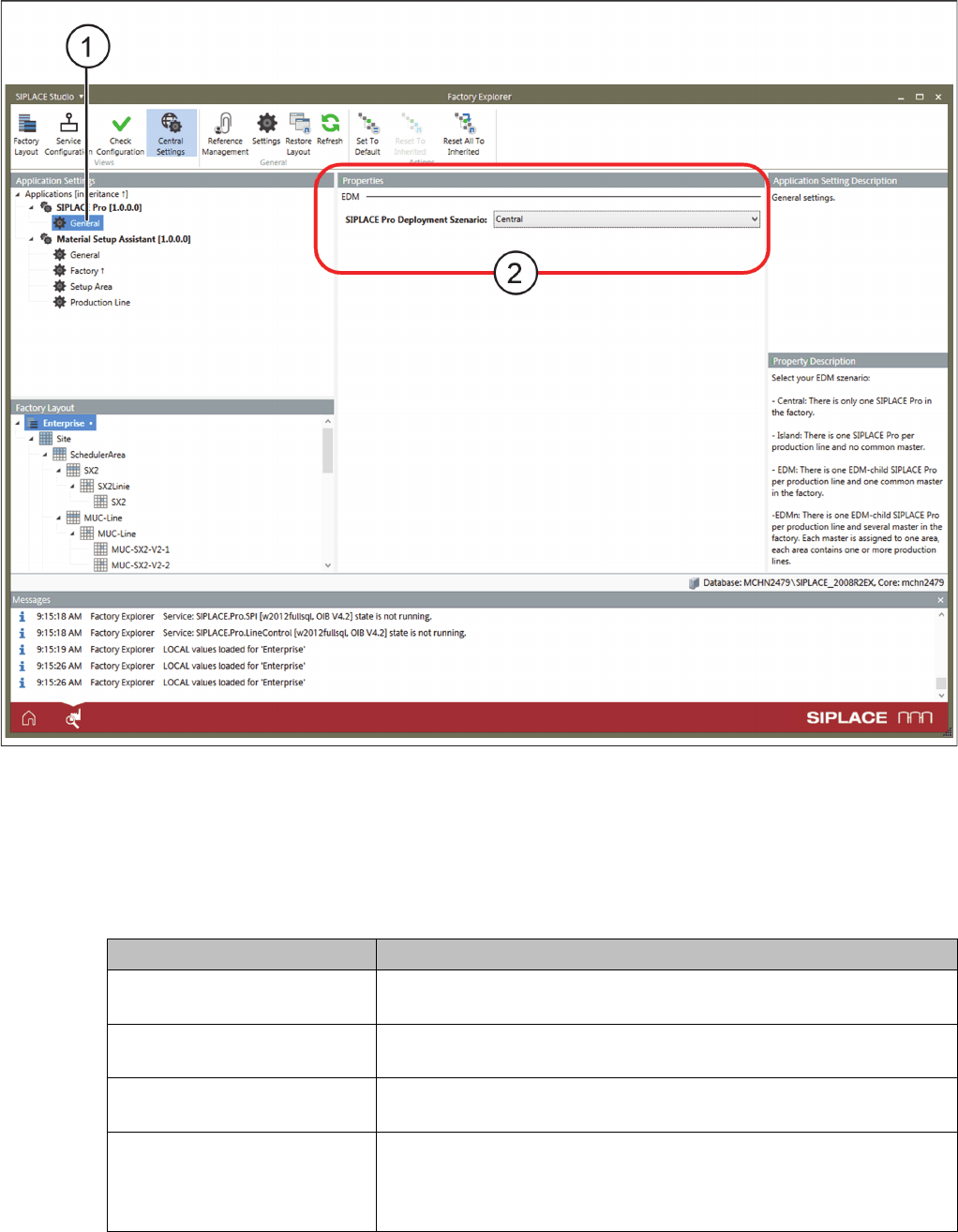
With this setting, you select the EDM scenario of your production.
Application Settings – SIPLACE Pro Adapter - EDM
► Select Central Settings.
⇨ If the ASM Material Manager - full version or the ASM Material Manager for MSA is installed, the
Application Settings => SIPLACE Pro are available in OIB.
► Go to Application Settings and select => SIPLACE Pro => General (1).
► Go to Properties and select the => SIPLACE Pro Deployment Scenario:
Parameters Function
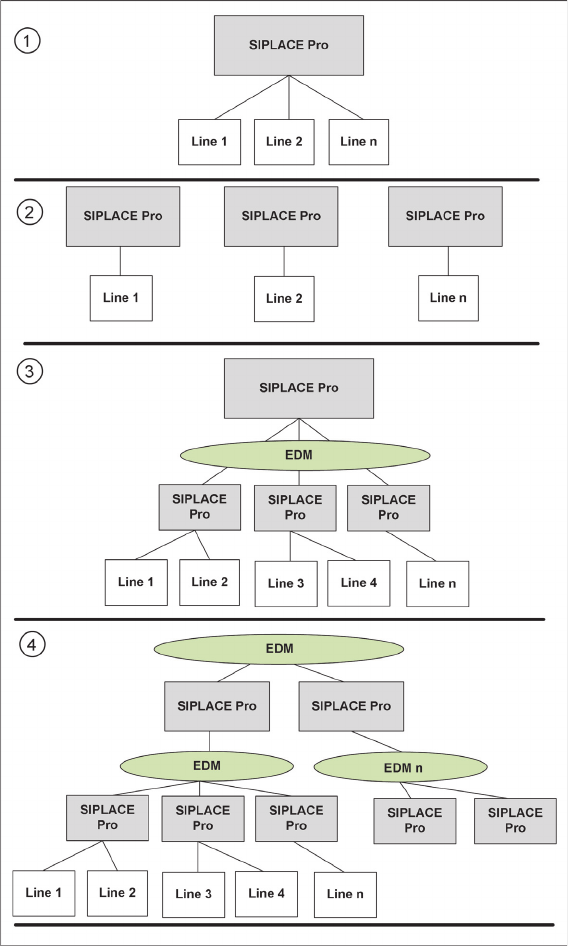
Central There is only one SIPLACE Pro application in the factory. This is the
default configuration without EDM.
Isle There is one SIPLACE Pro application per production line but no com
-
mon master.
EDM In the factory, there is one EDM child of a SIPLACE Pro application
per production line and a common master.
EDMn In the factory, there is one EDM child of a SIPLACE Pro application
per production line and there are several common masters. Each
master is assigned to an area. Each area includes one or more pro
-
duction lines that are assigned to this master.
Configuration
Configuration Settings in ASM OIB
SIPLACE Material Setup Assistant 2.2 SIPLACE Material Setup Assistant 2.2 87
SIPLACE Pro Deployment Scenario - Overview
SIPLACE Pro Deployment Scenario - Overview
1. Central
2. Island
3. EDM
4. EDMn
Configuration
Configuration Settings in ASM Setup Center
88 SIPLACE Material Setup Assistant 2.2 SIPLACE Material Setup Assistant 2.2
3.1.10.2
3.1.10.2 EDM Settings
EDM Settings
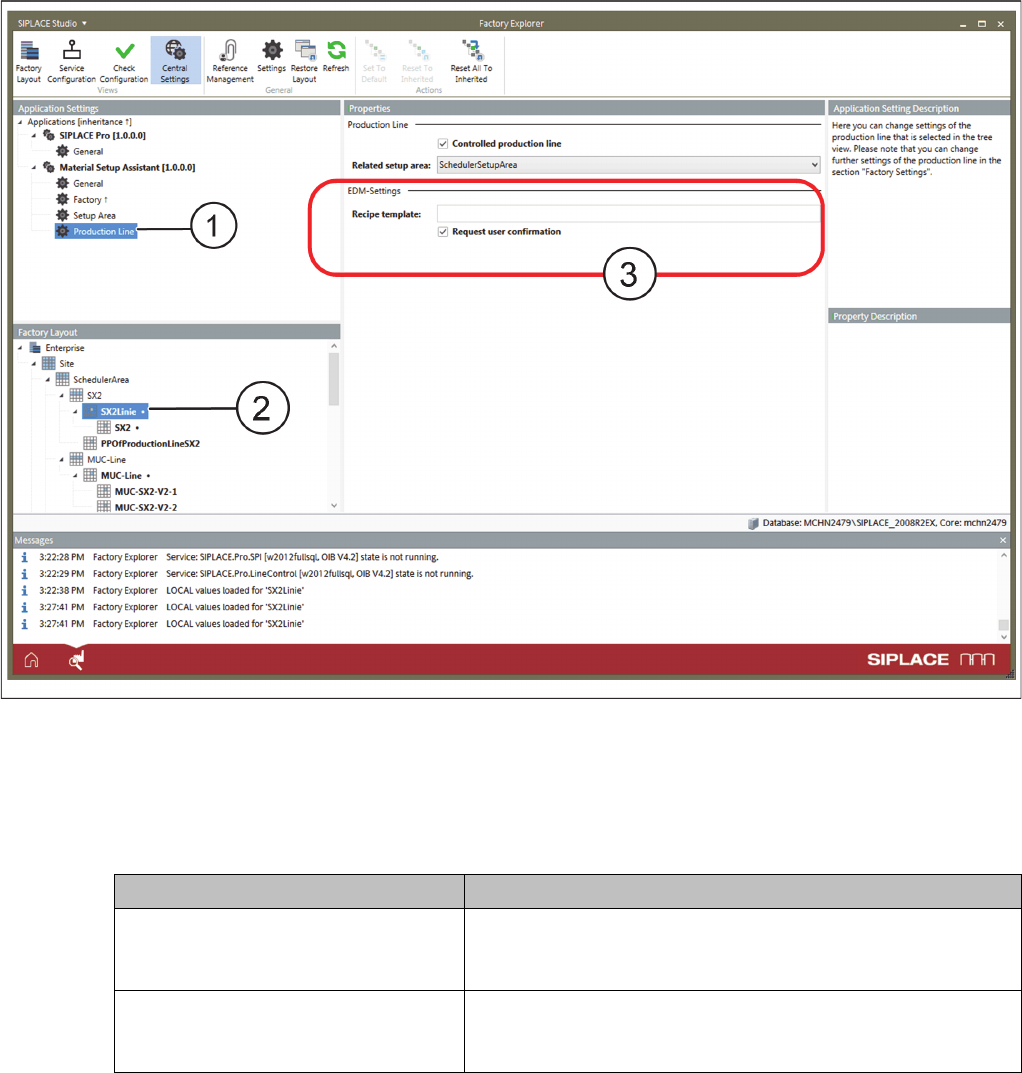
Application Settings: Production Line - EDM Properties
► Go to Application Settings => Material Setup Assistant and select Production Line (1) from the tree
structure.
► Go to Factory Layout (2) and select the production line.
► Go to Properties (3) => EDM and select the appropriate EDM properties.
3.2
3.2 Configuration Settings in ASM Setup Center
Configuration Settings in ASM Setup Center
The SIPLACE Material Setup Assistant (MSA) workflow solution requires ASM Setup Center for the set
-
up preparation. To enable the SIPLACE Material Setup Assistant to communicate and work with ASM
Setup Center, you need to perform the following configurations in ASM Setup Center:
▪ "3.2.1 Configuring Communication with ASM Setup Center" [ ➙ 89]
▪ "3.2.2 Configuring the ASM Setup Center Application" [ ➙ 91]
▪ "3.2.4 Configuring the ASM Setup Center Server" [ ➙ 94]
Parameters Function
Recipe template Enter the EDM template to be used. For detailed information
on EDM and templates, refer to the current User Manual of the
ASM Engineering Data Manager.
Request user confirmation Before the data are pushed by EDM, an update of the EDM
data is requested. A dialog is displayed that must be confirmed
by the user before the data push will be executed.