00198228-02_IM-MaterialSetupAssistant_DE_EN.pdf - 第92页
Configuration Configuration Settings in ASM Setup Center 92 SIPLACE Material Setup Assistant 2.2 SIPLACE Material Setup Assistant 2 .2 Workflow with ASM Material Manager for MS A ► For the workflow wit h ASM Material Man…
Configuration
Configuration Settings in ASM Setup Center
SIPLACE Material Setup Assistant 2.2 SIPLACE Material Setup Assistant 2.2 91
3.2.2
3.2.2 Configuring the ASM Setup Center Application
Configuring the ASM Setup Center Application
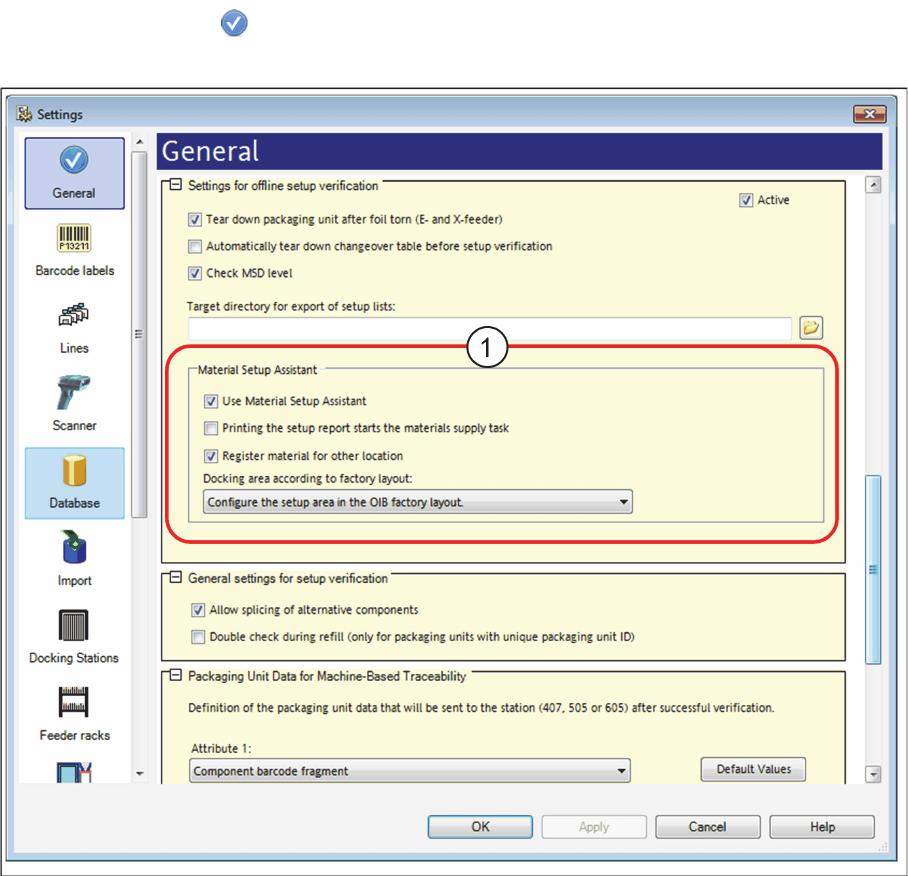
► In the main menu open Extras > Settings and the Settings window will open.
► Select the category General.
⇨ The dialog box General will be shown.
Settings – General
Activating the "setup preparation" view.
► Navigate to Settings for online setup verification.
► Go to Material Setup Assistant (1) and enable the option Use Material Setup Assistant.
⇨ The Setup verification view is now active in ASM Setup Center. This view is used for the Material
Setup Wizard workflow. The tasks waiting and their status are shown. Setup lists can also be printed.
Printing the setup report starts material supply task
Deactivated: Default setting
Activated: The material supply task is automatically set to the status "started" once the setup report is
printed. Thus, SIPLACE Material Setup Assistant is notified that the material supply task has been start
-
ed.
Configuration
Configuration Settings in ASM Setup Center
92 SIPLACE Material Setup Assistant 2.2 SIPLACE Material Setup Assistant 2.2
Workflow with ASM Material Manager for MSA
► For the workflow with ASM Material Manager for MSA, enable the Printing the setup report starts
materials supply task option.
The printout of the setup report is used as the order form for the other material management system
und the customer uses it to start the material procurement. Thus, it is ensured that the material which
is ordered via the setup report is used.
Register material for other location
Option for the workflow with ASM Material Manager for MSA with the scan workflow Sort material.
Disabled: The scan workflow Sort material only records reels for the current location. For packaging units
that are used on other locations, the user receives a hint as to where the packaging unit is used. The
user can freely decide where the packaging unit is to be used.
Enabled: During the scan workflow Sort material, he packaging unit for the other recognized location is
registered and will be taken into account during a recalculation of the material demand.
Assigning the pre-setup area for this Setup Center application
The storage zone for the presetup area must have been created in the factory layout of the Factory Ex
-
plorer. Multiple presetup areas can be present as storage zone within the same production environment.
See also "3.1.2 Defining the Factory Layout" [ ➙ 72].
Docking area according to factory layout shows all the Storage zones for the factory layout.
► Go to Docking area according to factory layout and select the presetup area which is assigned to
this Setup Center application.
Configuration
Configuration Settings in ASM Setup Center
SIPLACE Material Setup Assistant 2.2 SIPLACE Material Setup Assistant 2.2 93
3.2.3
3.2.3 Configuring Feeder Racks
Configuring Feeder Racks
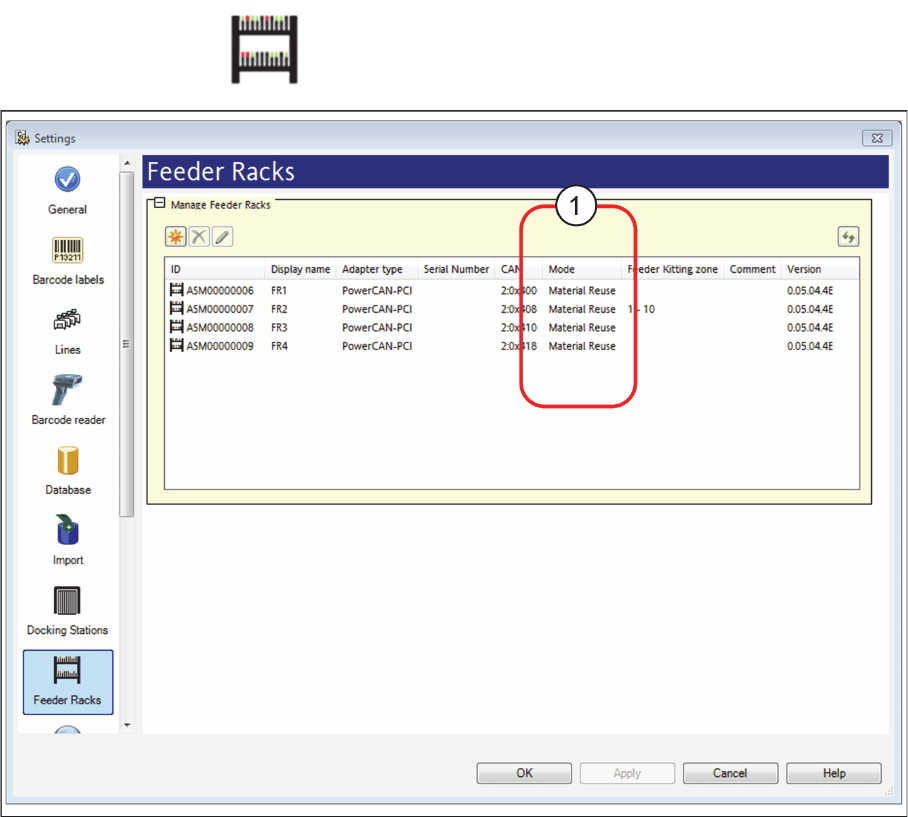
► Go to the main menu and select Extras > Settings to open the Settings window.
► Select the category Feeder Racks and the settings are opened.
Settings - Feeder Rack
► The Material Reuse mode (1) must be activated for the feeder racks used. Correct this setting, if nec
-
essary.
⇨ In connection with the SIPLACE Material Setup Wizard, this feeder rack is used as AFP hardware
in the pre-setup area. In this feeder rack, set-up feeders are parked for a later reuse.
► For detailed information on the configuration of the feeder racks, please refer to the ASM Setup
Center user manual or to the ASM Setup Center online help.