00198228-02_IM-MaterialSetupAssistant_DE_EN.pdf - 第83页
Configuration Configuration Settings in ASM OIB SIPLACE Material Setup Assistant 2.2 SIPLACE Material Set up Ass istant 2.2 83 3.1.7 3 . 1 . 7 C o n f ig u r a t io n s f o r S I P L A C E P r o Configurations f or SIPLA…
Configuration
Configuration Settings in ASM OIB
82 SIPLACE Material Setup Assistant 2.2 SIPLACE Material Setup Assistant 2.2
Settings in OIB - Factory
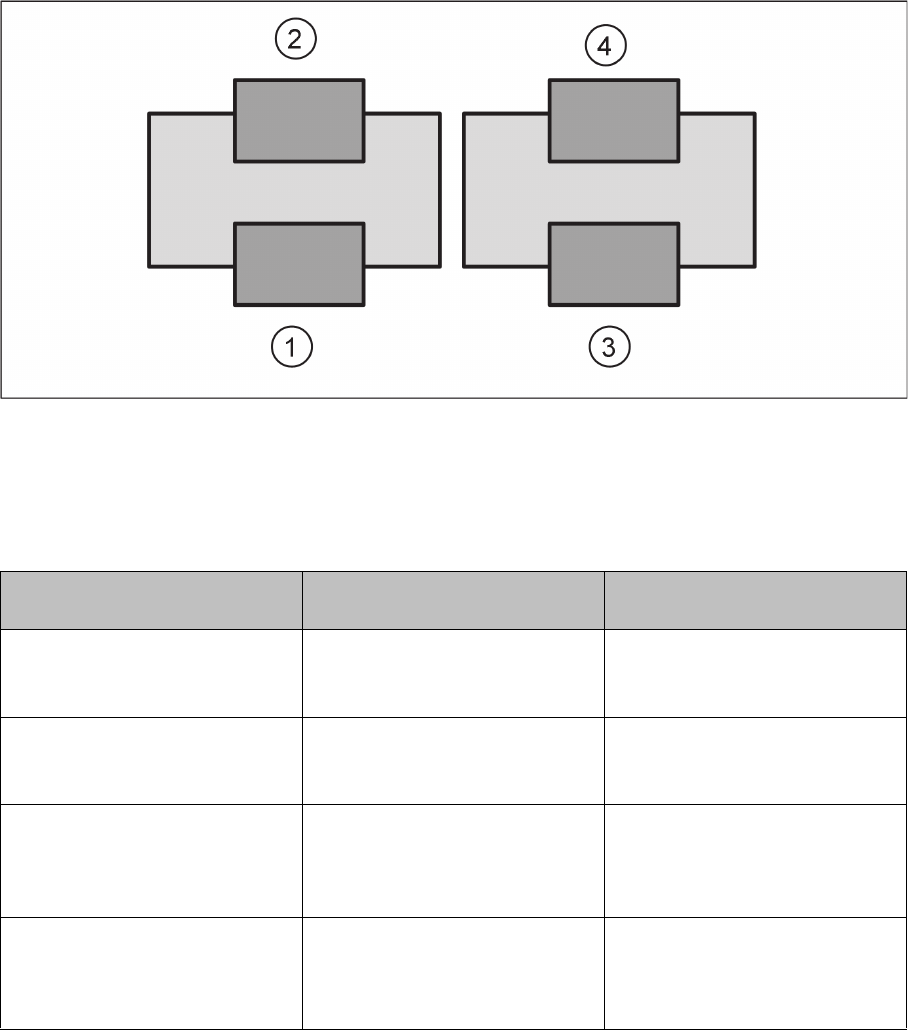
The Request material for fixed setups and constant tables option and the Request refill material option
enforce the following four combination scenarios.
Example: line with two placement machines with two tables each
1. Setup with flexible table (default)
2. Setup with fixed/constant table
3. Setup with flexible table (default)
4. Setup with fixed/constant table
Material for fixed setups and con
-
stant tables
Request refill material Effect
On On ▪ Basic setup at tables 1 to 4.
▪ Refill material is requested
for tables 1 to 4.
On Off ▪ Basic setup at tables 1 to 4.
▪ Refill material is not request
-
ed at tables 1 to 4.
Off On ▪ Basic setup at tables 1 and 3
only.
▪ Refill material is requested
for tables 2 and 4.
Off Off ▪ Basic setup at tables 1 and 3
only.
▪ Refill material is not request
-
ed at tables 1 to 4.
Configuration
Configuration Settings in ASM OIB
SIPLACE Material Setup Assistant 2.2 SIPLACE Material Setup Assistant 2.2 83
3.1.7
3.1.7 Configurations for SIPLACE Pro
Configurations for SIPLACE Pro
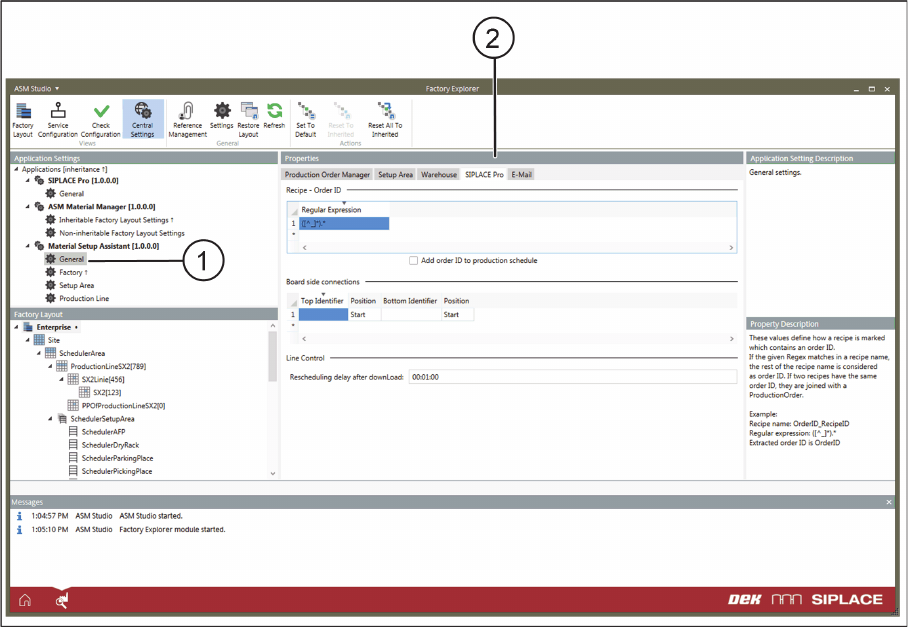
► Select Central Settings.
► Go to Application Settings => Material Setup Assistant and select General (1) from the tree structure.
► Go to Properties and select the SIPLACE Pro (2) tab.
Application Settings – General: Tab - SIPLACE Pro
► Define the following settings.
Recipe - Order ID
With the help of regular expressions, you can define how a recipe which contains a job number is named.
If the regular expression occurs in the name of the recipe, the remaining part of the recipe name will be
understood as the job number. If two recipes have the same job number, these recipes will be compiled
to a production job.
▪ Add order ID to production schedule
– Enabled: The order ID determined by the regular expression is added to the corresponding rec
-
ipe in the production schedule in the SIPLACE Line Control GUI.
Board side connections
If the board descriptions for the top and bottom sides have been divided up in SIPLACE Pro, you can
add the designators for the top and bottom accordingly here. This is helpful in case another two boards
for the top and bottom have been created in SIPLACE Pro.
Line Control
After a download, a new planning is to be made after this time.
Configuration
Configuration Settings in ASM OIB
84 SIPLACE Material Setup Assistant 2.2 SIPLACE Material Setup Assistant 2.2
3.1.8
3.1.8 Setting up E-Mail Messages
Setting up E-Mail Messages
Configuration of an e-mail messaging service is recommended for monitoring and recording errors and
problems. If errors and problems occur, these will be sent by the system to the specified e-mail address.
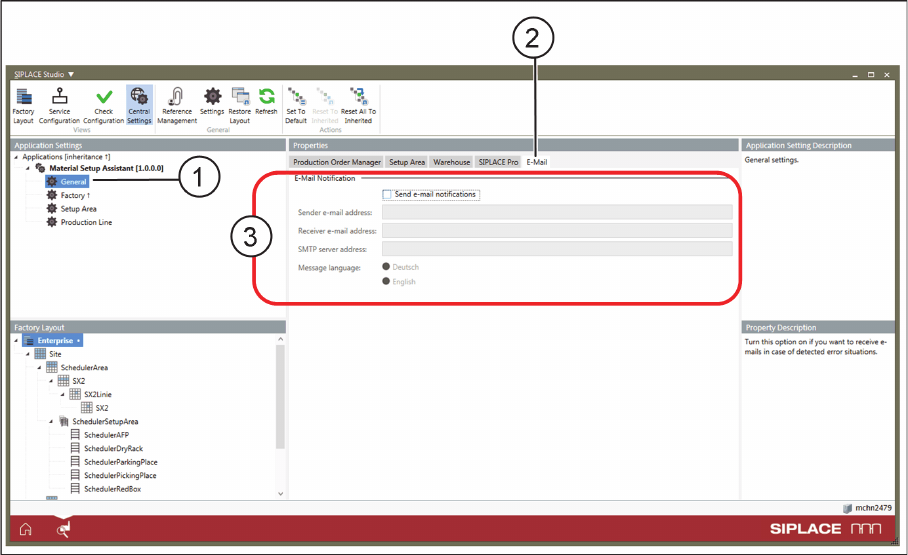
► Select Central Settings.
► Go to Application Settings => Material Setup Assistant and select General (1) from the tree structure.
► Go to Properties and select the E-Mail (2) tab.
Application Settings – General: Tab - E-Mail
► Define the required settings (3).