00198228-02_IM-MaterialSetupAssistant_DE_EN.pdf - 第71页
Configuration Configuration Settings in ASM OIB SIPLACE Material Setup Assistant 2.2 SIPLACE Material Set up Ass istant 2.2 71 ► The Factory Explorer will open. Factory Explorer – Central Settings ► Select Central Settin…
Configuration
Configuration Settings in ASM OIB
70 SIPLACE Material Setup Assistant 2.2 SIPLACE Material Setup Assistant 2.2
3.1.1
3.1.1 Starting the Factory Explorer
Starting the Factory Explorer
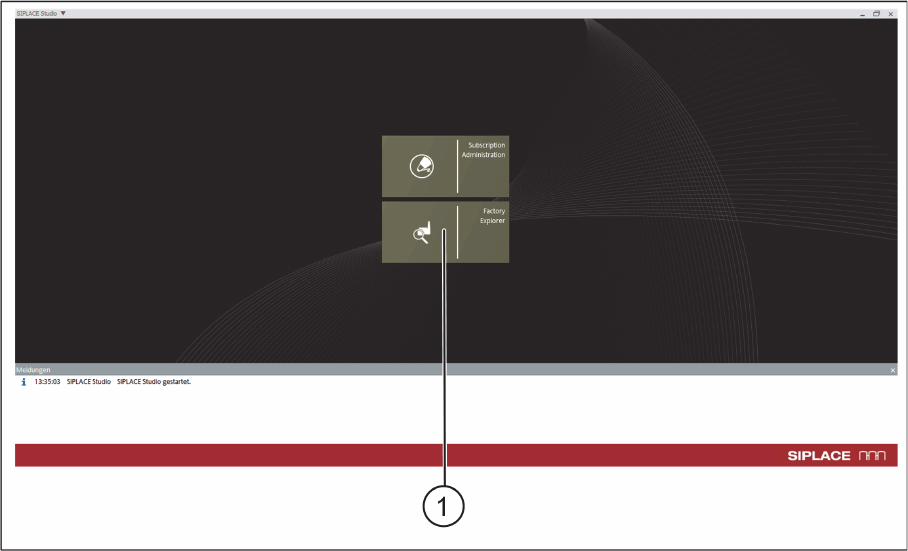
► Go to the ASM Studio and start the Factory Explorer (1) module.
ASM Studio – Start Factory Explorer
Configuration
Configuration Settings in ASM OIB
SIPLACE Material Setup Assistant 2.2 SIPLACE Material Setup Assistant 2.2 71
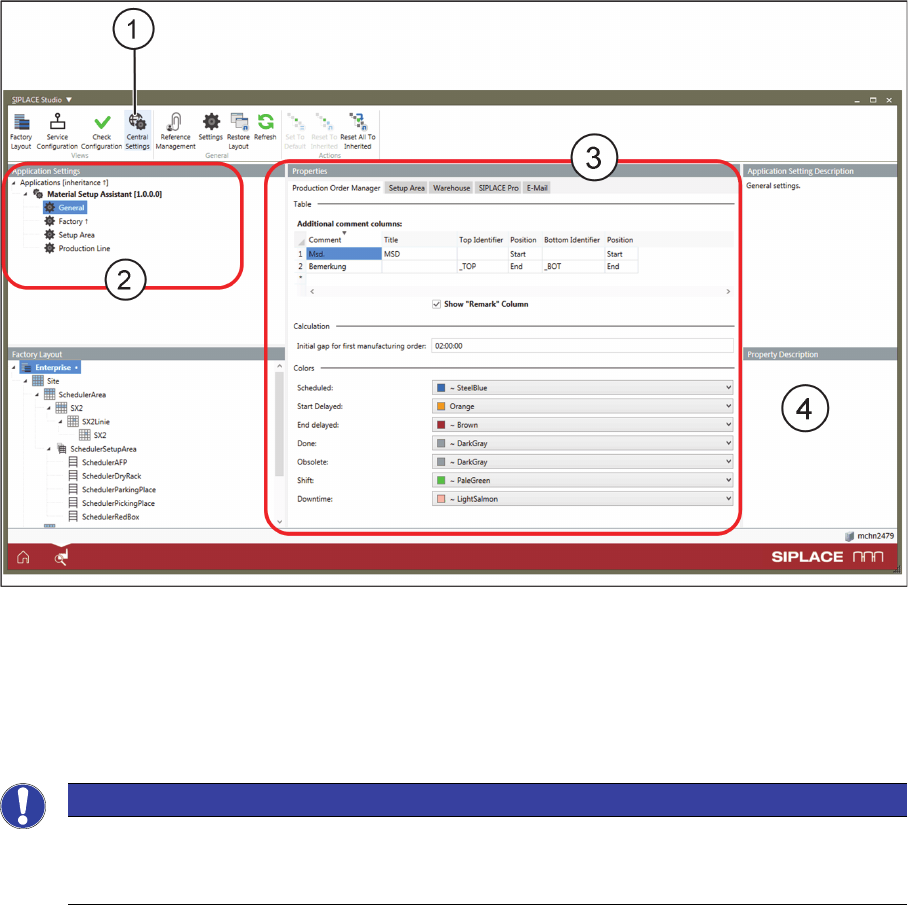
► The Factory Explorer will open.
Factory Explorer – Central Settings
► Select Central Settings (1).
⇨ If the Order Manager is installed, the Application Settings => Material Setup Assistant (2) are avail
-
able in OIB.
► Go to Application Settings => Material Setup Assistant (2) and define the relevant settings for the
corresponding Properties (3).
NOTICE
Help with the settings
Helpful information about the individual parameters and settings is shown on the software in
-
terface at Properties Description (4).
Configuration
Configuration Settings in ASM OIB
72 SIPLACE Material Setup Assistant 2.2 SIPLACE Material Setup Assistant 2.2
3.1.2
3.1.2 Defining the Factory Layout
Defining the Factory Layout
In order for the workflow to be configured in SIPLACE Material Setup Assistant, you need to have a defi
-
nition of your factory layout in the Factory Explorer. The description and elements of a factory layout are
based on the ISA-95 standard.
Elements required for the Material Setup Assistant Workflow
To ensure that the material flow in the SIPLACE Material Setup Assistant works with reuse, you need to
define additional elements in the factory layout. You also need to have these elements in the ASM Ma
-
terial Manager.
▪ In the presetup area:
– AFP
The Active Feeder Pool (AFP) serves as a temporary warehouse for parking feeders in the pre
-
setup area for reuse later on. Feeder racks are used as AFP hardware. In addition, docking sta
-
tions with changeover table can be used as AFP hardware.
– REDBOX
The REDBOX is a container for storing torn-down materials, which should remain in the presetup
area as the feeder is needed.
▪ For the line:
– PickingPlace (PIP)
Working area in which the materials for production are delivered to the line.
– ParkingPlace (PAP)
Working area which serves as intermediate storage at the line.
WARNING
Factory layout in accordance with the ASM Material Manager
The factory layout for the SIPLACE Material Setup Assistant must correspond to the factory lay
-
out of the ASM Material Manager. The element names must be identical!
➢ Make sure that the factory layout and the element names are identical in both systems.
► For a description of the individual elements, refer to the user manual for the ASM Material
Manager.
German [item no. 00197586-xx]
English [item no. 00197587-xx]
NOTICE
Creating elements in the Factory Explorer
For details of how to create elements in the Factory Explorer, refer to the Online Help for the
Factory Explorer.