46230812.pdf - 第39页
Page 37 TECHNICAL PUBLICATIONS DH Positioning System Assembly , P/T T46230812 Rev . D This Document Supports Assembly 46230812 6. If the desired axes in the Axes to Display area of the screen are not selected, refer to t…
Page 36
TECHNICAL PUBLICATIONS
T46230812 Rev. D DH Positioning System Assembly, P/T
This Document Supports Assembly 46230812
X-Y Axes Limit Switch Adjustments
Purpose:
When activated, the X and Y limit switches prevent the tables from being
driven into their mechanical limits. The Y limit switches and X limits
switches are all made by separate actuators.
Prerequisites:
X and Y Axes Encoder Adjustments
Machine palmed down
Adjustment Procedures:
1. Manually position the head tooling on the insertion head to the up
position to prevent damage to the insertion tooling during positioning
system movements.
2. Palm the machine up and push the INTLK RESET push button.
3. Activate the IM Diagnostics as follows. Refer to the IM-UPS and IM
Diagnostics documentation for specific details relating to the operation
of the machine terminal.
Select the IM Diagnostics icon.
When the machine is in the IM Diagnostics function, power is provided to
the machine. Exercise caution when performing the following
procedures to avoid Injury to personnel and equipment.
4. After the IM Diagnostics has completed its initialization, select the
following. Machine Setup>Critical Axis Positions
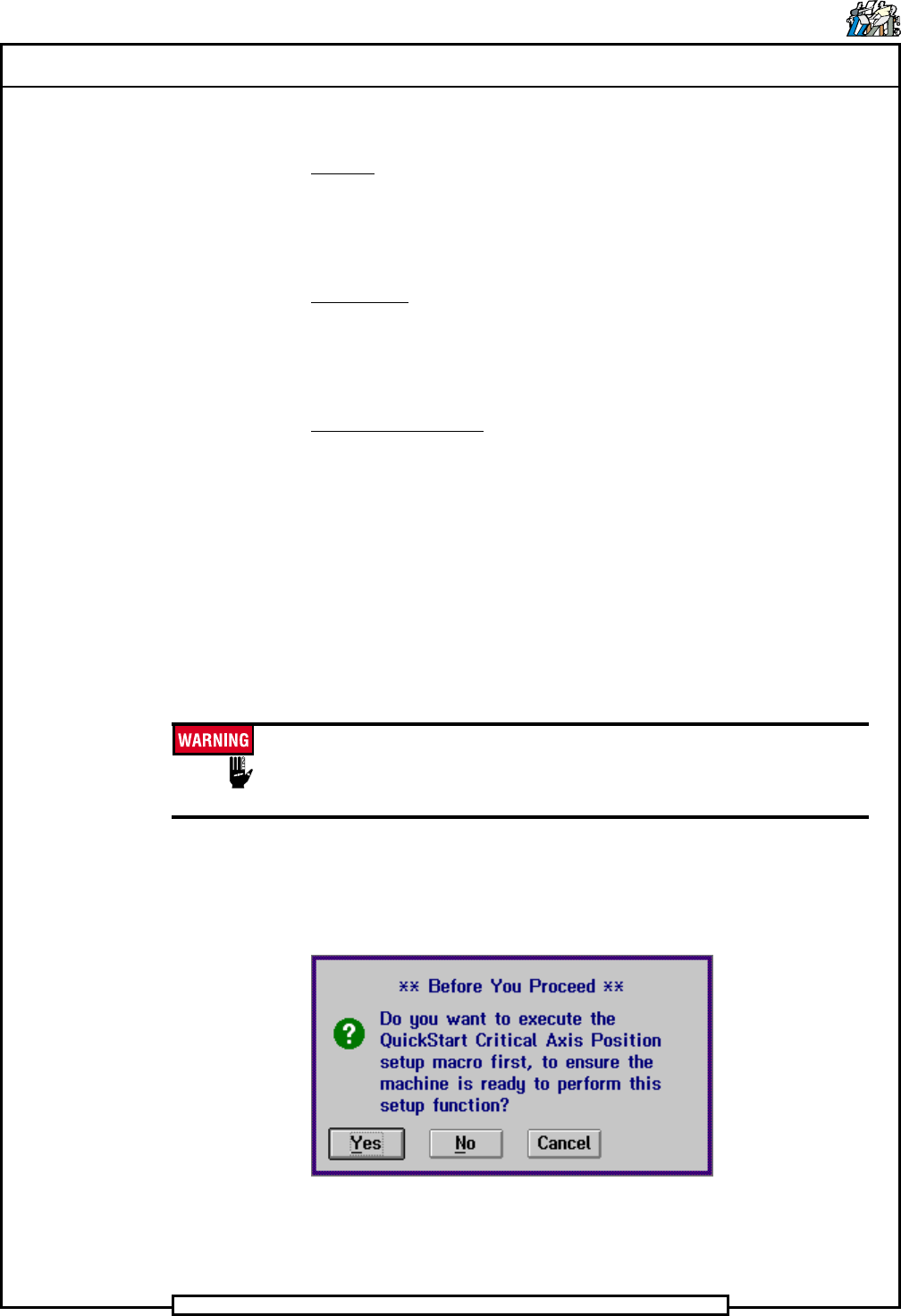
The following message is displayed.
5. Click on Yes. This zeros all axes.
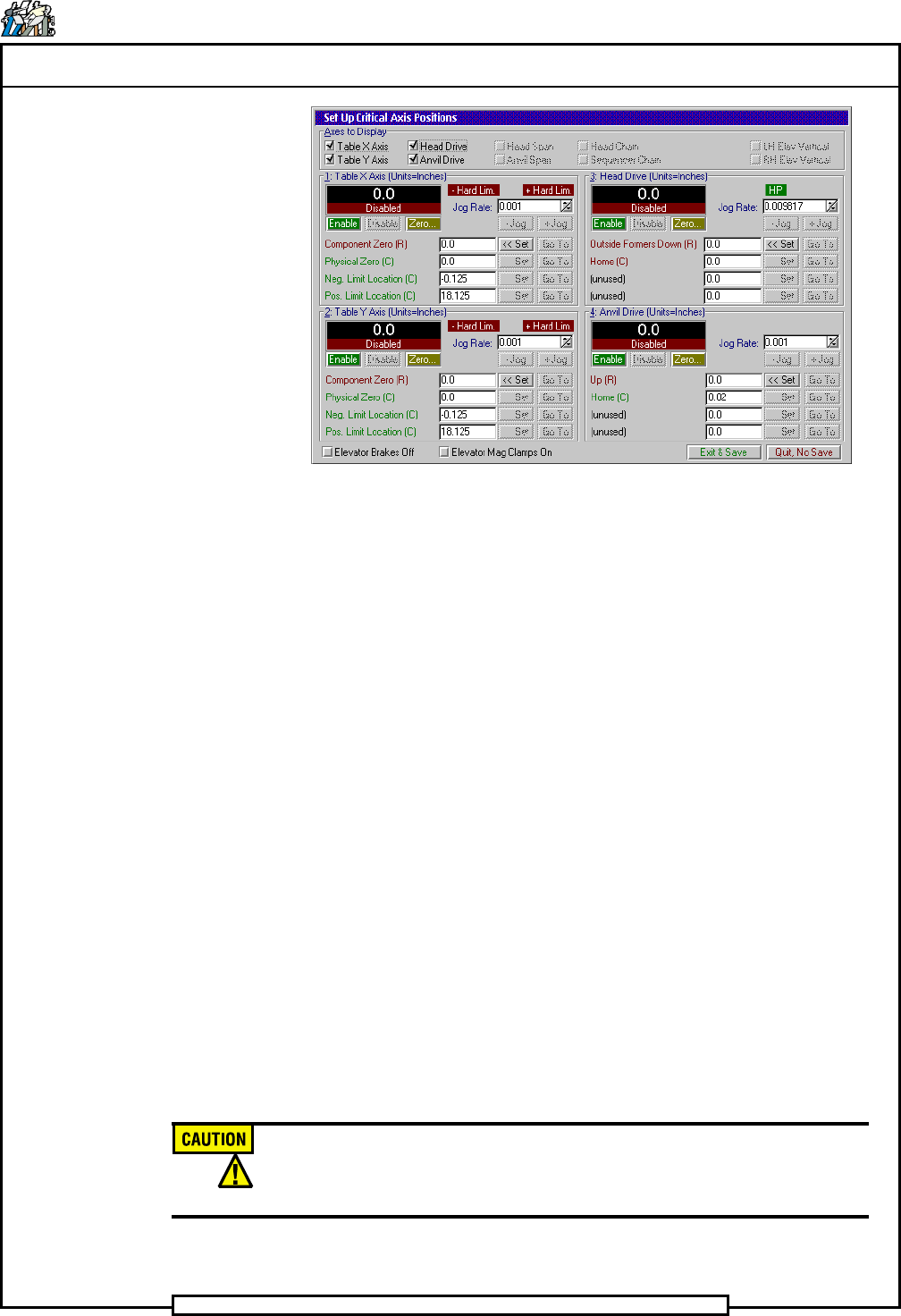
The Set Up Critical Axis Positions screen is displayed.
Page 37
TECHNICAL PUBLICATIONS
DH Positioning System Assembly, P/T T46230812 Rev. D
This Document Supports Assembly 46230812
6. If the desired axes in the Axes to Display area of the screen are not
selected, refer to the Critical Axes Position section of the IM
Diagnostics document for information on selecting the desired axes.
7. Select the desired axes to be adjusted, then proceed as follows for each
specific limit adjustment.
X Axis Negative Limit
1. In the Table X Axis section, click on the value (-0.125) in the entry
field then select Go To.
2. The X axis will move at a set speed to the negative axis position.
3. Depending on the limit actuator position, one of the following occurs.
a. The limit actuator fails to contact the limit switch. In this case,
move the limit switch actuator until the negative limit just
actuates, then secure the actuator. Zero the axis and select Go
To again to verify the correct limit position.
b. A negative hard limit occurs, the Hard Limit indicator is
displayed. In this case, move the actuator block slightly away
from the limit switch then repeat steps 1 through 3.
4. The value in the display field, at the end of this procedure, should be
between -0.105 and -0.145.
Do not move the negative limit actuator excessively. Excessive
movement will disrupt the zero position of the axis and may require axis
encoder adjustment.
End of procedure.
Page 38
TECHNICAL PUBLICATIONS
T46230812 Rev. D DH Positioning System Assembly, P/T
This Document Supports Assembly 46230812
X Axis Positive Limit
1. In the Table X Axis section, click on the value (18.125) in the entry
field then select Go To.
2. The X axis will move at a set speed to the positive axis position.
3. Depending on the limit actuator position, one of the following occurs.
a. The limit actuator fails to contact the limit switch. In this case,
move the limit switch actuator until the positive limit just
actuates, then secure the actuator. Zero the axis and select Go
To again to verify the correct limit position.
b. A negative hard limit occurs, the Hard Limit indicator is
displayed. In this case, move the actuator block slightly away
from the limit switch then repeat steps 1 through 3.
4. The value in the display field, at the end of this procedure, should be
between 18.105 and 18.145.
End of procedure.
Y Axis Negative Limit
1. In the Table Y Axis section, click on the value (-0.125) in the entry
field then select Go To.
2. The Y axis will move at a set speed to the negative axis position.
3. Depending on the limit actuator position, one of the following occurs.
a. The limit actuator fails to contact the limit switch. In this case,
move the limit switch actuator until the negative limit just
actuates, then secure the actuator. Zero the axis and select Go
To again to verify the correct limit position.
b. A negative hard limit occurs, the Hard Limit indicator is
displayed. In this case, move the actuator block slightly away
from the limit switch then repeat steps 1 through 3.
4. The value in the display field, at the end of this procedure, should be
between -0.105 and -0.145.
Do not move the negative limit actuator excessively. Excessive
movement will disrupt the zero position of the axis and may require axis
encoder adjustment.
End of procedure.