46230812.pdf - 第48页
Page 46 TECHNICAL PUBLICATIONS T46230812 Rev . D DH Positioning System Assembly , P/T This Document Supports Assembly 46230812 32. Install the two tooling pin arm assemblies to the tooling housings using the two 6 - 32 x…
Page 45
TECHNICAL PUBLICATIONS
DH Positioning System Assembly, P/T T46230812 Rev. D
This Document Supports Assembly 46230812
28. Install the shaft assembly to the rotary table ensuring the torsion
springs properly engage the rotary table as shown. Secure the left
bearing block to the rotary table using the two 10 - 32 x 7/8 cap screws.
Align the right bearing block squarely to the rotary table then secure it
in place using the two 10 - 32 x 7/8 cap screws.
29. Assemble the collar clamp and shaft spacer to the left end of the shaft
so the retaining ring and shaft spacer are located firmly against their
respective bearing blocks. There should be no lateral movement of the
shaft.
Squaring the bearing blocks to the rotary table provides a coarse
adjustment that will be finely adjusted at the board handling final set up
procedure.
30. Install the two tooling pin housings to the tooling plate using the four 6
- 32 x 3/8 button head screws.
Location of the tooling pin housings on the tooling plate will be determined
at the final set up procedure.
31. Attach the two tooling pins to the two tooling arms using the two 5 -
40 x 1/4 cap screws.
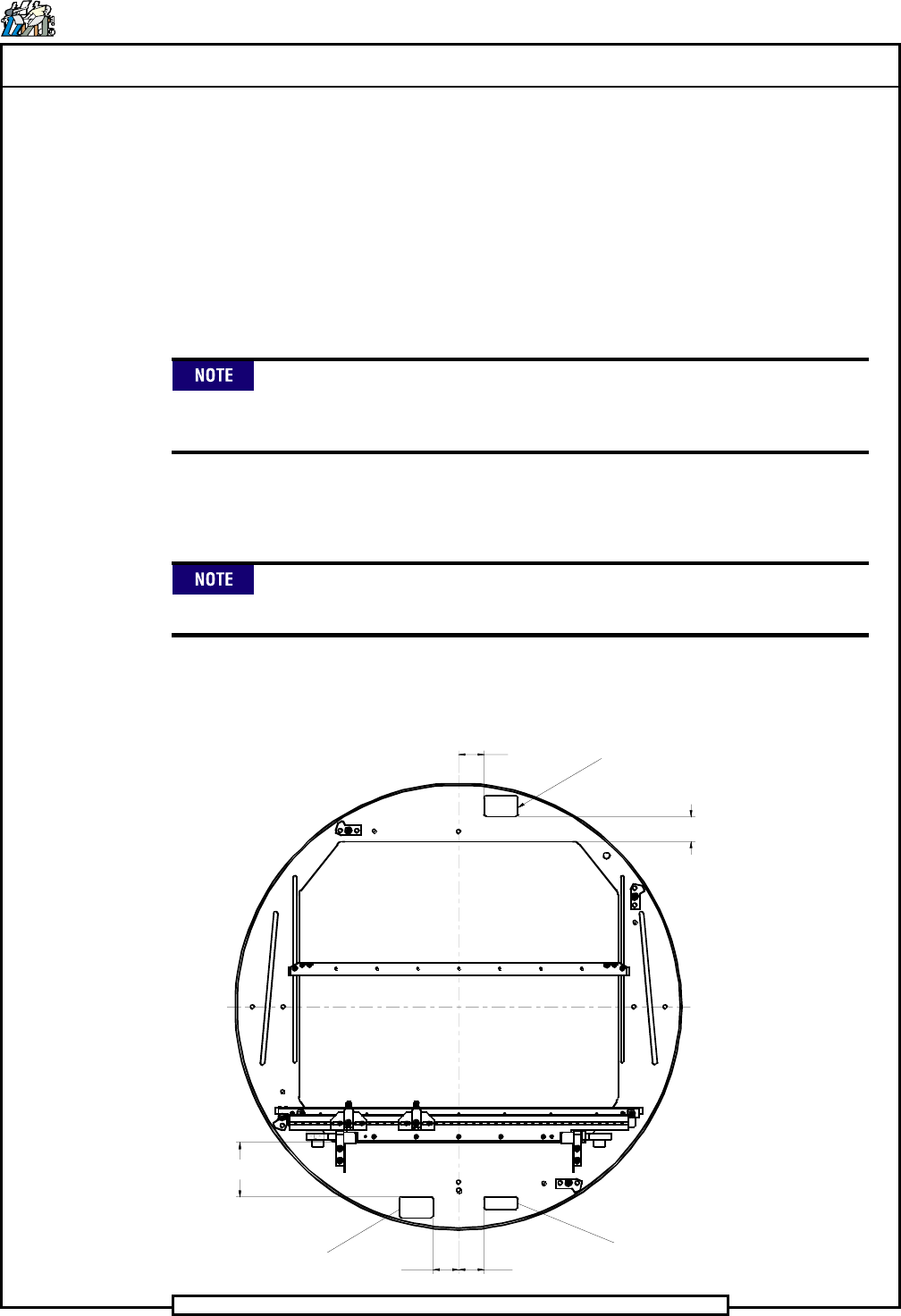
1.500
Safety Label
1.470
Safety Label
1.500
1.500
Front Label
2 x 3.220
Page 46
TECHNICAL PUBLICATIONS
T46230812 Rev. D DH Positioning System Assembly, P/T
This Document Supports Assembly 46230812
32. Install the two tooling pin arm assemblies to the tooling housings
using the two 6 - 32 x 3/16 button head screws and washers.
33. If necessary, install the two safety labels and the front label to the
rotary table at the positions shown.
Two different size tooling pins are supplied with the board handling
system. The standard tooling pin, UIC # 45810401, is supplied
assembled to the locators. The standard tooling pin is used for datum
holes .110 inch (2,8mm) to .187 inch (4,75mm) in diameter. The large
tooling pin, UIC # 45810402, is supplied in a bag attached to the
workboard holder. The large tooling pin is used for datum holes .188
inch (4,76mm) to .250 inch (6,35mm) in diameter.
End of procedure
Actuator Assembly Disassembly/Assembly
1. Remove two 10 - 32 x 5/8 cap screws securing the front board guide to
the plate and remove the front board guide.
2. Remove two shoulder screws that secure the left switch assembly to the
plate and remove the left switch assembly. Perform the same for the
right switch assembly.
3. If necessary, remove the shoulder screws, compression springs and 10 -
32 x 3/4 set screw from each switch bracket.
4. On the left switch assembly remove the two 8 - 32 x 7/8 flat head
screws that secure the strap and sensor switch to the left switch bracket
and remove the strap and switch. Perform the same for the right switch
assembly.
5. Remove the two 6 - 32 x 3/4 cap screws that secure the strap to the air
cylinders and remove the strap.
6. Remove the two 10 - 32 x 5/8 cap screws that secure the left air
cylinder assembly to the plate and remove the left air cylinder
assembly. Perform the same for the right air cylinder assembly.
7. Remove the 10 - 24 x 5/8 cap screw that secures the actuator to the left
air cylinder and remove the actuator. Perform the same for the right air
cylinder assembly.
8. Remove the two 10 - 24 x 1/2 cap screws that secure the cylinder
bracket to the left air cylinder and remove the bracket. Perform the
same for the right air cylinder assembly.
Page 47
TECHNICAL PUBLICATIONS
DH Positioning System Assembly, P/T T46230812 Rev. D
This Document Supports Assembly 46230812
9. If necessary, remove the three male elbows and the straight fittings
from the air cylinders.
10. Inspect all parts for wear or damage and replace as necessary.
11. Install the male elbow and straight fitting to the left air cylinder, as
shown, and label them 107 and 106 respectively. Install the two male
elbow fittings to the right air cylinder, as shown, and label them 107
and 106 respectively.
12. Install the cylinder bracket to the left air cylinder using the two 10 - 24
x 1/2 cap screws. Perform the same for the right cylinder and cylinder
bracket.
13. Loosely install the left actuator to the left air cylinder piston. Rotate
the actuator counter clockwise until the flats on the piston shaft contact
the grove on the actuator then tighten the cap screws. Perform the
same for the right actuator and right air cylinder.
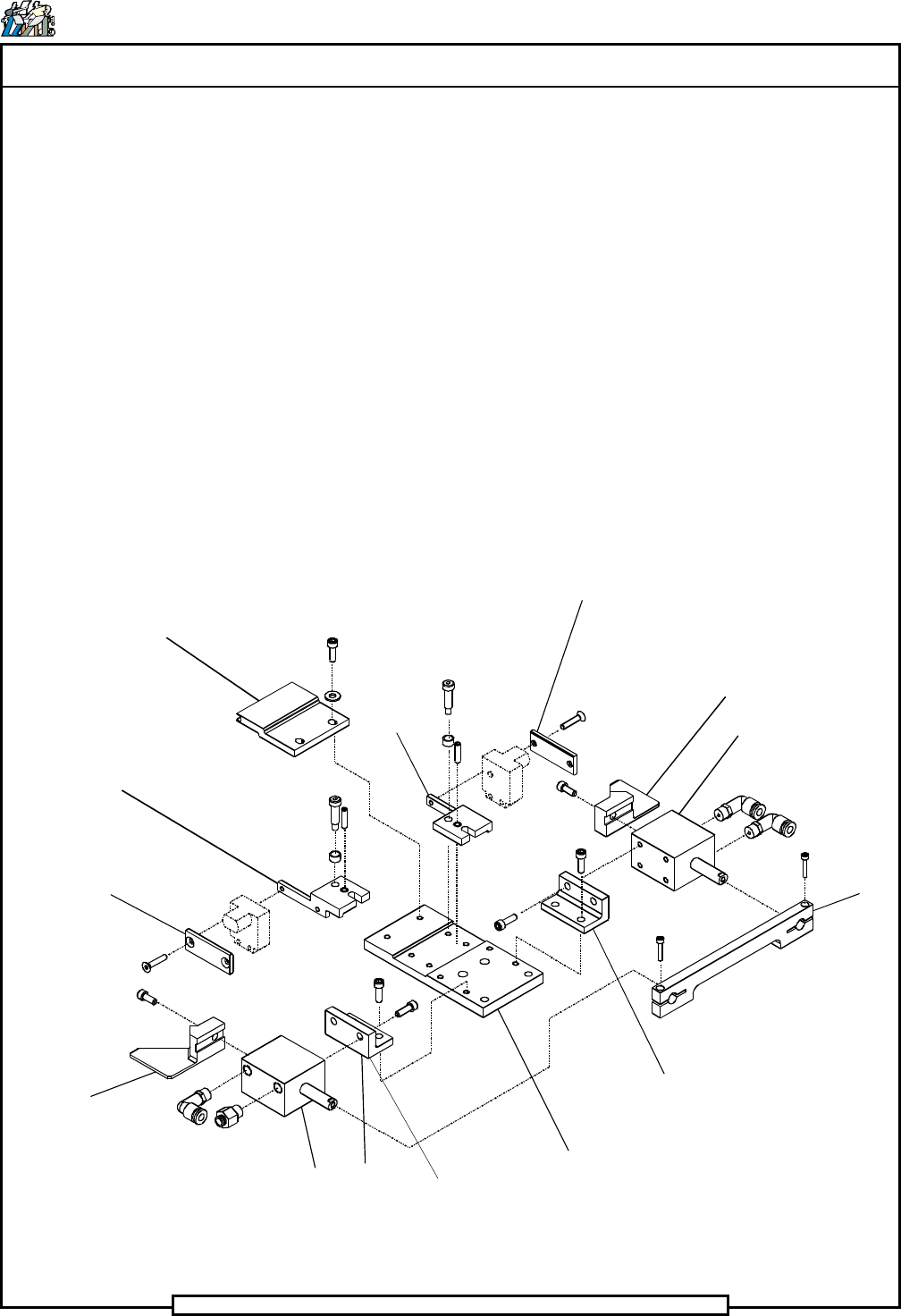
Front Board Guide
Switch Bracket
Strap
Actuator
Air Cylinder
Cylinder Bracket
Plate
Cylinder Bracket
Strap
Air Cylinder
Actuator
Switch
Bracket
Strap