CP-65-09.pdf - 第3页
U s i n g t h e P a r t s L i s t 2 / 2 基本的な使用方法 B a s i c o p e r a t i o n BACK T OP パーツリスト使用方法 2 / 2 T OP 2 . P l a c i n g h e a d , d r u m ( W P H ) 1 . N o z z l e s ( W P H ) クリック C l i c k ⑪ クリックして 目的のページヘ C l i…
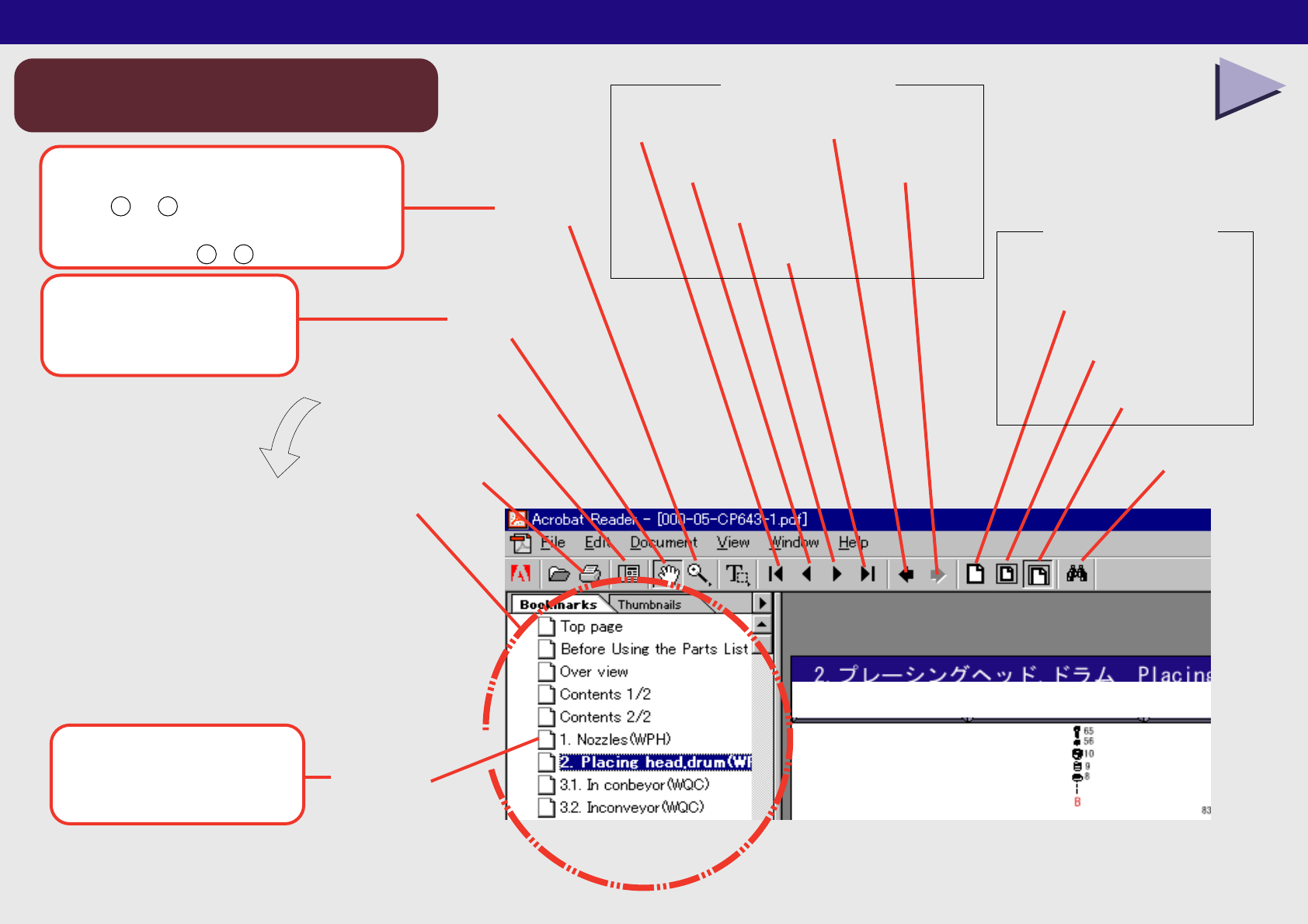
最終ページ
次ページ
前ページ
先頭ページ
手のひらツール
拡大ツール
Last Page
前の画面
Go to Previous View
次の画面
Go to Next View
検索
Find
Next Page
Previous Page
First Page
Zoom in Tool
印刷
Print
Hand Tool
パレットの表示/非表示
しおり
Bookmarks
Show/Hide Navigation Pane
パレット
Navigation Pane
幅に合わせる
Fit Width
全体表示
Fit in Window
実際の大きさ
Actual Size
ウインドウ操作
ページ操作
Using the Parts List 1/2
パーツリスト使用方法 1/2
A:
Using the Parts List
B:
Acrobat Reader Operation
C:
Used to enlarge or reduce the view. Hold down [Shift] and [Z], and press ei
ther [+] or [-] to change.
D:
Used to click the links and scroll the document.
E:
Click to display the contents of each link.
F:
Page navigation tools
G:
H:
Basic operation
I:
Click to display the machine overview.
J:
Click to display the component unit
K:
Click
L:
Select the required area.
M:
Check the part number.
N:
Select one.
O:
Click
P:
The page list displays.
Q:
Click to jump to the required page.
R:
The part information displays.
以上で、宜しくお願いします。
アクロバットの使い方
Acrobat Reader Operation
Page navigation tools
Window tools
ボタンをクリックする時と
画面を移動する時に使います。
クリックすると各ユニット図へ
ジャンプします。
画面を拡大縮小する時に使います。
[Shift] + [Z] で + と − が切り替わります。
Used to enlarge or reduce the view.
Hold down [Shift] and [Z], and press
either + or - to change.
Used to click the links
and scroll the document.
Click to display
the contents of each link.
NEXT
Using the Parts List 2/2
基本的な使用方法
Basic operation
BACK TOP
パーツリスト使用方法 2/2
TOP
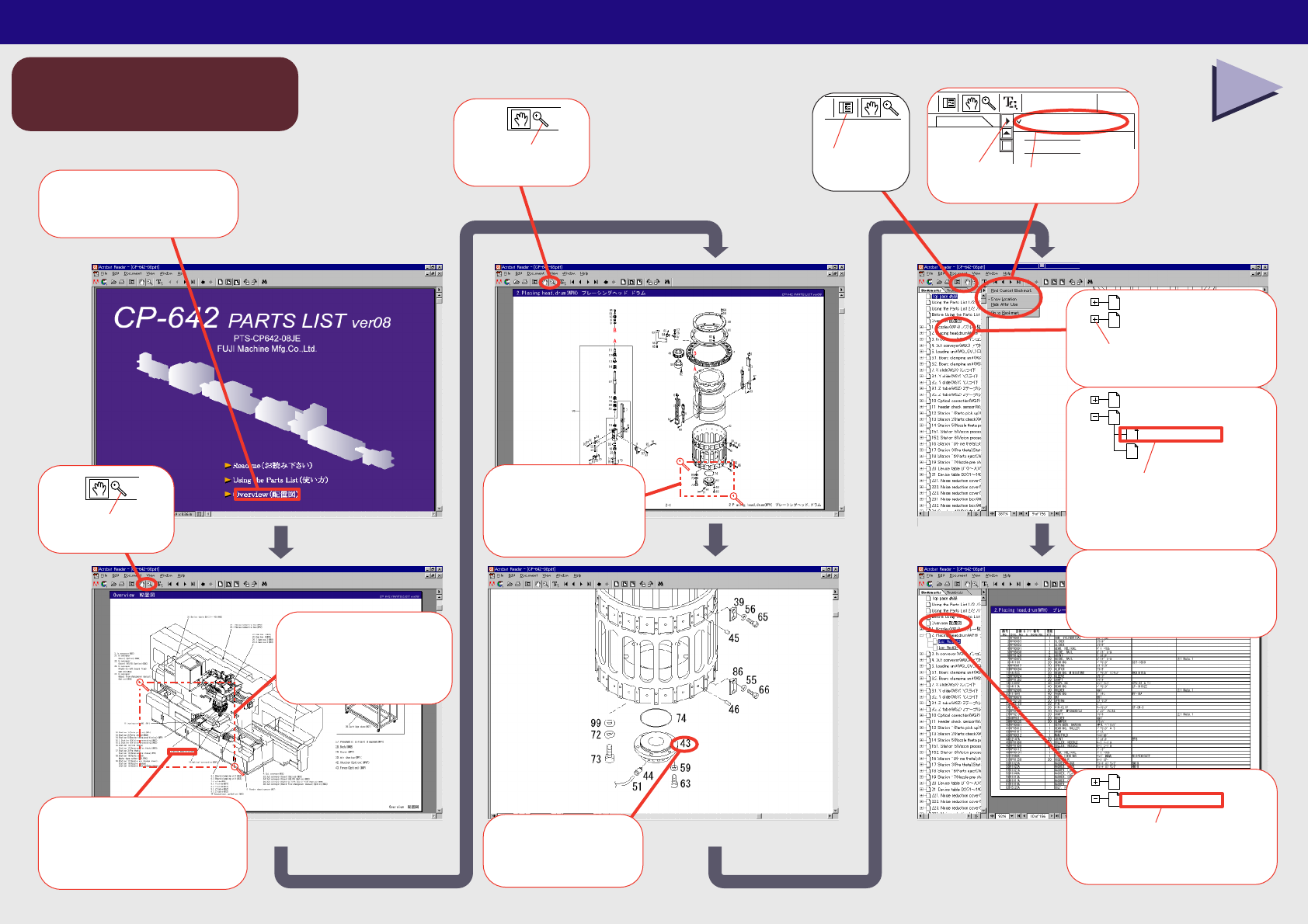
2.Placing head,drum(WPH)
1. Nozzles(WPH)
クリック
Click
⑪
クリックして
目的のページヘ
Click to jump to
the required page.
2.Placing head,drum(WPH)
1. Nozzles(WPH)
List No.1-56
List No.57-98
⑫
クリック
Click
⑤
目的の部品附近を
ドラッグ
Select the
required area.
⑥
クリックして
ユニット図へ
Click to display
the component unit
④
目的のユニット附近を
ドラッグ
Select the
required area
③
クリック
Click
②
クリックして配置図へ
Click to jump to
the Overview
①
Find Current Bookmark
Click
⑩
Bookmarks
クリック
Click
⑨
クリック
部品の情報が表示されます。
The part
information
displays.
⑬
部品の情報が表示されます。
◆The part information displays.
クリックして配置図ヘ
Click to jump to
the Overview.
Overview 配置図
Before Using the Parts List
⑭
Find Current Bookmark
クリック
Click
⑧
部品番号を確認
Check the
part number.
⑦

納入後第三者への転売をお考えの際には、必ず事前に弊社へご連絡下さい。
Consult FUJI beforehand if you are considering selling
this equipment to a third party after it has been installed.
パ−ツリストをご利用される前に
1.部品は、図番、コ−ド番号、個数、品名、および規格で発注下さい。
この発注方法以外で発注された場合は発注部品に間違いが生じる恐れがあります。
2.本パ−ツリストは改良のため予告なく変更することがあります。
3.リスト左端の番号が抜けて順番に記載されていない箇所がありますが、これは記載モレや作成途中ではなく
今まで使用していた部品が設計変更により使用されなくなり表から削除されたものです。同時にイラスト内の部品も削除されています。
4.ボルト類,ナット類およびワッシャ類などは種類のみ記載してあります。それぞれの個数は記載せず空欄となっています。
図面原稿 : 2001年 6月
09JE発行 : 2001年 7月
Before Using the Parts List
1. Specify a part number, code number, quantity, part name and rating when ordering parts.
2. This parts manual is subject to change without notice.
3. There are cases where there are no numbers in the left hand column of the parts list. This is not because they were omitted or
the list is incomplete but because the parts to which the numbers applied were eliminated due to a design change.
In such cases the parts have also been removed from the figures.
4. Only the part types are described for nuts, bolts and washers. The quantity column is left blank.
Blueprints created : JUN 2001
09JE released : JUL 2001
5.設計変更した部品(図番の下一桁をカウントアップした部品)は設計変更前の部品と互換です。
しかし、設計変更前の部品は設計変更後の部品と互換であるとは限りません。
例:ABC1231はABC1230と互換であるが、ABC1230がABC1231と互換であるとは限りません。
5. A redesigned part (the last digit of the part number is incremented) is compatible with a part before the redesign.
However,the original part is not always compatible with the revised part,e.i.,ABC1231 is compatible with ABC1230,but
ABC1230 is not always compatible with ABC1231.
TOP