QP132三级参考手册.pdf.pdf - 第88页
6.2.6 T Mark Reference on Y Direction and Mark Reference V alue X Note: Measuring the positions of the Heat Expansion jig attached to each head. 1. Press [SET] → [MANUAL] → [VISION] → [ADJUST] → [GET ACQ] → [DISPLAY] to …
6.2.4 Nozzle Bend
Note: This measures nozzle bend and does not replace the Proper data.
1. [SET] → [MANUAL] → [NOZZLE] → [CALIB. CNTR] → [In turn meas]
or [Simult meas] → [EXECUTE] → Enter a starting PM No. and final PM
No. → START.
6.2.5 Nozzle_D Offset
Note: Calibrate the offset value for nozzles B, C and D from reference nozzle A, and the offset
value from nozzle F to nozzle E.
Camera Center and Nozzle Center must be measured before this calibration. The offset
between nozzles use the Nozzle Center value as reference.
1. Attach 1.3 diameter nozzle to each holder.
2. Press [SET] → [PROPER] → ID No. → [PM] → select the module →
[FINISH] → [Part Camera] → [OFF SET] → [EXECUTE] to activate auto-
calibration.
Chapter 6
6.2 Measuring Parts Camera Proper Data and Adjustment
Edition 1.1 6-7 QP-132 Level 3 Tutorial
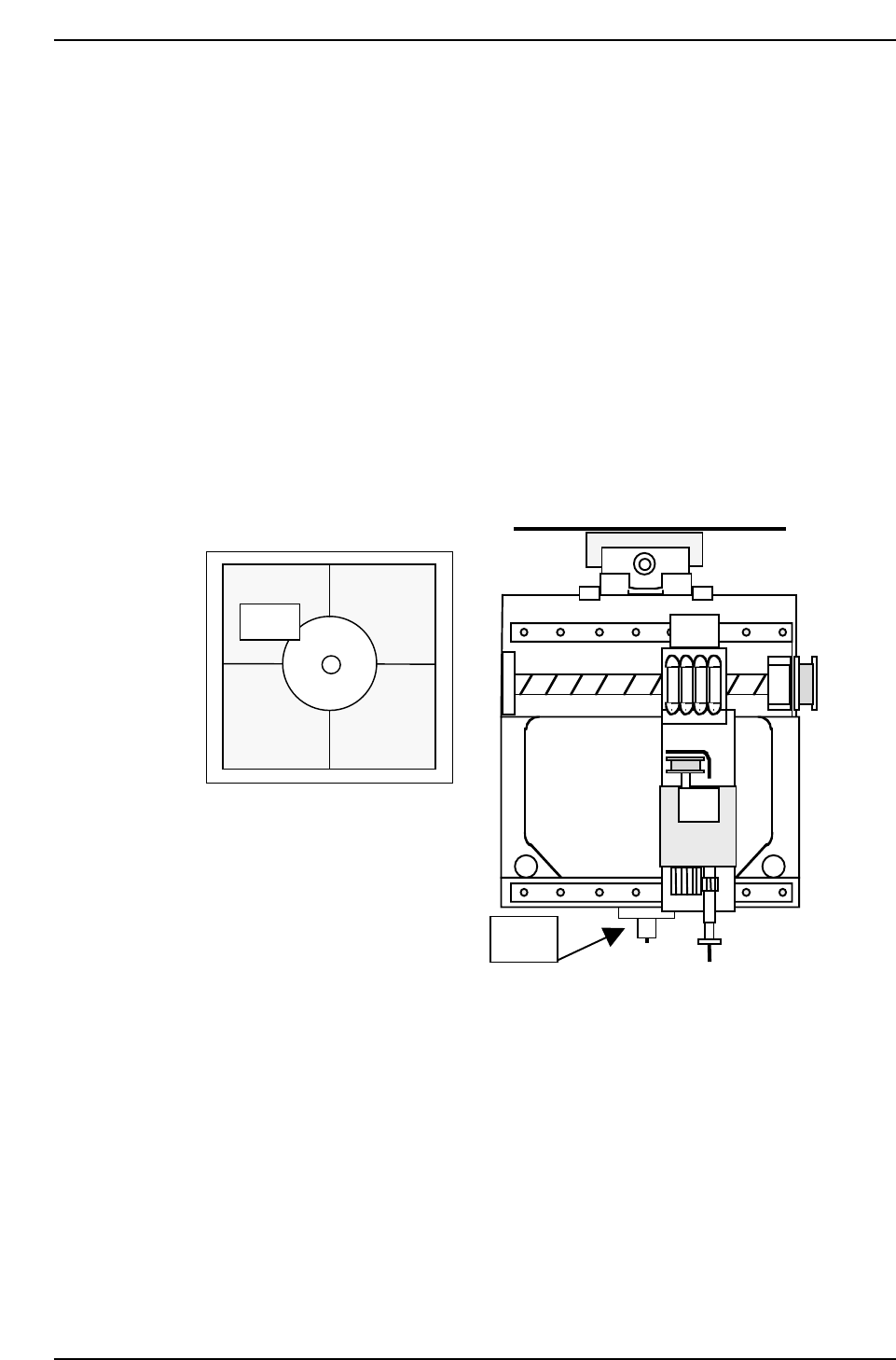
6.2.6 T Mark Reference on Y Direction and Mark
Reference Value X
Note: Measuring the positions of the Heat Expansion jig attached to each head.
1. Press [SET] → [MANUAL] → [VISION] → [ADJUST] → [GET ACQ] →
[DISPLAY] to acquire a real image of the Parts camera on the monitor.
2. Turn OFF the 200V.
3. Move the head so that the jig appears at the center of the crosshairs.
4. Press [SET] → [PROPER] → ID No. → [PM] → select the module →
[FINISH] → [Part Camera] → [T-Mark] → [EXECUTE] to activate auto-
calibration.
Jig
Jig
QP132T6008
Chapter 6
6.2 Measuring Parts Camera Proper Data and Adjustment
Edition 1.1 6-8 QP-132 Level 3 Tutorial
6.2.7 Lighting
Note: VP version : V2.96 or after
1. Attach 0.7 diameter nozzles to all holders.
2. Select program PRODUCT_1005_QP1_D.
3. Press [SET] → [MANUAL] → [NOZZLE] → [NOZZLE COND] → [In
turn meas] or [Simult meas] → [EXECUTE] → Enter Starting PM No. and
the Last PM No. → START.
4. Press [RESULTS] → [B_LIGHT DATA] to check the brightness.
Gray scale value : 170 ± 20
5. If the gray scale value is out of range, perform the following in order:
* Replace the nozzles.
* Replace the UV lamp.
* Replace the camera.
Chapter 6
6.2 Measuring Parts Camera Proper Data and Adjustment
Edition 1.1 6-9 QP-132 Level 3 Tutorial