00193688-04.pdf - 第133页
Ins tal lati on and Co nf igurat ion Gu ide Index SI PLACE Explo rer Editio n 12/ 2005 E N 133 Index A Acce ss Factory Webs ite . . . . . . . . . . . . . . . . . . 113 Add Line . . . . . . . . . . . . . . . . . . . . . .…
5 Deinstallation Installation and Configuration Guide SIPLACE Explorer
5.4 Remove Edition 12/2005 EN
132
The
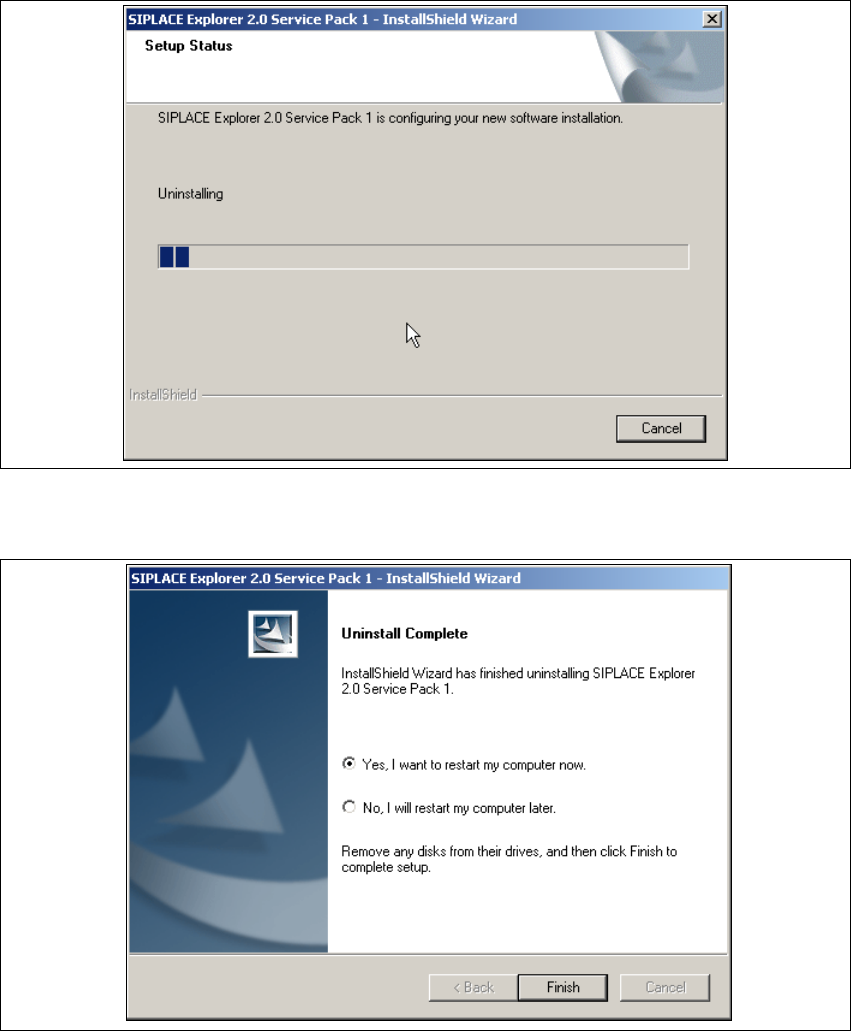
Setup Status dialog box will show the deinstallation status. 5
5
Fig. 5 - 11 Deinstallation process
→ SIPLACE Explorer V2.0 SP1 deinstallation has been completed.
5
Fig. 5 - 12 Deinstallation complete
→ Click on Finish to close the SIPLACE Explorer 2.0 SP1 - InstallShield Wizard.
→ After you have rebooted your computer, SIPLACE Explorer 2.0 SP1 will not be available.

Installation and Configuration Guide Index
SIPLACE Explorer Edition 12/2005 EN
133
Index
A
Access Factory Website . . . . . . . . . . . . . . . . . .113
Add Line
. . . . . . . . . . . . . . . . . . . . . . . . . . . . . .108
add line
. . . . . . . . . . . . . . . . . . . . . . . . . . . . . . . .70
Add Production Lines
. . . . . . . . . . . . . . . . . . . .108
Add User
. . . . . . . . . . . . . . . . . . . . . . . . . . . . . .114
Administrator privileges
. . . . . . . 29, 35, 43, 49, 53
Adobe Reader 6.0
. . . . . . . . . . . . . . . . . . . . . . . .23
Apache Tomcat setup
. . . . . . . . . . . . . . . . . . . . .44
Application Logic
. . . . . . . . . . . . . . . . . . . . . . . . .19
Application Wizard
. . . . . . . . . . . . . . . . . . . . . . .89
Application Wizard,
Application features loading
. . . . . . . . . . . . .93
Application Wizard,
Configuring the database
. . . . . . . . . . . . . . .98
Application Wizard,
Configuring the production line
. . . . . . . . . . .94
Application Wizard,
Generating the website
. . . . . . . . . . . . . . .104
Application Wizard,
Selecting application features
. . . . . . . . . . .96
Application Wizard, starting
. . . . . . . . . . . . . . . .89
architecture
. . . . . . . . . . . . . . . . . . . . . . . . . . . . .12
Archive Browser
. . . . . . . . . . . . . . . . . . . . . . . . .16
archiving schedule
. . . . . . . . . . . . . . . . . . 84, 119
B
Backflush . . . . . . . . . . . . . . . . . . . . . . . . . . 23, 52
Bean Factory
. . . . . . . . . . . . . . . . . . . . . . . . . . . .19
Beans
. . . . . . . . . . . . . . . . . . . . . . . . . . . . . . . . .18
Build configuration
. . . . . . . . . . . . . . . . . . . . . . .88
C
Calendar . . . . . . . . . . . . . . . . . . . . . . . . . . . 77, 97
calendar
. . . . . . . . . . . . . . . . . . . . . . . . . . . . . .111
Central Database/Web Server
. . . . . . . . . . . . . .26
change the port number
. . . . . . . . . . . . . . . . . . .67
Changing Tomcat Port Number
. . . . . . . . . . . . .67
Choose destination location,
Apache Tomcat
. . . . . . . . . . . . . . . . . . . . . .45
Choose destination location,
SIPLACE Explorer setup
. . . . . . . . . . . 38, 39
Choose folder’ dialog box,
SIPLACE Explorer setup
. . . . . . . . . . . . . . 39
client LAN
. . . . . . . . . . . . . . . . . . . . . . . . . . . . . 11
completely remove SIPLACE Explorer V2.0
. . 125
Configuration
. . . . . . . . . . . . . . . . . . . . . . . . . . . 69
Configuration of the system database
. . . . 81, 101
configuration type
. . . . . . . . . . . . . . . . . . . . . . . 92
Configurations
. . . . . . . . . . . . . . . . . . . . . . . . . . 11
Configure Line Host
. . . . . . . . . . . . . . . . . . . . 113
configure production line
. . . . . . . . . . . . . . . . . . 74
configure system database
. . . . . . . . . . . . . . . . 79
Configuring Production Lines
. . . . . . . . . . . . . 107
Configuring the database
. . . . . . . . . . . . . . . . 121
Configuring the database, Application Wizard
. 98
Configuring the production Line
. . . . . . . . . . . . 94
Configuring the production line,
Application Wizard
. . . . . . . . . . . . . . . . . . . 94
Configuring Your Web Server
. . . . . . . . . . . . . . 60
connect to the MS SQL Server
. . . . . . . . . 81, 101
Connectivity properties of the machines
. . . . . . 18
Console
. . . . . . . . . . . . . . . . . . . . . . . . . . . . . . . 16
Creation of custom applications
. . . . . . . . . . . . 69
Custom
. . . . . . . . . . . . . . . . . . . . . . . . . . . . . . . 92
D
Database . . . . . . . . . . . . . . . . . . . . . . . . . . . . . . 19
database backup
. . . . . . . . . . . . . . . . . . . . . . . . 85
Database components
. . . . . . . . . . . . . . . . . . . 19
Database Connection Wizard
. . . . . . . . . . 80, 100
Database connection, configure
. . . . . . . . . . . 123
Database connection, test
. . . . . . . . . . . . . . . . 123
Database settings
. . . . . . . . . . . . . . . . . . . . . . 121
Database/Web Server
. . . . . . . . . . . . . . . . . . . . 26
DB Administrator Login
. . . . . . . . . . . . . . . 84, 118
DB error
. . . . . . . . . . . . . . . . . . . . . . . . . . . 79, 100
DB Maintenance
. . . . . . . . . . . . . . . . . 18, 84, 118
DE Windows Start menu
. . . . . . . . . . . . . . . . . . 58
default maintenance schedule
. . . . . . . . . 84, 119
Default user rights
. . . . . . . . . . . . . . . . . . . . . . 115
Default web server
. . . . . . . . . . . . . . . . . . . . . . 67
Deinstallation
. . . . . . . . . . . . . . . . . . . . . . . . . . 125
deinstallation
. . . . . . . . . . . . . . . . . . . . . . . . . . 125
Deinstallation process
. . . . . . . . . . . . . . . . . . . 132
Descriptor
. . . . . . . . . . . . . . . . . . . . . . . . . . . . . 72
Developer Tools
. . . . . . . . . . . . . . . . . . . . . . . . 89
Development Environment
. . . . . . . . . . 15, 17, 21
Development Environment, installation option
. 40

Index Installation and Configuration Guide
SIPLACE Explorer Edition 12/2005 EN
134
E
e . . . . . . . . . . . . . . . . . . . . . . . . . . . . . . . . . . . . 18
Edit Logbook entries
. . . . . . . . . . . . . . . . . . . . 113
Equipment Editor
. . . . . . . . . . . . . . . . . . . . . . . . 18
Event Report
. . . . . . . . . . . . . . . . . . . . . . . . . . . 19
F
Factory - load settings from . . . . . . . . . . . . . . . 106
factory architecture
. . . . . . . . . . . . . . . . . . . . . . 14
Factory Calendar
. . . . . . . . . . . . . . . . . . . . . . . 111
Factory calendar
. . . . . . . . . . . . . . . . . . . . . . . 111
Factory Configuration Utility
13, 15, 17, 21, 59, 105
Factory Configuration Utility - DB maintenance
118
Factory Configuration Utility - factory calendar
111
Factory Configuration Utility -
generate website
. . . . . . . . . . . . . . . . . . . 120
Factory Configuration Utility - production lines
108
Factory Configuration Utility - reports
. . . . . . . 112
Factory Configuration Utility - SMTP server
. . 117
Factory Configuration Utility - user details
. . . 115
Factory Configuration Utility - users
. . . . . . . . 114
Factory Configuration Utility
Windows Start menu
. . . . . . . . . . . . . . . . . 59
Factory Configuration Utility, installation option
40
Factory Configuration Utility, starting
. . . . . . . 105
factory database
. . . . . . . . . . . . . . . . . . . . . . . 118
factory host
. . . . . . . . . . . . . . . . . . . . . . . . . . . 107
Factory Reporting
. . . . . . . . . . . . . . . . . . . . 17, 92
factory reports
. . . . . . . . . . . . . . . . . . . . . . . . . . 13
factory website
. . . . . . . . . . . . . . . . . . . . . 13, 120
Firewall
. . . . . . . . . . . . . . . . . . . . . . . . . . . . . . . 61
Full
. . . . . . . . . . . . . . . . . . . . . . . . . . . . . . . . . . 92
G
Generate a Website . . . . . . . . . . . . . . . . . . . . 120
generate website
. . . . . . . . . . . . . . . . . . . . . . . 104
Generate website -
Factory Configuration Utility
. . . . . . . . . . . 120
generating the website
. . . . . . . . . . . . . . . . . . . 87
Generating the website, Application Wizard
. . 104
I
Import OIS Lines . . . . . . . . . . . . . . . . . . . . . . . . 71
initial installation, SIPLACE Explorer 2.0 SP1
. . 35
Installation CD
. . . . . . . . . . . . . . . . . . . . . . . 38, 55
Installation complete, Jave JRE
. . . . . . . . . . . . 34
Installation complete,
SIPLACE Explorer setup
. . . . . . . . . . . 42, 56
Installation variants
Island installation
. . . . . . . . . . . . . . . . . . . . 29
Line
. . . . . . . . . . . . . . . . . . . . . . . . . . . . . . . 27
Server
. . . . . . . . . . . . . . . . . . . . . . . . . . . . . 25
installation variants
. . . . . . . . . . . . . . . . . . . . . . 23
installation, Java 2 JRE 1.5
. . . . . . . . . . . . . . . . 29
installation, MSDE 2000
. . . . . . . . . . . . . . . . . . 49
installation, Tomcat 5.5
. . . . . . . . . . . . . . . . . . . 43
Installing SIPLACE Explorer
. . . . . . . . . . . . . . . 21
Island Installation
. . . . . . . . . . . . . . . . . . . . . . . . 28
J
J2SDK . . . . . . . . . . . . . . . . . . . . . . . . . . . . . 36, 54
Java 2 JRE 1.5
. . . . . . . . . . . . . . . . . . . . . . . . . 52
Java 2 SDK 1.4 to Java 2 JRE 1.5
. . . . . . . . . . 52
Java 2 JRE 1.5, installation
. . . . . . . . . . . . . . . . 29
Java beans
. . . . . . . . . . . . . . . . . . . . . . . . . . . . 19
Java programs
. . . . . . . . . . . . . . . . . . . . . . . . . . 19
L
Library of Java beans . . . . . . . . . . . . . . . . . . . . 19
License agreement
. . . . . . . . . . . . . . . . 31, 36, 44
license agreement, Apache Tomcat
. . . . . . . . . 44
license agreement, Java 2 JRE 1.5
. . . . . . . . . . 31
license agreement, SIPLACE Explorer 2.0 SP1
36
Line
. . . . . . . . . . . . . . . . . . . . . . . . . . . . . . . . . . 25
Line Configuration
. . . . . . . . . . . . . . . . . . . . . . . 16
Line Configuration, starting
. . . . . . . . . . . . . . . . 69
Line Configurator
. . . . . . . . . . . . . . . . . . . . . . . . 18
line database
. . . . . . . . . . . . . . . . . . . . . . . . . . . 85
line host
. . . . . . . . . . . . . . . . . . . . . . . . . . . . . . 107
line list
. . . . . . . . . . . . . . . . . . . . . . . . . . . . . . . . 70
Line-Server
. . . . . . . . . . . . . . . . . . . . . . . . . 25, 26
Login
. . . . . . . . . . . . . . . . . . . . . . . . . . . . . . . . . 89