YS24X_Mainte_E.pdf - 第150页
6-14 6 How to replace consumable parts 0 Attach the board clamp plate. 1. Fit the board clamp plate into its original position and tighten the board clamp plate mounting bolts with a hex wrench (3). 2. Remove the square …
6-13
6
How to replace consumable parts
n
NOTE
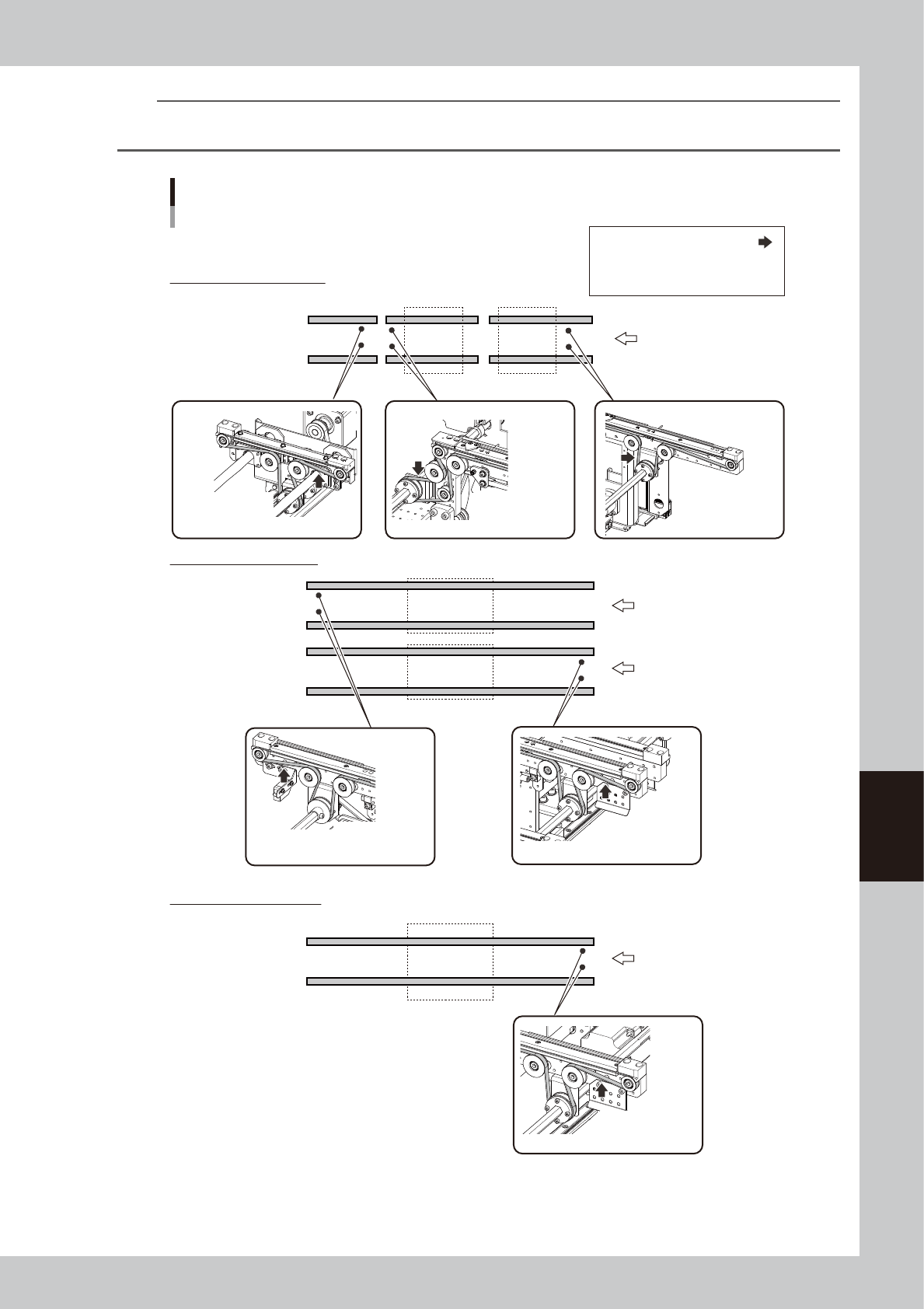
The tension measurement locations and tension standards of this machine’s conveyor belt are as follow.
Adjust by using a tension meter as necessary.
Conveyor belt: Tension measurement positions and tension standards
YS24X
W1W2W3
Tension measurement positions:
STD: Tension of standard conveyor
EXT: Tension of extended conveyor
STD : 627 - 741 Hz
Conveyance direction
Conveyance direction
Specification: Dual-stages
Specification: Dual-lanes
EXT : 627 - 741 Hz
STD : 605 - 715 Hz
STD : 416 - 491 Hz
EXT : 416 - 491 Hz
STD : 378 - 446 Hz
EXT : 128 - 150 Hz
STD : 378 - 446 Hz
EXT : 140 - 164 Hz
STD : 378 - 446 Hz
EXT : 128 - 150 Hz
Conveyance direction
Lane 1
Lane 2
Specification: Single-lane
53633-L4-00
6-14
6
How to replace consumable parts
0
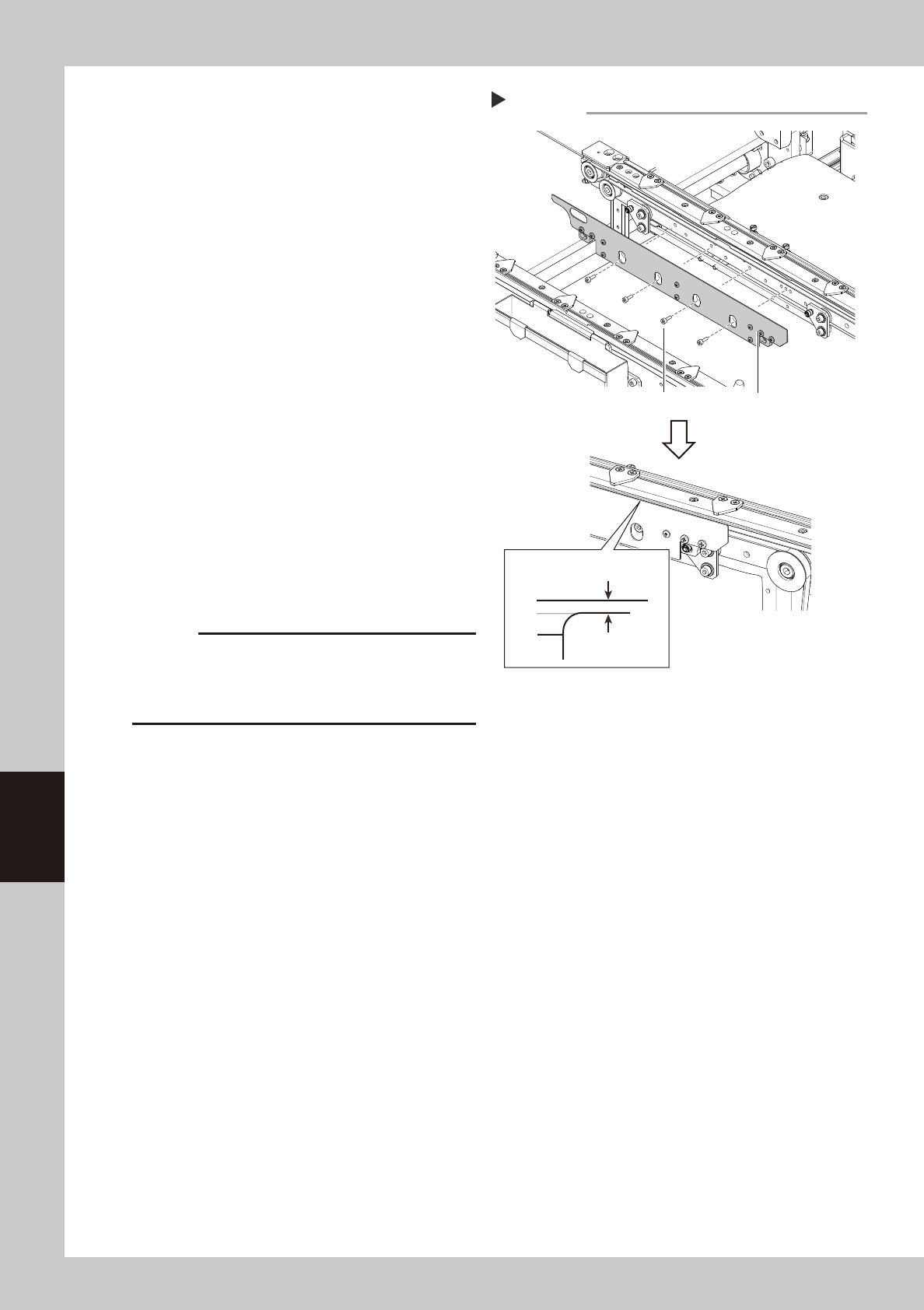
Attach the board clamp plate.
1. Fit the board clamp plate into its original
position and tighten the board clamp
plate mounting bolts with a hex wrench
(3).
2. Remove the square cloth on the push-up
plate.
53628-L4-00
q
Check the belt rotating condition.
1. Make sure that the board clamp top
surface is approx. 0.5mm lower than the
belt upper surface.
2. Close the machine safety cover, and
cancel the emergency stop. If the
machine could be equipped with a
carriage, set the carriage.
3. On the [Unit] - [Conveyor] screen, press
the [Conveyor In] button or [Conveyor
Out] button to turn on the conveyor
motor and check the belt rotation.
4. If the rotation speed fluctuates or there is
slack in the belt, adjust the position of
the tensioner (pulley/pulley bracket) that
tension is applied, and then check the
rotation again.
c
CAUTION
When the difference between the belt upper surface
and board clamp top surface is very little, the board
transfer error may occur easily. In this case, contact
YAMAHA sales representative.
Step 10,11
Attaching the board clamp plate
Board clamp plateBoard clamp plate mounting bolt
0.5 mm
Board clamp
Belt upper surface
6-15
6
How to replace consumable parts
n
Dual stage specification : Replacing the conveyor belt of W2-axis
The following describes conveyor belt replacement of the dual-stage W2-axis. First perform Step 1 through 4 in the
preceding section "
n
Dual stage specification : Replacing the conveyor belt other than that of W2-axis" and then
continue from Step 5.
5
Read the board data.
1. Read the board data of your choice.
2. Open the [Board] – [Board] screen, and
change the “A: Board size X (mm)” to
“330” or less, and “B: Board size Y (mm)
to approx. “200”.
TIP
By reading the board data, the [Mount Position] button
used in the next Step becomes active.
6
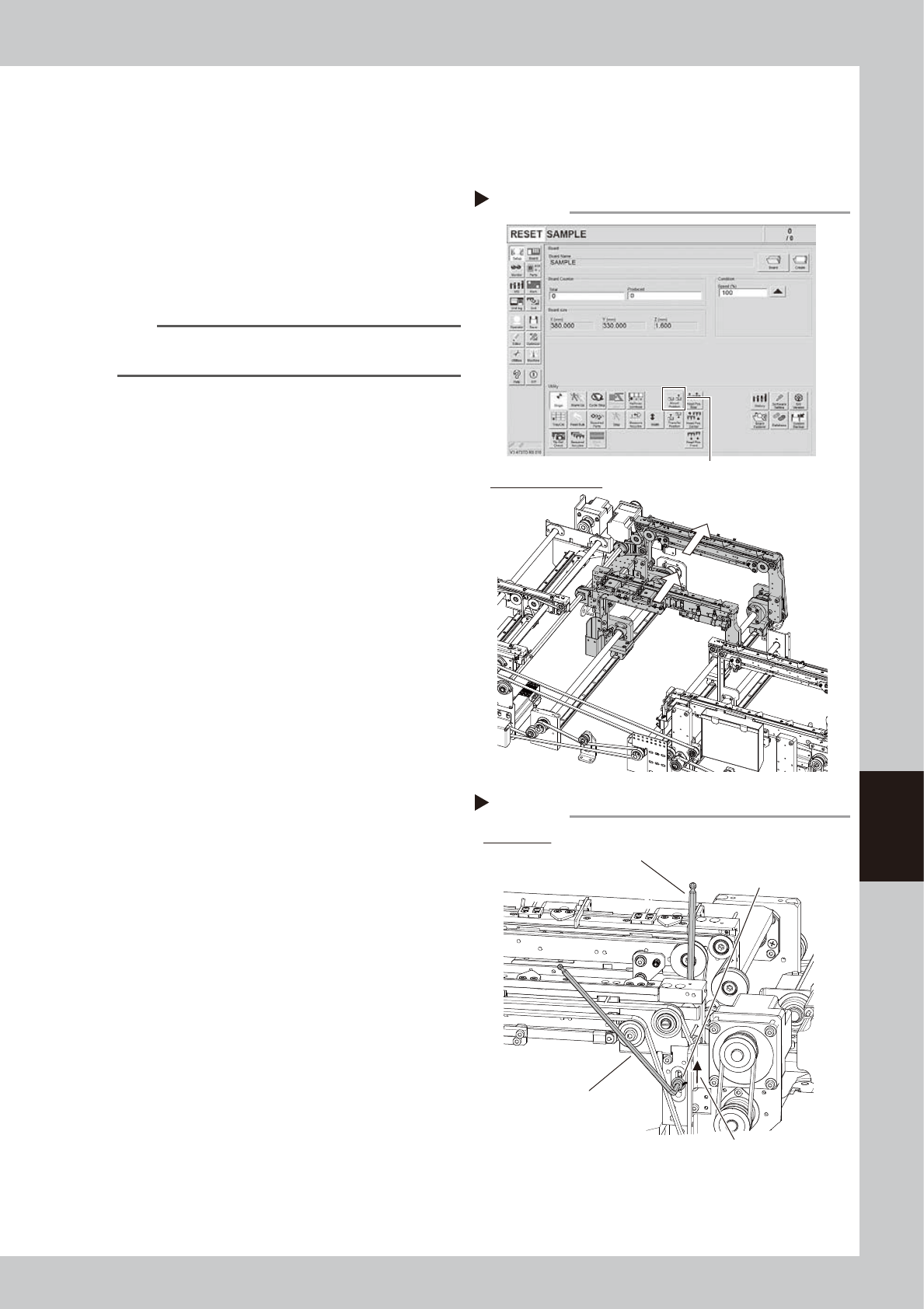
Move the conveyor to the mount
position.
1. Close the machine’s safety cover, and
cancel the emergency stop. If the
machine could be equipped with a
carriage, set the carriage.
2. Press the [Mount Position] button on the
[Setup] screen to move the conveyor to
the mounting position.
53619-L4-10
e
7
Loosen the belt.
1. Press the emergency stop button, and
open the machine’s safety cover. If the
machine is equipped with a carriage,
remove the carriage.
2. Loosen the fixing bolt of the pulley that
tension is applied using two hex
wrenches.
Pulley side: Hex wrench 5 mm
Fixing bolt side: Hex wrench 4 mm
3. Move the pulley all the way to the end of
the slot (in the loosening direction).
53618-L4-00
Step 6
Move W2 conveyor to the mount position.
W2 conveyor operation
[Mount Position] button
Step 7
Loosening the belt
W2 conveyor
Hex wrench (4)
Hex wrench (5)
* Pulley side
Pulley mounting bolt
Move the pulley to loosen the belt.