YS24X_Mainte_E.pdf - 第63页
2-5 2 Daily maintenance items 1.1.1 V acuum level when nozzle is open T he table below shows the vacuum lev el measured when each nozzle is open. T he values might differ slightly depending on the air source and operatin…
2-4
2
Daily maintenance items
n
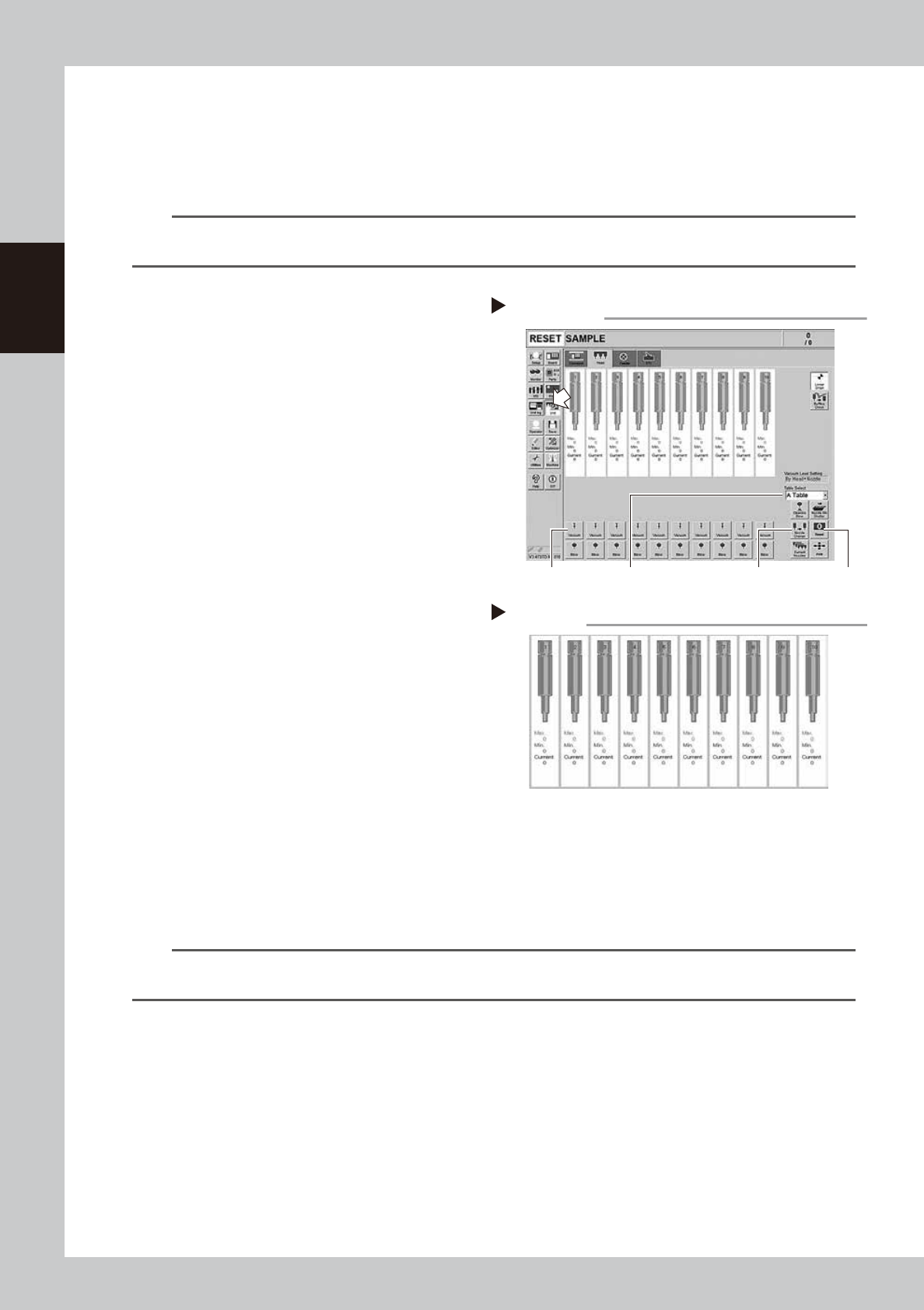
How to check for clogged nozzles (on the [Unit] - [Head] screen)
The term "clogged nozzle" used here indicates that material such as solder is adhering to the nozzle hole, causing a rise
in negative pressure even if no component is being picked up by the nozzle. This state might cause problems such as
component mounting errors. The following describes the checking procedure for clogged nozzles using Type 302A
nozzles as an example.
n
NOTE
The vacuum level when nozzle is open, which is the criterion for clogged nozzle, varies depending on the nozzle types.
See the next section for the vacuum level when nozzle is open other than Type 302A nozzle.
e
1
Attach the nozzle.
1. Press the emergency stop button and
attach Type 302A nozzles to all tables
and heads. When the machine has a
nozzle station, press the [Nozzle Change]
button to change the nozzles.
2. Select a table, and attach a nozzle on
both A and B head units.
54202-L4-10
2
Reset the numerical figure.
Open the [Unit] - [Head] screen. Then press
the [Reset] button on the lower right of the
screen to reset the pickup level values.
Perform the table selection and reset the
pickup level values of all tables.
3
Generate negative pressure.
On the [Unit] - [Head] screen, set the
[Vacuum] buttons for all heads to ON. When
this value starts rising, wait 5 to 10 seconds
and set to OFF. Perform the table selection
and reset the pickup level values of all
tables.
4
Check the vacuum levels.
Change the table sequentially to read all
"Max" values shown in red on the [Head]
screen. If this value is 80 to 120, it is in the
normal range. If higher than 120, the nozzle
hole might be dirty. Clean the nozzle seeing
chapter 3,"1.2 Nozzle cleaning" and "2.1
Cleaning the nozzle air path".
54203-L4-10
n
NOTE
If a correct value cannot be obtained after cleaning even after performing steps 1 to 4, then the interior of the spline
shaft might be dirty. To check it, refer to the table on the right.
Negative pressure generation
Step 1 to 3
[Nozzle Change] button[Vacuum] button [Reset] button[Table selection] button
Negative pressure check
Step 4
2-5
2
Daily maintenance items
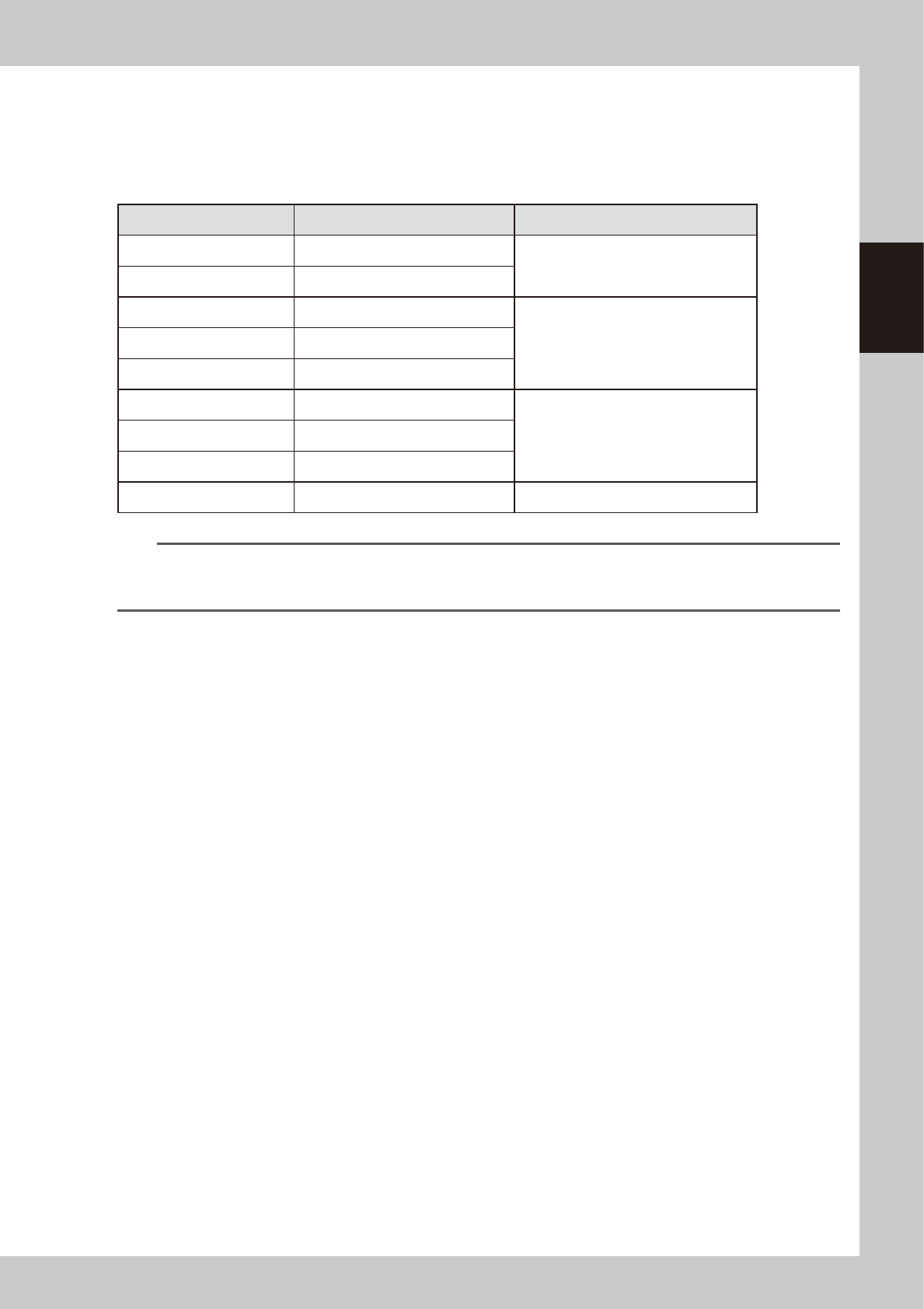
1.1.1 Vacuum level when nozzle is open
The table below shows the vacuum level measured when each nozzle is open.
The values might differ slightly depending on the air source and operating conditions. Use these values for
reference during maintenance.
n
Standard vacuum level when nozzle is open
Nozzle Standard value when nozzle is open Remarks
Type301A 160 to 200
Standard nozzle
Type302A 80 to 120
Type311A 180 to 210
Narrow-pitch nozzleType312A 140 to 180
Type313A 60 to 100
Type303A/Type314A* 50 to 90
Standard & Narrow-pitch common nozzleType304A/Type315A* 40 to 80
Type307A/Type318A* 40 to 80
No nozzle 40 to 80
n
NOTE
The nozzle holes of the nozzles marked with an asterisk are larger than those of other nozzles. If a nozzle marked with
an asterisk exceeds its standard value shown above, the air path in the head (spline shaft, etc.) may be
contaminated.
2-6
2
Daily maintenance items
1.2 Checking the nozzles visually
To visually check nozzles, remove each nozzle from the head or from the nozzle station.
n
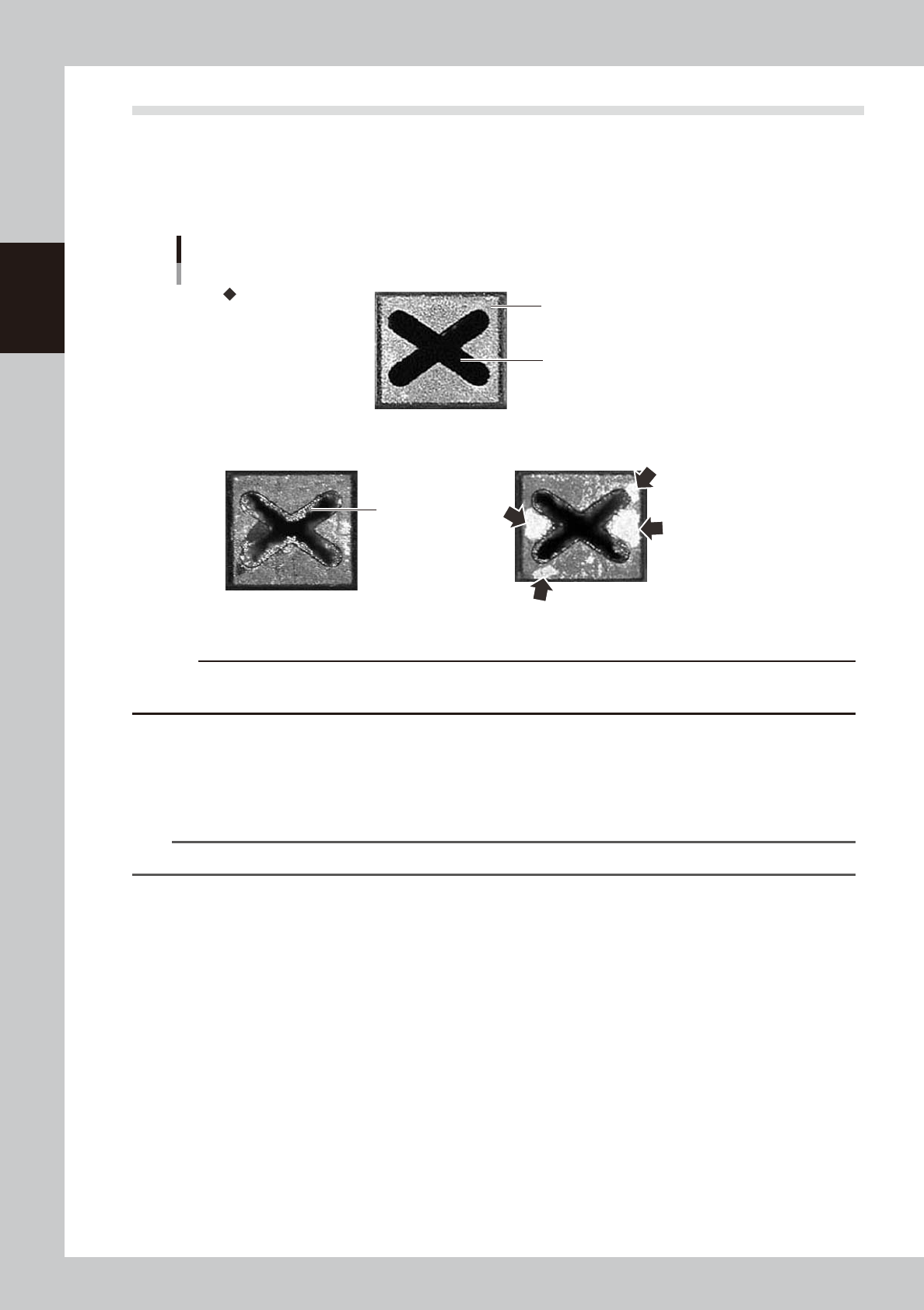
Points to check the removed nozzles
Check the removed nozzles with a magnifying glass or similar tool.
If any solder or contaminant sticks to the nozzle tip or nozzle hole, clean the nozzle.
Nozzle tip
Solder is adhering to
nozzle hole
Solder is adhering to
nozzle tip (flat surface)
Nozzle hole
Checking the nozzle condition
No good: Nozzle is clogged No good: Shiny material on tip
Normal condition
53200-L4-00
c
CAUTION
If the above check reveals a clogged or dirty nozzle, clean the nozzle hole and nozzle tip.
See chapter 3,"1.2 Nozzle cleaning" and "2.1 Cleaning the nozzle air path".
n
Checking nozzles by removing them from the head
1. Move the head to a position where the nozzles can be easily removed, then remove each nozzle by hand.
2. After checking and cleaning the nozzle, reattach the nozzle to the head while making sure the head position and the
nozzle's orientation are correct.
n
NOTE
As for a simple method, check the nozzle attached to the head with a mirror or similar tool.
n
Checking nozzles by removing them from the nozzle station
1. Return all nozzles in the nozzle station.
2. On the [Unit] - [Head] tab screen, press the [Npzzle Stn Shutter] button to allow the nozzles to be removed from the
nozzle station, then remove each nozzle by hand.
3. After checking and cleaning the nozzle, return the nozzle back in the nozzle station and press the [Npzzle Stn Shutter]
button.