YS24X_Mainte_E.pdf - 第152页
6-16 6 How to replace consumable parts 8 Remo ve the bolt securing the shaft. 1. Open the safety cover at the rear of the machine. 2. When moving the W axis belt of the W2 far side conveyor rail to the right of the perso…
6-15
6
How to replace consumable parts
n
Dual stage specification : Replacing the conveyor belt of W2-axis
The following describes conveyor belt replacement of the dual-stage W2-axis. First perform Step 1 through 4 in the
preceding section "
n
Dual stage specification : Replacing the conveyor belt other than that of W2-axis" and then
continue from Step 5.
5
Read the board data.
1. Read the board data of your choice.
2. Open the [Board] – [Board] screen, and
change the “A: Board size X (mm)” to
“330” or less, and “B: Board size Y (mm)
to approx. “200”.
TIP
By reading the board data, the [Mount Position] button
used in the next Step becomes active.
6
Move the conveyor to the mount
position.
1. Close the machine’s safety cover, and
cancel the emergency stop. If the
machine could be equipped with a
carriage, set the carriage.
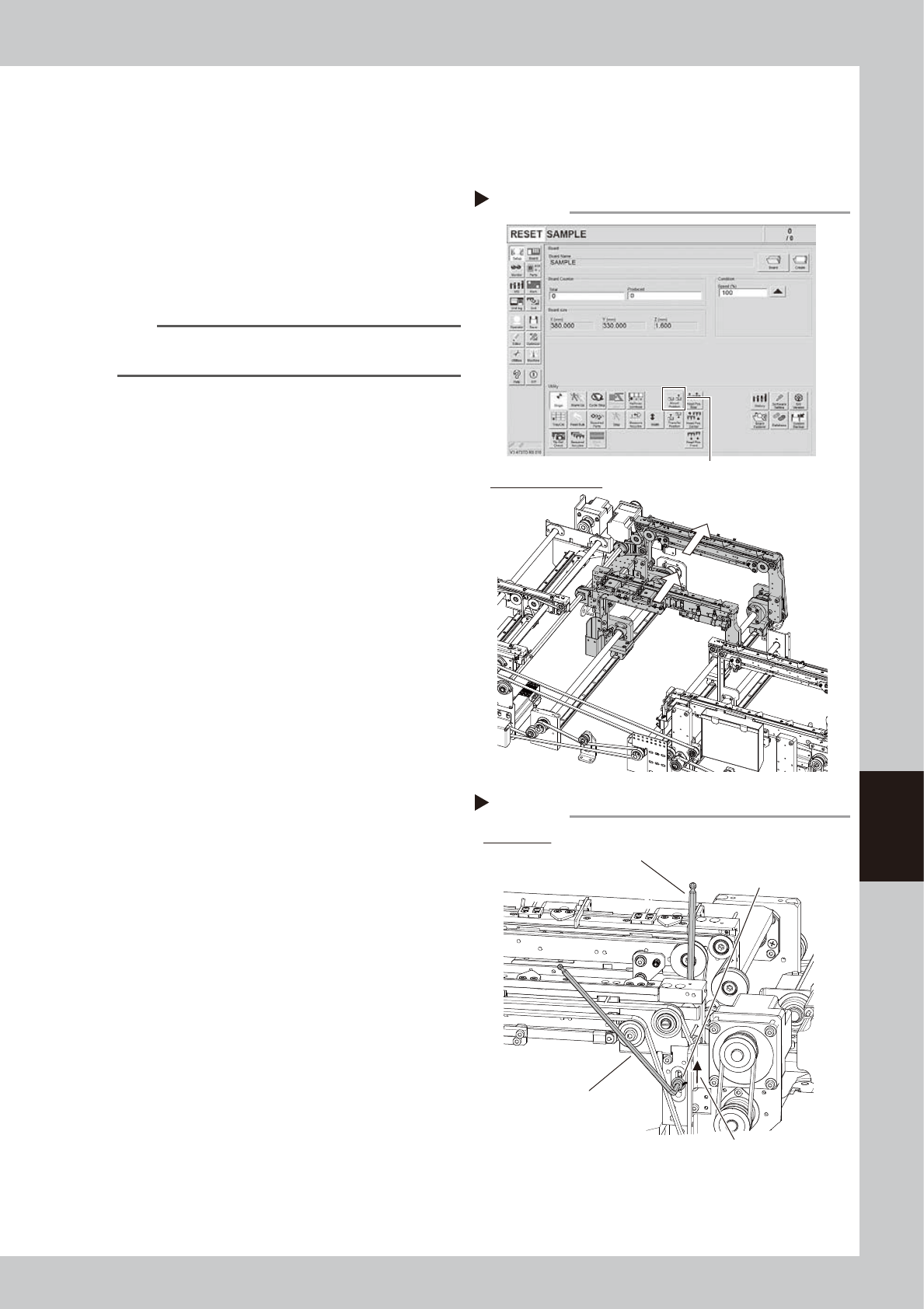
2. Press the [Mount Position] button on the
[Setup] screen to move the conveyor to
the mounting position.
53619-L4-10
e
7
Loosen the belt.
1. Press the emergency stop button, and
open the machine’s safety cover. If the
machine is equipped with a carriage,
remove the carriage.
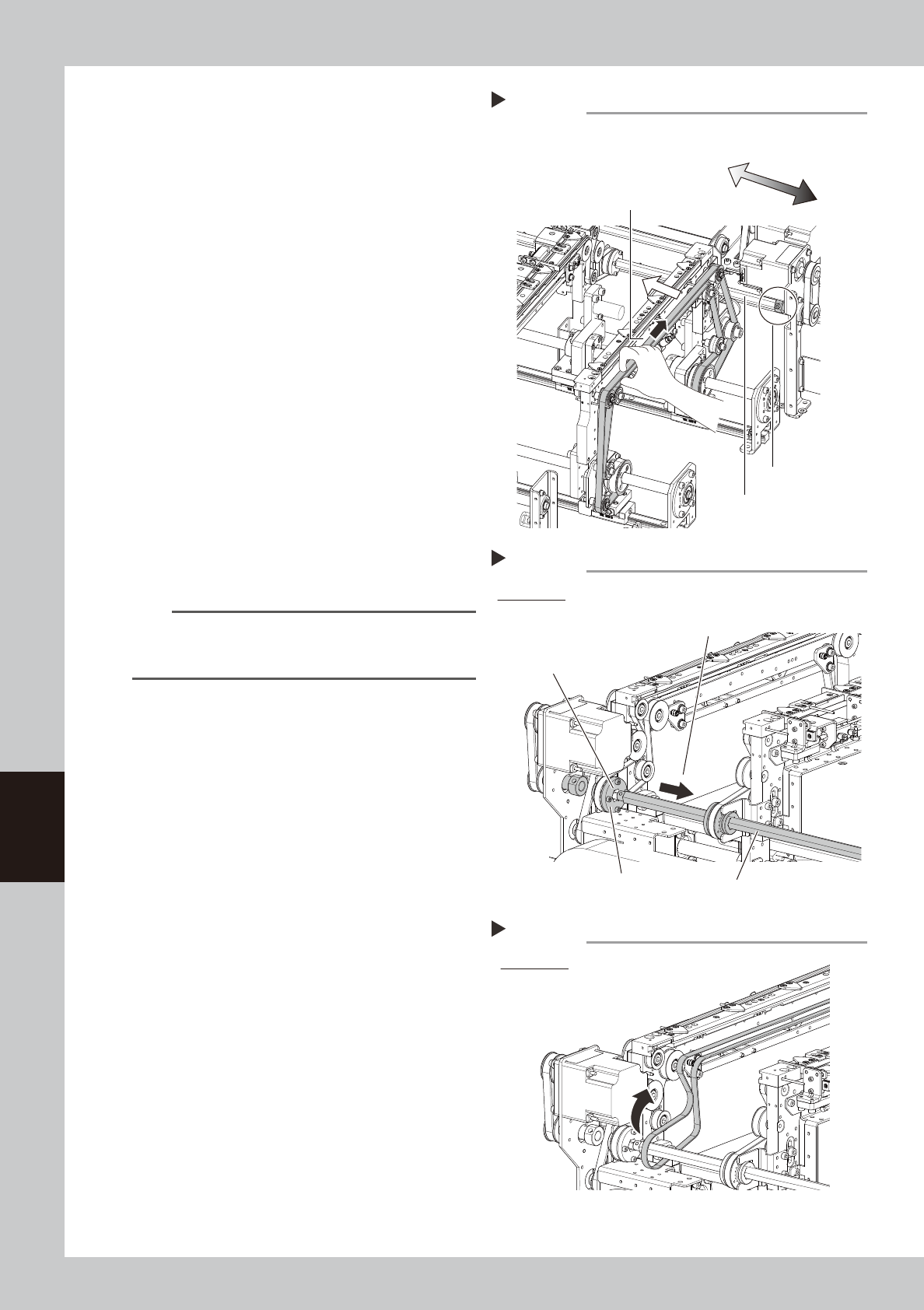
2. Loosen the fixing bolt of the pulley that
tension is applied using two hex
wrenches.
Pulley side: Hex wrench 5 mm
Fixing bolt side: Hex wrench 4 mm
3. Move the pulley all the way to the end of
the slot (in the loosening direction).
53618-L4-00
Step 6
Move W2 conveyor to the mount position.
W2 conveyor operation
[Mount Position] button
Step 7
Loosening the belt
W2 conveyor
Hex wrench (4)
Hex wrench (5)
* Pulley side
Pulley mounting bolt
Move the pulley to loosen the belt.
6-16
6
How to replace consumable parts
8
Remove the bolt securing the shaft.
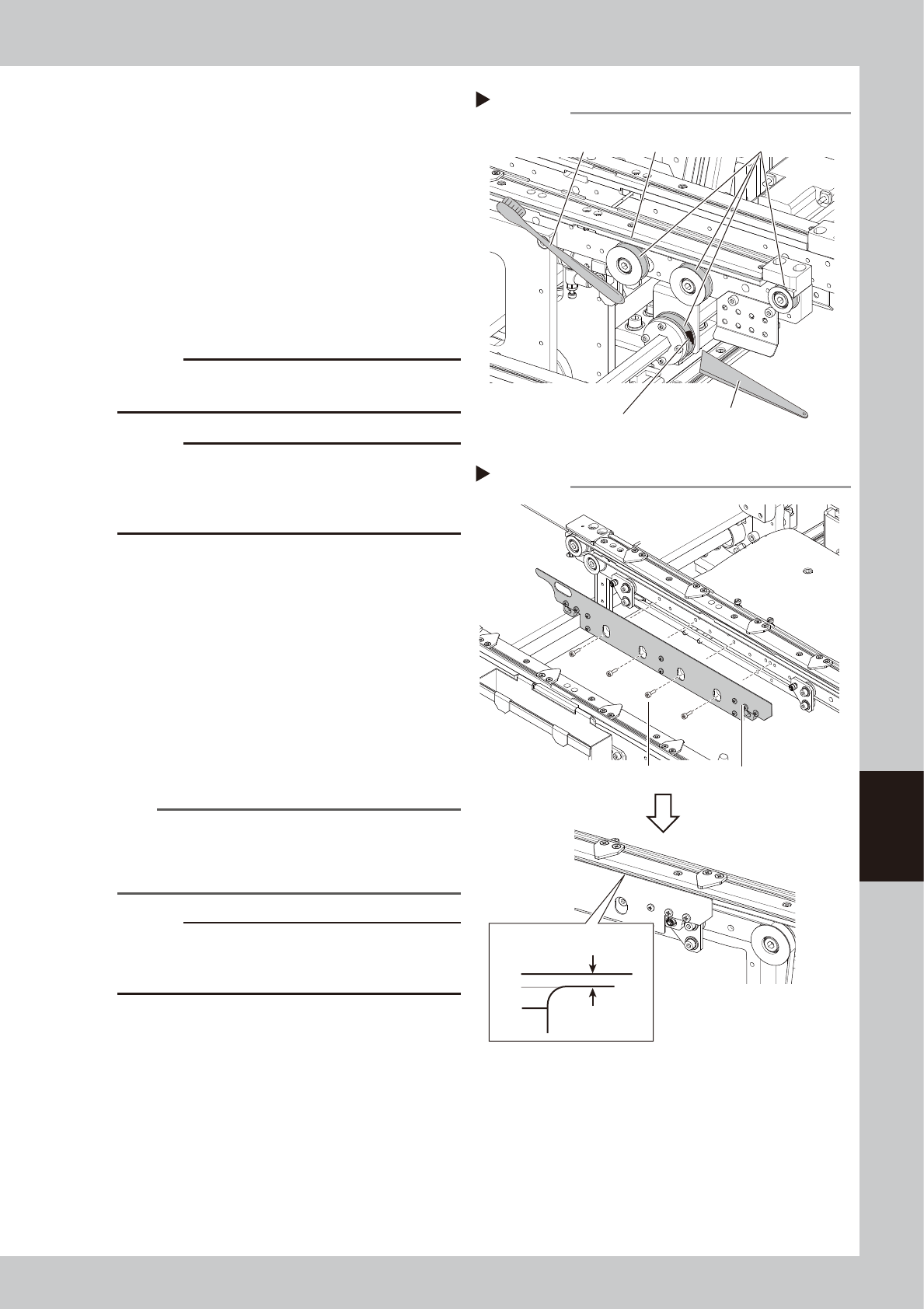
1. Open the safety cover at the rear of the
machine.
2. When moving the W axis belt of the W2
far side conveyor rail to the right of the
person facing, the conveyor rail moves
to the front side of the machine. Push the
conveyor rail forward about 100 mm,
and the bolt securing the spline shaft
can be accessed.
3. Remove the bolt securing the shaft with
the hex wrench (3). Turn the hex spline
shaft to face the bolt to your side, it
becomes easy to access.
4. Turn the W axis belt to the opposite
direction from 2, and move the far side
conveyor rail all the way to the end of
machine.
53620-L4-10
9
Pull out the shaft from the belt
drive pulley.
Pull the shaft toward the front to pull it out
from the drive pulley completely.
53621-L4-00
n
NOTE
When pulling out the shaft, the drive pulley is easy to
come off. Pull out the shaft while holding the pulley by
hand.
0
Remove the belt from the conveyor.
Detach the conveyor belt through the
clearance between the shaft and drive
pulley.
53622-L4-00
Drive pulley
Pull the shaft toward front side of machine.
Pulling out the shaft from the drive pulley
Step 8
Remove the belt through
this clearance.
W2 conveyor
Hex spline shaft
Removing the belt
Step 9
W2 conveyor
Step 8
Removing the bolt securing the shaft
W2 conveyor (Figure from the rear side)
Move the W axis belt with your hand
Shaft securing bolt
Hex spline shaft
Far side of the
machine
Front of the
machine
6-17
6
How to replace consumable parts
q
Clean the guides and pulleys.
1. Use a vacuum assembly (option) to
suction the belt wear debris on the belt
guides and sensors, etc.
2. Use a plastic spatula or similar tool to
remove the belt wear debris adhering to
the outer peripheral surface of the
pulleys.
3. Use a brush or similar tool to remove the
belt wear debris caught in the belt
guides.
53630-L4-00
c
CAUTION
Use a plastic spatula and brush to avoid scratching the
pulleys and guides.
c
CAUTION
Do not use a solvent (IPA, etc.) unless the guides and
pulleys are excessively dirty. If using a solvent, be
careful not to spill the solvent on the bearing in the
pulleys during cleaning.
w
Attach the conveyor belt.
1. Temporarily attach the new conveyor
belt by hooking to the pulley.
2. Insert the shaft through the driving pulley.
3. Tighten to secure the spline shaft with the
fixing bolt.
4. Move the pulley that tension is applied
to the position marked in Step 4, and
tighten the fixing bolt.
5. When the belt is loose, adjust the position
of the pulley to apply belt tension.
n
NOTE
For the tension measurement position and tension
standard of the machine’s conveyor belt, see the figure
in Step 9 of "
n
Dual stage specification : Replacing the
conveyor belt other than that of W2-axis".
c
CAUTION
The tightening standard of the securing bolt of pulley
that tension is applied is 5.5N·m. Be cautious not to
tighten too hard.
e
Attach the board clamp plate.
1. Fit the board clamp plate into its original
position and tighten the board clamp
plate mounting bolts with a hex wrench
(3).
2. Remove the square cloth on the push-up
plate.
53632-L4-00
Cleaning the guide and pulleys
Step 11
Brush
Belt guides
Belt wear debris
sticking to pulley
Spatula
(made of plastic)
Outer peripheral surface
of pulley
Step 13,14
Mounting the board clamp plate
Board clamp plateBoard clamp plate mounting bolt
0.5 mm
Board clamp
Belt upper surface