德森印刷机说明书之操作手册-4d1321fc284ac850ac024234.pdf - 第34页
深圳德森精密设备有限公司 Shenzhen Desen Pre cision Machine Co., Ltd. - 34 - 图 4-6 〈设置〉下拉菜单 Fig ure 4- 6 (Setting) P ul l-down Menu 单击主菜单栏中 [ 查看 ] ,出现下拉菜单,可 进行 [ 生产报表 ] 、 [ 报警记录 ] 、各运动轴 [ 当 前位置 ] 等项目的查看,如图 4 – 7 所示。 C licking V iew i…
深圳德森精密设备有限公司
Shenzhen Desen Precision Machine Co., Ltd.
- 33 -
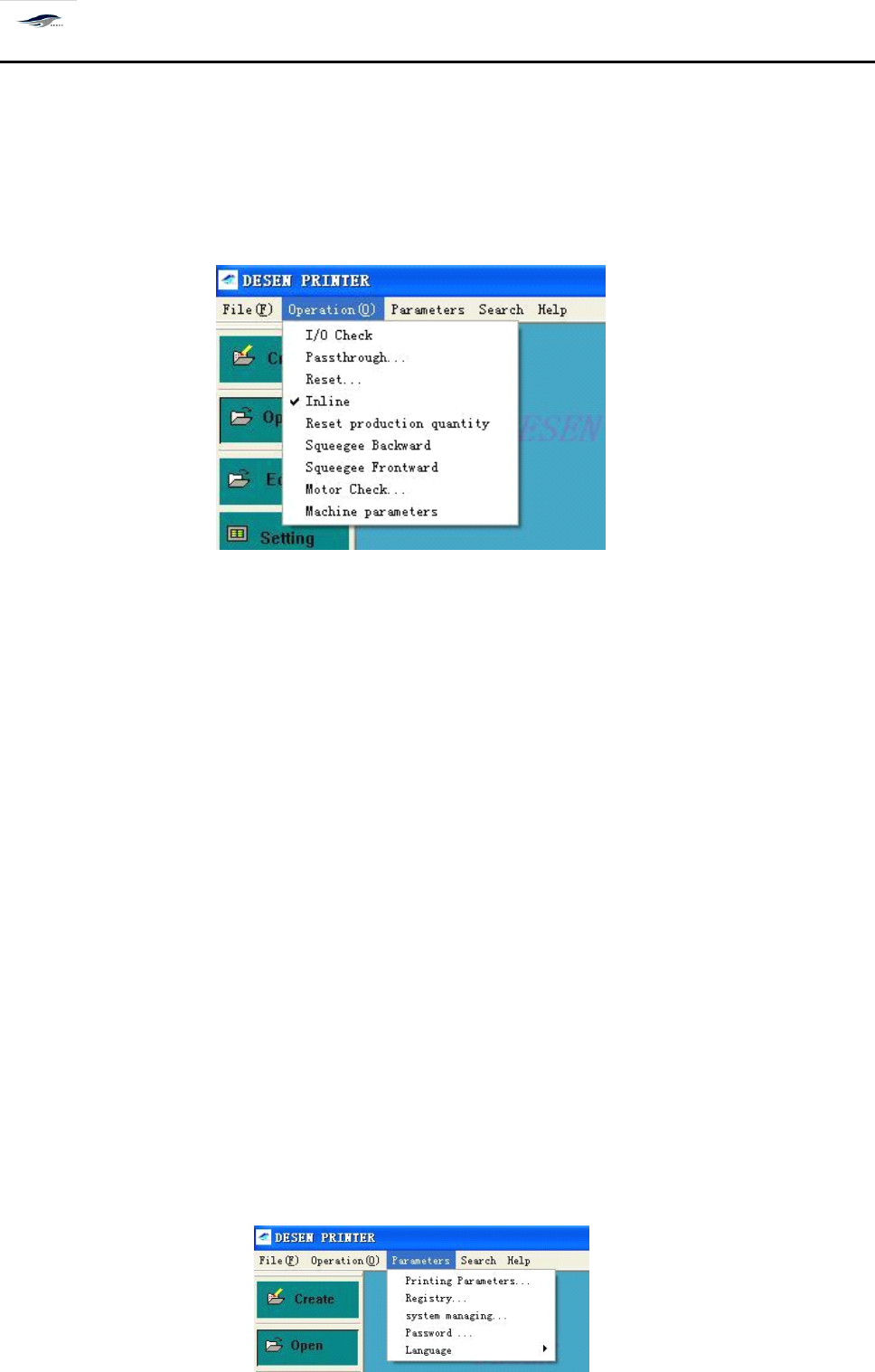
进 ] [ 运动测试 ] [ 机器参数 ] 等项操作,如图 4 – 5 所示。
Click “ Operate ” in the main menu, there will be a pull-down menu for operations such as Start
production, Stop production, I/O test, Return-to-zero operation, Transfer board, Reset, On-line
working, Output reset, Production setting, Squeegee back, Squeegee forward, Moti on test and
Machine parameters. S ee Figure 4-5.
图 4-5 〈操作〉下拉菜单
Figure 4-5 (Operation) Pull-down Menu
注意:
其中的 [ 机器参数 ] 设置,在机器出厂前均已设定好,用户不须重新设定。特殊情况 下
用户可以更改机器参数值。
Note: The Machine parameters sub-menu has been well set before the delivery of printing machine
and no re-setting shall be done by users. F or particular circumstances, users can change the values of
the sub-menu.
选择所要进行的操作并单击 [ 确定 ] ,系统保存此次设置,回到主窗口画面,并执行此次
设置;单击 [ 取消 ] ,取消此次设置,仍回到主窗口画面。
Choose an operation and click OK, then the system will save the setting, return to the main
interface and execute the setting; and click Cancel, the system will cancel the setting and return to
the main interface too.
单击主菜单中的 [ 设置 ]
, 出现下拉菜单, 可进行
[ 印刷参数设置 ]
、
[ 信息设置 ] [ 系统管理 ][ 密
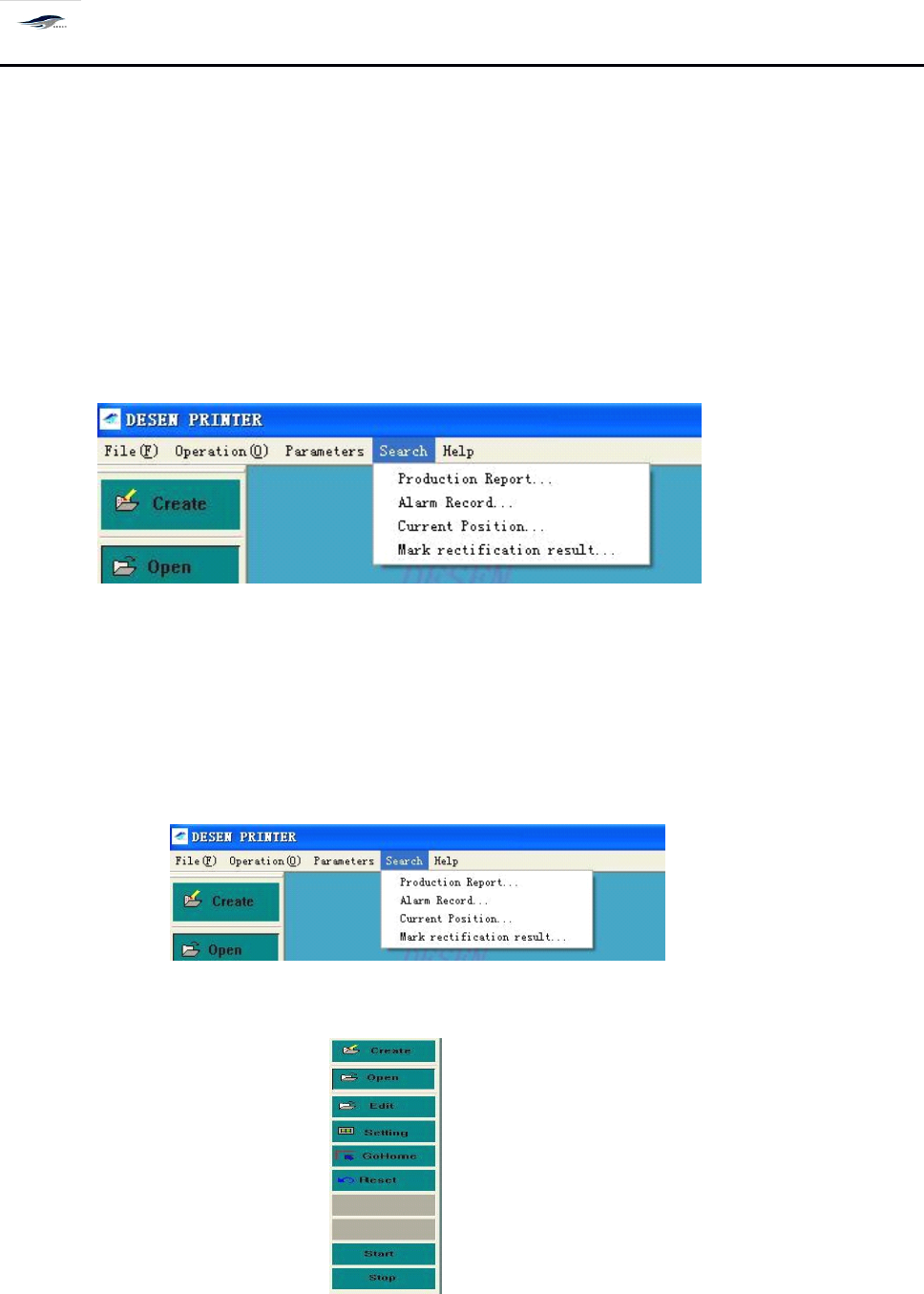
码设置 ] [ 语言 ] 等项操作,如图 4 – 6 所示。
A
pull-down menu will emerge after Setting in the main menu is clicked. T he pull-down menu
contains operations such as Print parameter settings, Information setting, System management,
Password setting and Language. See Figure 4-6.
深圳德森精密设备有限公司
Shenzhen Desen Precision Machine Co., Ltd.
- 34 -
图 4-6 〈设置〉下拉菜单
Figure 4-6 (Setting) Pull-down Menu
单击主菜单栏中 [ 查看 ] ,出现下拉菜单,可进行 [ 生产报表 ] 、 [ 报警记录 ] 、各运动轴 [ 当
前位置 ] 等项目的查看,如图 4 – 7 所示。
Clicking View in the main menu bar will produce a pull-down menu where items such as
Production statement, Alarm record and Current location of kinematic al axis can be viewed. See
Figure 4-7.
图 4-7 〈查看〉下拉菜单
Figure 4-7 (View) Pull-down Menu
单击主菜单中 [ 帮助 ]
, 出现下拉菜单, 可对本机器的
[ 操作说明 ]
,
[ 故障查询 ] 及公司简介 [ 关
于 DESEN ] 等项目进行阅读,如图 4 – 8 所示。
Clicking Help in the main menu bar will produce a pull-down menu where items such as
Operation description, Fault view and About DESEN are available for reading. See Figure 4-8.
图 4-8 〈帮助〉下拉菜单
Figure 4-8 (Help) Pull-down Menu
4.2.
4.2.
4.2.
4.2.
3
3
3
3
主工具栏
4.2.3
4.2.3
4.2.3
4.2.3
Main
Main
Main
Main
tool
tool
tool
tool
bar
bar
bar
bar
如图 4 – 9 所示:
See
See
See
See
Figure
Figure
Figure
Figure
4-9.
4-9.
4-9.
4-9.
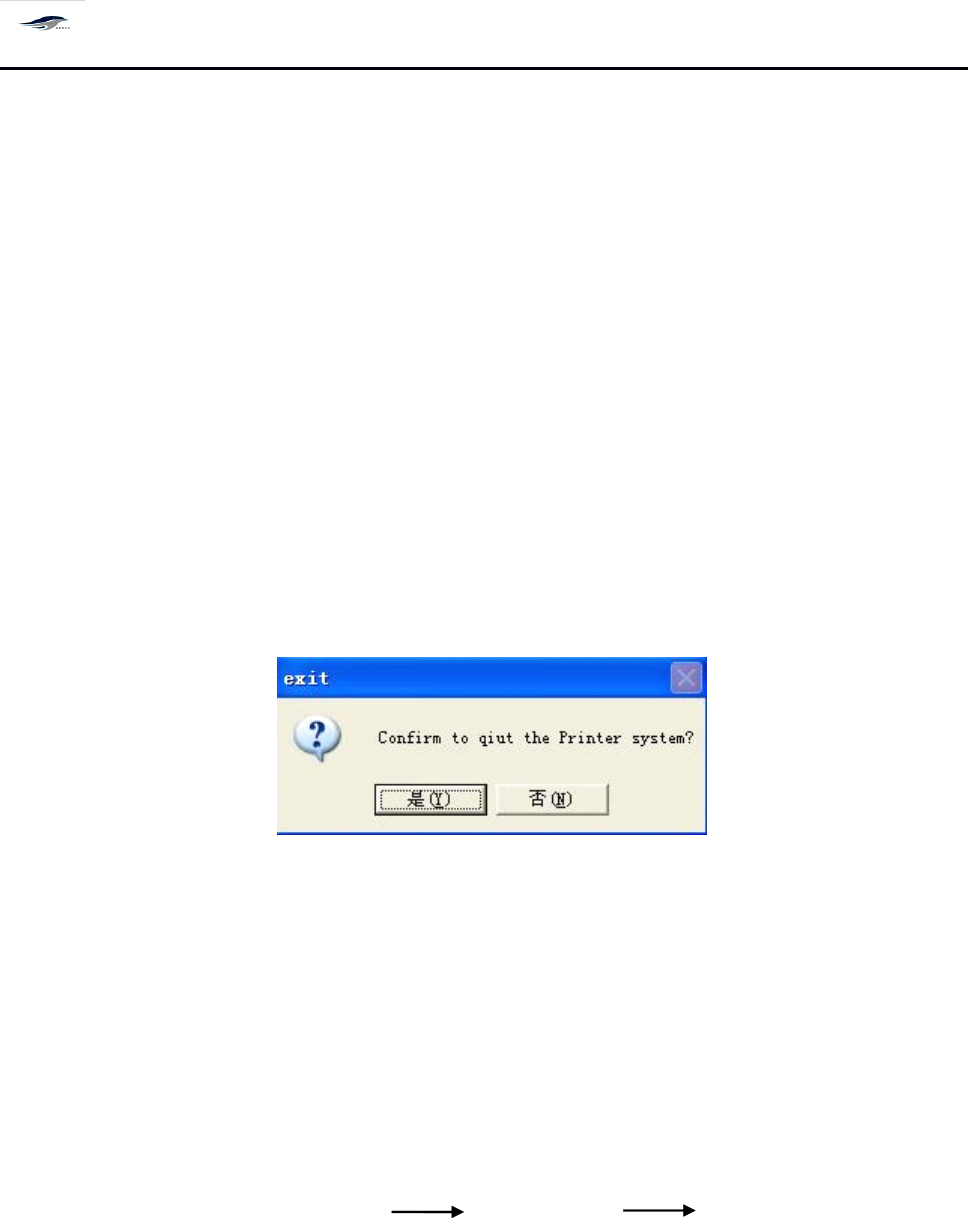
主工具栏包含 [ 新建文件 ][ 打开程序 ] [ 程序编辑 ] [ 生产设置 ][ 归零 ][ 复位 ][ 钢网清洗 ][ 手动清洗 ]
[ 开始生产 ][ 停止生产 ] 等控制按钮。
深圳德森精密设备有限公司
Shenzhen Desen Precision Machine Co., Ltd.
- 35 -
The main tool bar contains control buttons such as Create new file, Open program, Edit program,
Production setting, Return-to-zero, Reset, Steel mesh cleaning, Manual cleaning, Start production
and Stop production.
4.3
4.3
4.3
4.3
系统退出
4.3
4.3
4.3
4.3
Exit
Exit
Exit
Exit
the
the
the
the
system
system
system
system
退出 DESEN 操作系统。操作步骤如下:
T
o exit DESEN operating system, following operations shall be done.
1.
在主窗口画面单击 [ 文件 / 退出 ] ,或单击主窗口右上角 [ × ] 图示,显示 [ 退出 ] 对话框。如
图 4 – 1 0 所示:
1. Click File/exit in the main interface or icon “ × ”
at
the top right corner of main interface, then
there will be an Exit dialog box shown in Figure 4-10.
图 4- 1 0 〈退出〉对话框
Figure 4-10 (Exit) Dialog Box
2.
在 “ 请确认是否要退出 Printer 系统 ” 的提问下,单击 [ 否( N ) ] ,仍回到主窗口画面;
单击 [ 是( Y ) ] 退出 Printer 系统并关闭计算机。
2. Click “ N ” to answer the question “
To
exit Printer system? ” , then the system will return to the
main interface too; and click “ Y ” will exit the Printer system and shut down the computer.
3.
关机操作程序如下所示:
3. Follow is the sequence to stop the printing machine.
退出机器主画面(主菜单) 关闭气源开关 关闭总电源开关
Exit the main interface (main menu), switch off the air supply switch and switch off the
main power switch.
4.4
4.4
4.4
4.4
主菜单栏使用说明
4.4
4.4
4.4
4.4
Use
Use
Use
Use
direction
direction
direction
direction
for
for
for
for
the
the
the
the
main
main
main
main
menu
menu
menu
menu
bar
bar
bar
bar