德森印刷机说明书之操作手册-4d1321fc284ac850ac024234.pdf - 第41页
深圳德森精密设备有限公司 Shenzhen Desen Pre cision Machine Co., Ltd. - 41 - interface. 3. 此时,主 菜单栏 [ 复位 ] 之前的各项操作按钮被关闭, 单击 [ 操作 / 复位 ] 按钮, 启动工 具 栏中的各项操作按钮,才能进行操作。 3 . A t t his time, al l o peration b uttons before operating t he R …
深圳德森精密设备有限公司
Shenzhen Desen Precision Machine Co., Ltd.
- 40 -
follows:
1.
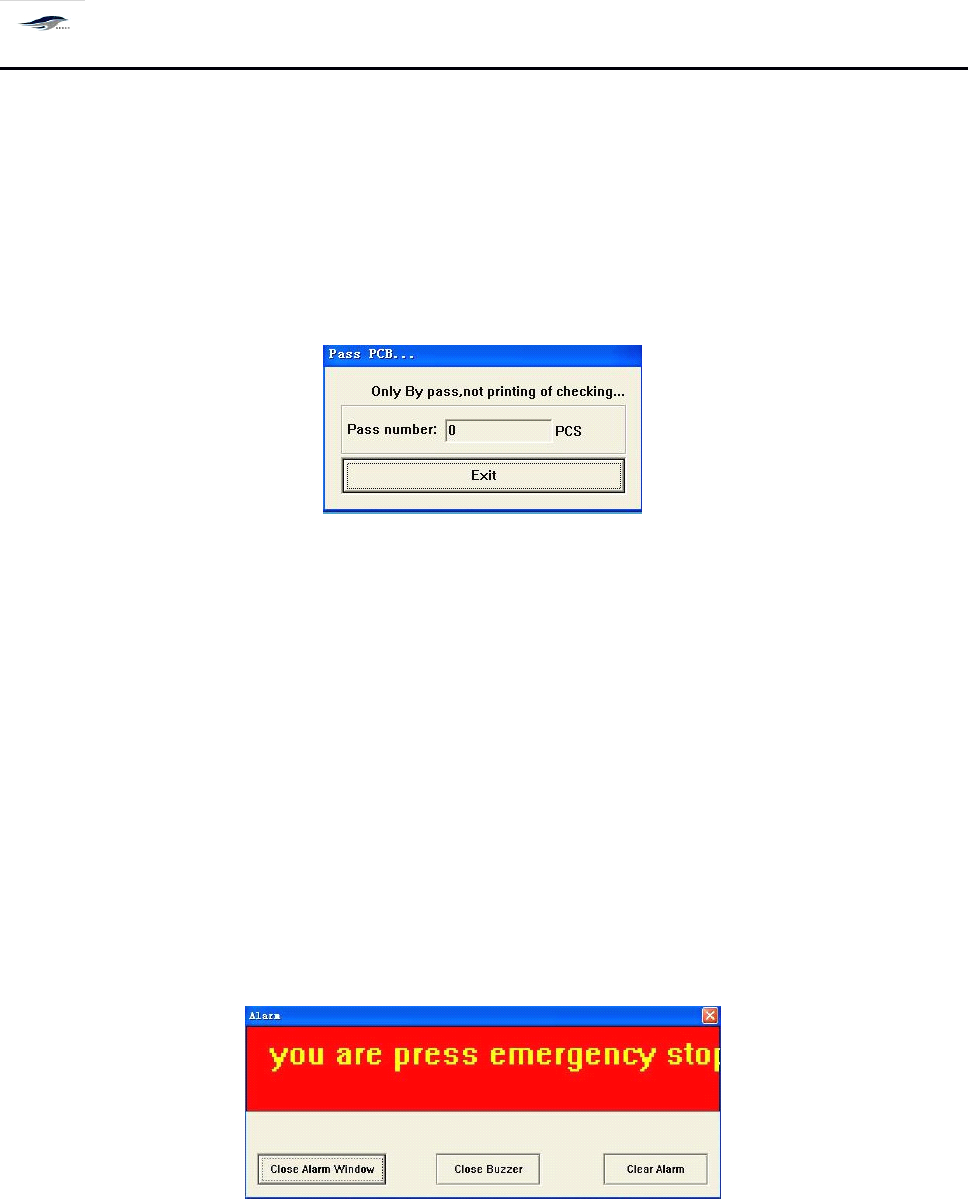
在主窗口画面单击 [ 操作 / 过板 ] ,出现 [ 过板 ] 对话框。如图 4 – 16 所示:
1. Click Operate/Transfer Board in the main interface, then Transfer Board dialog box will emerge.
See Figure 4-16.
2.
单击 [ 退出 ] 仍回到主窗口画面。
2. Clicking Back will return to the main interface.
图 4- 16 〈过板〉操作对话框
Figure 4-16 Transfer Board Dialog Box
对话框进入方式:单击操作 / 过板
To
enter the dialog box, click Operate/Transfer Board.
4.4.
4.4.
4.4.
4.4.
6[
6[
6[
6[
报警复位 ]
]
]
]
4.4.6
4.4.6
4.4.6
4.4.6
Alarm
Alarm
Alarm
Alarm
Reset
Reset
Reset
Reset
当机器出现故障或按下紧急制动器,屏幕显示 [ 报警 ] 对话框,同时蜂鸣器叫报警。如图
4 – 17 所示,此时进行以下操作:
After the printing machine suffers from fault or the Emergency Stop button is pressed, the
screen will show an Alarm dialog box and the buzzer will sound to give an alarm. S ee Figure 4-17.
The operations are as follows:
图 4- 17 [ 报警 ] 对话框
Figure 4-17 Alarm Dialog Box
1.
单击 [ 关闭蜂鸣器 ] 按钮,蜂鸣器停止鸣叫;
1. Click Close Buzzer to stop the sounding of buzzer.
2.
排除故障后,单击 [ 关闭报警窗口 ] 或 [ 清除报警 ] 按钮,回到主窗口画面。
2. After the fault is removed, click Close Alarm Window or Clear Alarm to return to the main

深圳德森精密设备有限公司
Shenzhen Desen Precision Machine Co., Ltd.
- 41 -
interface.
3.
此时,主菜单栏 [ 复位 ] 之前的各项操作按钮被关闭,单击 [ 操作 / 复位 ] 按钮,启动工 具
栏中的各项操作按钮,才能进行操作。
3. At this time, all operation buttons before operating the Reset in the main menu bar are closed.
C lick Operate/Reset button to start the operation buttons in the tool bar for operations.
注意: 如果故障原因没有排除而只是 “ 关闭报警窗口 ” 或 “ 清除报警
”
,待 “ 复位 ” 后重新
进行操作时,机器仍然会发生报警。
Caution:
Caution:
Caution:
Caution:
in case that the fault is not removed and the Close Alarm Window or Clear Alarm is
clicked, the printing machine will still give alarm when operation is practiced after resetting.
4.4.
4.4.
4.4.
4.4.
7[
7[
7[
7[
联机 ]
]
]
]
4.4.7
4.4.7
4.4.7
4.4.7
Online
Online
Online
Online
Working
Working
Working
Working
其作用是设定在线工作,连接上下位机器, 操作如下: 单击主菜单栏 [ 操作 / 联机 ] 。
I
I
I
I
t
t
t
t
is
is
is
is
used
used
used
used
to
to
to
to
set
set
set
set
the
the
the
the
online
online
online
online
working
working
working
working
and
and
and
and
to
to
to
to
connect
connect
connect
connect
the
the
the
the
upper
upper
upper
upper
computer
computer
computer
computer
and
and
and
and
lower
lower
lower
lower
computer
computer
computer
computer
.
.
.
.
T
T
T
T
he
he
he
he
operation
operation
operation
operation
is
is
is
is
clicking
clicking
clicking
clicking
Operate/Online
Operate/Online
Operate/Online
Operate/Online
Working
Working
Working
Working
in
in
in
in
the
the
the
the
main
main
main
main
menu
menu
menu
menu
bar.
bar.
bar.
bar.
4.4.
4.4.
4.4.
4.4.
8[
8[
8[
8[
产量清零 ]
]
]
]
4.4.8
4.4.8
4.4.8
4.4.8
Output
Output
Output
Output
Reset
Reset
Reset
Reset
其作用是清除产量, 操作如下: 单击主菜单栏 [ 操作 / 产量清零 ] 。
It
It
It
It
is
is
is
is
used
used
used
used
to
to
to
to
reset
reset
reset
reset
the
the
the
the
output.
output.
output.
output.
T
T
T
T
he
he
he
he
operation
operation
operation
operation
is
is
is
is
clicking
clicking
clicking
clicking
Operate/Output
Operate/Output
Operate/Output
Operate/Output
Reset
Reset
Reset
Reset
in
in
in
in
the
the
the
the
main
main
main
main
menu
menu
menu
menu
bar.
bar.
bar.
bar.
4.4.
4.4.
4.4.
4.4.
9[
9[
9[
9[
刮刀前移 ]
]
]
]
和 [
[
[
[
刮刀后移 ]
]
]
]
4.4.9
4.4.9
4.4.9
4.4.9
Squeegee
Squeegee
Squeegee
Squeegee
Forward
Forward
Forward
Forward
or
or
or
or
Squeegee
Squeegee
Squeegee
Squeegee
Back
Back
Back
Back
单击主菜单栏 [ 操作 ] 下 [ 刮刀前移或后移 ] ,分别使刮刀架前后移动。
C lick Squeegee Forward or Back under the Operate option in the main menu to make the
squeegee move forward or back.
4.4.
4.4.
4.4.
4.4.
10[
10[
10[
10[
机器参数 ]
]
]
]
4.4.10
4.4.10
4.4.10
4.4.10
Machine
Machine
Machine
Machine
Parameters
Parameters
Parameters
Parameters
深圳德森精密设备有限公司
Shenzhen Desen Precision Machine Co., Ltd.
- 42 -
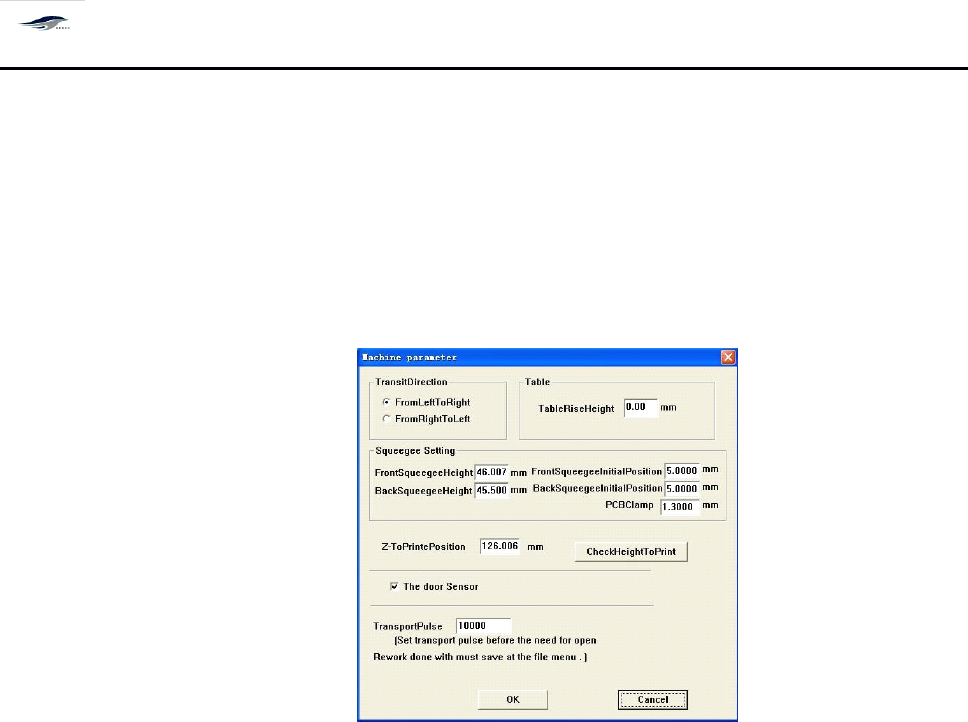
其作用是设定或修改运输方向 、 刮刀行程、刮刀升起高度、印刷高度等参数,
操作如下:
单击主菜单栏 [ 操作 / 机器参数 ]
, 输入密码
” printer9 ” 后确定进入机器参数设
置。
如图 4 – 18 所示,可以进行以下操作:
It
is used to set or amend the transport direction, squeegee travel, lift height of squeegee and
printing height and some other parameters
.
T he operating steps are as follows: click Machine
Parameters under Operate option in the main menu, input password “ printer9 ” and click OK to
enter the Machine Parameters setting interface. See Figure 4-18. Following operations can be
done.
Figure 4-18 Machine Parameters Dialog Box
1. 单击从左到右或从右到左,设置进板的方向。按 OK 确定后退出回到主窗口。
1. Click Left-to-right or Right-to-left to set the direction of board incoming. Pressing OK to exit the
setting and return to the main interface.
2. 直接输入数字到刮刀行程来调整两个刮刀,刮刀初始位用来设置生产中刮刀升起的高度。
2. Make figures input to the Front Squeegee Travel and Rear Squeegee Travel columns directly to
adjust the two squeegees. The Initial Position of Front Squeegee and Initial Position of Rear
Squeegee are used for setting the lift heights of squeegees in production.
3. 到印刷位置用来设置生产时 PCB 和网板的间距,默认值运输导轨上平面与网板间距为零。
3.
To
Printing Position is used to set the distance between PCB board and screen in production. T he
default value of the distance between the upper surface of guide rail and screen is “ 0 ” .
4. 可以通过印刷高度检测来自动测试印刷位置的值。 (可选项)
4. Inspection to the printing height can be used for testing the value of printing position
automatically. ( Optional )
5. 选择门开关传感器后 , 生产时当安全门打开各运动轴以 1 / 3 速度运转。
5. After the door switch sensor is chosen and the safety door is opened, each kinematic al axis will
operate with a rate of one third.