德森印刷机说明书之操作手册-4d1321fc284ac850ac024234.pdf - 第60页
深圳德森精密设备有限公司 Shenzhen Desen Pre cision Machine Co., Ltd. - 60 - guide rail c lamping w i thout s to pping the p roduction. T he d ialog b ox c an a lso ma ke sur e the e ffectivene ss of the n ext p roduction c ycle. 10)…
深圳德森精密设备有限公司
Shenzhen Desen Precision Machine Co., Ltd.
- 58 -
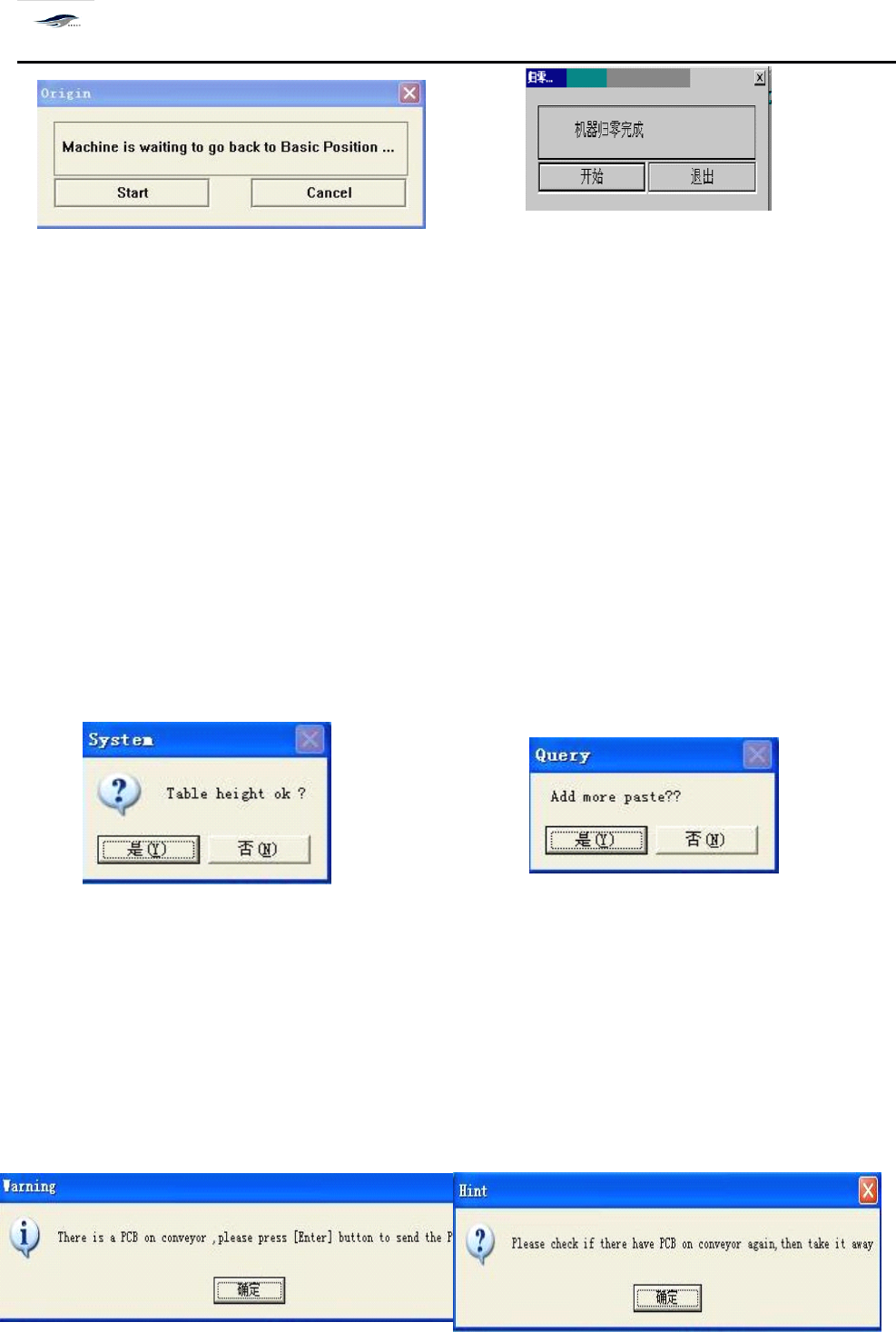
图 4-3 3 图 4-3 4
Figure 4-33 Figure 4-34
2)
单击 [ 是 ] ,回到主窗口画面,进行 [ 归零 ] 操作。操作步骤见第 4.3.1 节 “ 归零操作
”
。
2) Click “
Yes
” to return to the main interface for “ Return-to-zero ” operation. S ee 4.3.1 “ Return-to-
zero Operation ” for the operating steps.
3)
归零完成单击图 4-3 4 [ 开始 ] ,回到主窗口画面。
3) After the return-to-zero operation is finished, click “ Start ” in Figure 4-34 to return to the main
interface.
4)
再单击 [ 开始 ] ,显示 “ 在开始生产前请确认生产文件或数据是否正确 ” 的生产提问对
话框,如图 4-3 5 所示:
4) Clicking “ Start ” again will make dialog box “ Do you want to inspect whether the production
files or data are correct before start the production? ” as shown in Figure 4-35 emerge.
图 4-3 5 图 4-3 6
Figure 4-35 Figure 4-36
5)
单击 [ 否 ] ,回到主窗口画面,打开正确的生产档或进行参数设置;单击 [ 是 ] ,出现提 问
对话框 “ 是否要添置锡膏? ” 如图 4-3 6 所示。
5) Clicking “ No ” will return to the main interface. A
t
this time, open the correct production files or
set parameters; and clicking “
Yes
” will make the dialog box “
To
add solder paste or not? ” as shown
in Figure 4-36 emerge.
深圳德森精密设备有限公司
Shenzhen Desen Precision Machine Co., Ltd.
- 59 -
图 4-3 7 图 4 -38
Figure 4-37 Figure 4-38
6)
单击 “ 是 ” 进入运输宽度调节;
6) Clicking “
Yes
” will enter the transport width adjustment interface.
7)
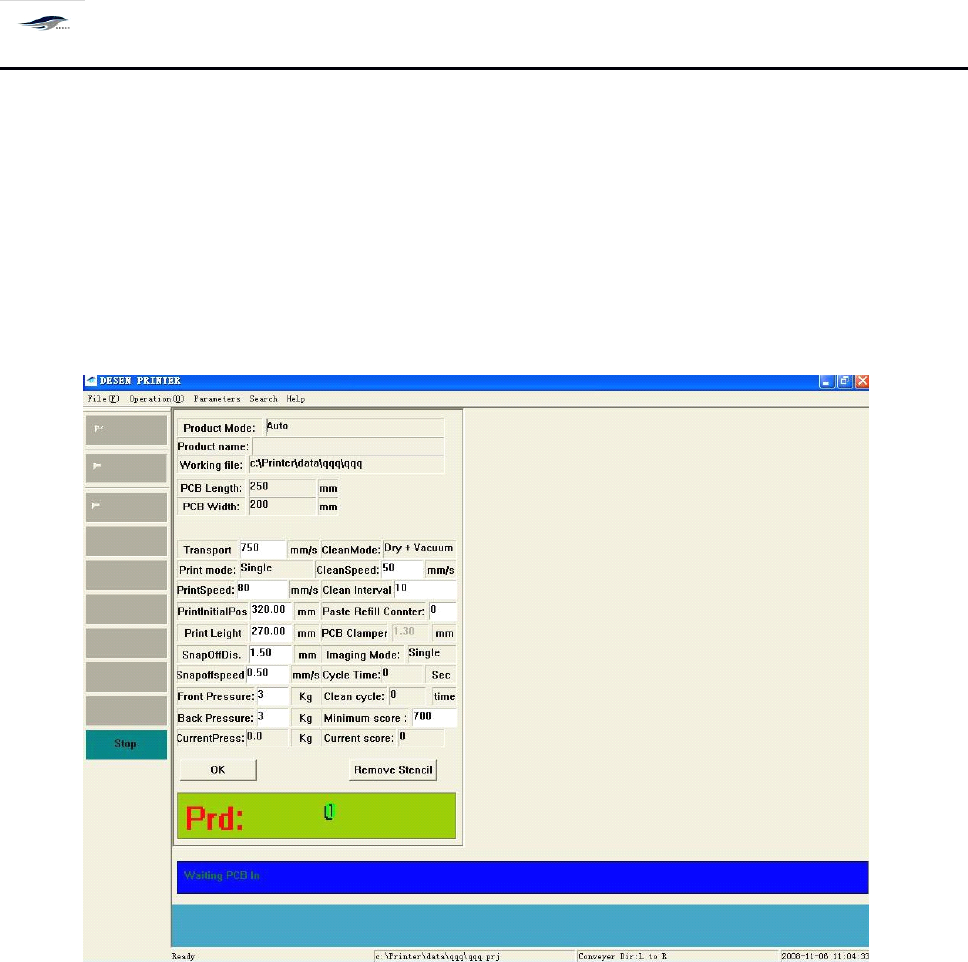
单击 “ 否 ” 在主窗口画面上显示 [ 生产状态 ] 对话框,如图 4- 39 所示:
7) Clicking “ No ” will make the dialog box “ Production Status ” as shown in Figure 4-39 emerge in
the main interface.
图 4- 39 生产状态 对话框
Figure 4-39 “ Production Status ” Dialog Box
对话框进入方式:开始生产 + 生产档正确与否? / 正确 + 运输宽度调节否
T
o enter the dialog box, click “ Start Production ”
,
“
Yes
” in the dialog box “ Are the production files
are correct? ” and “ No ” in the dialog box “ Do you want to adjust the transport width? ” respectively.
8)
机器开始生产,并在上图对话框的下面一栏动态显示机器当前状态: “ 等待进板 -------
”
8) The printing machine starts the production and the lower column of the above dialog box shows
the current status of printing machine: “ waiting for incoming board ” .
9)
在生产状态桌面上,可以直接修改运输速度、印刷、脱模、清洗的速度和长度,以及
刮刀压力、导轨夹紧等参数,不必停止生产;确定好下一个生产周期生效。
9) In the “ Production Status ” dialog box,
it
is allowed to directly amend parameters such as
transport rate, printing, demoulding and cleaning rates and lengths as well as squeegee pressure and

深圳德森精密设备有限公司
Shenzhen Desen Precision Machine Co., Ltd.
- 60 -
guide rail clamping without stopping the production. T he dialog box can also make sure the
effectiveness of the next production cycle.
10)
[ 关闭蜂鸣器 ] 当机器在生产过程中出现报警时,三色灯的红灯闪烁,蜂鸣器鸣叫。此
时可单击生产状态上 [ 关闭蜂鸣器 ] 图示,将蜂鸣器关闭。
10) “ Close Buzzer ” : when the printing machine gives alarm in production, the three-color light will
show red color and the buzzer will scream. A
t
this time, clicking icon “ Close Buzzer ” on the dialog
box “ Production Status ” can close the buzzer.
4.5.5
4.5.5
4.5.5
4.5.5
停止生产
4.5.5
4.5.5
4.5.5
4.5.5
Stop
Stop
Stop
Stop
Production
Production
Production
Production
快捷按钮式控制开关,控制生产的停止。
It
is a quick button-like control switch for controlling the stop of production.
单击主窗口工具栏中的 [ 停止生产 ] 图标按钮,机器即会停止生产。
Clicking the icon “ Stop Production ” in the tool bar of main interface will make the printing
machine stop production.