德森印刷机说明书之操作手册-4d1321fc284ac850ac024234.pdf - 第43页
深圳德森精密设备有限公司 Shenzhen Desen Pre cision Machine Co., Ltd. - 43 - 6. 当运输选择进出方向相同时 ,P CB 不能正常运出请将运输脉冲加大。 6 . W he n t he i nc oming a nd o utgoing t rans port d irections a re i dentical and P CB b oards c anno t be c onvey…
深圳德森精密设备有限公司
Shenzhen Desen Precision Machine Co., Ltd.
- 42 -
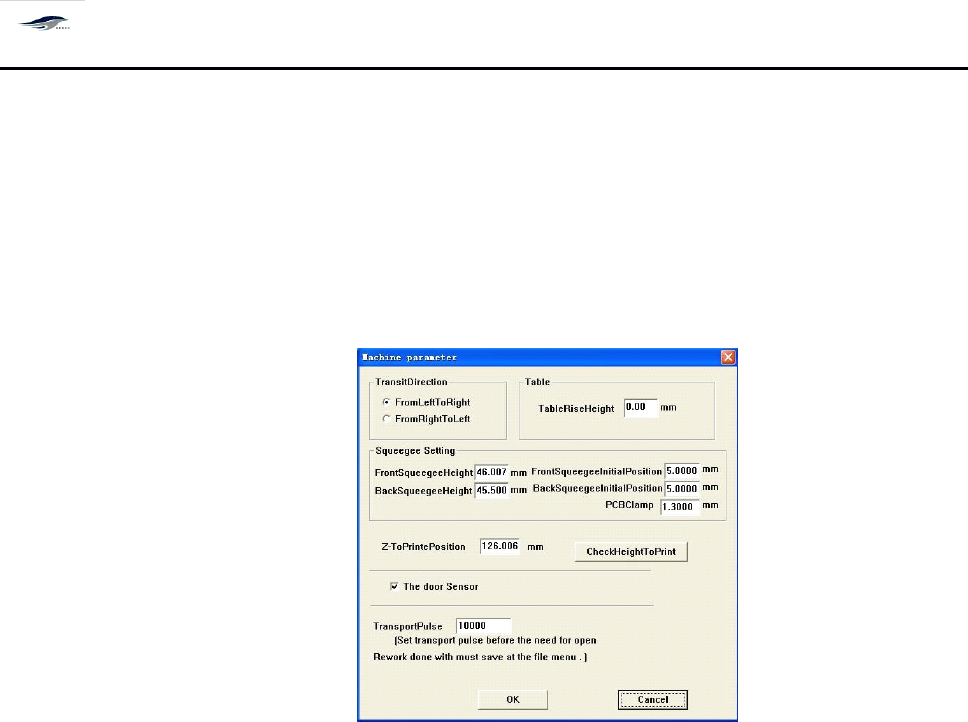
其作用是设定或修改运输方向 、 刮刀行程、刮刀升起高度、印刷高度等参数,
操作如下:
单击主菜单栏 [ 操作 / 机器参数 ]
, 输入密码
” printer9 ” 后确定进入机器参数设
置。
如图 4 – 18 所示,可以进行以下操作:
It
is used to set or amend the transport direction, squeegee travel, lift height of squeegee and
printing height and some other parameters
.
T he operating steps are as follows: click Machine
Parameters under Operate option in the main menu, input password “ printer9 ” and click OK to
enter the Machine Parameters setting interface. See Figure 4-18. Following operations can be
done.
Figure 4-18 Machine Parameters Dialog Box
1. 单击从左到右或从右到左,设置进板的方向。按 OK 确定后退出回到主窗口。
1. Click Left-to-right or Right-to-left to set the direction of board incoming. Pressing OK to exit the
setting and return to the main interface.
2. 直接输入数字到刮刀行程来调整两个刮刀,刮刀初始位用来设置生产中刮刀升起的高度。
2. Make figures input to the Front Squeegee Travel and Rear Squeegee Travel columns directly to
adjust the two squeegees. The Initial Position of Front Squeegee and Initial Position of Rear
Squeegee are used for setting the lift heights of squeegees in production.
3. 到印刷位置用来设置生产时 PCB 和网板的间距,默认值运输导轨上平面与网板间距为零。
3.
To
Printing Position is used to set the distance between PCB board and screen in production. T he
default value of the distance between the upper surface of guide rail and screen is “ 0 ” .
4. 可以通过印刷高度检测来自动测试印刷位置的值。 (可选项)
4. Inspection to the printing height can be used for testing the value of printing position
automatically. ( Optional )
5. 选择门开关传感器后 , 生产时当安全门打开各运动轴以 1 / 3 速度运转。
5. After the door switch sensor is chosen and the safety door is opened, each kinematic al axis will
operate with a rate of one third.
深圳德森精密设备有限公司
Shenzhen Desen Precision Machine Co., Ltd.
- 43 -
6. 当运输选择进出方向相同时 ,PCB 不能正常运出请将运输脉冲加大。
6. When the incoming and outgoing transport directions are identical and PCB boards cannot be
conveyed out normally,
it
is necessary to increase the transport pulse.
注意: 此参数设置更改可能引起危险,请不要随意尝试,如有问题请与本公司售后服务部 联
系。
Note:
Note:
Note:
Note:
do not practice parameter amendment, for
it
can result in danger. C ontact our after-sale
service department for any questions.
4.4.
4.4.
4.4.
4.4.
11[
11[
11[
11[
系统管理 ]
]
]
]
4.4.11
4.4.11
4.4.11
4.4.11
System
System
System
System
Management
Management
Management
Management
用来锁定 windows
windows
windows
windows
xp
xp
xp
xp
系统
It
is used for lock windows xp system.
单击 [ 设置 \ 系统管理 ], 在弹出密码窗口输入密码 ‘ dssystem ’ , 确定后回到主窗口。
C lick System Management under Setting option, input password “ dssystem ” in the popped
password window and click OK, then the system will return to the main interface.
4.4.
4.4.
4.4.
4.4.
12[
12[
12[
12[
密码设置 ]
]
]
]
4.4.12
4.4.12
4.4.12
4.4.12
Password
Password
Password
Password
Setting
Setting
Setting
Setting
用来设置或修改 [
[
[
[
生产界面 ]
]
]
]
的参数修改密码
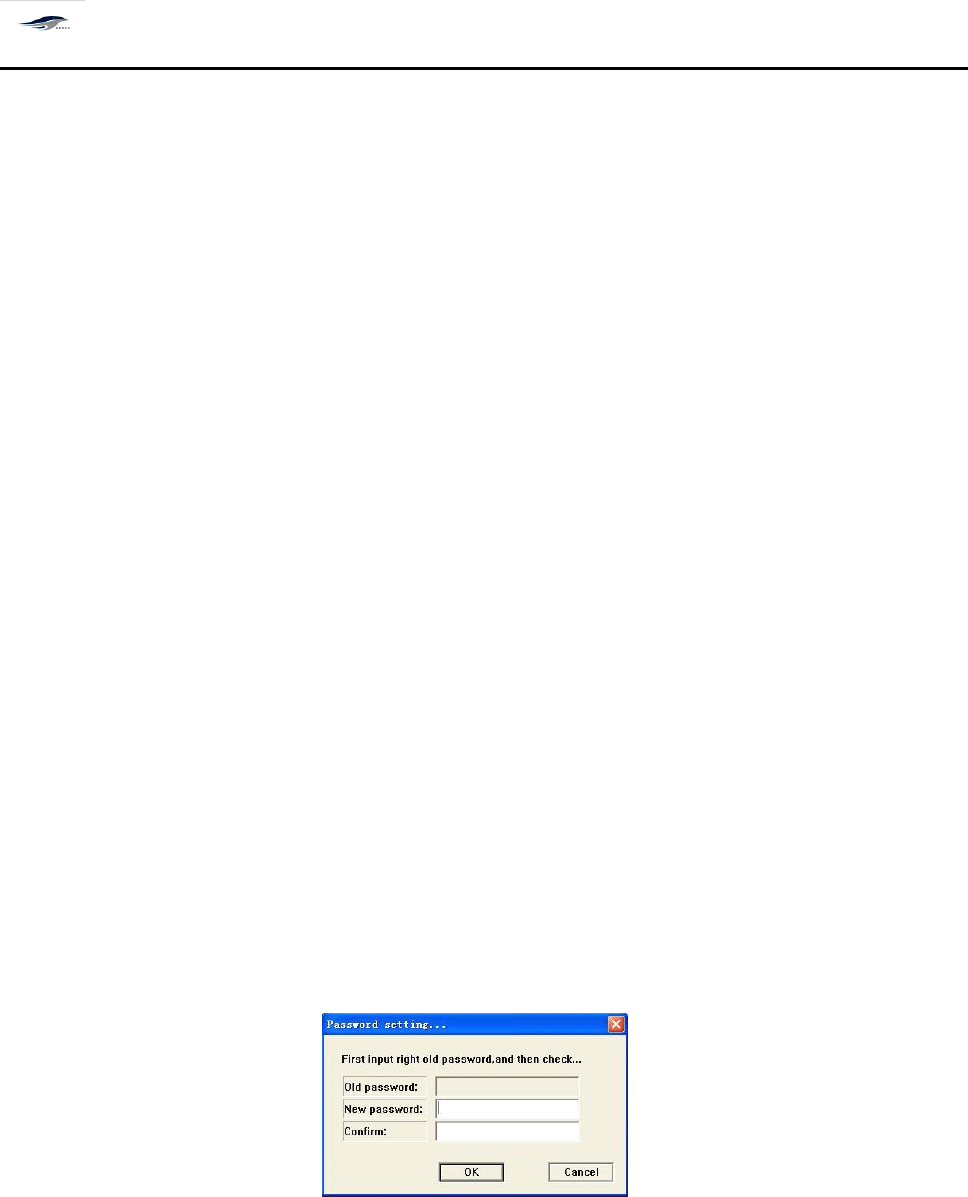
It
is used to set or amend the parameter amendment password of Production Interface.
Figure 4-19 Password Setting Dialog Box
4.4.
4.4.
4.4.
4.4.
13[
13[
13[
13[
语言 ]
]
]
]
4.4.13
4.4.13
4.4.13
4.4.13
Language
Language
Language
Language
中英文快速切换
It
is used for the quick transfer between Chinese version and English version.
深圳德森精密设备有限公司
Shenzhen Desen Precision Machine Co., Ltd.
- 44 -
4.4.
4.4.
4.4.
4.4.
14[
14[
14[
14[
设置用户产品信息及生产信息 ]
]
]
]
4.4.14
4.4.14
4.4.14
4.4.14
Setting
Setting
Setting
Setting
of
of
of
of
Product
Product
Product
Product
Information
Information
Information
Information
and
and
and
and
Production
Production
Production
Production
Information
Information
Information
Information
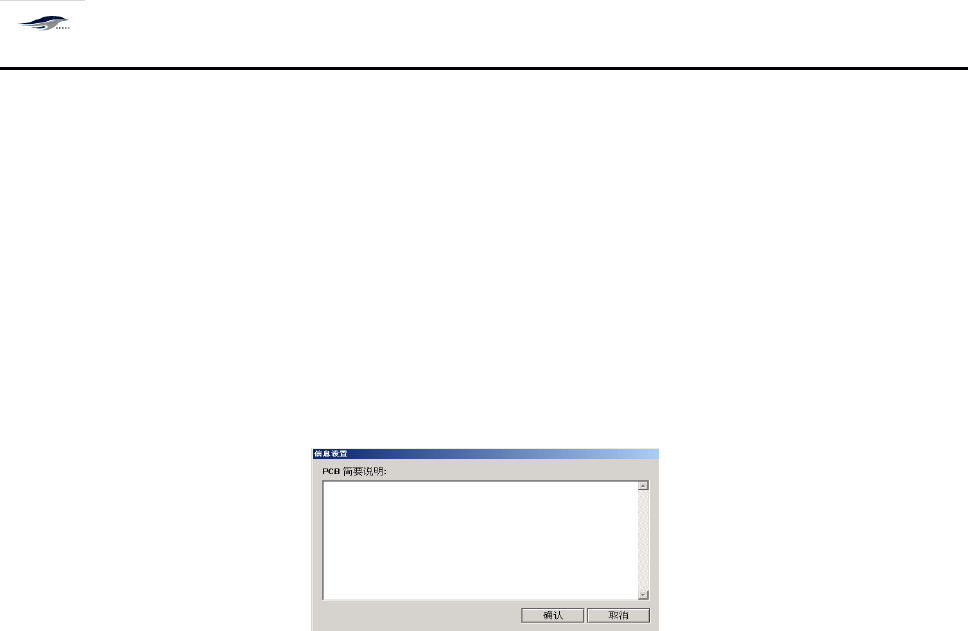
用户可在此设置中对 PCB 、生产信息等作简要说明,便于以后操作参考查阅。操作步骤
如下:
Users can give brief descriptions on the PCB board and production information in this setting
option for future reference. T he operating steps are as follows:
图 4- 20 〈信息设置〉
Figure 4-20 Information Setting
在上图对话框中可进行对 PCB 的简要说明。单击 [ 确认 ] ,保存所设置的信息,回到主窗
口画面;单击 [ 取消 ] ,取消信息设置,回到主窗口画面。
Brief description related to PCB board can be given in the above dialog box. C licking OK will
save the set information and return to the main interface; and clicking Cancel will cancel the set
information and return to the main interface.
4.4.1
4.4.1
4.4.1
4.4.1
5[
5[
5[
5[
查看报警记录 ]
]
]
]
4.4.15
4.4.15
4.4.15
4.4.15
View
View
View
View
Alarm
Alarm
Alarm
Alarm
Record
Record
Record
Record
当机器出现故障发出声、光报警时,系统将自动诊断故障原因并记录下报警时间和故障
原因。操作步骤如下:
When the printing machine suffers from fault and gives audible and visual alarms, system will
make automatic judgment on the fault cause and record the alarming time and fault cause. T he
operating steps are as follows:
在主窗口画面单击 [ 查看 / 报警记录 ] ,出现 [ 报警记录 ] 对话框。如图 4-2 1 所示:显示当时
和以往的报警记录。
Click Alarm Record under View in the main interface, then the Alarm Record dialog box as
shown in Figure 4-21 will emerge to display current and previous alarm records.