德森印刷机说明书之操作手册-4d1321fc284ac850ac024234.pdf - 第55页
深圳德森精密设备有限公司 Shenzhen Desen Pre cision Machine Co., Ltd. - 55 - 单击 [ 装载 ] ,读取弱磁盘中的标志点数据; Click “ L oa d ” to r ead the fi ducial ma rk data in t he disc; 单击 [ 测试 ] ,得出丝网标志 1 的图像坐标 P x 、 Py ; Click “ T est ” t o g…
深圳德森精密设备有限公司
Shenzhen Desen Precision Machine Co., Ltd.
- 54 -
图 4 – 30 所示:
3) Click “ Move ” option in the above dialog box and move the keys ←
,
↑
,
→ and ↓ on the
keyboard in accordance with the “ Position of manual moving rate ” in the dialog box to seek for
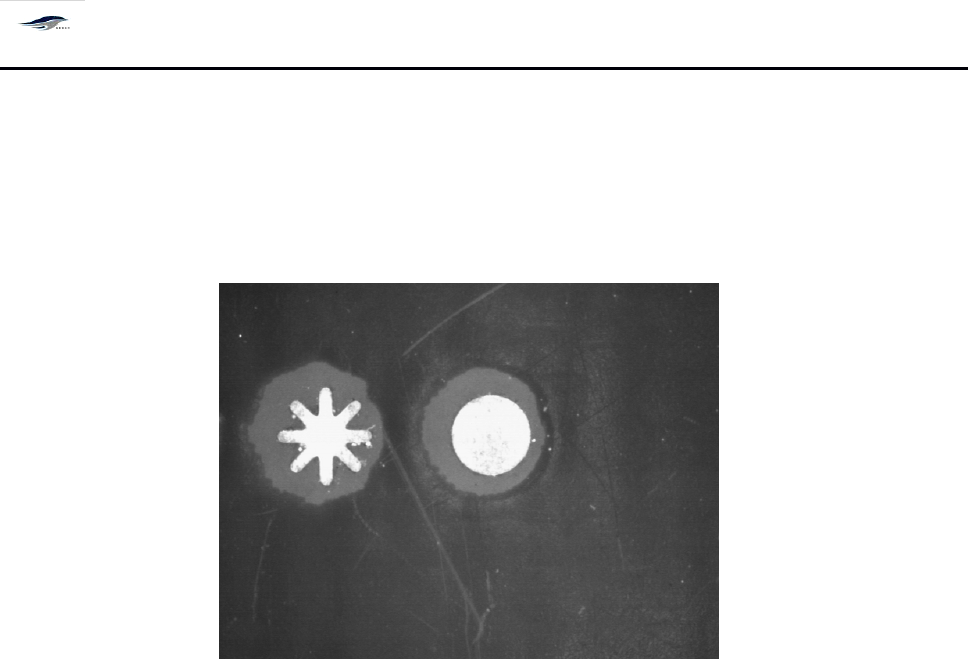
the fiducial mark image, then click “ Capture ” to locate the image. S ee Figure 4-30.
图 4- 30 标志点图像
Figure 4-30 Fiducial mark Image
在上图中按住鼠标左键从图像的中间往外拉(即用红色圆圈将标志点图像包容)
Place the mouse in the above figure and press its left key and pull
it
outwards from the middle
of image (namely, make the fiducial mark image embraced by the red circle).
用鼠标点住红色方框的中心 “ 十字型 ” 图标,使之与标志点图像相切;
Click the “ Cross-shaped ” icon in the center of red box with mouse to make
it
form a tangential
relation with the fiducial mark image;
进行 “ 匹配选项 ” 设置,如图 4 – 29 中所示:匹配的分数( 7 00 ) 、匹配的精度(高)为
机器的缺省值(本机器匹配分数的设置范围为 0 ~ 1000 ,如在进行匹配时发现标志点 周
围有相似图像或标志点图像在缺损可能会影响印刷精度, 匹配分数越高, 印刷精度就 越
高,同时对 Mark
点的形状要求高。 )
Setting the “ Matching Options ” as shown in Figure 4-29: the matching score (700) and
matching precision (high) are default values of the printing machine (the setting scope of
matching score of the printing machine is 0 ~ 1000
.
Similar images or fiducial mark images
damaged around the fiducial mark found in the matching course are probably to affect the
printing precision. T he higher the matching score
is,
the higher the printing precision will be
and the stricter the requirement for the fiducial mark
’
shape will be );
单击 [ 记忆 ] ;
Click “ Memory ” ;
深圳德森精密设备有限公司
Shenzhen Desen Precision Machine Co., Ltd.
- 55 -
单击 [ 装载 ] ,读取弱磁盘中的标志点数据;
Click “ Load ” to read the fiducial mark data in the disc;
单击 [ 测试 ] ,得出丝网标志 1 的图像坐标 Px 、 Py ;
Click “ Test ” to get the image coordinates Px and Py of “ steel mesh mark 1 ” ;
单击 [ 确认 ] ,回到图 4 – 25 [ 生产编辑 ] 对话框中,同时得出 PCB 标志 1 的机械坐标 Mx
、
My 值;
Click “ OK ” to return to the “ Production Edit ” dialog box and get the mechanical coordinates
Mx and My of “ PCB board mark 1 ”
at
the same time.
同样方法,找出 [PCB 标志 2 ] 后单击 , 在弹出窗口中直接确定 , 将 PCB 标 志
点坐标值覆盖钢网标志点坐标值并回到 [ 生产编辑 ], 用上面的方法分别设置 [ 丝网标志 1] 、
[ 丝网标志 2] 的图像 , 点击 根据提示移动钢网 , 完成后确定回到 [ 生产编辑 ] 窗
口。
W ith the same method, find out “ PCB board mark 2 ” and click “ Steel Mesh Adjustment ”
.
M ake
confirmation in the popped window directly, and make the coordinate values of PCB fiducial
marks cover that of the steel mesh fiducial marks and return to the “ Production Edit ” dialog box.
B y means of the above method, set the images of “ Steel mesh mark 1 ” and “ Steel mesh mark 2 ”
respectively and click “ Steel Mesh Adjustment ”
.
M ove the steel mesh in accordance with the
prompt and click “ OK ” after completion to return to the “ Production Edit ” interface.
注意: 1
1
1
1
. 在进行标志点图像采集时,可以通过调节 [ 寻找标志点 ] 对话框中的 LED1
、
LED2
、
LED3 亮度,以便采集到清晰的图像。
2. 丝网标志 1 、 2 和 PCB 标志 1 、 2 数据采集完后,单击右下角的 [ 确认 ] 按钮,退回
到主画面并保存数据;单击 [ 取消 ] ,取消此次编辑。
3. PCB 标志点的机械坐标 Mx
、
My 值与钢网标志点的机械坐标 Mx
、
My 值必须 分
别保持一致。
Cautions: 1. When collecting the fiducial mark images, the brightness of LED1
,
LED2 and LED3 in
“ Seek for Fiducial mark ” can be adjusted so that clear images can be collected;
2. After the data of “ Steel mesh mark 1 ”
,
“ Steel mesh mark 2 ”
,
“ PCB board mark 1 ” and
“ PCB board mark 2 ” are all connected, click “ OK ”
at
the lower right corner to return to the main
interface and save data; and clicking “ Cancel ” to cancel this editing; and
3. The values of mechanical coordinates Mx and My of PCB board fiducial marks must
conform to that of steel mesh fiducial marks.
深圳德森精密设备有限公司
Shenzhen Desen Precision Machine Co., Ltd.
- 56 -
4.
4.
4.
4.
5
5
5
5
.
.
.
.
2
2
2
2
生产设置
4.5.2
4.5.2
4.5.2
4.5.2
Production
Production
Production
Production
Setting
Setting
Setting
Setting
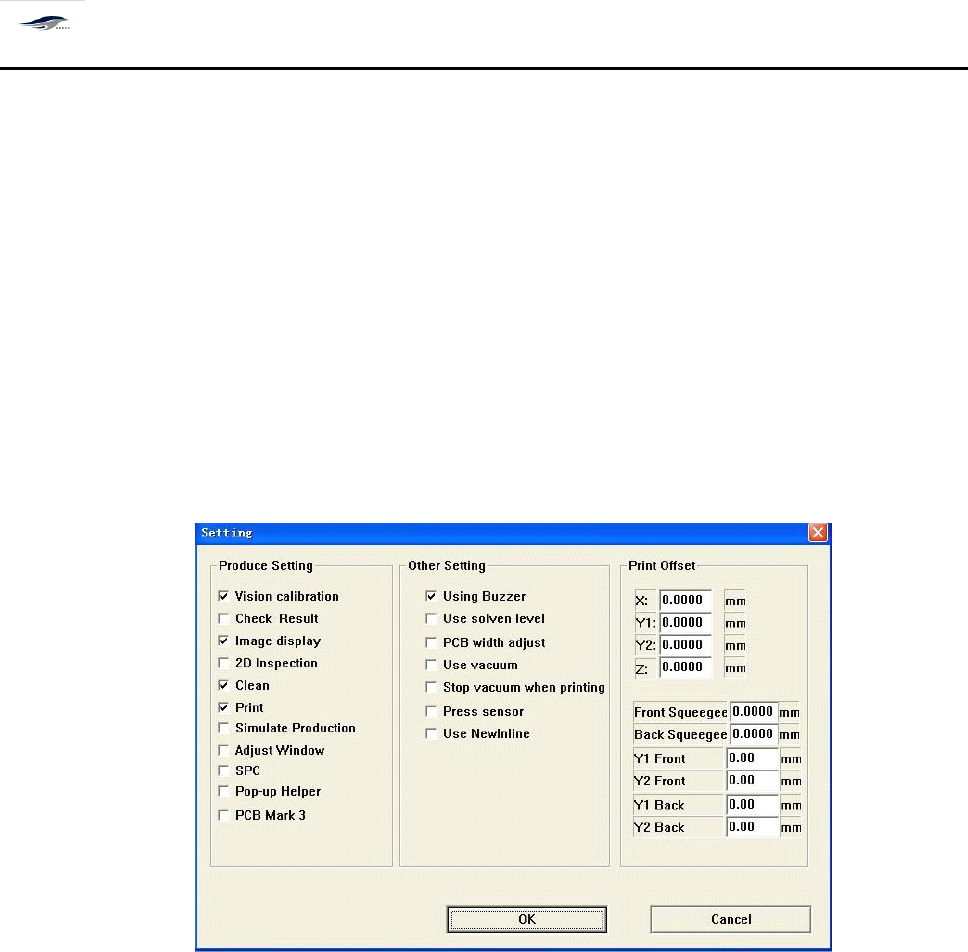
功能设置选项,可通过图 4 – 31 [ 生产设置 ] 对话框来快速改变运输、视觉检查、清洗、印
刷、检测等生产设置及其它如图所示的设置(如门开关感应器的设置等) 。 同时可对工作台 升
降误差及刮刀行程误差进行补偿。
It
is a function setting option. T he “ Production Setting ” dialog box as shown in Figure 4-31 can
be used to change production settings such as transport, visual inspection, cleaning, printing and
detection as well as other settings shown in the figure (such as the setting of door switch sensor)
quickly. M eanwhile, compensations can be made for the lift error of workbench and travel error of
squeegee.
Figure 4-31 “ Production Setting ” Dialog Box
对话框进入方式:单击主工具栏 [ 生产设置 ]
To
enter the dialog box, click “ Production Setting ” in the main tool bar.
4.5.3
4.5.3
4.5.3
4.5.3
网板自动清洗
4.5.3
4.5.3
4.5.3
4.5.3
Automatic
Automatic
Automatic
Automatic
Cleaning
Cleaning
Cleaning
Cleaning
of
of
of
of
Screen
Screen
Screen
Screen
用于对印刷网板底面的自动清洗。操作步骤如下:
It
is used for the automatic cleaning of the bottom of screen for printing use. T he operating steps
are as follows:
1.
在主窗口画面单击主工具栏中的 [ 网板清洗 ] 图标,显示 [ 清洗网板 ] 对话框,如图 4 – 3 2 所
示:
1. Click “ Screen Cleaning ” in the main tool bar of the main interface, the “ Screen Cleaning ” dialog